Mouse System Ex

● ARCHIVED · READ-ONLY
Started by Galenmereth 20 posts View original ↗
  1. mouse_system_graphic.png

    Introduction

    TDDP – MouseSystemEx lets you set and change custom mouse cursors during gameplay and event interaction; enables mouse interaction to trigger events without the player character; show icons next to the mouse, and much more.

    Before asking for help, please read the documentation page to see if it might already be covered there. That page will be updated over time and always be the most current documentation available for the plugin.

    Latest version

    1.8.1 - 2015-11-09

    Features

    • Setting custom default mouse cursor using .png images and changing it during gameplay
    • Cursor can have custom offsets, for example for crosshairs where the "click point" needs to be the center of the cursor
    • ​​Showing icons next to the mouse cursor when interacting with events
    • Highlighting menu items on hover, so you don't have to click to select then click to execute
    • Trigger event pages by mouse click, hover and leave
    • Trigger event switches by mouse click
    How to use

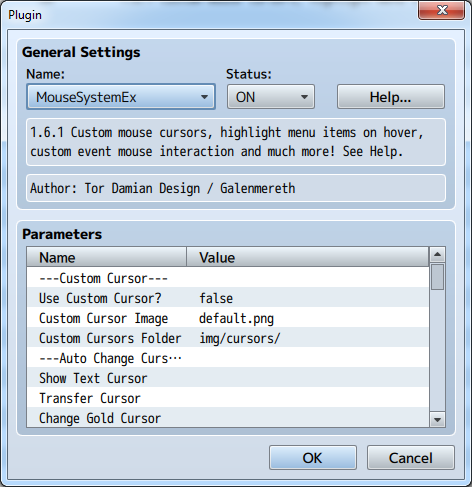
    Add the plugin to your game and check the parameter settings for help. The Help section contains general information and a link the plugin's documentation page.

    Documentation

    Official documentation page

    Download

    GitHub

    Dependencies

    None

    FAQ

    No items yet

    Credit

    Tor Damian Design

    Terms of use

    Free for non-commercial and commercial use. See terms of use for the full terms.

    A big thank you to Degica for making this plugin free for commercial use for everyone!
  2. Galenmereth said:
    Marvelous TK: Are you sure the plugin is set to ON in the Plugin Manager? While there is a newer version available, I just tested with the one from the dlc download and it worked in a completely new blank project on my end. Also try hitting F8 while testing your game to see if there's any error messages in the console and if so, share a screenshot of them in the thread I linked, and I'll look at it :)
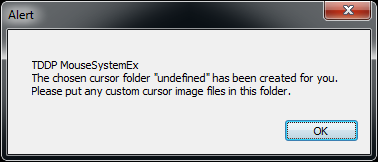
    Figured I'd move the conversation over here anyways, even though: Yes I'm quite positive the plugin is turned on, I've been turning it on and off while I've tested various things besides, so there's no way it hasn't been on during some tests. F8's console didn't show any error. And to be thorough, I tried making my own new blank project to test again on, and... well, it's still not working, but this happened:

    error_zpsvvwb2gbv.png

    That is... very much not what my chosen cursor folder is - it's still on the default of /img/cursor. Screenshot evidence:

    asyousee_zpsfip9pes6.png

    It did, in fact, make an 'undefined' folder - not in the /img/ folder, though, but in the main project folder. I'm more confused about what's happening than ever.
  3. Ah, I see the problem. You renamed the plugin; since plugins fetch their parameters based on a name string, if you rename them they can't get to their parameters anymore, and thus the folder is undefined. If you rename the plugin to its original name TDDP_MouseSystemEx, then it should work fine for you :)
  4. whoops

    i mean i figured it was all my fault but

    jeesh, that was such a small thing, but i guess it's the small things you've got to look out for
  5. Yeah, but I think this problem isn't very intuitive for the end user. But what I could do is make my plugins it throw an informative error message if it can't find its parameters and ask if the filename is correct. That'd be a bit more useful :)
  6. Any way we could animate the icon? 

    Great plugin btw  :)  Really nice and easy to use.
  7. Thank you for the kind words! Animated cursors is something I've been looking into, as it would be really cool. The problem is that no browsers currently support animated cursors of any shape or form properly, but there is a solution I've yet to try that might just work. I'll keep you all updated if I make progress :)
  8. errr ok so i thought i posted this all ready but is there a way to set the cursor to different events such as attack?
  9. Thank you so much for this script. The event on hover and on click will make minigames and stuff so much easier now!
  10. pclaydon said:
    errr ok so i thought i posted this all ready but is there a way to set the cursor to different events such as attack?
    Per right now there's no auto cursor change for battle events, but you can manually (and temporarily) change cursors using the following notetag: 

    hover_cursor filename;This can be either in the event's Note box (then it's active for all event pages) or in a Comment entry in a specific page, only valid while that page is active. Take a look through the documentations linked in the topic for a better overview :)
  11. I specifically made a post in a topic about hoping for a plugin that featured "Click Activate" event. So thank you very much! This opens up a lot of possibilities for us.
  12. thank you that worked i was going about it all wrong when i was trying using variants such as

    hover_cursor:filename

    hover_cursor:'filename'

    hover_cursor='filename'

    least all works now :D
  13. I just have a small question about this plugin on android. Considering android doesn't show a cursor when you click on something. Will it still show the cursor change on android if you hover your finger over an event? Just curious. I would wrather ask than test it out my self because i spent 4 hours downloading java, apache, crosswalk, sdk, and then building my very first .apk ever. The proccess was a nightmare so i only want to do it after doing serious progress on a game for play testing or making significant changes ^^;
  14. If I can suggest one improvement to this script, it would be that when you click on something in the menu, the mouse jumps to the first selection in the subsequent area. So, for example, if I click "Status," the mouse pointer snaps to the first actor in the Party list, and vice versa, if I right-click to back-up, the mouse snaps back to my previous selection.

    Is that possible?

    EDIT: Another suggestion: Mouse ON/OFF in the options menu. If mouse is on=disable keyboard. If mouse is off=enable keyboard.
  15. While I do think it's possible to reposition the mouse cursor forcibly, I wouldn't do it. It's very user unfriendly and can easily cause confusion.

    Having toggleable mouse or keyboard support is a pretty good idea. I'm not sure if this is something that should be part of this plugin though, as that deals with a separate input method. You could make a request for a plugin that does this; if nobody else does it in a reasonable time I'll jump on it :)
  16. Galenmereth said:
    While I do think it's possible to reposition the mouse cursor forcibly, I wouldn't do it. It's very user unfriendly and can easily cause confusion.

    Having toggleable mouse or keyboard support is a pretty good idea. I'm not sure if this is something that should be part of this plugin though, as that deals with a separate input method. You could make a request for a plugin that does this; if nobody else does it in a reasonable time I'll jump on it :)
    Sure. I'll suggest it now.
  17. Thanks  Galenmereth for this awesome plugin!!!

    I have two question/sugestions:

    1) I want to make a certain area of the screen trigger an action when I click the mouse instead of an event. For this I would need to save the mouse coordinates into 2 variables. Is it possible to do that?

    2) I would like to stop character from moving when I click the mouse. How do I do that?

    thanks!

     
  18. does this allow better mouse controls in the menus? the current versions, even with the menu plugins, makes it so you have to click "items" then click "weapons" then click weapons again, then you can click the actual weapons. 

    I want to be able to go to the menu, click weapons and start clicking the actual weapons, not click over and over through menus
  19. @bernkastel: Actually yes! It has an option in the parameter list called "Highlight On Hover" which does just that. It also lets you specify an internal cooldown between playing the sound effect for a more pleasant player experience.
     
    @JareX:

    • This is something I've been thinking that I could add as an addon feature. Right now it's not in the plugin, but I'll get back to you on this :)
    • I've been using it together with Yanfly's StopAllMove plugin, which has a plugin command for stopping / hindering the player character from moving. I don't see it in the DLC folder, but here's a link to it which I hope is OK to share until it's officially available: https://dl.dropboxusercontent.com/u/73268/rmmv/YEP_StopAllMove.js

    New version: 1.6.2
     
    A new version of this plugin has now been released. The changes are:

    • Added Battle Processing Cursor and Battle Processing Icons for auto cursor/icon switching when hovering over events with these event commands in them.
    • The plugin no longer requires a specific filename to work, as it fetches its parameters in an alternative manner now.
    Be sure to check the documentation page for a full changelog and most up-to-date help files.
  20. Galenmereth said:
    @JareX:

    • This is something I've been thinking that I could add as an addon feature. Right now it's not in the plugin, but I'll get back to you on this :)
    • I've been using it together with Yanfly's StopAllMove plugin, which has a plugin command for stopping / hindering the player character from moving. I don't see it in the DLC folder, but here's a link to it which I hope is OK to share until it's officially available: https://dl.dropboxusercontent.com/u/73268/rmmv/YEP_StopAllMove.js
    1) Thank you! I would really appreciate that feature on the plugin

    2) I think that will stop the character from moving, completely. What I want to do is being able to move with the arrow keys but not with the mouse click. It's because I want to make a custom menu, and I don't want the character to move nor the selected tile to "shine" when I click it. Is that posible? (thanks!)