I'm having an issue with Moghunters ray of light not working correctly, its staying pinned to the spot on the map I am at when it spawns (at 6am). I changed the size of the $ray_light.png according to my screen-size difference just to see if that was it and nothing changed. Here is a screenshot, any help would be greatly appreciated since I am fairly new to parallax stuff.
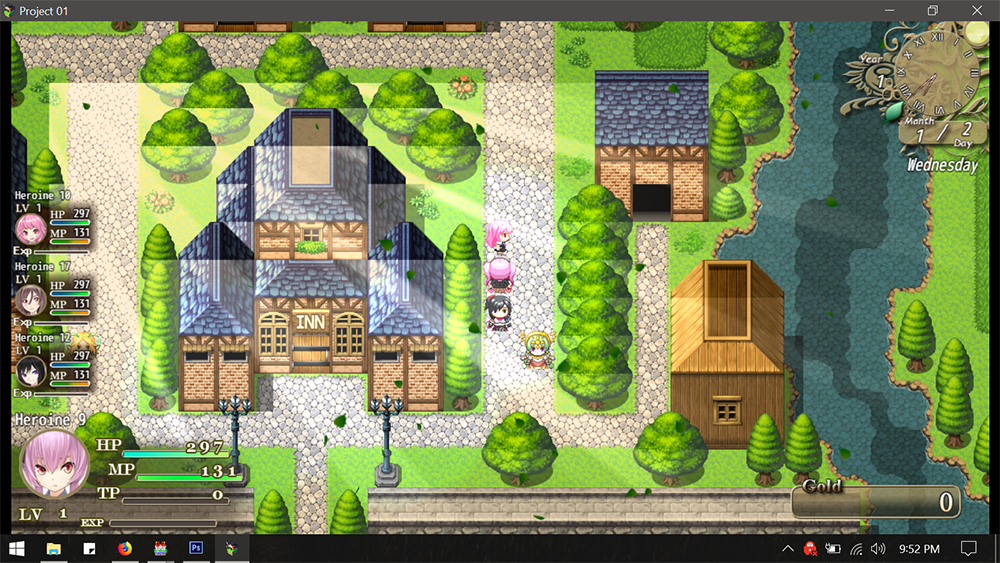
Moghunters light ray parallax not working correctly
● ARCHIVED · READ-ONLY
-
-
Please post how you are showing the sun rays, if thru an event please show us a screenshot
-
I set it up exactly like the event used in the Moghunter MV demo.
-
So by turning the switch ON, the rays are shown by the plugin? Do you know which plugin exactly handles that?
Just to clarify, the rays stay on the map location where it was spawned and what you want is for it to follow the screen?
If you need it to follow the screen, better just use Show Picture to show it then. Most parallax plugins are for keeping the images in a certain location. -
Its the Moghunter TimeSystem plugin I am using. It's set up to "turn on" at 6am using the time plugin, same as the in the demo. I also ran a test with ONLY YEP_CoreEngine and Mog_TimeSystem on in my game and it still happens, even with just those two plugins.
"Just to clarify, the rays stay on the map location where it was spawned and what you want is for it to follow the screen?"
Well, in the Moghunter demo the parallax stays put when spawned but no matter where you are on the map the rays start at the top-left corner of the screen and do not move. In my game they don't move either but they spawn right where my character is and when the map scrolls it looks bugged out like in my first screenshot. -
Oh so the problem is simply that it spawns on the wrong place?
What happens if you also disable Yanfly's core? -
Even when I start a new game and use only the timesystem plugin it happens. I'll spent some time working with parallax's and maybe the answer will come to me.
-
In case you don't find any solution: A workaround - you can use the sun beams picture as a doodad.
You'll need: Yanfly's Gridfree Doodads plugin + Extended Doodad Pack.
Then, when playing it, you first move with WASD to the edge of your screen and from there place it with ARROW KEYS where you exactly want it to be. If you need it bigger/smaller, there's an option to scale it (by default open edit menu with T).
Anyway, before saving it, look through the edit list, where it says "Switches". There choose your switch and voilá - this should work correctly.
I've already done this in one of my maps.
I think, sometimes plugins don't work properly cuz either there is some incompatibility or they don't work correctly with the newer MV version.
edit: But before you might wanna test if the switch self is working with the time system. -
Alright, I'll look into it in the morning, thanks.
-
are you sure that this is the event that controls the ray picture?
Because there is nothing in the event page that has anything to do with it.
If it is in the custom move route, please post a screenshot of that. -
are you sure that this is the event that controls the ray picture?
Because there is nothing in the event page that has anything to do with it.
If it is in the custom move route, please post a screenshot of that.
The switch that controls it is number 22, in the screenshot number 4 is highlighted but I am still using the right switch in the event. -
I'm not talking about you using the wrong switch, I'm talking about the fact that the event will do nothing when the switch is used.The switch that controls it is number 22, in the screenshot number 4 is highlighted but I am still using the right switch in the event.
Why did you include the event in the screenshot at all?
Either you forgot to copy content from the original, or this event has absolutely nothing to do with the picture.
That is that I'm talking about. -
Someone asked for me to post the event screenshot. The event I am using is a direct copy from the Moghunter Master MV demo and for whatever reason, if it isn't used, the sunrays will appear immediately (rather than at 6am) and not turn off. I am probably too noobly to get it atm. It may take someone who is directly familiar with the mogtime setup to know what is happening.
-
that means your screenshot is incomplete, most likely because there are commands inside the custom move route.
Please give us a screenshots of the events custom move route - and if you don't know what that is, then you have missed copying those commands from the original event in moghunters demo.
those commands are on the next window, when you click on the route button after switching autonomous movement to custom. -
It's not letting me upload a screenshot atm but in the movement route menu, in the left hand column, there is a script that reads "this._blendMode = 1" and nothing else is checked on this page. It appears to be the same as in the mog demo.
-
even in that case, you're missing something.
please give a link to where you got the demo and the plugin website, so that someone else can check. -
Here is the master demo link: https://atelierrgss.wordpress.com/rpg-maker-mv/
What I did was copy the audio, images, and js folders over to my project then set it up from there manually, rather than overriding my data folder with the one from the demo. So I guess to repeat it, just start a new game and paste the three folders then add the timesystem.js plugin and wait for 6 am to come around to see the sun rays that appear.
Edit: Alright, I got it finally. The issue was where I was PLACING the event box on the map. You have to place the event box at the top left hand side of the screen. The lighting is still a bit messed up though, its like its getting blocked by the rooftops and some other stuff. I noticed the rooftops are removed from the tilesheets in mogs demo to... so there is something else to figure out. I also increased the size of the parallax .png to better match the map I am using it on, for testing. The only issue is the tops of trees and houses blocking the light. -
That should be easy to fix.The lighting is still a bit messed up though, its like its getting blocked by the rooftops and some other stuff. I noticed the rooftops are removed from the tilesheets in mogs demo to... so there is something else to figure out.
Your event is "Priority: Same as Player" which means, its layer is same as player. Everything above player will be above the event aswell (like roof tops).
Set the priority "Above Player" and everything should be fine. -
Oh wow, fantastic! And that was the issue, everything works now. =)