MOG Boss HP Meter

● ARCHIVED · READ-ONLY
Started by ScytheX 6 posts View original ↗
  1. has anyone ever mess with the settings in this mod? i need to find a way to make the hp numbers longer. they cut off as seen in the image below and when i try to edit them they just clip in front of the "HP" text and even then they still don't fine because the number is too long and before you say so yest i want large numbers i'm not making them smaller.
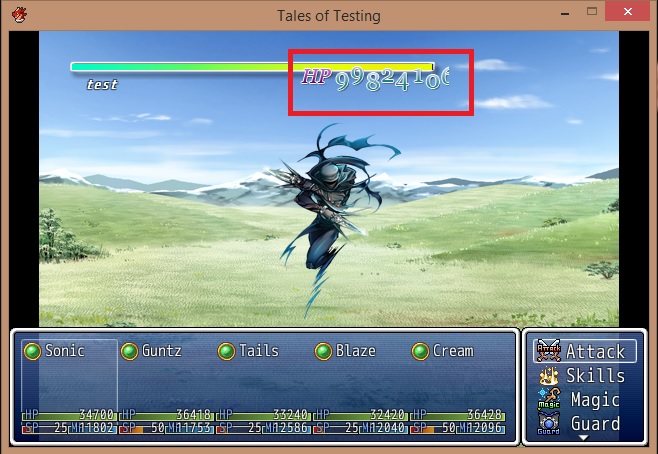
    upload_2018-3-24_21-5-37.jpeg
    https://atelierrgss.wordpress.com/rgss3-boss-hp-meter/
  2. Well line 72 is
    HP_NUMBER_POSITION = [230, 5]

    perhaps reducing it to 220, 5 might be what you want
  3. Roninator2 said:
    Well line 72 is
    HP_NUMBER_POSITION = [230, 5]

    perhaps reducing it to 220, 5 might be what you want

    no good that moves both the HP and numbers but not space them out to stop the cut.

    i came up with a small theory. there's a image file that comes with the numbers and hp on it. would widening the file give the space that i need or no thats now how that would work?

    this is the file upload_2018-3-24_22-27-11.png
  4. The sprite's width is too small for the number of digits the HP has.
    Put this below MOG's script.
    Code:
    # Fixes HP numbers being cut off for HP with many digits for
    # MOG - Boss HP Meter (V1.5).
    #
    # -------------------
    # Script by: vFoggy
    class Boss_HP_Meter
      def create_hp_number
          @hp2 = $game_system.boss_hp_meter[4]
          @hp3 = @hp2
          @hp_old2 = @hp2
          @hp_ref = @hp_old2
          @hp_refresh = false   
          @hp_number_image = $game_temp.cache_boss_hp[2]
          @hp_cw = @hp_number_image.width / 10
          @hp_ch = @hp_number_image.height / 2
          @hp_ch2 = 0
          @hp_ch_range = HP_NUMBER_WAVE_EFFECT == true ? @hp_ch / 3 : 0
          @hp_number_sprite = Sprite.new
          # determine number of digits. each digit has 15 pixels of width
          # add 35 pixels for the HP chars
          width = (Math.log10(@hp2).to_i + 1)*15 + 35
          @hp_number_sprite.bitmap = Bitmap.new(width, @hp_ch * 2)
          @hp_number_sprite.z = @layout.z + 2
          @hp_number_sprite.x = @layout.x + HP_NUMBER_POSITION[0]
          @hp_number_sprite.y = @layout.y + HP_NUMBER_POSITION[1]
          @hp_number_sprite.viewport = @hp_vieport
          @hp_number_sprite.visible = $game_system.boss_hp_meter[9]
          refresh_hp_number
        end
    end
  5. vFoggy said:
    The sprite's width is too small for the number of digits the HP has.
    Put this below MOG's script.
    Code:
    # Fixes HP numbers being cut off for HP with many digits for
    # MOG - Boss HP Meter (V1.5).
    #
    # -------------------
    # Script by: vFoggy
    class Boss_HP_Meter
      def create_hp_number
          @hp2 = $game_system.boss_hp_meter[4]
          @hp3 = @hp2
          @hp_old2 = @hp2
          @hp_ref = @hp_old2
          @hp_refresh = false  
          @hp_number_image = $game_temp.cache_boss_hp[2]
          @hp_cw = @hp_number_image.width / 10
          @hp_ch = @hp_number_image.height / 2
          @hp_ch2 = 0
          @hp_ch_range = HP_NUMBER_WAVE_EFFECT == true ? @hp_ch / 3 : 0
          @hp_number_sprite = Sprite.new
          # determine number of digits. each digit has 15 pixels of width
          # add 35 pixels for the HP chars
          width = (Math.log10(@hp2).to_i + 1)*15 + 35
          @hp_number_sprite.bitmap = Bitmap.new(width, @hp_ch * 2)
          @hp_number_sprite.z = @layout.z + 2
          @hp_number_sprite.x = @layout.x + HP_NUMBER_POSITION[0]
          @hp_number_sprite.y = @layout.y + HP_NUMBER_POSITION[1]
          @hp_number_sprite.viewport = @hp_vieport
          @hp_number_sprite.visible = $game_system.boss_hp_meter[9]
          refresh_hp_number
        end
    end

    awesome! that works great thanks for the help ^-^
  6. i got another question for this. after fighting 1 enemy with the boss meter on when i fight the same one or another one it crashes and gives this massage

    upload_2018-4-8_21-51-48.jpeg

    any idea how to fix that?