Message Plus

● ARCHIVED · READ-ONLY
Started by Fogomax 20 posts View original ↗
  1. TTK - Message Plus (v1.3.5)

    Introduction
    This plugin improves the default message system, adding new features to it.
     
    How to use
    Save the script in a .js and move it to js/plugins folder.
     
    Images
    Spoiler
    iKPVvsm.png

    iLyyzvO.png

    BvfHVi4.png

    PBwENTR.gif
    Plugin Code
    Github: https://github.com/rafaelalmeidatk/JGSS/blob/master/TTK_MessagePlus.js

    Objectives
    • Ballon Texts ✓
    • Name boxes ✓
    • Animated faces ✓
    • Big faces
    • Integration with Yanfly - Core Message

    Credits
    Fogomax

  2. yes,I Will use it,Thanks! for creating;D
  3. Does this work with the followers as well?  If not, would it be possible to do that?  Thanks.

    EDIT:  Oh and is it possible to switch out the Windowskin on the fly so that the speech balloons can have a different look?  And how do you adjust the size so that it only fits the text displayed?  For instance, if the Balloon only contains the word "Hello." then I don't want a huge empty box.  I'd just like a small box.  Is that possible?  And can a Speech Tail be added?
  4. redspark said:
    Does this work with the followers as well?  If not, would it be possible to do that?  Thanks.


    EDIT:  Oh and is it possible to switch out the Windowskin on the fly so that the speech balloons can have a different look?
    It doesnt works with followers yet, but I can do this. And yes, you can switch the windowskin of the Ballon Texts changing the System windowskin
  5. Update (v1.3.4):
    • New feature: Animated Faces! Now you can give life to your faces, making them animated and express emotions in a way like never before:
      Spoiler
      PBwENTR.gif
    Update (v1.3.5):
    • Fixed a small bug: the begin of the message was cropped by 2 pixels
  6. Very well done :)
  7. Beautiful plugin so far!

    As a note, it needs to be placed after Frysning's monster leveler plugin, otherwise it doesn't work.
  8. the work so far looks amazing! 

    Does it require any extra images for the animated faces?
  9. How do you activate the script? 

    It's in my plugins but none of the commands seem to work. I even tried in a new project.

    Edit: Heh... My mistake. When I copied the script into a new .js, I somehow missed the very last line!
  10. Looks awesome! Waiting for more extensions :D
  11. I see that you mention:

    • Integration with Yanfly - Core Message

    Does that mean we might be able to do something like: \n<x> and maybe \p<x> whereas n<x> is the name and p<x> is the position in which it is drawn?

    I only ask because currently having to do the plugin commands over and over in cutscenes is kind of annoying. D:
  12. Hudell said:
    Very well done :)
    Thanks Hudell!  :D

    Maus Merryjest said:
    Beautiful plugin so far!

    As a note, it needs to be placed after Frysning's monster leveler plugin, otherwise it doesn't work.
    Thanks for the information, i'll see it later.

    Jenza said:
    the work so far looks amazing! 

    Does it require any extra images for the animated faces?
    Yes, if you want add a animation to a face, you need create a facesheet and include one animation sheet per row, the name will be prefix_index_FileName.png, see this example to the first face of Actor1.png: http://i.imgur.com/gTQ65mq.png

    If you didn't change the prefix, the file name will be anim_0_Actor1.png, and the animations: 1 to blink, 2 to speak. I hope you understand, this part is really very hard to get.

    Korten12 said:
    I see that you mention:

    • Integration with Yanfly - Core Message
    Does that mean we might be able to do something like: \n<x> and maybe \p<x> whereas n<x> is the name and p<x> is the position in which it is drawn?
    I only ask because currently having to do the plugin commands over and over in cutscenes is kind of annoying. D:
    No, the integration is to you be able to use the font effects in the name window and to I fix some bugs to who are using both plugins. What is your difficulty with the plugin commands? If you have any suggestions, I really wanna know. I'm thinking about a general configuration to each character, you will pre-config all the settings (such like the name, face, face animations, big faces, anything you wanna) and to call it you simple use MessagePlus load CharacterName, with this you wont need call each command individually.

    redspark said:
    Does this work with the followers as well?  If not, would it be possible to do that?  Thanks.

    EDIT:  Oh and is it possible to switch out the Windowskin on the fly so that the speech balloons can have a different look?  And how do you adjust the size so that it only fits the text displayed?  For instance, if the Balloon only contains the word "Hello." then I don't want a huge empty box.  I'd just like a small box.  Is that possible?  And can a Speech Tail be added?
    Sorry for the late answer, I have not seen your edit. Well, the Ballon Texts size adjusts with the text size, can you show me your issue? And yes, I'll add a Speech Tail, or something similar.
  13. Fogomax said:
    No, the integration is to you be able to use the font effects in the name window and to I fix some bugs to who are using both plugins. What is your difficulty with the plugin commands? If you have any suggestions, I really wanna know. I'm thinking about a general configuration to each character, you will pre-config all the settings (such like the name, face, face animations, big faces, anything you wanna) and to call it you simple use MessagePlus load CharacterName, with this you wont need call each command individually.
    Ah. Cause currently I have to do this:

    MessagePlus setName x

    MessagePlus setBallon x

    <Dialogue>

    MessagePlus setName x

    MessagePlus setBallon x

    <Dialogue>

    For when it switches between characters. It's not hard, it's just a bit on the tedious side. 
  14. I really like your last update with the animated face, it made though of Shining for 3 dialog box.

    Still, I would like to make the suggestion to add an option to have a second layout, like this one : http://img.gawkerassets.com/img/17mz80z94u82pjpg/ku-xlarge.jpg

    And if you could reproduce the same layout too that would be really cool B)

    Good luck.
  15. Animated busts and more escape codes compatibility would be amazing, today in the evening I will animate my faceset for MV.
  16. Niceeee, animated faces is a beautiful touch.

    +1 ill be using this the instant it gets compatible with yanfly message core.
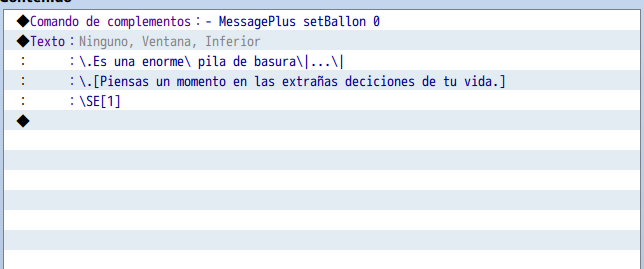
  17. I don't really understand nothing at all, how do you activate the balloon or the animated face? I tried this.

    tried.png
  18. Chaos17 said:
    I really like your last update with the animated face, it made though of Shining for 3 dialog box.


    Still, I would like to make the suggestion to add an option to have a second layout, like this one : http://img.gawkerassets.com/img/17mz80z94u82pjpg/ku-xlarge.jpg


    And if you could reproduce the same layout too that would be really cool B)


    Good luck.
    I liked the suggestion, I will try make that.

    Shiroi Akuma said:
    Animated busts and more escape codes compatibility would be amazing, today in the evening I will animate my faceset for MV.
    Yes, I will add Big Faces support too. And about the escape codes, the plugin will be compatible with Yumis one.

    Bogsy said:
    Niceeee, animated faces is a beautiful touch.


    +1 ill be using this the instant it gets compatible with yanfly message core.
    Thanks :)

    Necrojoker00 said:
    I don't really understand nothing at all, how do you activate the balloon or the animated face? I tried this.


    tried.png
    You cant include the "-" in the plugin command, its in the help just to formatation. The correct is: MessagePlus setBallon 0
  19. Fogomax said:
    I liked the suggestion, I will try make that.

    Yes, I will add Big Faces support too. And about the escape codes, the plugin will be compatible with Yumis one.

    Thanks :)

    You cant include the "-" in the plugin command, its in the help just to formatation. The correct is: MessagePlus setBallon 0
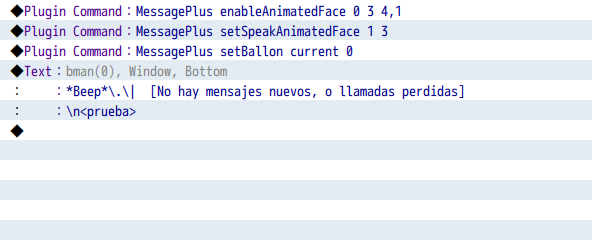
    oh, I see now, yep, it totally worked, I have  my sprites in the order of the example, how can I set it to behave like in your gif? right now the character speaks and then stop (kinda neat), but if he could blink too would be appreciated.

    bman2.png
  20. The animated faces look awesome! I can't wait to use this. Thanks for putting this together for us!