Message Pause Cursor

● ARCHIVED · READ-ONLY
Started by Tsukihime 22 posts Page 1 of 2 View original ↗


  1. By default, when a message has finished displaying all of the words and is waiting for player input, a little animated cursor is shown to indicate that the player should press the confirm button to proceed.

    However, this cursor is stored inside the windowskin, which gives you enough freedom to have one 24x24 cursor with 4 frames of animation. You also cannot choose where the cursor should appear, or how fast it should animate.

    With this plugin, you are given more control over that pause cursor.
    • You can change how it looks!
    • You can change where it's positioned!
    • You can change how fast it animates!
    What kind of cursor will you create?
     
    More information and downloads are available at HimeWorks
  2.  

     What kind of cursor will you create?  
    1. Just different animation: I think a little bird will be nice... and the cursor like the drill, which rotates... and a little cloud with a dissapearing "tail"...

    2a. Change animation and his position (not only 'center', 'left' and 'right' - what if we can change ox-oy by hands?) during the character conversation: emotions for example, when some character explans something for us and we can see his\her satellite emotions - ha-ha! but 24x24 too small for it i suppose... but I think it will be very funny when we'll see a littel spider crawling in the box;

    2b. And just symbols (for example "exclamation mark" means something VERY important in next text box - "Pay attention!").
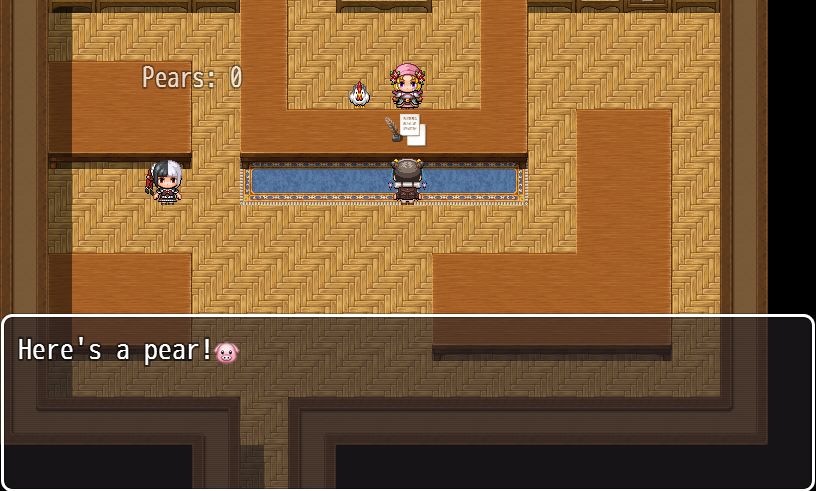
  3. This plugin is awesome, thanks! I wanted a Pig-MessageCursor and I didn't know what to do! 
     

    P.S.

    I tried to set the plugin manager's parameter to 'right', but the cursor was still in the center, I had to create an event to change it.

    The other parameters work well!

    Here's how i modified your MessagePauseCursor.png, if someone needs a pig! hahaha


    Thanks again!
  4. Is it possible for the pause cursor to be positioned just after the last character of the message is displayed? 

    l5ugMNz.jpg

    Of course, if the cursor is gonna go past the message box width, I suspect it would have to be moved to the next line.
  5. MakoTorii said:
    Is it possible for the pause cursor to be positioned just after the last character of the message is displayed? 


    l5ugMNz.jpg


    Of course, if the cursor is gonna go past the message box width, I suspect it would have to be moved to the next line.
    Hmm...what happens if you fill up all the available space on the window?


    Like you just have 4 long lines that fill it up?


    Here's how it looks


    CWsI_y7W4AIorrW.jpg


    This is good because now I can think about how to handle extra stuff in my other message plugins.


    My popup messages for example don't know about the cursor in the text:


    CWsINBlXIAAcml5.jpg
  6. Tsukihime said:
    Hmm...what happens if you fill up all the available space on the window?

    Like you just have 4 long lines that fill it up?

    Here's how it looks

    CWsI_y7W4AIorrW.jpg

    This is good because now I can think about how to handle extra stuff in my other message plugins.

    My popup messages for example don't know about the cursor in the text:

    CWsINBlXIAAcml5.jpg
    For some reason, I'm unable to view the 2nd image. 

    On the topic of what if all 4 lines are filled, that actually slipped my mind. Hmm... In my kind of use for the plugin, I'm not gonna fill the entire space cause it looks so jammed like that, but in the case of others... I guess putting it on the right as if using the default "right" position setting of your plugin. I think it'd be the most "consistent", if that makes sense.
  7. Here's my solution: I'll just put it at the end of the last character.

    If you need to jump to the next line, add an extra line.

    If you're out of space, re-structure your text

    And so on.

    This way it's up to you to figure out how it should be displayed.

    What that said, I have updated the plugin so to support a new align called "end".

    When the "end" align is used, the pause cursor will be displayed after the last character in the message.

    Script call for alignment:

    $gameMessage.setCursorAlign('end')Results:HqqwFHo.jpg

    Note that I have also renamed the plugin to

    Code:
    HIME_HMSMessagePauseCursor.js
    To conform with the other message plugins that I'm writing.
  8. Is it possible to assign a face graphic used in Show Text to a cursor so you can have specific cursors per character without needing hundreds of script calls? I think it'd add a bit of personallity and maybe I could even make my character sprites' heads into cursors and have them as that character's cursor!
  9. Kloe said:
    Is it possible to assign a face graphic used in Show Text to a cursor so you can have specific cursors per character without needing hundreds of script calls? I think it'd add a bit of personallity and maybe I could even make my character sprites' heads into cursors and have them as that character's cursor!
    Here is another idea that builds on it: we use the face to designate the "speaker".


    And with the "speaker", we can use this information to determine how the message should be displayed.
  10. Tsukihime said:
    Here is another idea that builds on it: we use the face to designate the "speaker".

    And with the "speaker", we can use this information to determine how the message should be displayed.
    YEAH!! That would be super duper useful! I think someone has a plugin which does something like that, but with a plugin command, and uses that data to add a specific face to the following conversations! 
  11. its not working anymore? im using 1.5.1 version
  12. Black Mamba said:
    its not working anymore? im using 1.5.1 version
    I'm with you there. I just tried plugging it in on a blank game and nothing is showing up anymore.
  13. I'd like to preface this by saying I'm not a programmer at all and this is based off a little hack I did to get it working in my project.

    I noticed nothing was appearing, until I opened the main menu screen, then when I would talk to people afterwards the cursor would appear.
    Which meant the animation was only being loaded when the main menu was called, not the message window.
    So I added this to the code.

    Window_Base.prototype.loadWindowskin = function() {
    this.windowskin = ImageManager.loadSystem('Window');
    this.windownew = ImageManager.loadSystem(a);
    };

    I can't remember why, also in this case I'm directly calling the files Window.png and a.png from the system folder. (that may be important?)

    but for now maybe try adding

    Window_Base.prototype.loadWindowskin = function() {
    this.windowskin = ImageManager.loadSystem('Window');
    this.windownew = ImageManager.loadSystem($.filename);
    };

    above the line -> var TH_SceneBoot_loadSystemImages = Scene_Boot.prototype.loadSystemImages;

    will do the trick?

    once again, not a programmer, but the key lies in loading the file when the message window is called.

    (also it's an old project, so I may be missing something)
  14. Thank you good sir
  15. Harken_W said:
    I'd like to preface this by saying I'm not a programmer at all and this is based off a little hack I did to get it working in my project.

    I noticed nothing was appearing, until I opened the main menu screen, then when I would talk to people afterwards the cursor would appear.
    Which meant the animation was only being loaded when the main menu was called, not the message window.
    So I added this to the code.

    Window_Base.prototype.loadWindowskin = function() {
    this.windowskin = ImageManager.loadSystem('Window');
    this.windownew = ImageManager.loadSystem(a);
    };

    I can't remember why, also in this case I'm directly calling the files Window.png and a.png from the system folder. (that may be important?)

    but for now maybe try adding

    Window_Base.prototype.loadWindowskin = function() {
    this.windowskin = ImageManager.loadSystem('Window');
    this.windownew = ImageManager.loadSystem($.filename);
    };

    above the line -> var TH_SceneBoot_loadSystemImages = Scene_Boot.prototype.loadSystemImages;

    will do the trick?

    once again, not a programmer, but the key lies in loading the file when the message window is called.

    (also it's an old project, so I may be missing something)


    I tried adding the code and it doesn't change anything. I still need to load the main menu before it displays the cursor. :(
  16. HintonR said:
    I tried adding the code and it doesn't change anything. I still need to load the main menu before it displays the cursor. :(

    Strange, it seems to be working for me. Although when it's set to 'center' it appears in a weird place. Try setting it to 'end' to see if it atleast appears.

    I've uploaded my edited version of the plugin here ->
    if you'd like to try it.
  17. I've just downloaded the latest version and I get an error every time. I tried a fresh project with this as the only plugin, and I get this:
    Image
    1599956984471.png

    EDIT: I just realized that this probably wasn't updated for MZ, and that this is hasn't had a reply in 2 years. My bad!! (not completely sure why I thought it was, looking at it again..)
  18. Harken's edited version works after renaming from Hime's plugin to yours. The only aligned works is "end".