Medieval Dlc Packs Character and Weapons.

● ARCHIVED · READ-ONLY
Started by killdude 10 posts View original ↗
  1. Hi.Im just buyed the medieval dlc packs and its very awesome.İ have 2 huge troubles.Tilesets are easy with parallax mapping so i dont have any questions about that.My question is about the characters and generators.As you can see in the images(I drawed because of the coprights but without it i cant explain my problem well.)Where should i put this images in my project or program.Where should i put this generator parts?Which ones must be in tv,tvd,variation?İts so complicated my head is burning now :)
    Another trouble from the weapons.Pv games make this weapons like actors and monsters(As you can see in the image each weapon has collapse,sv,default images like clothes.) Ok i give up.What should i do i have same questions abot the weapons just like clothes.As you can see my english is not very good so please explain me with some images or some samples? İll be grateful.Thanks for help happy rpg making ! :)) medieval2.png medieval2.png
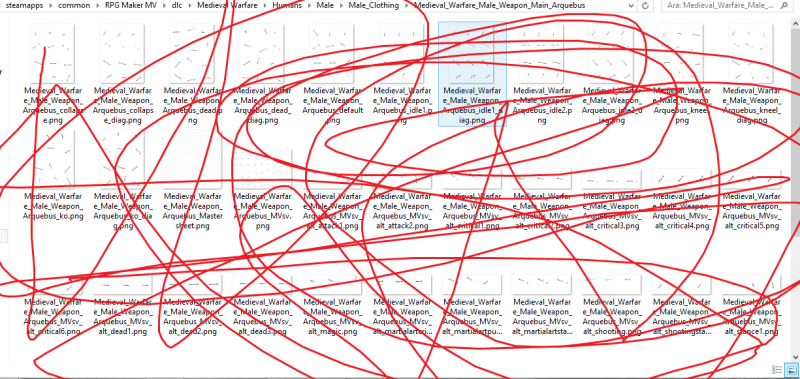
  2. You are not supposed to put those parts anywhere in your Project. You have to piece your characters together either using an Image - editing - Software or by using the (semi)official Generator. You can find it on the PV - Games Website. Just copy your files (or even better: the whole resource Folder) into it.
    The weapons are actually character parts. That means that there ist one weaponsheet for standing, one for walking characters etc.
  3. You have to do the same as parrallax mapping, put the images together in gimp or use the character generator and then build sheets out of them. All the default characters have there own sheets.

    You then put the correct sheets in the correct folders.
    Characters face goes into face,
    characters default (walking) goes into characters.
    characters idle into characters
    characters MVsv goes into SVactors.
  4. So i cannot do custom weapons like default rpg maker.Thats very upsetting i put a axe in a shop,İ buy it and nothing changes it looks sword again.I wish he ll make solution for this.
  5. killdude said:
    So i cannot do custom weapons like default rpg maker.Thats very upsetting i put a axe in a shop,İ buy it and nothing changes it looks sword again.I wish he ll make solution for this.

    It can be done but will involve changing core code.
    If Jesse released the weapons seperate like this it would mean the player would have to be confident enough to jump into editing the core code and moving the weapon location around relative to the sprite.
    There is also an issue that female sprites are slightly shorter than male sprites and in the default style they are exactly the same.

    It's not Jesse's issue but the issue the engine it auto set for certain sized sprites.
    So if the axe was simply put into the game it would look like it was swinging from the players crotch.

    It can be done by changing actor graphics but its a messy solution where you need a load of player battler sheets for each equipable weapon.
  6. It might be possible to change weapons via an extended "Visual-Equipment - Plugin" that does not only work on the map but during animated battles as well. However, I don`t know any plugin out there that works this way. You could probably comission one, though.
  7. The most viable alternative is as follows for now at least.

    • Download and install Yanfly's Utility Common Event Plugin
    • Make a battler sheet for each weapon with each player.
    • Have it run a common event (or 10) when you close the menu. Have the common event check weapons.
    • Example... common event
    Lets say I have a character called "Bob". I have 6 weapon types - Sword, Axe, Hammer, Dagger, Bow and Staff.
    There are 3 levels to each weapon... 1, 2, and 3.

    So I have 6 weapon types x 3 of each = 18 weapons. I need to make a long common event.

    I need 6/7 sheets...
    In my game the player doesn't carry weapon on the map so I have his normal character default "$Bob" for map movement.
    The I need to make and export 6 battler sheets - one holding each weapon type.
    So I have "Bob_swd_MVsv", "Bob_axe_MVsv", Bob_staff_MVsv" etc...

    Now into my common event...
    My common event would be Bobs Weapons...

    Bobs weapons in common event:
    if Bob has equipped Swd1 - change actor graphic for Bob to normal face, normal character, "Bob_swd_Mvsv".
    if Bob has equipped Swd2 - change actor graphic for Bob to normal face, normal character, "Bob_swd_Mvsv".
    if Bob has equipped Swd3 - change actor graphic for Bob to normal face, normal character, "Bob_swd_Mvsv.
    if Bob has equipped Axe1- change actor graphic for Bob to normal face, normal character, "Bob_axe_Mvsv".
    if Bob has equipped Axe2- change actor graphic for Bob to normal face, normal character, "Bob_axe_Mvsv".
    etc...

    As you can see for 18 weapons thats 18 "if" conditions.
    If you've got hundreds of weapons... then God help you.

    You then simply get Yanfly's Utility Common Event to call the common event everytime you close the menu.
    Note: You won't be able to switch weapons mid-battle and I haven't checked so not sure if this works with the shop equip scene.

    If you want to do weapons and shields, I'd commision a plugin.
  8. killdude said:
    So i cannot do custom weapons like default rpg maker.Thats very upsetting i put a axe in a shop,İ buy it and nothing changes it looks sword again.I wish he ll make solution for this.

    There won't be a solution for this because the parts you want to use (médiéval) and the workflow you hope to use (use built in generator and battle weapon option) are not compatible.

    Use Gimp to assemble character parts, or the generator, linked in the medieval documents.
  9. If your using Yanfly's Equip Core, Waynee_99 has a plugin called OnEquipEval that will run JavaScript code when something is equipped like armor or weapons and you can change sprite images. Like said above, you're going to need a lot of images though.
  10. Thank you everyone for lending aid while I was away! :)

    It seems like most of the possible solutions have been discussed above already. I will just add my own two cents from personal experience:

    The way RPG Maker MV does visual, on-screen weapons is that it superimposes the weapon graphic on top of the sprite. It will only ever have three frames of animation, and it has to be pretty much aligned perfectly, and currently that is to fit with the Chibi sprites. You *could* do the same thing with my resources, but you would have to set up the weapon graphic manually and ensure that it is the proper animation for the sprite (so making sure the "overhand swing" of a sword matches with the "overhand swing" of the sprite, that sort of thing).

    What I did with my game Aleph is I made separate sprite sheets for each character, each character having a number of spritesheets, one for each type of weapon they could equip - so ultimately one character would have like 10 different spritesheets (one for sword, one for spear, one for bow, one for axe, etc etc) and the spritesheets would be swapped out depending on what type of weapon was equipped.