MBS - Mobile DirPad & Action Button

● ARCHIVED · READ-ONLY
Started by  Masked  64 posts Page 1 of 4 View original ↗
  1. ​

    m6BRKBq.png
    MBS - Mobile DirPad & Action Button (1.1.0)
    by Masked​
     
     
    Introduction
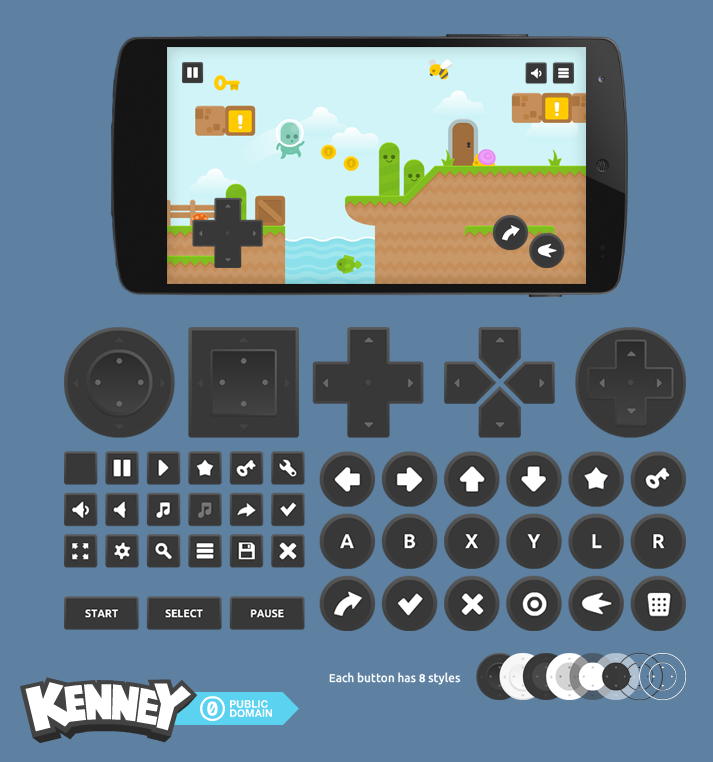
    This plugin was made based on this request, it creates a Directional Pad and action buttons on the screen when the game is played with mobile devices.


    Screenshots
    Spoiler
    dAz5ewh.png
    The DPad and Action Button images where taken from the screenshot on Kich's topic
     
    How to use
    Save the script in a .js file on your project's js/plugins folder and enable it from the Plugin Manager. Further information on plugin help.
     
     
    Script
    GitHub: https://github.com/MaskedRpg/JS/blob/master/mv/MBS_MobileDirPad.js
    MV Plugins: http://mvplugins.com/plugin/Masked/MBS%20-%20Mobile%20DirPad
     
     
    Credits
    - Masked, for creating;
  2. Very interesting. Is it possible to have a switch that shuts off the feature in-game? I think it's better that the choice be made by the player.
  3. thechancellor said:
    Very interesting. Is it possible to have a switch that shuts off the feature in-game? I think it's better that the choice be made by the player.
    also have it so when the controls are visible the touch screen controls dont work and while the controls are hidden the normal touch screen works.
  4. Plugin updated:

    thechancellor said:
    Very interesting. Is it possible to have a switch that shuts off the feature in-game? I think it's better that the choice be made by the player.
    Bernkastel said:
    also have it so when the controls are visible the touch screen controls dont work and while the controls are hidden the normal touch screen works.
    Did it, just use these plugin commands to disable/enable it:

    Code:
    MobileDirPad disableMobileDirPad enable
  5. Great plugin, you save me because i'don't know javascript and i have try to do that with parallel process :p
    And the result was not so bad, is like this DEMO

    I have a question, because i cant try it with a tablet or mobile phone right now, so:

    Your plugin have multi touch feautres ?

    I mean, if i'm walking around so my left finger press the screen, and i press with right  finger a button, it works?
    Or i need to relase left finger?

    Thanks!
  6. Thanks for the plugin, this will be really useful! Only I'm getting the error:

    'TypeError'

    Cannot set property 'visible' of undefined.

    Tried messing around with paths, filetypes, making sure they're all correct. Any ideas? :) (I'm on mac)
  7. Lakaroth said:
    Great plugin, you save me because i'don't know javascript and i have try to do that with parallel process :p


    And the result was not so bad, is like this DEMO


    I have a question, because i cant try it with a tablet or mobile phone right now, so:


    Your plugin have multi touch feautres ?


    I mean, if i'm walking around so my left finger press the screen, and i press with right  finger a button, it works?


    Or i need to relase left finger?


    Thanks!
    Omg, I didn't think about this and what's worse, I'm not sure about how to implement it o.o
    Polysquid said:
    Thanks for the plugin, this will be really useful! Only I'm getting the error:


    'TypeError'


    Cannot set property 'visible' of undefined.


    Tried messing around with paths, filetypes, making sure they're all correct. Any ideas? :) (I'm on mac)
    Oops, my fault, fixed it.
  8. Masked said:
    Omg, I didn't think about this and what's worse, I'm not sure about how to implement it o.o
    It is as I thought, this is a big problem, i think there must be a way to implement multitouch but i think is not easy at all..

    I'm not a developer, but i find this

    http://hammerjs.github.io/

    It is js, the game is and HTML5 browser game so... i think there's a way to implement it !
  9. Any estimate for 8 directions? :)
  10. Masked said:
    Oops, my fault, fixed it.
    Are you sure? I've been trying to get this thing to work for days and I'm also (still) getting the:

     'TypeError'

    Cannot set property 'visible' of undefined.

    Error thingy..

    I'd love to give this a go, since opening the menu or trying to cancel anything on the android port of the game requires you to tap the screen with 2 fingers at the same time, and that has some input lag, so..

    Anyway, I hope you can to fix this soon 'cause I can't wait to test it! :)
  11. Lakaroth said:
    It is as I thought, this is a big problem, i think there must be a way to implement multitouch but i think is not easy at all..


    I'm not a developer, but i find this


    http://hammerjs.github.io/


    It is js, the game is and HTML5 browser game so... i think there's a way to implement it !
    I'll take a look at it, doesn't seem to be much complicated. Thank you o/


    Plugin updated (finally):

    Lucas Kich said:
    Any estimate for 8 directions? :)
    Now it does support 8 direction movement, I made a little script specifically for that: https://github.com/MaskedRpg/JS/blob/master/mv/MBS_8Direction.js
    It should work with any other diagonal movement plugin, though.

    JohnnyR said:
    Are you sure? I've been trying to get this thing to work for days and I'm also (still) getting the:


     'TypeError'


    Cannot set property 'visible' of undefined.


    Error thingy..


    [...]
    Lol, I was pretty sure I did o_O
    I changed some things, now it doesn't ignore the buttons when they're not going to appear on the screen anymore, it might work that way...
  12. Masked said:
    Lol, I was pretty sure I did o_O

    I changed some things, now it doesn't ignore the buttons when they're not going to appear on the screen anymore, it might work that way...
    Yeah.. Well.. The error remains. 

    Just by turning the script "on" the game won't even load. Before getting to the title screen the error shows up.

    The thing is, I think I get what the problem is.

    Once I set the PC Debug parameter to false, the game works just fine, but, the images are all over the screen. Like, over ALL screens. Clicking the buttons does works, but they just won't disappear when I enter another window, like the main menu for example. I mean, they show up in the title screen as well..

    Anyway, you got close to it, maybe some more fixing and you'll find the bug. :p

    Also, please add a version number to your script, it is confusing to switch versions without knowing if they're one version up or down... lol 
  13. Can you please add a run button?
  14. Yeah.. Well.. The error remains.


    Just by turning the script "on" the game won't even load. Before getting to the title screen the error shows up.


    The thing is, I think I get what the problem is.


    Once I set the PC Debug parameter to false, the game works just fine, but, the images are all over the screen. Like, over ALL screens. Clicking the buttons does works, but they just won't disappear when I enter another window, like the main menu for example. I mean, they show up in the title screen as well..
    Well, I updated it again (now with the version number marked), but... I couldn't reproduce this error here even with the last version .-.


    Like, it's in an empty project with just this plugin and what it needs and I can't get to have any error messages.


    Maybe it's some kind of incompatibility, try moving this script to the last position on the plugin manager, just in case.


    The images don't show up anymore when you disable them, but the dpad is supposed to appear at every scene replacing the keyboard arrows, I can make it optional if you want, though.

    Skywindz said:
    Can you please add a run button?
    I'll try to implement something like double-clicking the dpad to run, it sounds unnecessary to have another button just for dashing...
  15. Masked said:
    I'll take a look at it, doesn't seem to be much complicated. Thank you o/
    Great!!!

    Thanks to you!

    Update here if u fix that (Y)
  16. Masked said:
    Well, I updated it again (now with the version number marked), but... I couldn't reproduce this error here even with the last version .-.

    Like, it's in an empty project with just this plugin and what it needs and I can't get to have any error messages.

    Maybe it's some kind of incompatibility, try moving this script to the last position on the plugin manager, just in case.

    The images don't show up anymore when you disable them, but the dpad is supposed to appear at every scene replacing the keyboard arrows, I can make it optional if you want, though.
    Yeah, it's some incompatibility problem, I'm currently looking into it, I'll edit this post if I find the problem. Apparently the problem is not related to Yanfly's core engine, to everyone's relief..

    Just a heads up, the buttons are showing up during the battle scene, and that shouldn't be happening.. (I suppose)

    Also, thanks for adding the version number. :p

    Edit: After testing over 30 plugins, I've found the problem. I still don't understand why, but it seems that your script is conflicting with MOG's "Title Splash Screen" plugin. Just by turning off one of them the game will either show MOG's splash screens, or your buttons. I also forgot to mention that the buttons are showing up on the title screen. Is that supposed to happen?
  17. Ok, now it's 100% fixed and tested xD


    The problem were not just with MOG's script, it would happen with any plugin that created/modified a scene without calling the Scene_Base start method.


    Also, there were a problem with the disable/enable commands that would make the interface to appear when the map was reloaded even if it had been disabled, fixed it too.


    About the buttons showing up at the battle and title screens, the idea was that the dpad would replace the directional arrows from the keywboard, so it should appear at every scene, but if you want now you can control this changing the "Only in Map" parameter.


    Now it's working fine o/
  18. When i try to playtest my game is says "Error: Failed to load: ./img/system/DirPad.png" any help? Also, is there any way i could possibly have 3 buttons instead of 2? Great plugin if it works!
  19. Changed...