Make Sprites great again! - A nice MV workaround

● ARCHIVED · READ-ONLY
Started by Avery 20 posts View original ↗
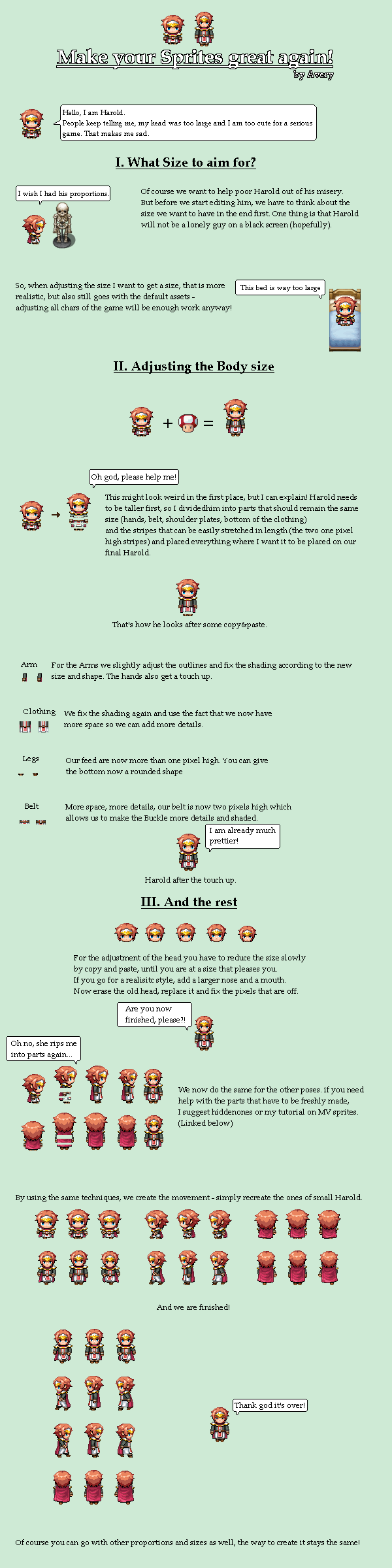
  1. For best results, download the tutorial image and look at in a graphic programm of your chice so you can zoom in whenever you need it!
    If you have any questions or feedback, let me know!
    m9uedkux.png
    I highly recommend to read @hiddenone 's or my sprite tutorial first (or best, both!).
  2. D1aKK0T.png
    i wish i never saw this tutorial because i have so much to do now :rswt
  3. Avery for president! :D
    However, won't it look weird if you have only main characters dechibified? I've seen a project where someone mashed huge and chibi people together and it looked just awful... And honestly, dechibifying every character in the game is seriously a lot of work :(
    Although, looking at @esby's post, it surely does look good :)
  4. I might just have to do this, my short people bother me.
  5. Really nice and helpful tutorial °^°
    thank you for sharing this!
  6. Avery, its nice to see you again....
    But come on... now I have to rework my whole game :D
  7. Oh my god this works amazing, Im no spriter but I'm definitely going to give this a go.
  8. Thats cool man. Cheers.
  9. This should be done to the character generator!
  10. Awesome, I really dislike those chibi MV sprites.
  11. This is a really clever workaround. I've always hated how chibi the default RPGMaker sprites look, so having more space to work with really helps with making things look more...Not-RPGMaker-y.
  12. This was a nice toutoril.But I prefer that this toutoril would had been as a video cause people like me(I mean beginner at photo editing)would prefer videos!!!!
  13. Wow, this is helpful. Thank you for this tutorial. Chibi sizes look ugly (at least for me).
    Looks like a lot of work tho if you're no photo editing pro. :-/

    Well, it can't be helped. :)
  14. I wonder if this can be automatized...
  15. Dittos on the Automatization. Find me a program that will do that and I'll convert all of my TV sprites tonight.
  16. It is also a lot of work if you are a pro since you need to do it to every single char in your game... and no, it can't be automatized. As you can see in the tutorial there are several parts where you just need to manually fix things so they don't look off.
  17. I followed the tutorial once now and I'm quite satisfied with the outcome. Really good tutorial indeed (und Grüße aus und nach Deutschland ;)).
    May I ask how long it takes for an experienced artist do to that for one full character?

    I just want to see if it takes me disproportionally long in comparison to others.
  18. One potentially obvious question thought...What is the character's size? I know in VXAce the default was 32x32, and with they could be made into 32x48 for a "tall" sprite. So what are the dimensions for the example above? I'm a complete newb where spirites is concerned so bear with me, and apologies upfront if I'm not explaining my query effectively. Oh and thank you for the example/tutorial/explanation of your sprite technique.
  19. whoa, thank you very much for the tutorial! :D its awesome trick
  20. Nice tutorial I'll have to try for next project