My dream update to the plugin!
Limited Inventory - [MZ]
● ARCHIVED · READ-ONLY
-
-
I'm getting a "text.replaceAll" error when I open the item menu? I turned off all other plugins and is still happens.
-
I'm getting a "text.replaceAll" error when I open the item menu? I turned off all other plugins and is still happens.
I've tested it with and without other plugins and I don't receive any error. Could you possibly zip your project up and upload to google drive or drop box and share it with me via PM? I could take a look at what's going on for you a lot faster this way. -
Thanks. got it in a stable format and zipped. PMed you.I've tested it with and without other plugins and I don't receive any error. Could you possibly zip your project up and upload to google drive or drop box and share it with me via PM? I could take a look at what's going on for you a lot faster this way.
-
Hi, I'm back with an important bug fix to address a recent bug found by @maunderingcabal. What was happening was that he was using my independent items plugin, and there was a bug in that one causing independent items to not be added to the database correctly.
You can download the latest build over here. -
Hello again. I'm trying some weird stuff with this other plugin that splits the inventory up to multiple inventories for each actor. It doesn't seem to want to play nice with yours. I'll ask the other developer too. If I put this plugin above your limited inventory plugin the other plugin doesn't work but the game run normally. If I put it below your plugin, then try to add another actor it freezes the game with no error codes. If I remove the limited inventory plugin then this actor inventory one work, but I'd like to have all actors have limited inventories. Maybe it's just not compatible, which if is the case I'll just nix the idea of using both. Figured I'd let you know it's not compatible.
DAE's Actor Inventories MZ (Original + Kingdom-Hearts style) -
Hello again. I'm trying some weird stuff with this other plugin that splits the inventory up to multiple inventories for each actor. It doesn't seem to want to play nice with yours. I'll ask the other developer too. If I put this plugin above your limited inventory plugin the other plugin doesn't work but the game run normally. If I put it below your plugin, then try to add another actor it freezes the game with no error codes. If I remove the limited inventory plugin then this actor inventory one work, but I'd like to have all actors have limited inventories. Maybe it's just not compatible, which if is the case I'll just nix the idea of using both. Figured I'd let you know it's not compatible.
Hi there,
Unfortunately, this plugin isn't compatible with that one. You can refer to the compatibility section of each of my plugins over on the official website here. If the plugin isn't listed under "Compatibility," then I'm afraid you're out of luck. It doesn't necessarily mean it won't work, it's just that if there are any problems you'll be on your own. -
I'm back again with even more updates to my most popular plugin! A special shout-out to @chris-cote for commissioning me for these awesome features and allowing me to share it with you all.
There is a minor bug fix listed in the image for this post. There has been a small change to the "Inventory Type" parameter. So please revisit the plugin parameter and change the value to avoid any possible item weight calculation errors.
There are a few quality of life features added to the plugin. Read them in the post's image to find out more. This plugin is now compatible with VisuStella's Visual Item Inventory plugin! There are special instructions in the plugin help file, so please read.
Happy RPG Making!
Link to the plugin. -
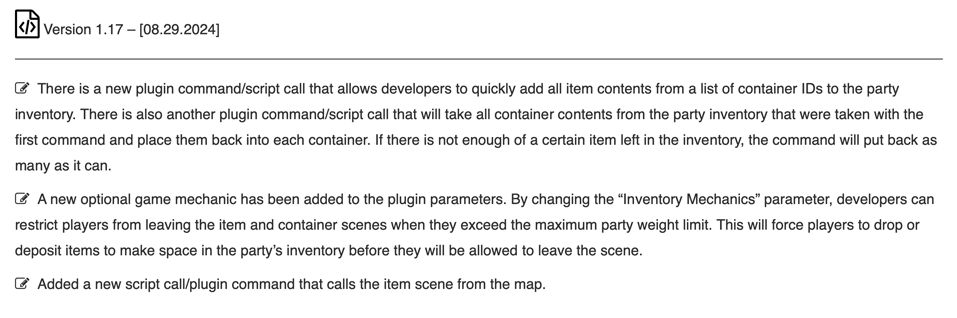
Hello, fellow RPG Maker Developers! I'm back again with some more awesome updates for you.
There are now plugin commands/script calls that allow the developer to pull all item contents from a list of container IDs and place them in the party inventory. This is very useful in circumstances where the player temporarily needs to use items that are only available in certain containers. You can then use another plugin command or script call to put them all back. Just make sure you use the plugin commands and script calls in the correct order when applying the effects. Just remember, if the party no longer has a specific item available in the inventory, then it won't be able to put it back.
There is a new plugin parameter that's been added to this version:
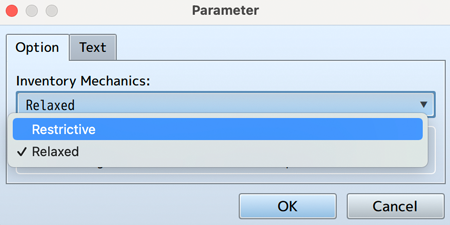
Developers can now choose one of two options:
Restrictive
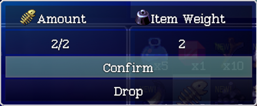
This option will prevent players from leaving the container or item scenes while the current inventory weight exceeds the maximum weight limit. It will also add the ability to drop items in the container scene while indicating this to the player by displaying a message in the help window.

Relaxed
This option will allow players to leave both scenes while exceeding the maximum weight limit, which is identical to the old way the plugin worked. This option is mostly for people who don't find a use for the new feature and would like to revert back to the old way.
And finally, I've added another script call/plugin command that allows developers to call the item scene from the map. This is useful after performing a conditional script call to check if the player exceeds the maximum party weight. This will then force the player to drop items before leaving the item scene.
I hope that you find a use for the new features.
Happy RPG Making!
Link to plugin file. -

Hello, I'm back with more great updates for the plugin! You can now use plugin commands or script calls to create containers from in-game and store the container's ID in a variable. I've also added another plugin command that can change the inventory mechanics parameter after the game has started. Please enjoy, and as always, you can let me know in the comments if you find any bugs, and I'll gladly take a look.
Happy RPG making!
Link To Plugin Page. -
-
Update: Bug Fix for Key Items & Common Events
A small but important update:
I've identified and fixed the issue with key items not triggering common events correctly.
Thanks to @chrimp for reporting the issue and helping me improve the plugin!
Stay tuned for the next update!
Link to plugin page. -
Plugin Update: Stack Deposit Fix
As I continue working on my RPG Maker MZ plugin, I've been ironing out small but pesky bugs. One issue that's been addressed is a problem with depositing items into stacks. Specifically, when trying to deposit the last item into a stack, the plugin would incorrectly register the stack as full.
After digging into the code, I discovered that the issue was due to an incorrect equation. I've since corrected the formula to use "less than or equal to" when depositing items into stacks, ensuring that the plugin accurately handles full stack deposits.
This fix should provide a smoother experience for players and help prevent any potential issues with inventory management. I'll continue to work on refining the plugin and squashing bugs to ensure the best possible experience for users. -
Exciting News!
I've just released a massive update to my Limited Inventory plugin, and I'm thrilled to share the new features with you!
What's New?
Fast Drop: Holding sprint + clicking an item (without the <undroppable> notetag) now attempts to drop it, opening the drop quantity select window.
Customizable Command Text: Edit command text for various windows, including:
Touch UI Buttons: Added touch UI amount sprite buttons to the “Drop Amount” and “Deposit/Withdraw Amount” windows, similar to shop buy/sell quantity selection.- Window_ContainerActionSelect: “Withdraw” and “Deposit”
- Window_Confirmation Commands: “Withdraw,” “Deposit,” “Drop,” and “Cancel”
- Drop Quantity Select Scene: “Confirm” button text (e.g., “Discard”)
Dynamic Touch UI Control: Touch UI buttons can now be toggled on and off using script calls and plugin commands, allowing for greater flexibility and customization.
Container Item Dropping: The plugin now allows dropping items from containers when inventory mechanics are set to restrictive.
Enhanced Plugin Documentation: I’ve extensively revamped the plugin help files, incorporating a table of contents, numbered sections, and custom icons to represent each section.
These updates are designed to make your game development experience smoother and more enjoyable. I'm proud to offer these features to the RPG Maker community, and I hope you'll find them useful in your projects! Get the latest version of the Limited Inventory plugin now and start exploring the new features! Share your feedback and let me know what you think!
Changelog
Plugin File Download -
DM_LimitedInventory Update: Stability and Compatibility Improvements
I'm excited to share the latest update for DM_LimitedInventory, which brings two significant improvements to the plugin.
Firstly, we've resolved a crash issue that occurred when selecting an empty slot in the container and item windows within the Scene_Container scene. This fix ensures a smoother gaming experience and eliminates a potential frustration point for players.
Secondly, we've added compatibility between the Fast Drop feature and Hendrix_Keyboard_Gamepad rebinding. This means that players can now enjoy seamless integration with custom key bindings, making gameplay even more enjoyable and intuitive.
These updates are now live, and you can download the latest version of DM_LimitedInventory (v1.24) from the usual links. As always, if you encounter any issues or have feedback, please don't hesitate to reach out.
Thanks for your continued support, and happy developing!
Changelog
Plugin Download Page -
Fast Drop Help Window Update for DM_LimitedInventory
I'm back again with another update to my DM_LimitedInventory plugin! This time, I've added a new help window to the Item Scene that informs players about the SHIFT + Click shortcut to directly access the drop window. This feature was previously added, but now players will be notified about it through this new window. The text displayed in this window is fully customizable via plugin parameters, so you can tailor it to fit your game's style.
Let me know what you think, and I'll keep working on making DM_LimitedInventory even better!
Changelog
Plugin Download Page -
Limited Inventory Update: V1.27!
The RPG Maker Forums might be down for maintenance, but my plugin updates are still going strong! Despite the silence from the forums, I've been busy behind the scenes, cranking out two updates in the last 24 hours. I'm excited to share the latest changes with you, featuring new features, bug fixes, and improvements to enhance your game development experience.
Version 1.27 – June 5, 2025
- Bug Fix: Resolved an issue where the game would crash when the ‘Quantity Touch UI Buttons’ plugin parameter was set to ‘Disabled’ by default.
- Added Swap Help and Weight Window Positions Feature: Introduced an option to swap the positions of the help and weight windows in the inventory scene, giving developers more control over the layout.
- Improved Quantity Window Layout: When the “Inventory Mechanics” plugin parameter is set to “Slot Based” and not “Item Weight”, the item weight section is now removed from the withdrawal, deposit, and drop quantity windows.
- New Feature: Added “Overweight Text Colour Change” parameter, which automatically changes the inventory title colour to red when the party is overweight, overriding existing colour codes.
- Improvement: Consolidated Item Weight and Shortcut Drop Hints windows into a single window, improving the overall layout and aesthetics of the scene.
- Licensing Update: Changed licensing model to offer Single Project Licence and Unlimited Projects Licence options.
Stay tuned for more updates, and don't hesitate to reach out if you have any questions or feedback!
Changelog
Plugin Download Page -
Limited Inventory Update: V1.28!
I'm excited to announce a new update to my DM_LimitedInventory plugin, which brings two significant improvements: bug fixes and new features!
Bug Fix: Default Item Limit Enforcement
In RPG Maker, the default item limit is set to 99 per item. However, my plugin allows you to customize this limit to fit your game's needs, thanks to the "Default Item Max" parameter in the plugin settings. Previously, there was an issue where items could be withdrawn from or deposited into inventories beyond this limit when interacting with containers, causing inconsistencies in the game. I'm happy to report that I've resolved this bug, and the default item limit is now properly enforced during these interactions. Note that this limit is separate from the Container and Party Maximum Weight limits, which are also enforced by the plugin.
New Feature: Customizable Notifications for Default Item Limit!
I've added new customizable notifications that will be displayed when the default item limit is exceeded during container interactions. These notifications can be configured in the plugin parameters, giving you full control over the messaging and allowing you to tailor the game's feedback to your players.
What's Changed
With this update, my DM_LimitedInventory plugin now:
- Properly enforces the default item limit during container interactions (not to be confused with Container and Party Maximum Weight limits, which are also enforced)
- Provides new customizable notifications for exceeded default item limits
If you're already using my DM_LimitedInventory plugin, you can grab the latest version from my website or the RPG Maker Forums. As always, I'm here to help with any questions or issues you might have.
Thanks for your continued support, and I look forward to hearing your feedback!
Plugin Download Page
Changelog -
Limited Inventory Update: V1.29!
What's New?
Version 1.29 of the DM_LimitedInventory plugin is now available, bringing two important bug fixes to the table.
Fixes and Improvements
I've addressed an issue with the 'Overweight Text Colour Change' parameter, ensuring that the inventory title colour accurately changes to red when the weight limit is reached or exceeded.
Additionally, I've resolved an alignment issue with item quantity numbers in the deposit, withdraw, and drop windows, providing a more polished and consistent user experience for both "Item Weight" and "Slot Based" inventory types. The fix preserves the flexibility for developers to fine-tune the positioning using the itemWeightWindowNumbers_X_Offset parameter.
Get Ready to Create!
These updates further enhance the stability and functionality of the DM_LimitedInventory plugin. Until next time, enjoy these improvements and happy game developing!
Plugin Download Page
Changelog -
Limited Inventory Update: V1.30!
I've released a new update for my limited Inventory plugin with the following changes:
- Bug Fix: Fixed a null reference error that occurred when trying to access etypeId property of a null item object in Scene_Item.prototype.onActionUse.
- Edit: Optimized putBackContainersContents function for improved performance.
Changelog
Plugin Download Page