Lilac Throwable Events MZ - 1.1.0

● ARCHIVED · READ-ONLY
Started by chaucer 19 posts View original ↗
  1. Lilac Throwable Events : Version - 1.1.0

    Author : Chaucer

    Introduction:


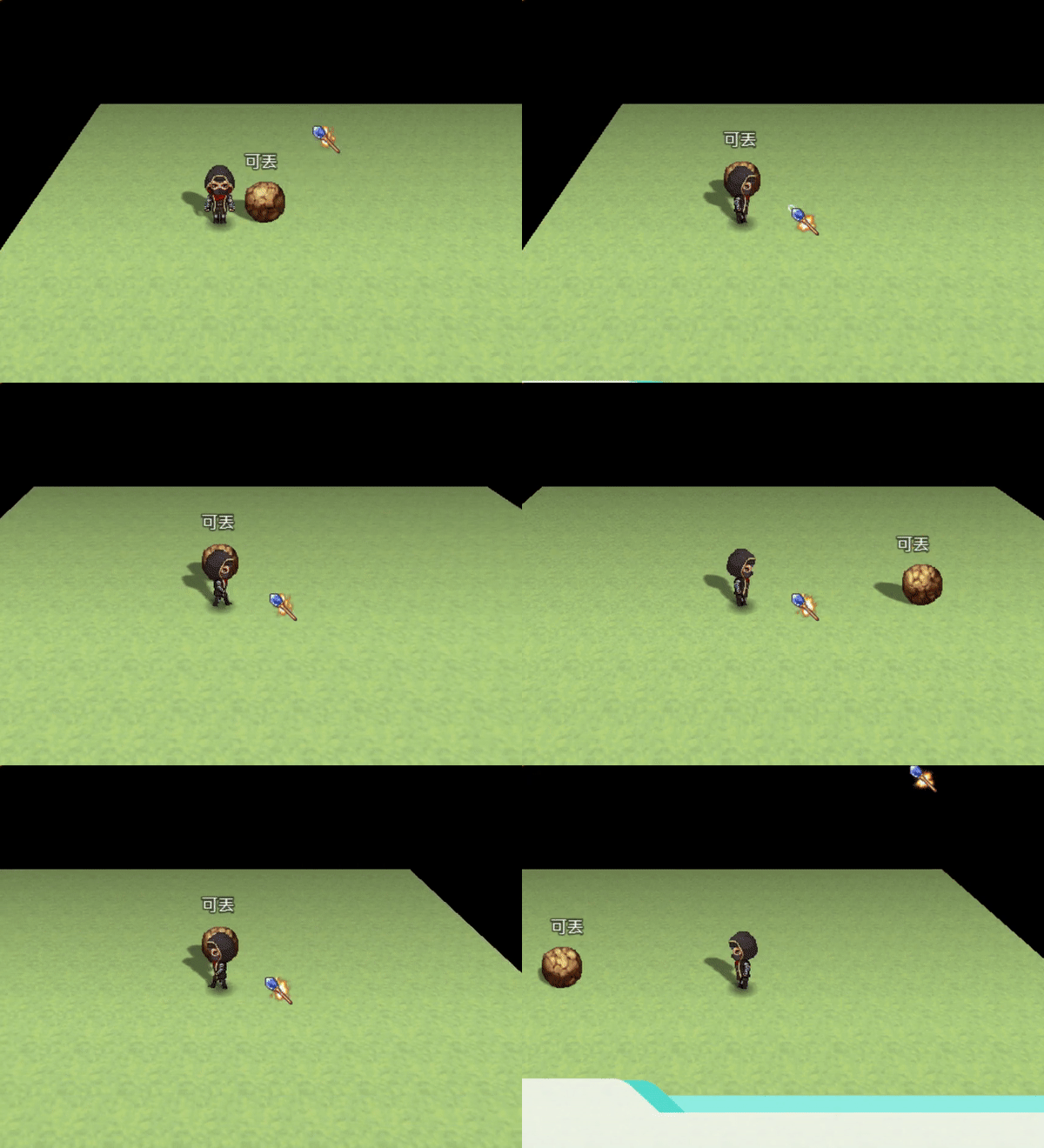
    An easy to use plugin available for MV and MZ that allows you to let your players throw events! Wanna make a puzzle where you need to move some blocks around? Or maybe you just wanna give the player the ability to throw those pesky events that get in their way!


    Features:
    • Allow the player to pickup and throw events.
    • Can set various type of requirements in order to pickup events.
    • Can have code run on pickup, and on throw for each event.
    • Can set a regionId which events can't be thrown past.
    Videos:
    [embedded media]

    Screenshots:

    Event Setup:
    Spoiler
    View attachment 56851

    Gif :
    Spoiler
    View attachment 53671


    How to Use :
    Make an event, and create a comment with the word "throwable"(without quotes), make sure this comment is at the very top, or it wont work, the event will only start when it is thrown, for more detailed instructions on how to add requirements check the help file.

    Plugin:
    Get it on itch.io!


    Terms of use:

    This Plugin may be used commercially, or non commercially. This plugin may
    be extended upon, and or shared freely as long as credit is given to it's
    author(s). This plugin may NOT be sold, or plagiarized.
  2. Awesome! Can you add also a comment for current actor id? So we can also use specific heroes for the throwable events. Also define different throwable distance in the event or even items, or skill learnt.
  3. @Killuki Zaoldyeck I can definitely add actor id! that's a great idea, I'm surprised I missed that as an option as well ._. that makes tons of sense.

    As for the different through distances for events, its' already possible, in the intro video, you can see how I set it up at 9:40 via plugin command, you can easily adjust throw distance based on items/skills learned by some basic conditional branches with the same method I used in the video. :)
  4. Nice one Chaucer! Will help me make more interesting puzzles.
  5. GREAT JOB!
  6. this is a good plugin.
    but if i walk behind a tree with it, you can still see it.

    !!!.png
  7. I hope you implement the deliver object too, together with the other idea's mentioned above.

    keep up the nice work :)
  8. @Platsch I don't think that's supposed to happen :| I got a fix in mind for this, I'll add this in for the next update. :D thanks for pointing this out.
  9. I am running into a problem with the plugin on rpg maker mz. I can pick up the event just fine but when I want to throw it the event just disappears.
  10. Plugin has been updated!~


    ● Version : 1.1.0
    ● Date : 02/03/2021
    ★ Add - Can talk to events when carrying objects!
    ★ Add - "Pickup Variable" in plugin parameters, to stores picked up event ID!
    ✩ Fix - removed unecessary console.log statement.
  11. @chaucer, thank you again for your wonderful plugin. I just wanted to ask is there an option to add something like "selfswitch after pickup", which makes the event turn SS for X when picked up (for different look for example)? Also, I would like to check if the event was dropped (was carried and thrown). Can I check it somehow...?
  12. @fizzly you can execute commads when an obect is picked up and execute commands when a object is thrown, so both things should be possible! I forgot to document these features so I apologize for that!

    so to execute event commands when you pick up an event... you need to create a new comment with the following placed inside
    pickup

    then place any commansd you want to run when the event is picked up, below this comment.

    and likewise when you want to want to execute event commads when the player throws something add a commet with this inside
    throw

    then place all the commands you want the event to run after being thrown, below it!

    here's a preview of what it looks like in an event.

    1678126763392.png


    So basically if you want to trigger a self switch when the event gets picked up, use the pickup comment, and place the self switch anywhere BELOW the pickup comment, but ABOVE the throw comment( if your using the throw comment that is ).
  13. Oh, that's absolutely fantastic! I'm sorry, you did not forgot. I just somehow skipped that... It's already in documentation. So sorry for bothering and thank you so much!
  14. Hi there! Amazing plugin! I'm running into a problem, whenever i carry something and try to interact with another throwable event, it replaces the one i was already holding and throws it behind me. The first event is now floating over me and although I can interact with it and pick it up again, it stays above the player character, when it's previously been on the same layer as the player character :( am i missing something? thanks in advance!

    EDIT: Sorry, I've also just now realized that the requirements aren't working. When entering 'throwable : require switch 1 ON' for example it's showing an error message, it couldn't define 'on'... Again, sorry if it's something obvious but I just can't seem to figure it out
  15. thanks for the headsup! I'll look into this over the weekened! ^^; hopefully that's not too far away, I've been meaning to make some modifications to this plugin anyways. :)
  16. @chaucer thank you! really looking forward to it! :)
  17. Is there a way to throw over same level events/obstacles that aren't passable for the player?