I don't know if there's someone that are asking about it, but I wonder if there's some kind of example for every default plugins for RMMV? Because I don't understand some of it, like EnemyBook or NovelMessage. But I do understand something like AltMenuScreen2 or 3 plugins and any other simple plugins like that. If there's actually tutorial for it, I would be very thankful. It doesn't have to be video, just text and image is fine. And just to let you know, I'm trying to use default plugins without any other plugins like YEP so that I can know my limit with those default plugins.
Thank you for your time :D
JavaScript questions that don't deserve their own thread
● ARCHIVED · READ-ONLY
-
-
@Lanzy Thanks, but I got rid of that screen by disabling the item plug-in. Seems like a trivial one to me. Turns out even the default font has that issue. Only thing left is the small icons and texts on the main menu. I can live with that or find an alternative.
Is there a way to disable some of the tabs in the status menu?
Menu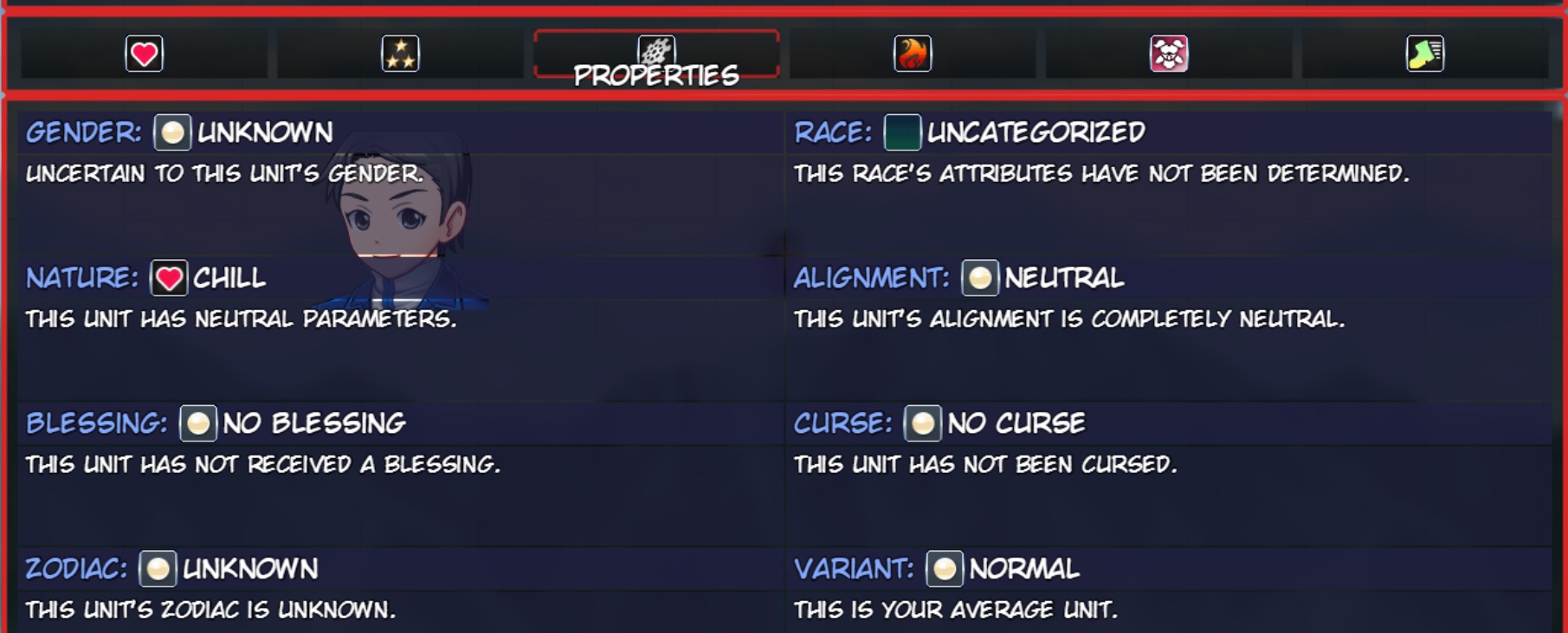
Some of these are too much and I don't think I'll need all of them in my game. I don't mean just the details of gender or race, but the other tabs like elements and equipment, too. The only thing that I like is the biography of the character that I can put in. The rest, I don't really care much.
Edit: I figured it out: it's the Element Status Core plugin! Just change it or disable it completely! -
If you want the battle scene to wait on you, this could be super difficult if you are not familiar with it.
The battle flow is partially dependent on whether or not a certain window is open or not. As soon as one window closes, the battle process continues until the next window is open. It's very counter-intuitive, I had my fair share of frustration with the battle system.
That being said, I did a quick check to see if there is a simple "pause switch" for the battle scene.
This will probably freeze everything on screen, including your game message, but I think it's worth a shot.
Try setting the battle scene to inactive by using:
SceneManager._scene._active = false;
Then, once the item is chosen set it back to true.
Another possible way could be to go to the Scene_Battle.prototype.update Method and insert a condition for it
to pause the updating whenever you want. I don't know how familliar you are with the core code, let me know and I could help.
Here's the resulting portion of code:
JavaScript:The console still prints 0 twice. It's the code processing that I need to put on hold for this part, and the new line of code didn't make it happen.$gameVariables.setValue(20, 0); $gameMessage.add("selection"); $gameMessage.setItemChoice(20, 3); console.log($gameVariables.value(20)); SceneManager._scene._active = false; console.log($gameVariables.value(20));
If there's a condition I could put into awhileloop that only becomes false once the selection window is gone, I think my issue would be solved. -
Hello there,
I am quite a noob in Java and I am trying to write a script where all the heroes in the active party gain 1 level.
I have a total a 40 heroes but only 10 actives spots so I use something like that
Code:for (var i = 0 ; i < 40; i++){ if ($gameActors.actor(i).isBattleMember() == true) { $gameActors.actor(i)._level +=1; } }
Sadly, it doesn't work. What am I missing ? -
@Lanzy Thanks, but I got rid of that screen by disabling the item plug-in. Seems like a trivial one to me. Turns out even the default font has that issue. Only thing left is the small icons and texts on the main menu. I can live with that or find an alternative.
Is there a way to disable some of the tabs in the status menu?
Menu
Some of these are too much and I don't think I'll need all of them in my game. I don't mean just the details of gender or race, but the other tabs like elements and equipment, too. The only thing that I like is the biography of the character that I can put in. The rest, I don't really care much.
What Maker version are you using and/or plugin? Because that's not the normal status window.
Here's the resulting portion of code:
JavaScript:The console still prints 0 twice. It's the code processing that I need to put on hold for this part, and the new line of code didn't make it happen.$gameVariables.setValue(20, 0); $gameMessage.add("selection"); $gameMessage.setItemChoice(20, 3); console.log($gameVariables.value(20)); SceneManager._scene._active = false; console.log($gameVariables.value(20));
If there's a condition I could put into awhileloop that only becomes false once the selection window is gone, I think my issue would be solved.
In $gameVariables.setValue(20, 0) you are setting variable 20 to the value of 0.
Of course it will return 0 when you do a console log. Or am I missing something?
Hello there,
I am quite a noob in Java and I am trying to write a script where all the heroes in the active party gain 1 level.
I have a total a 40 heroes but only 10 actives spots so I use something like that
Code:for (var i = 0 ; i < 40; i++){ if ($gameActors.actor(i).isBattleMember() == true) { $gameActors.actor(i)._level +=1; } }
Sadly, it doesn't work. What am I missing ?
Hey, don't get discouraged. You were on the right track.
In $gameActors.actor() there is no actor 0. It begins with actor 1.
So in your for-loop you wanna do (let i = 1; i <= 40; i++).
Secondly, there is a method already for increasing level:
JavaScript:Game_Actor.prototype.levelUp = function () { this._level++; this.currentClass().learnings.forEach(function (learning) { if (learning.level === this._level) { this.learnSkill(learning.skillId); } }, this); };
As you can see, it also increased the ._level prop by 1. But it does more, like
adding new skills depending on new level. If there is a method for it already,
it's always better to use that. You can find that method in the rpg_objects.js core file line 3894.
Now having that said, try:
JavaScript:for (let i = 1; i <= 40; i++) { if ($gameActors.actor(i).isBattleMember()) { $gameActors.actor(i).levelUp(); } } -
@Lanzy
Thanks a lot.
Effectively, I was not far away.
The "== true" is not mandatory in the if statement ? -
@Lanzy
Thanks a lot.
Effectively, I was not far away.
The "== true" is not mandatory in the if statement ?
If a method or property returns a boolean you don't have to check it for true or false.
If-statements already check if true or false and on true it always continues.
For example:
$gameActors.actor(i).isBattleMember() returns true.
So you are basically checking if (true === true), which is redundant.
If you want to check if $gameActors.actor(i).isBattleMember() is false you can do:
if (!$gameActors.actor(i).isBattleMember())
"!" flags it to be checked for opposite. So it checks if isBattleMember is false in that case.
Also most of the time you wanna use "===" unless you are comparing integers with strings like 6 == "6"
or if you want to compare strings and ignore capitalization. -
Completely intended. What I want is a default value of 0 so I can catch if the player cancelled the selection. It's the second console log that shouldn't return a 0, especially when the selection window is still active.In $gameVariables.setValue(20, 0) you are setting variable 20 to the value of 0.
Of course it will return 0 when you do a console log. Or am I missing something?
But I found a solution:
Initially, what I wanted was a weapon selection screen in combat, that would be triggered by a skill.
I had found a plugin that allowed weapon selection, but it only worked on the map.
So what I did first was create one Hidden Item A (the category I use for item selection) for each eligible weapon.
I'm well-organized in my database, so the code was:
JavaScript:The eligible weapons are those with an ID between 11 and 60, their matching hidden items have their IDs spread between 161 and 210 (which is why the 3rd line saysfor (var wpnId = 11; wpnId <= 60; wpnId++) { if ($gameParty._weapons[wpnId]) { $gameParty.gainItem($dataItems[wpnId+150], 1); } $gameVariables.setValue(20, 0); }wpnId+150).
If the party has one of these weapons (doesn't count any weapon that's equipped), it's added to the item selection.
At the end of the Apply Effect, variable 20 is set to 0, which will allow me to know if the user cancelled the selection.
This code went into a Custom Apply Effect for a state that's given to the user upon using the "change weapon" skill, which then calls a common event.
The common event handles the item selection, letting the user pick a Hidden Item A and storing it into variable number 20. This choice window will contain nothing but the eligible weapons in the party's inventory.
Then, I need to look for whoever in the party has the state given by the initial skill, and give them a second state.
JavaScript:This triggers another Apply Effect:for(i=0; i<$gameParty.members().length; i++) { if($gameParty.members()[i].isStateAffected(101)) { $gameParty.members()[i].addState(102); } }
JavaScript:If variable 20 is equal to 0, that means the selection was cancelled and I'm refunding the cost. I'm also removing the state, because it also seals weapon switching and cancelling it should remove the restriction.target.removeState(101); if($gameVariables.value(20)==0) { target.gainMp(1); target.removeState(102); } else { target.changeEquip(0, $dataWeapons[$gameVariables.value(20)-150]); } for (var i = 161; i <= 215; i++) { $gameParty.loseItem($dataItems[i], 1); }
If the variable isn't 0, a selection was made, so I'm getting the matching weapon ID and i'm making the wearer of the state equip it.
No matter which one happens, I'm removing the Hidden Items A that were used for selection, so that the party doesn't have any left. I always clear them after this kind of selection.
That was a headache and a half, but I love getting complicated things to work. -
Just pointing out that instead ofNow having that said, try:
JavaScript:for (let i = 1; i <= 40; i++) { if ($gameActors.actor(i).isBattleMember()) { $gameActors.actor(i).levelUp(); } }
$gameActors.actor(i).levelUp()
one should use
$gameActors.actor(i).changeLevel( $gameActors.actor(i).level + 1 )
(the former only covers what should happen on a level up, but is not supposed to be used on its own, as it would be undone the next time the actors experience is updated) -
Just pointing out that instead of
$gameActors.actor(i).levelUp()
one should use
$gameActors.actor(i).changeLevel( $gameActors.actor(i).level + 1 )
(the former only covers what should happen on a level up, but does not actually change the actors experience, so the level up is undone the next time that experience is updated)
Thanks for pointing that out. It's amazing how fast you forget things when you take a break from coding MV. -
@Lanzy I'm using MZ and the Visustella Menu plugin.
-
@Lanzy I'm using MZ and the Visustella Menu plugin.
Ohh, that explains why the menu looked so different. Sorry but I only know MV. Should've clarified that im the beginning. -
So all I want to do is to store the name of the actor that last used an item in a variable. I use the Last Target Actor ID command to store the actor's ID in variable 7, that's working. But what is missing in the following?
$gameVariables.setValue(8, $gameActors.actor($gameVariables.value(7).name); -
So all I want to do is to store the name of the actor that last used an item in a variable. I use the Last Target Actor ID command to store the actor's ID in variable 7, that's working. But what is missing in the following?
$gameVariables.setValue(8, $gameActors.actor($gameVariables.value(7).name);
You're missing a closing parenthese. If I understood correctly, Variable #7 contains the Actor ID of the last target. In that case, the parenthese goes right before.name.
The resulting line would then be$gameVariables.setValue(8, $gameActors.actor($gameVariables.value(7)).name); -
Wow, should have cought that. Thanks! However, the result is even more confusing - what I wanted to do was construct a message "Attack of [name of the user of the item] has been raised." This should work with "Attack of [\V8] has been raised".
But when I then try to determine the user name with your line above, the game gives me the following message:
"Attack of function () {return this._name;} has been raised"
What in the world is going on? -
Can I get someone to help me configure yanflys custom menu I have no idea where I should begin
-
What's going on is that I forgot not one but two parentheses to properly help you out.Wow, should have cought that. Thanks! However, the result is even more confusing - what I wanted to do was construct a message "Attack of [name of the user of the item] has been raised." This should work with "Attack of [\V8] has been raised".
But when I then try to determine the user name with your line above, the game gives me the following message:
"Attack of function () {return this._name;} has been raised"
What in the world is going on?
nameis a function, the "function () {return this._name;}" you got is the code of what the function does. "name" needs its own set of parentheses to understand that we're trying to execute it instead of just reading its contents.
Try$gameVariables.setValue(8, $gameActors.actor($gameVariables.value(7)).name());that one should work as intended.
Side note, writing_nameinstead ofname()probably works as well given that the function just returns the value of_name. -
Excellent, that worked. Ah, I'm really not fond of coding, but I guess I'll have to learn one or two things...
-
If you know the bases of programming and how to do effective Google searches, you'll get comfortable with using plugins and scripts faster than you think.Excellent, that worked. Ah, I'm really not fond of coding, but I guess I'll have to learn one or two things...
I was lucky enough to learn these bases in the short time I spent in college. It was C++ with Processing, but some aspects are still applicable here. The rest is just clever copy-pasting, and understanding JS code better with practice. -
I'm using MogHunter's splash screen on MZ. I'd like to start the intro music right on the splash screen, instead of having to wait until the players get to the title screen. How do I do this? Guess I'll need a little plugin? X3