Try $dataSkills[id].name
JavaScript questions that don't deserve their own thread
● ARCHIVED · READ-ONLY
-
-
Am I going the right way in adding parameters/fields/whatever you call them to an actor? It doesn't need to be editable in the Editor.
Code:// Adding parameters to Game_Actor var Game_Actor_initMembers = Game_Actor.prototype.initMembers; Game_Actor.prototype.initMembers = function() { Game_Actor_initMembers.call(this); this._Science = 0; this._Floaty = 0; this._Dangerous = 0; this._Boring = 0; this._Practical = 0; } var Game_Actor_setup = Game_Actor.prototype.setup; Game_Actor.prototype.setup = function (actorId) { Game_Actor_setup.call(this, actorId); this._Science = actor.science; this._Floaty = actor.floaty; this._Dangerous = actor.dangerous; this._Boring = actor.boring; this._Practical = actor.practical; }; Game_Actor.prototype.science = function() { return this._Science; }; Game_Actor.prototype.floaty = function() { return this._Floaty; }; Game_Actor.prototype.dangerous = function() { return this._Dangerous; }; Game_Actor.prototype.boring = function() { return this._Boring; }; Game_Actor.prototype.practical = function() { return this._Practical; };
And how would I then call these in a script call? $gameActor.something ? -
You're close but you'll get a "cannot read property 'science' of undefined error"
because of this function:
In that function you try to read the property "science" of a variable called "actor" but that variable is not defined.Code:var Game_Actor_setup = Game_Actor.prototype.setup; Game_Actor.prototype.setup = function (actorId) { Game_Actor_setup.call(this, actorId); this._Science = actor.science; this._Floaty = actor.floaty; this._Dangerous = actor.dangerous; this._Boring = actor.boring; this._Practical = actor.practical; };
To access the properties later depends on the context. Since you made a function called Game_Actor.prototype.dangerous, you would access it by calling that function.
For example, in the damage formula it would be a.dangerous() or b.dangerous() because a or b would be the actor. Or if you know the actor ID it would be $gameActors.actor(id).dangerous() -
So I would need to define actor in there too. okay. I thought I could just do it this way, because the Game_Actor.prototype.setup is like this:
Code:Game_Actor.prototype.setup = function(actorId) { var actor = $dataActors[actorId]; this._actorId = actorId; this._name = actor.name; this._nickname = actor.nickname; this._profile = actor.profile; this._classId = actor.classId; this._level = actor.initialLevel; this.initImages(); this.initExp(); this.initSkills(); this.initEquips(actor.equips); this.clearParamPlus(); this.recoverAll(); };
And in there, a var named actor is declared and defined.
I would later use these fields, and a similar set in Game_Party, in Victor's Passive States notetags.
I originally handled my check stuff functionality in common events, but we all know how that went >.> -
Yeah so you add that line to your setup function
Code:Anyways, once you try it any errors will show information in the Console.var actor = $dataActors[actorId]; -
With that line added, it was error-free. Thanks.
Now to write all those checks by hand :p If statements galore -
Hey everyone,
So in Yanfly's Main Menu Manager plugin there is an option for making the background blurry. I'd just like to know if it's possible to make the background even blurrier? I'd like the background to look more distorted or out of focus. -
As I've found in my own thread, apparently I've still ed up adding fields to the Game_Actor.
Adding them to Game_Party worked, .
Game_Actor
Code:var Game_Actor_initMembers = Game_Actor.prototype.initMembers; Game_Actor.prototype.initMembers = function() { Game_Actor_initMembers.call(this); this._Science = 0; this._Floaty = 0; this._Dangerous = 0; this._Boring = 0; this._Practical = 0; }; var Game_Actor_setup = Game_Actor.prototype.setup; Game_Actor.prototype.setup = function (actorId) { Game_Actor_setup.call(this, actorId); var actor = $dataActors[actorId]; this._Science = actor.science; this._Floaty = actor.floaty; this._Dangerous = actor.dangerous; this._Boring = actor.boring; this._Practical = actor.practical; }; Game_Actor.prototype.science = function() { return this._Science; }; Game_Actor.prototype.floaty = function() { return this._Floaty; }; Game_Actor.prototype.dangerous = function() { return this._Dangerous; }; Game_Actor.prototype.boring = function() { return this._Boring; }; Game_Actor.prototype.practical = function() { return this._Practical; };
Game_Party
Code:var Game_Party_Initialize = Game_Party.prototype.initialize; Game_Party.prototype.initialize = function() { Game_Party_Initialize.call(this); this._Physical = 0; this._Languages = 0; this._STEM = 0; this._Social = 0; }; Game_Party.prototype.physical = function() { return this._Physical; }; Game_Party.prototype.languages = function() { return this._Languages; }; Game_Party.prototype.stem = function() { return this._STEM; }; Game_Party.prototype.social = function() { return this._Social; };
If I ask for any of the Game_Actor fields, the console returns undefined.
I've tried adding them in the initialize function, but then it fails with the name of the actor.
What did I do wrong? -
So it would be in this function:
Does $dataActors[id] have a property called science or floaty or etc.?Game_Actor.prototype.setup = function (actorId) {
Game_Actor_setup.call(this, actorId);
var actor = $dataActors[actorId];
this._Science = actor.science;
this._Floaty = actor.floaty;
this._Dangerous = actor.dangerous;
this._Boring = actor.boring;
this._Practical = actor.practical;
}; -
Nope, it doesn't
-
If it doesn't have that property, then no surprise that
Code:this._Science = $dataActors[id].science
causes the _Science property of Game_Actor to be undefined. Because it's not defined on $dataActors[id], so assigning the value to something not defined means it's 'undefined'. Thus the error message you got that it was undefined.
Basically you're setting the value to 0 in the Game_Actor.prototype.initMembers function, then you're setting the value to 'undefined' in the Game_Actor.prototype.setup function.
Do you know what the console is? To figure this out by using the console, add this line to the end of the Game_Actor.prototype.initMembers function
Code:console.log("The value of Science after initMembers is:", this._Science)
Then add this line to the end of the Game_Actor.prototype.setup function
Code:console.log("The value of Science after the setup function is:", this._Science)
After you run the playtest, check what the console says. I encourage you to become more familiar with the console, it will greatly help you to debug faster and understand what's happening. -
First, it says 0, then undefined. Okay, I think I understand now. I made those functions the way they are, as that is how it looked like things as level, and hp were assigned to Game_Actor. I think it might work if I just scrap setup alltogether.
EDIT: Well, the fields are declared and defined, but it still messes up when I add Victor's Plugin. It takes a bit longer to reach the max call stack than before tho. -
Ahhh maybe there's a complication with this Victor's plug in. It's best to try new things with a blank project before combining it with all your other scripts, you can reduce the possible things that are wrong.
I think at this point it's worth making a new thread in the Javascript Support or Learning Javascript. Make sure to link that Victor plugin and also the code that you currently wrote. -
Hey there!
Let me apologize beforehand, because I know this has probably been answered before.
I've found that using yanfly's EnhancedTP plugin does not work with items that add the "preserve TP" trait. In my case, there's just a single item (a ring) that provides this trait, and I've been trying to figure out how to make it work with EnhancedTP. Changing the TP mode of the character on equip and on unequip of the ring would work, but it'd also require a plugin.
The simplest possible solution was suggested to me in Discord: add an eval for whether the actor has the ring equipped in the "Preserve TP" plugin parameter for every TP mode. So, again with the help of some Discord users, we figured out the following script, (where X is the id of the ring):
user.hasArmors($dataArmors[x]) ? true : false
Unfortunately, this error shows up when I try to run this in the game:
Spoiler
What would be the appropriate way to check whether an actor has a certain piece of armor equipped?
Thank you! -
Where, specifically, are you adding this eval?
Does the variable "user" exist in that eval? (it seems not) -
Where, specifically, are you adding this eval?
Does the variable "user" exist in that eval? (it seems not)
Hey Aloe, thanks for the quick reply!
Here's the place where I'm writing the eval:
Spoiler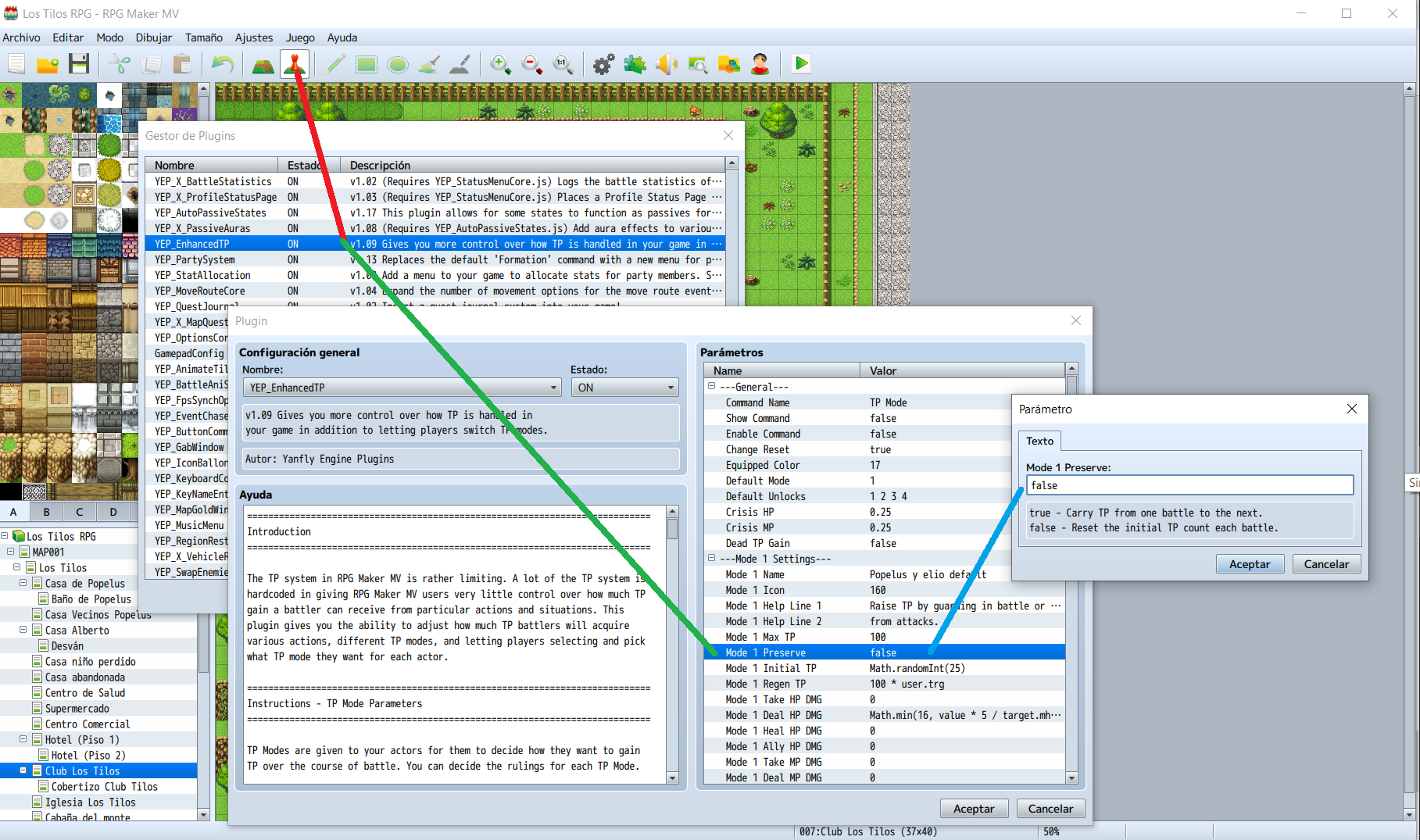
Basically, it's a plugin parameter that you're supposed to set to true or false to determine whether the actor that is using this TP Mode will have TP Preservation. -
I guess you're talking about this plugin? It's best if you can provide a link to any plugin you're asking for help with so people don't have to search for it.
So the plugin as currently written does not allow flexibility for that parameter. On line 3252 of the plugin you can see:
Code:(and yes, there's 3000 lines before the plugin actually starts to do anything). This line of code is executed when the game is loaded, so there's no "user" at the moment, it's not really an eval, the plugin author is just using "eval" for some reason to convert a string to a boolean.preserve: eval(String(Yanfly.Parameters['Mode ' + Yanfly.i + ' Preserve'])),
To enable this, you have to save that plugin parameter as a string instead of a boolean, so it could be evaluated later. I didn't test it but this would be close to what you need. Save this code as a new plugin and install directly below YEP Enhanced TP, and now you can use a variable called "user" in the eval parameter.
Code:$dataTpModes.forEach((tpMode, i) => { if (tpMode) { tpMode.preserve = Yanfly.Parameters[`Mode ${i} Preserve`] } }) Game_BattlerBase.prototype.isPreserveTp = function() { const user = this if (this.tpMode()) return eval(this.tpMode().preserve) return Yanfly.ETP.Game_BattlerBase_isPreserveTp.call(this) } -
I guess you're talking about this plugin? It's best if you can provide a link to any plugin you're asking for help with so people don't have to search for it.
So the plugin as currently written does not allow flexibility for that parameter. On line 3252 of the plugin you can see:
Code:(and yes, there's 3000 lines before the plugin actually starts to do anything). This line of code is executed when the game is loaded, so there's no "user" at the moment, it's not really an eval, the plugin author is just using "eval" for some reason to convert a string to a boolean.preserve: eval(String(Yanfly.Parameters['Mode ' + Yanfly.i + ' Preserve'])),
To enable this, you have to save that plugin parameter as a string instead of a boolean, so it could be evaluated later. I didn't test it but this would be close to what you need. Save this code as a new plugin and install directly below YEP Enhanced TP, and now you can use a variable called "user" in the eval parameter.
Code:$dataTpModes.forEach((tpMode, i) => { if (tpMode) { tpMode.preserve = Yanfly.Parameters[`Mode ${i} Preserve`] } }) Game_BattlerBase.prototype.isPreserveTp = function() { const user = this if (this.tpMode()) return eval(this.tpMode().preserve) return Yanfly.ETP.Game_BattlerBase_isPreserveTp.call(this) }
Hello again!
I did as you said, but I'm still getting the "user not defined" error. Also, there's a new error that pops up on battle start:
Code:this.tpMode is not a function at Game_Actor.Game_BattlerBase.isPreserveTp (Aloe's fix.js:9)
Everything you've said makes a lot of sense, it's well explained and I can follow the logic, but unlike with other plugins, I truly can't "play around" with this one, because it vastly surpasses my tiny js knowledge. I think I will just get a plugin that allows me to run a common event on item equip.
In any case, thank you very much for your time! -
I'm trying to figure out how to keep track of the number of basic attacks a character makes. I don't think it can be done by eventing, and I don't know how it would be scripted. Anyone know? Best regards.
-
In MV, how can I set up a skill that randomly hits X number of times, but can't hit the same target more than Y number of times, and ends the skill as soon as the latter limit is reached? Examples:
- Skill A: Randomly attacks 10 times, but can't target a given enemy more than 4 times. Against a Troop of one enemy, or a Party of one, it would hit the sole unit four times, and then end without the other six hits coming into play.
- Skill B: Randomly attacks 8 times, but can't target a given enemy more than 2 times. Against a Troop or Party of four, provided they were all alive, each unit would take two hits.