Very well, thank you for the clarification!
JavaScript questions that don't deserve their own thread
● ARCHIVED · READ-ONLY
-
-
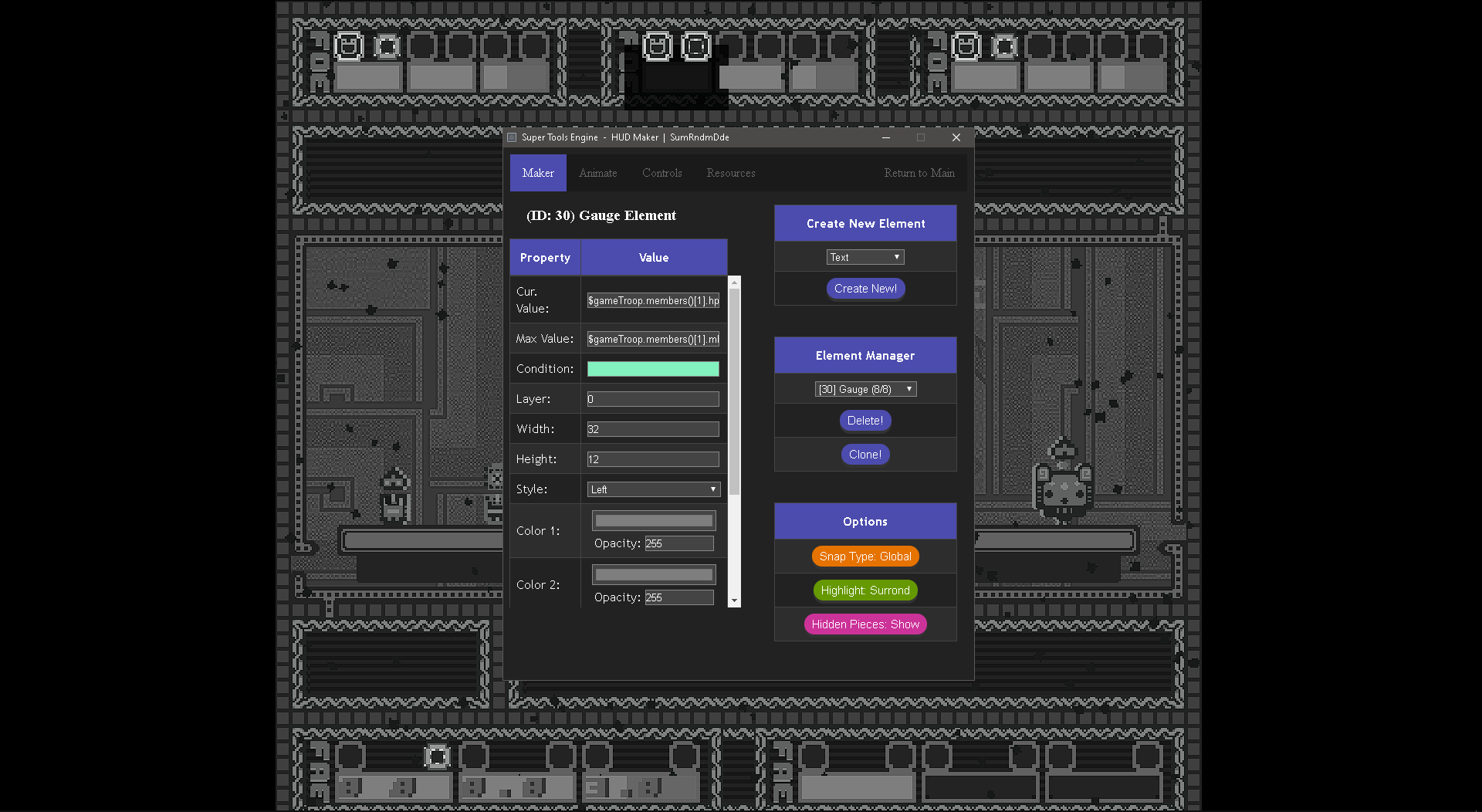
Hi. I add a few gauges for the HP, MP and TP values for a maximum of three enemies in battles. It works wonderfully, so long as there are three enemies in the battle. If there are two or one enemy, the framerate of the battle enters single digit territory. I am thinking the game is constantly looking for enemies that do not exist to grab their HP, MP and TP values?
Thankfully, I am using SRD HUD Maker for the gauges and the plugin gives me a "Condition" field, meaning the gauge will only show if the condition equals true. My question is, what piece of code do I put in condition to let the game check if the enemy exists?
-
How can I disable the item command during battle only on a specific troop?
-
Is there a script call that can permanently give an actor a SKILL TYPE they didn't have originally from the beginning of the game?
-
you could use a plugin to disable the option from the actor menu, but if how well that works depends on if you have other plugins that also alter the command menu. Also if its relevant, i think a visustella plugin had a setting to disable the item window based on states.How can I disable the item command during battle only on a specific troop?
if its a specific encounter, then you can use the script in the script call list to remember the party's inventory, clear it, and then call it back after the troop though if youre ok with the player having the empty item list.
the short answer is "no" to my knowledge. you could use a script call to give an actor additional traits mid-game via its data entry, but that would only last for as long as the game is open and would persist through saves.Is there a script call that can permanently give an actor a SKILL TYPE they didn't have originally from the beginning of the game?
imo itd also require some plugin. it could be one to tweak how traits are looked at or something like yanfly's item categories where you can make an unremovable invisible state that just adds the skill type and give it to the actor -
This is what I'm using now, but the passive state gets removed whenever the actor dies... I've tried all "Bypass/Persists Beyond Death" plugins and none of them work [The state is still removed on death]. I've managed to get the state reapplied after revival, but all the skills for that state are reset and the player has to start over.something like yanfly's item categories where you can make an unremovable invisible state that just adds the skill type and give it to the actor
I actually just found a script that will do exactly what I wanted to do: Trait Control
I had to finagle a little in the scripts positioning, but it works great with all the scripts I'm using... -
In an RMMV YEP Action Sequence, can I call the Plugin Command for a different plugin?
(I'm using Theo Screenshake (fixed for YEP), and wanted to know if I can use that instead of YEP's shake, basically) -
You can call the functions directly. No need to go through plugin command scripts unless the plugin is obfuscated.
-
Doesn't seem to do anything as part of an action sequence if I input it directly, so what am I missing?You can call the functions directly. No need to go through plugin command scripts unless the plugin is obfuscated.
i.e.
Code:<target action> se: DL-CamWhoosh, 80, 100, 0 camera focus: target zoom: 200%, 20 wait: 15 action animation: target wait for animation action effect animation 52: target ScreenShake 10 120 <--- This is the other plugin command if I just call it directly, does nothing though. wait for animation action effect </target action> -
he didnt mean to try to call the plugin command. all plugin commands are more or less just shortcuts plugin users can call to use certain plugin functions without needing to know the code inside it.
he means that instead of trying to call the plugin command in the action sequence, you peek in the js file and see if theres an associated function you can use. if there is, then you then call it with the action sequenceEval:command -
No I mean like
$gameTemp.shake_screen(power, duration);
EDIT: Use the correct action sequence format to use JS code -
Yep sorry, figured out my dumbness after a few moments, and using
Code:Works fine, thanks alot!eval: $gameTemp.shake_screen(40, 40) -
Look it's me again (lol). Didn't figure this was a 'whole thread' thing again.
In my various Item, Skill, and Equipment windows (modded by Yanfly) is there an easy way to swap the position of my Window_Help with the windows directly below, so that the help is closer to the item you have selected?
i.e.
SELECTION BOXES/ITEM CATEGORIES
HELP WINDOW
ITEM LIST/SKILL LIST/WHATEVER
Didn't really want to download SRD's HUD thingy for such a small change (and looking at that, it's actually just the size you can change and not the position of windows). -
Yeah, modify the coordinates it gives in the
Scene_X.prototype.create ->
this.createYWindow();
EDIT: You might need to change stuff what's in the initialize for some windows too, I guess. -
What command one would need to put into "evaluation" (whatever that is) to display the value of characters current ability points from Visustella's learnable skills plugin?
I tried this.drawactorabilitypoints, this.drawclassabilitypoints and some other variations,a t best they display a dummy 0 that doesn't correspond to character actual AP as it displays when I go to learn menu
At worst it just displays error. -
Where are you putting that? If you have window reference, for example in some scene (replace actor id, class id, x, y, width):
SceneManager._scene._statusWindow.drawActorAbilityPoints($gameActors.actor(id), class id, x, y, width, 'center')
If you use combined ability points for all classes, I guess you can throw whatever for the class id, like 0. -
Hello, Hello! Got 2 questions regarding RPG Maker MV.
I got the Yanfly ATB plugin but I dunno how to move the ATB turn bar to fit in between the arrows of the status screen (see screenshot) and I had a play around in a plugin editor and I cannot move the axis. Any help would be appreciated please.
And last question, can Yanfly's action sequences animated 2 specific actors at the same time? I got Jay's Dual Tech plugin from itch and I'd love for the 2 specific actors needed that use the combo skill to move at the same time akin to Chrono Trigger (see X-Strike screenshot as an example as Frog & Crono attack at same time).
-
I"ll try here because I didn't get a reply in original thread where plugin was posted as it seems that the original poster of the plugin is taking some time off this forum =)
Can anyone help with this? I'm 100% sure I'm making a beyond stupid beginner mistake but unlike all other plugins I have tried that have been so simple to execute/implement in-game any simpleton could do it yet after reading the documentation I'm just running into a wall here (being inept at reading/writing JS most likely being the prime reason =')
Is it my lack of trying to call the plugin through JS that is the issue meaning that I am misunderstanding the included documentation entirely or?
I am very new at this but Im sure Im doing something very wrong but not sure at all how to fix it to get the plugin to run
View attachment 353167
This does nothing.
I tried putting in additional parameters decribed in the *help* section with the plugin but still nothing. I've also tried to put Start/Launch with and without spaces/_/- and so on in front of the 'blackjack' text: also nothing.
would appreciate help pointing me in the right direction (= -
I just randomly slammed the assets into my Game, and it instantly worked (admittedly I didn't set default tokens or anything so I can't play the actual rounds but hey).I"ll try here because I didn't get a reply in original thread where plugin was posted as it seems that the original poster of the plugin is taking some time off this forum =)
Can anyone help with this? I'm 100% sure I'm making a beyond stupid beginner mistake but unlike all other plugins I have tried that have been so simple to execute/implement in-game any simpleton could do it yet after reading the documentation I'm just running into a wall here (being inept at reading/writing JS most likely being the prime reason =')
Is it my lack of trying to call the plugin through JS that is the issue meaning that I am misunderstanding the included documentation entirely or?
You've definately loaded it in plugin manager? Put the assets in the right place (into images and SE respectively?). Definately using MV? Should just work. I used:
Just to be dead sure it didn't always require a parameter, but I don't see why that would be the case. -
Solved it:
Issue was the version of MV used. I tried to use this plugin with 1.5.0: does not work.
1.6.3: works perfectly fine.
First time I've run into this unfortunately but I am happy to conclude that the issue was not my reading comprehension =')