JavaScript questions that don't deserve their own thread

● ARCHIVED · READ-ONLY
Started by Shaz 3413 posts Page 164 of 171 View original ↗
  1. Slaughty said:
    Try this:

    JavaScript:
    <Custom Turn Start Effect>
    if (target.isStateAffected(22) && $gameParty.leader().isStateAffected(22)) {
      target.startAnimation(21);
      var value = Math.floor(target.mhp * 0.5);
      target.gainHp(value);
    }
    </Custom Turn Start Effect>
    Thank you! That did not work initially, but once I changed Turn Start for Action End it decided to work.
  2. DrBuni said:
    That did not work initially, but once I changed Turn Start for Action End it decided to work.
    Just as a note: Damage/healing popups arent automatic when a battler's hp is changed. Theres only a handful of notetags iirc that trigger them automatically. If the animation happened but not the popup, then you just needed to add an additional line to call for a popup. The healing would have happened, but there wouldnt have been a visual indication
  3. Robro33 said:
    Just as a note: Damage/healing popups arent automatic when a battler's hp is changed. Theres only a handful of notetags iirc that trigger them automatically. If the animation happened but not the popup, then you just needed to add an additional line to call for a popup. The healing would have happened, but there wouldnt have been a visual indication
    You are right, thanks. It should be something like this, yes?
    JavaScript:
    <Custom Action End Effect>
    if (target.isStateAffected(22) && $gameParty.leader().isStateAffected(22)) {
      target.startAnimation(21);
      var value = Math.floor(target.mhp * 0.5);
      target.gainHp(value);
      target.startDamagePopup();
      target.clearResult();
    }
    </Custom Action End Effect>
    With that being said, my game features health bars for the player and enemy, so I could tell the healing was not working without the popup.
  4. DrBuni said:
    You are right, thanks. It should be something like this, yes?
    yep, thats it
    DrBuni said:
    With that being said, my game features health bars for the player and enemy, so I could tell the healing was not working without the popup.
    yeah, the comment was made in general. you have mismatched parenthesis in your first one that would have made the code not run. Slaughty's code looked fine and only "worked" when you changed the notetag so it was the first thing that came to mind
  5. It is me again, with another state-related question. I am trying to create a state where the attacker is inflicted with "state A" if they attack an enemy that is affected by "state B". I suppose this state would work sort of like the Poison Touch passive ability from Pokémon games.

    This is the code in the "state B" notetags:

    JavaScript:
    <Custom React Effect>
    // Check if the damage dealt deals physical HP damage.
    if (this.isPhysical() && this.isHpEffect() && value > 0) {
      user.addState(4);
    }
    </Custom React Effect>

    This is the basic damage formula I use in my game. It is a bit odd, but it works fine for my purposes.

    JavaScript:
    if (a.isStateAffected(22)) {((a.atk + 1) - b.def) + 1} else {((a.atk + 1) - b.def)}

    I tried "origin.addState(4);" as well, but it did not work. ;( I should note that I tried many variations of a state somehow applying a different state to an actor, and it just never works. I was getting really frustrated and I figured I should just accept I am idiot and ask for help again, so here I am. If I can get this working, many new state possibilities immediately open up to me.
  6. DrBuni said:
    I am trying to create a state where the attacker is inflicted with "state A" if they attack an enemy that is affected by "state B". I suppose this state would work sort of like the Poison Touch passive ability from Pokémon games.
    slightly confused here. did you mean poison point?

    DrBuni said:
    I tried "origin.addState(4);" as well, but it did not work. ;( I should note that I tried many variations of a state somehow applying a different state to an actor, and it just never works.
    Theres no syntax error in your code. your notetag should poison the attacker if they use a physical skill and deal damage to a target with that state.
    just to make sure, you did give the battler the correct state, and when they got hit by another battler with a skill that did at least 1 damage it didnt cause the attacker to gain state 4?
  7. Robro33 said:
    slightly confused here. did you mean poison point?


    Theres no syntax error in your code. your notetag should poison the attacker if they use a physical skill and deal damage to a target with that state.
    just to make sure, you did give the battler the correct state, and when they got hit by another battler with a skill that did at least 1 damage it didnt cause the attacker to gain state 4?
    Yup. Poison Point, my bad.

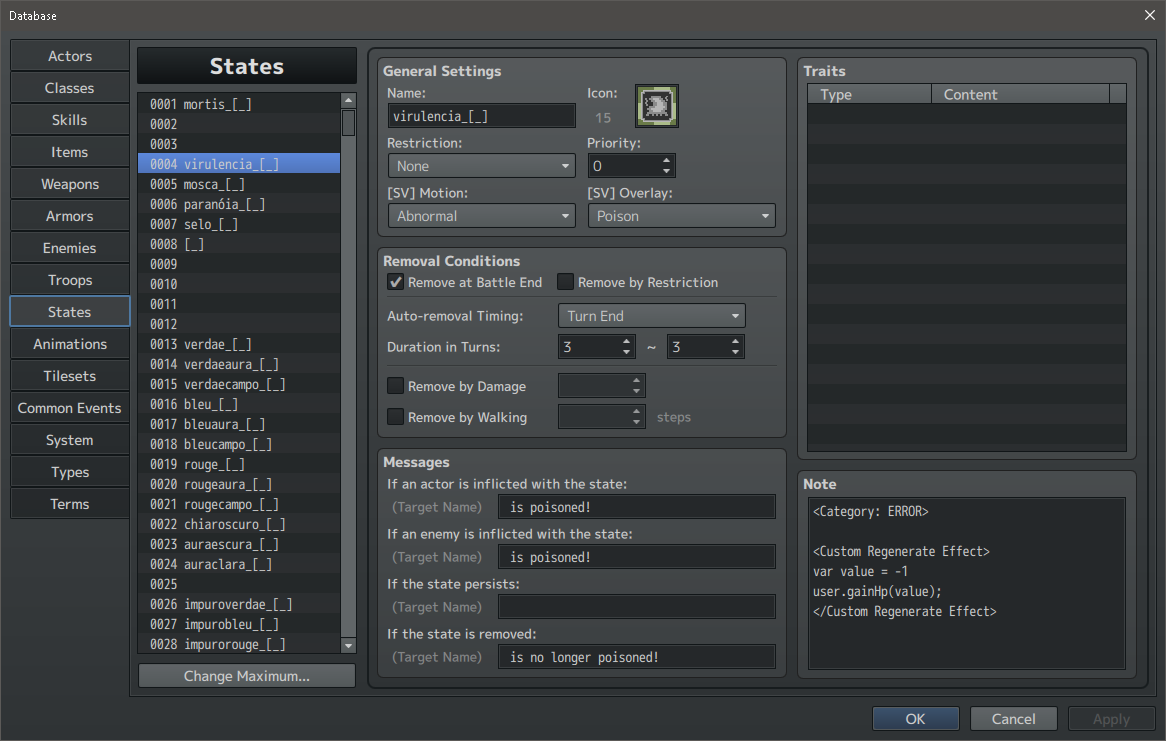
    Also, yup. State 4 is the equivalent of a regular poison state in my game. I use the YEP_StateCategories plugin and another plugin I commissioned from Eli/Hakuen Studio that shows the current states of both the actor and enemy on the screen, at all times, which makes it really easy to know when a state is not working. Here is how state 4 looks in the database:
    image.png
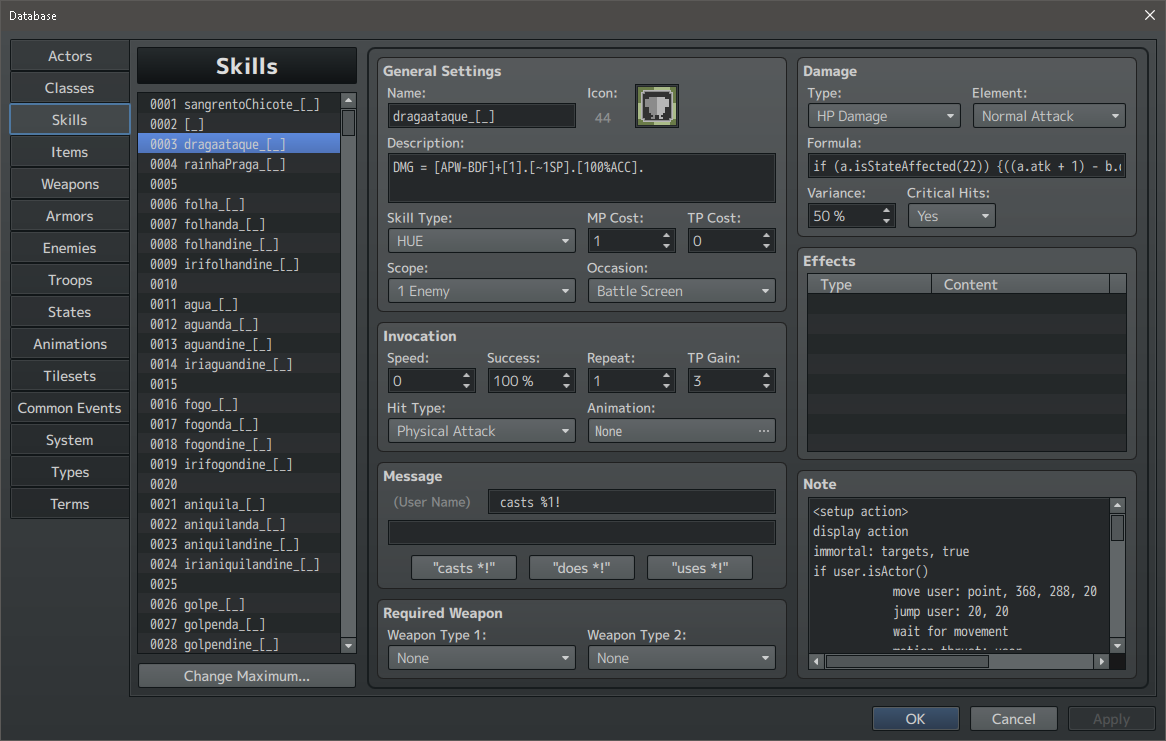
    By the way, I wonder if the action sequence could not be interfering with the state not being applied somehow? Here is how it looks in the database:

    image.png
    And, lastly, here is the action sequence itself:

    JavaScript:
    <setup action>
    display action
    immortal: targets, true
    if user.isActor()
        move user: point, 368, 288, 20
        jump user: 20, 20
        wait for movement
        motion thrust: user
        wait for motion
    else
        move user: point, 108, 288, 20
        jump user: 20, 20
        se: Cry1, 70
        wait for movement
        motion thrust: user
        wait for motion
    end
    </setup action>
     
    <target action>
    if user.isActor()
        projectile ani 18: duration 60, start user, goal target
        se: HueSpell1, 70
        wait for projectile
        animation 19: target
        wait for animation
    else
        projectile ani 18: duration 60, start user, goal target
        se: HueSpell1, 70
        wait for projectile
        animation 19: target
    end
    </target action>
     
    <follow action>
    animation 12: target
    se: HueSpell39, 70
    shake screen: 1, 3, 30
    </follow action>
     
    <finish action>
    action effect
    
    if user.isActor()
        move user: point, 388, 288, 20
        jump user: 20, 20
        wait for movement
    else
        move user: point, 88, 288, 20
        jump user: 20, 20
        wait for movement
    end
    
    immortal: targets, false
    
    if $gameTroop.members()[0].hp <= 0
        shake screen: 1, 1, 30
        flash screen: 255, 0, 255, 45
        collapse, force
    else if $gameParty.leader().hp <= 0:
        shake screen: 1, 1, 30
        flash screen: 255, 0, 255, 45
        collapse, force
    end
    clear battle log
    </finish action>
  8. everything looked correct and i gave your AS and state code a shot in my main project just to be sure since it already has all the plugins needed. Theres no problem between the skill and the state effect.

    Assuming your "State B" is on a battler, are you sure that your attacker isnt immune to state 4? have you tried applying a different state or doing a different effect like healing to make sure the code is running? when you press f12 to open up the console, are there any errors that show up?

    you could try using a respond effect instead of a react effect too.
  9. So, I made the basic healing spell also apply the noxious state, and it seems to work fine. The actor is not immune to it.
    image hosted at ImgBB
    As for errors, as it turns out, the action sequence I posted above had two mistakes:
    JavaScript:
    if $gameTroop.members()[0].hp <= 0
        shake screen: 1, 1, 30
        flash screen: 255, 0, 255, 45
        collapse, force
    else if $gameParty.leader().hp <= 0:
        shake screen: 1, 1, 30
        flash screen: 255, 0, 255, 45
        collapse, force

    Should have been:

    JavaScript:
    if $gameTroop.members()[0].hp = 0
        shake screen: 1, 1, 30
        flash screen: 255, 0, 255, 45
        collapse, force
    else if $gameParty.leader().hp = 0
        shake screen: 1, 1, 30
        flash screen: 255, 0, 255, 45
        collapse, force

    image hosted at ImgBB
    I will keep testing, thanks for now, Robro33!

    Edit: I tried Respond over React, and the problem remained!
  10. DrBuni said:
    As for errors, as it turns out, the action sequence I posted above had two mistakes:
    those arent errors and you can ignore those

    you want to look at whats here
    1748008102282.png


    DrBuni said:
    Should have been:
    what you had there first was correct actually. a single equal sign is an attempt to set the value, not to check it. if you were to change the <= with anything, it would have been == or ===, but itd functionally be the same
  11. Robro33 said:
    those arent errors and you can ignore those

    you want to look at whats here
    View attachment 341230


    what you had there first was correct actually. a single equal sign is an attempt to set the value, not to check it. if you were to change the <= with anything, it would have been == or ===, but itd functionally be the same
    You are right, the actual problem was not the "<=" but the ":". I replaced the "=" with "<=" as per your suggestion!

    Edit: Regarding the state, it seems like <Custom Respond Effect> and <Custom React Effect> do not work at all, regardless of state. Chances are a plugin or some setting is interfering with things ;( I think I will just move on to a different state concept, as I cannot afford to spend days trying to make one state work. Thanks again!

    Edit 2: I have been testing the <Custom Whatever Effect> tags with this code:

    JavaScript:
        <Custom Apply Effect>
        console.log("Howdy!");
        </Custom Apply Effect>

    And, I noticed none of the <Custom Effect> that are related to targeting battlers trigger the "Howdy" in the console log. Could this be a consequence of my game only featuring one actor and one enemy per battle [kind of like in Pokémon games]? If so, at least I learned something.
  12. DrBuni said:
    And, I noticed none of the <Custom Effect> that are related to targeting battlers trigger the "Howdy" in the console log. Could this be a consequence of my game only featuring one actor and one enemy per battle [kind of like in Pokémon games]? If so, at least I learned something.

    it sounds like one of your plugins after the buffs and states core overwrites the functions it uses to to work and youll have to find out which one it is. you'd have to show a screenshot of your plugin manager or start disabling them till you find out which one it is. at that point, id also suggest it to be its own thread
  13. Robro33 said:
    it sounds like one of your plugins after the buffs and states core overwrites the functions it uses to to work and youll have to find out which one it is. you'd have to show a screenshot of your plugin manager or start disabling them till you find out which one it is. at that point, id also suggest it to be its own thread
    Thank you so much :3 Debugging this would be a nightmare, so I am not even going to bother. I will just pretend the broken options do not exist.
  14. So... I have a skill that used to work just fine and now it doesn't and I'm not entirely sure why.
    Basically it's a skill that does extra damage if the target has 3 stacks of a specific state.
    (RPG Maker MV, using mostly Yanfly plugins)

    Normal Damage Formula:

    400 + a.mat * 4 - b.mdf * 2


    Notetag:

    <Post-Damage Eval>

    if(target.getStateCounter(40) == 3) {

    target.removeState(40);

    target.gainHp(-1100 + a.mat * 5 - b.mdf * 2);

    }

    </Post-Damage Eval>
  15. I have a question regarding Yanfly's Battle AI Core.
    JavaScript:
    <AI Priority>
    EVAL user.tp < 3: Skill 2
    EVAL user.mp < 3: Skill 2
    EVAL user.hp <= user.mhp * 0.50 && !user.isStateAffected(111): Skill 128
    Turn === 1: Skill 133, Highest HP%
    Turn === 2: Skill 124, Highest HP%
    Turn === 3: Skill 133, Highest HP%
    </AI Priority>
    Let us say the enemy finds themself with 2 TP in turn 2. What happens then? Does the enemy skip the turn 2 instructions [use Skill 124], opting to use Skill 2 instead, since the "EVAL user.tp <3" instructions comes first on the list? If so, what happens to the turn 2 instruction, is it gone or is it pushed to turn 3 with the turn 3 instruction being pushed to turn 4?
  16. DrBuni said:
    the enemy skip the turn 2 instructions [use Skill 124], opting to use Skill 2 instead, since the "EVAL user.tp <3" instructions comes first on the list?
    yes. no line is ever skipped unless the condition is false and the first true line is always ran.

    at that point it depends on the enemy's ai level though. if its at 100%, then if theyre at 2 tp on turn 2 theyll only ever use skill 2. the ai level essentially adds a random roll to each condition, so any level other than 100 adds a chance for each line to be "skipped"
  17. Super noob question here. Does a global variable in JavaScript (with or without a value) remain even if it wasn't called or used after 20+ hours of continuous gameplay?
  18. SolemnGravity said:
    Does a global variable in JavaScript (with or without a value) remain even if it wasn't called or used after 20+ hours of continuous gameplay?
    Time is irrelevant: if it is still in scope, it will remain in memory. No guesswork.

    Garbage collection only deallocates memory once the associated values are no longer accessible. More details here:
  19. Using the TextImage.js plugin, how do I enter a line break when calling it via script?

    PluginManager.callCommand(this, "TextPicture", "set", { text: "Line 1 <LINE BREAK HERE> Line 2" });
  20. Use "\n" for a new line, e.g.
    JavaScript:
    PluginManager.callCommand(this, "TextPicture", "set", { text: "Line 1\nLine 2" });