JavaScript questions that don't deserve their own thread

● ARCHIVED · READ-ONLY
Started by Shaz 3413 posts Page 155 of 171 View original ↗
  1. Your code is correct, but I'm not sure what this means:
    LookAtThisDude said:
    Im unsure if the enemy battler can even find a (single-)target out of my actors group during the "Pre-Apply" phase.

    I suggest you start a new thread, include screenshots of the skill and any events connected to it.
  2. 1728181212474.png
    Is there a way to get the value of the money obtained after a fight?
    I was planning on using that text eval plugin so that it only calls it "buck" instead of "bucks" when you only get 1 buck after a fight.
  3. In an effort to keep learning, I am wondering if there is a way in JavaScript (not super complicated) to have a Wait that can also be interrupted by a condition.

    For instance, I have Parallel Events that run continuously under certain conditions and the player can change the Wait time in these Parallel Events from 1 to 5 minutes. I use these for changing backgrounds, changing background music, and changing puzzle themes.

    So if the player wants one of these things to change, the Parallel Event gets turned on and the BG, BGM, or Theme start to change based on whatever number of minutes the player chose.

    But while that is running and happening, the player can change the number of Wait minutes. And I want that change to take effect BEFORE the full Wait time elapses. So if the player initially chose 5 minutes but then changed it to 2 minutes, I don't want the Wait to finish the full 5 minutes. I want it to get interrupted, to change whatever is being changed, and then start the new Wait time.

    So I did a simple Wait Loop and inserted a Conditional Branch check to see if the Wait Loop needs to continue or if it has changed.

    Here is what I did:
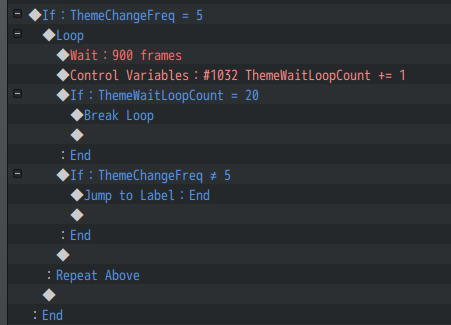
    Break Loop Check.png

    So in this example, the player set the change frequency to 5 minutes. The Parallel Event gets to this part and starts Looping. The Wait is 15 seconds, then it checks to see if the set number of Loops has passed (if so, then break the loop) and if not, then check to see if the change frequency amount was changed by the player.

    And I can change the delay amount by decreasing the Wait frames. Right now it is 15 seconds. But I could lower that to 5 seconds and increase the Loop count.

    For my Event, I can't just break the loop in that instance because then the game would automatically start another Wait instead of starting over from the beginning of the event. Which is why I have the Jump to Label (End) command.

    So I am wondering if there is a way to do something like this with JavaScript that isn't incredibly complex.

    I just tested the Wait script (this.wait($gameVariables.value(12));) which works fine with setting a Wait that is higher than what the default Wait Event Command will allow (999), but I couldn't figure out a way to break that Wait in the middle of waiting.

    I could just turn the Parallel Event off and then on again, but that isn't ideal and causes an undesired effect in the game.

    I tried searching for this in JavaScript resources, but didn't have much luck.

    Thanks for any thoughts that you might have.
  4. @ZombieKidzRule - I don't believe script calls offer anything here that commands don't. The basic principle is exactly as you describe: count off a corresponding number of short intervals, checking an "early-exit" condition each time. :kaohi:

    However, I would suggest making that short interval somewhat shorter, e.g. 12 frames rather than 900. This is because all Parallel events reset/restart on map change. E.g. if the event has waited 800 frames, then the player transfers to another map, the event will stop immediately: those 800 frames of wait time will be lost because your event only actually records full intervals of 900 frames. Some timers don't need to be super accurate, but I think 15 seconds is enough time for the player to delay indefinitely, perhaps even accidentally, just by transferring to another map before that time is up.

    It would be possible to write a plugin that implements a custom "wait mode", e.g. "wait while switch X is ON". The core scripts have a number of such wait modes, e.g. the "Wait for completion" option seen in various commands; these check their wait condition every frame. I don't feel like it'd be worth writing a plugin for this since, like you've demonstrated, it's easily accomplished and customised with commands.
  5. @caethyril Thanks! That is good info for people to remember and consider.

    For my game, it won’t make a difference since I only have 1 map. And I will probably still lower the Wait to 5 seconds so the player changes take effect more quickly. A delay of up to 15 seconds isn’t bad, but less is probably better.

    And I agree that this use case really doesn’t require a plugin since the work around seems pretty easy.

    Thanks for addressing the JS aspect!
  6. ey guys, just wanna ask how do i get the element id of an attack? i was planning on using victor's damage popups plugin so that element id 1 uses red, 2 uses orange, etc.

    to clarify, this is the eval that i used to define the damage colors:
    result.itemElements == 1 ? '#e62e4d' : result.itemElements == 2 ? '#ea8a22' : result.itemElements == 3 ? '#33ddff' : result.itemElements == 4 ? '#bf40ff' : '#ece6ff'
    however, loading the game after results in a crash:
    1728876314889.png
    since it isn't defined, imma return to the previous point: is there some way to find the damage's element via id?
    if i sound incomprehensible, these are the examples i'm trying to achieve:
    1728876750468.png1728876829138.png1728876694056.png1728877487181.png
  7. DecastarDaDumy said:
    to clarify, this is the eval that i used to define the damage colors:
    where did you get result.itemElements from initially? i dont know where you put the code youve shown, but the plugin doesnt mention a result variable for a parameter in its help section. And if its supposed to point to an Action_Result, itemElements is not a property within the regular engine and isnt addded by that plugin (or even shows up at all)

    I dont know if the Window_DamageSprite the plugin adds has any usable relationship to the action used to generate it, but you might be able to use
    Code:
    BattleManager._action.item().damage.elementId
    to grab the current skill's element and change the color with that
  8. Hi, I'm trying to learn to develop Javascript plugins for MZ. I know registering commands works somewhat like this:

    JavaScript:
    PluginManager.registerCommand("pluginName", "functionName", args => {
        const arg0 = String(args.argName);
        functionName(arg0);
    });

    But what do you do if your command doesn't have any arguments?
    I have 'use strict' so I don't think it will like me not referencing 'args'... I could just remove 'use strict' but I want to learn some good practices.
  9. Usually the way to write a lambda function that ignores any arguments is by replacing them with ().
    So you'd do:
    JavaScript:
    PluginManager.registerCommand("pluginName", "functionName", () => {
        functionName();
    });

    EDIT: Or in this case, you can simplify it to:
    PluginManager.registerCommand("pluginName", "functionName", functionName);
  10. Robro33 said:
    where did you get result.itemElements from initially? i dont know where you put the code youve shown, but the plugin doesnt mention a result variable for a parameter in its help section. And if its supposed to point to an Action_Result, itemElements is not a property within the regular engine and isnt addded by that plugin (or even shows up at all)

    I dont know if the Window_DamageSprite the plugin adds has any usable relationship to the action used to generate it, but you might be able to use
    Code:
    BattleManager._action.item().damage.elementId
    to grab the current skill's element and change the color with that
    ah. silly me just found that through a few searches. i just thought that was a thing that's part of the game's code. in truth they were from other plugins. thanks ;w;

    i forgot where i got the variable from but from what i could remember it's from a plugin that manages elements :p
  11. Hey all, wondering if I can edit the rpg_windows.js to move where the text appears in the Window_Help scene (As well as other window scenes) or if I need to edit code somewhere else or if there is a plugin that lets me more easily test the text position for the various window scenes that would also be good.
  12. FrozenFacade said:
    Hey all, wondering if I can edit the rpg_windows.js to move where the text appears in the Window_Help
    Yes, but you should never do that. You should always copy the functions into a new file, make your changes, and add them as a plugin.

    FrozenFacade said:
    or if there is a plugin that lets me more easily test the text position for the various window scenes
    You can try SRD's Super Tools or Graphical Design Mode.
  13. ATT_Turan said:
    Yes, but you should never do that. You should always copy the functions into a new file, make your changes, and add them as a plugin.


    You can try SRD's Super Tools or Graphical Design Mode.

    I am using Nelderson's (Nasty_Replace_Window_with_Picture.js) at the moment and I used SRDs Super Tools to get to this point.

    Untitled1.png

    However the SRD Super Tools only lets me move the windows and not where the text itself appears on screen. (The Nelderson plugin binds images to the windows so everything moves instead of just the text)


    (I tried Graphical Design Mode but it was unstable so I got rid of it)

    Ideally if I could move where the text is generated I could use Nelderson's plugin for all of my needs with custom window scenes and be able to figure out how to make everything work from there. I don't really know where that function is inside the rpg_window.js to copy to a plugin to mess around with numbers until I get the desired results.

    (I just kinda mocked up a picture to use in Photoshop to use with the Nelderson plugin for testing so don't mind the design lol)


    TLDR: I don't know how to read the code inside rpg_window.js to do what I want with the text.
  14. FrozenFacade said:
    However the SRD Super Tools only lets me move the windows and not where the text itself appears on screen. (The Nelderson plugin binds images to the windows so everything moves instead of just the text)

    windows with text (as I see the help window) can be also be smaller.
    but altering the help window in global does this for every window.

    even marges, so you need to make the window smaller in that scene alone.
    if it's a plugin, you can better alter the positions of windows on your own,
    instead of doing this with supertool engine.
  15. I apologize, I should not have mentioned everything I'm doing and rather just ask for what I would like to be able to do... it takes a lot of back and fourth for me to figure out what I ever need to know to ask the correct questions. Getting off for the day, but I think I need to take this to a better suited thread.
  16. FrozenFacade said:
    move where the text appears in the Window_Help
    Give this a try (do not modify the core files, just put this in a .js file and add as a plugin):
    JavaScript:
    Window_Help.prototype.refresh = function () {
        this.contents.clear();
        this.drawTextEx(this._text, this.textPadding() + 100, 0);
    };
    Replace 100 with however many pixels you'd want to move the text by.
  17. What's the easiest way to replace an actor's name with another value on the battle status window?

    I want to replace it with the character class instead. I'm using the Visustella Battle Core Script with MZ.
  18. How will I check if the player is currently inside a map (not in battle, menu, etc)?
  19. Fionn23 said:
    How will I check if the player is currently inside a map (not in battle, menu, etc)?
    Code:
    SceneManager._scene instanceof Scene_Map
  20. Hey guys! I'd like to know if there is a way to force all enemies to attack an enemy inflicted with a certain state?

    This is how it would work: I use a skill that inflicts a certain state onto an enemy, then all enemies proceed to attack that enemy.