JavaScript questions that don't deserve their own thread

● ARCHIVED · READ-ONLY
Started by Shaz 3413 posts Page 121 of 171 View original ↗
  1. So, here's one that has me feeling silly, and unfortunately doing a google search for "conditional and" is just turning up a lot of noise.

    In a conditional branch event command, I am trying to create a conditional && statement. However, what I have seems to behave more like a conditional OR statement. What am I doing wrong?
    Code:
    $gameVariables.value(93) <= 4 && $gameVariables.value(238) <= 4

    Hmmm.png
  2. Mid post-typing correction:
    I'm going to post what I was in the middle of typing because I want to find where the fault in my logic was. However, I was able to get this to work correctly by making the conditional branch have an else branch, and changing the code to this:
    Code:
    $gameVariables.value(93) >= 5 && $gameVariables.value(238) >= 5
    Where before it checked if both scores were equal to or less than 4, and if so it would show the counters.
    Now, with this change it checks if the scores are equal to or greater than 5, and if so, do nothing; else show the counters.
    I'm glad I was able to solve this, but I would appreciate an explanation to better help me understand why this solved it or where I was going wrong before. Therefore, I am going to continue with posting what I was in the middle of typing out before I had that epiphany to change the script.


    Basically I just want to compare 2 different "scores".

    In this case, this is a small mini game. You will see I have these counters beneath each action (+1, -1). Once the 2 meters on the right are both at 5 points (or higher), I want to change the behavior and appearance of the "shout" action command. I know it sounds like I am talking nonsense so here are some pictures:
    At the start of the mini game the meters on the left and the right are empty. The shout action command is showing the counters.
    Stage1.jpg

    I have taken enough actions now to fill up the meter on the right. It current has 5 points. However, as you can see, the meter on the left is still at 0 points. However, whenever we check the "Shout" command, we can see it has removed the counters even though the && statement has only been partially met.
    Stage2.jpg

    And just as confirmation, we can check variable 238 (the variable that controls the meter on the left) and we will see that, indeed, it currently is set to 0.

    Stage3.jpg
  3. I'd need to see how the event is setup, especially since you said one previous issue was solved by adding in an else branch.

    It sounds likely that there is an issue with the logic of the process if the variables are not inline with where you think they should be at the end.
  4. I'm sorry, it seems there is a bit of a misunderstanding here.
    I would post the event, but seeing as how this is using a large number of show/move picture events and contains a lot of logic for the entire mini game operation, it would be rather long, and probably just be difficult to make sense of for what is ostensibly suppose to be a quick question/quick answer type of post.

    In the screenshots, the variables are exactly inline with where I expect them to be. Everything is operating as intended except for the conditional && branch (when I had set it to check if the 2 variables (93 and 238) were equal to or less than 4.

    Let me explain this minigame in brief. We have AP points and MP points. AP points are on the left, MP points are on the right. "mulling it over" will reduce the AP point by 1 (this is variable 238) and increase the MP points by 2 (this is variable 93). "Shouting" will increase the AP points by 1 but decrease the MP points by 1. When the AP bar reaches 5 it will stay at 5 for 1 additional action (this is achieved by forcing the AP variable (variable 238) to be set to 6)
    Once both meters: MP and AP have at least a value of 5 or more, then the player is able to use the "Shout" command 1 final time. The final use of the "Shout" command is different than any other time because this is the end of the mini game. So, in order for the final "shout" to work correctly, it needs to check if AP && MP are equal to or greater than 5.


    As I said, this problem has been solved now. I simply wanted to know why, when switching the problematic equal to or less than 4 to the current equal to or greater than 5 solved the problem.

    BEFORE:
    not working
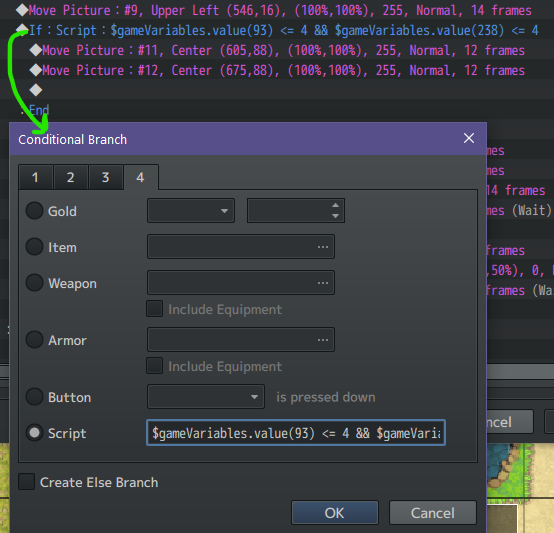
    Hmmm.png

    AFTER:
    working!
    (ignore all the additional move picture stuff, the main point of the picture is the change to the conditional branch)
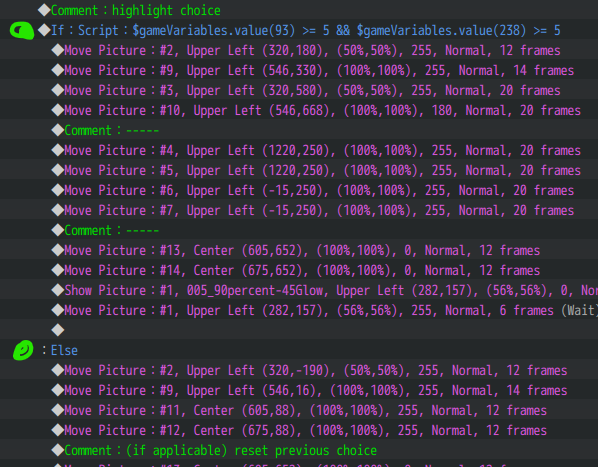
    Now.png

    If I still have not provided enough information, then just ignore this post since it has been solved, I was only hoping to find greater insight as to why it wasn't working originally.
  5. TheAM-Dol said:
    Once both meters: MP and AP have at least a value of 5 or more, then the player is able to use the "Shout" command 1 final time. The final use of the "Shout" command is different than any other time because this is the end of the mini game. So, in order for the final "shout" to work correctly, it needs to check if AP && MP are equal to or greater than 5.
    That's why what you have now is correct.

    What you posted initially was wrong because it required both to be too low. If you reverse the math, you also need to reverse the logic.

    So
    Code:
    variable 1 >= 5 && variable 2 >= 5
    will be true under the same circumstances as
    Code:
    variable 1 < 5 || variable 2 < 5
  6. How would I go about making a non damaging/healing skill that removes the target's ATK debuffs. Note that I mean the actual debuffs (not states), and would ideally not affect their buffs.
  7. Hello, I'm seeking help for 2 things:

    - Is there a script call allowing to jump on a choice index once a choice window opens?
    I'm using a choice command inside a loop, so when I confirm a choice, it stays open, but I'd like for the index selection to stay the same (if I press choice 3, I want the highlight selector to stay on choice 3 after it reached the end of the loop, it currently resets to choice 1)

    - Is there a way via script to get what's written in the currently highlighted choice?
    I want to store the obtained content in a variable
  8. Vis_Mage said:
    How would I go about making a non damaging/healing skill that removes the target's ATK debuffs.
    Do something that allows you to execute JavaScript on the target, such as Yanfly's Skill Core Post-Damage Eval. Then you'd do:
    Code:
    if (target.buff(2)<0)
        target.removeBuff(2);

    Narch said:
    - Is there a script call allowing to jump on a choice index once a choice window opens?
    - Is there a way via script to get what's written in the currently highlighted choice?
    The pinned thread of MV/MZ Script Calls has this:
    Spoiler
    Code:
    This must be in a single script call:
    
    // Initialize Choices Array
    const choices = ["choice1", "choice2", "choice3", "choice4", "choice5", "choice6", "choice7", "choice8"];
    // Set Message Choices
    $gameMessage.setChoices(choices, defaultType, cancelType);
    // Set Message Background
    $gameMessage.setChoiceBackground(background);
    // Set Message Position
    $gameMessage.setChoicePositionType(positionType);
    // Record Outcome in a Variable
    $gameMessage.setChoiceCallback(n => {
        this._branch[this._indent] = n;
        $gameVariables.setValue(variableIndex, n);
    });
    
    // You must add this in a new script call
    this.setWaitMode("message");

    So when you create the choice you can use the callback variable for setChoicePositionType() to put it back at the previous selection.

    As far as getting what's in the currently highlighted choice, do you mean while it's highlighted or when it's selected? When it's selected you can just do that in your event, set a variable or something to the text of that choice. If you need to reference it while it's being highlighted, that...might have to get added to the Window_ChoiceList class.
  9. @ATT_Turan Thank you. I'll see what I can make out of it.

    For the second point, it would be while it's highlighted yes. No idea how I'm going to add that to a class yet though.
  10. Not sure if this is the best place to ask this question, apologies if its not, but when releasing a Javascript plugin, what are the guidelines around using default RPGMaker assets in your demo project?

    For instance if I upload the code for my plugin to a github repository under the MIT license, can I also provide a project file in the release bundle which includes an RPGMaker project with default assets? I assume that replication of the default assets as project files is okay (since I've seen others do it), provided that Im simply including them in the release and not in my licensed source but its possible that other projects were doing so against the terms of use
  11. contentdeleted said:
    Not sure if this is the best place to ask this question
    I wouldn't say so, as it's not asking anything about JavaScript, but that's cool :wink:

    contentdeleted said:
    when releasing a Javascript plugin, what are the guidelines around using default RPGMaker assets in your demo project?
    I think you're over-complicating this for yourself. According to the RPG Maker EULA, you may distribute games with the default assets. It doesn't matter whether the game is for people to play and enjoy or use as a reference point, in an exported form or a raw project. (that distinction only makes a difference to people who already own the software)

    I guess your question gets more into whether you'd be claiming the project falls under your plugin's license, but it should be simple to include a few words to specify it doesn't.
  12. ATT_Turan said:
    I wouldn't say so, as it's not asking anything about JavaScript, but that's cool :wink:


    I think you're over-complicating this for yourself. According to the RPG Maker EULA, you may distribute games with the default assets. It doesn't matter whether the game is for people to play and enjoy or use as a reference point, in an exported form or a raw project. (that distinction only makes a difference to people who already own the software)

    I guess your question gets more into whether you'd be claiming the project falls under your plugin's license, but it should be simple to include a few words to specify it doesn't.
    Hey thanks for the response. Sorry it's a little off topic, I figured it would be but I also didn't think it deserved its own thread. That makes sense that distributing the assets as part of the project files falls under distributing the game. After all those assets aren't packed or encrypted in (most) rpgmaker release builds anyway.
  13. Hello. I'm trying to make a custom window following this tutorial.
    https://www.youtube.com/watch?v=2DnYEfScybo

    And at this point, when I try to push it to SceneManager, I get and error. Since I'm using MZ, I wrote "new Window_Custom(new Rectangle(0, 0, 320, 240))" instead of "new Window_Custom(0, 0, 320, 240)", otherwise followed the tutorial exactly. Can't figure out what's wrong.
    Screenshots
    1.png2.png3.png
  14. does anyone by chance know the repercussions of removing the updateSvePosition() method within yanfly's animated SV enemies plugin? long story short, i added the SRD Summon Core plugin to my game and i noticed that whenever a summoned actor dies or is desummoned, the game crashes if yanfly's animated SV enemies plugin is enabled. was able to comment out the line that calls the method (its only used once) and while SRD's plugin seems to work with Yanfly's plugin now, I cant actually notice any difference without the method functioning.
  15. @Nivalis line 22 should read Object.create(Window_Base.prototype);
    You're missing the prototype and you also appear to have a space after the function name and its open parenthesis.

    @Robro33 I'm not sure about your specific question, but I don't think it should be necessary. I use both plugins in my project and I don't recall having to edit either one to get them to work. If you're concerned, maybe start a thread with the error messages that you get.
  16. @Nivalis
    On lines 14 and 15 you've also got this.customWindow and this._customWindow. You either need to put the underscore on both, or on neither.
  17. @ATT_Turan @Arthran
    I knew I overlooked something obvious.-_- Thank you very much, now it works.
  18. How do you access the array of individual character sprites in the current map scene?

    I tried
    Code:
    SceneManager._scene._spriteset.children
    while on the map and I can see everything (weather, timer, pictures, etc.) besides the character sprites. where exactly are they? :)

    EDIT: found it under
    Code:
    SceneManager._scene._spriteset._tilemap.children
    however when I try to change the "rotation" property, nothing happens. I was able to do it with sprites I added myself, so I wonder why it doesn't work with a character sprite?
  19. AmVa said:
    when I try to change the "rotation" property, nothing happens.
    What exactly are you trying to do? Is there a reason you can't access the characters at a higher level and use the regular facing commands?

    I expect if you change the rotation manually, you'll at least need to call the refresh method for the associated characters.