JavaScript questions that don't deserve their own thread

● ARCHIVED · READ-ONLY
Started by Shaz 3413 posts Page 109 of 171 View original ↗
  1. eomereolsson said:
    Oh sorry, I kind of missed the part where we are talking about battle. My script call is a valid interpreter (hence no error) but not the currently running one (hence no effect).
    Try $gameTroop._interpreter instead.
    Hmm, nope, still doesn't wait.

    JavaScript:
    BattleManager.processDefeat = function() {
        if (this._canLose) {
            this.replayBgmAndBgs();
        } else {
            AudioManager.stopBgm();
        $gameTroop._interpreter.wait(600);
        }
        this.endBattle(2);
    };


    Ohhh, I wonder if I'm putting this code in the wrong js file. I'm doing it in Managers, but maybe it's supposed to go in the Scenes file? I'm gonna delve into that and see if I can find some answers, but if someone can give me a more straight forward answer I'd appreciate it.
  2. UmbrotheUmbreon said:
    Ohhh, I wonder if I'm putting this code in the wrong js file.
    There's no such thing. Code doesn't care what file it's in, unless you're modifying a function that is in return being overwritten by a plugin (which is why you should always make modifications in a plugin).

    UmbrotheUmbreon said:
    if someone can give me a more straight forward answer I'd appreciate it.
    I would suggest, for how many back and forths you've had, that this question no longer meets the qualification of "doesn't deserve its own thread" - you should probably make your own thread and get a few people on there trying to help put this to bed.
  3. ATT_Turan said:
    There's no such thing. Code doesn't care what file it's in, unless you're modifying a function that is in return being overwritten by a plugin (which is why you should always make modifications in a plugin).
    Oh.....I'm not smart :c
    ATT_Turan said:
    I would suggest, for how many back and forths you've had, that this question no longer meets the qualification of "doesn't deserve its own thread" - you should probably make your own thread and get a few people on there trying to help put this to bed.
    Fair enough. I originally thought it could be solved quickly but I'll make a new thread on it.
  4. UmbrotheUmbreon said:
    Oh.....I'm not smart :c
    I wasn't trying to say you're not smart, just help you learn.
  5. ATT_Turan said:
    I wasn't trying to say you're not smart, just help you learn.
    Oh I know you weren't. I have a weird sense of humor (which sadly doesn't always translate well in text form lol). You're an awesome person, and have helped me out a lot before, so I very much appreciate the information you give.
  6. Hey all, I'm pretty new to using JS in things... I don't know how to check randomInt inside of an if statement to make something happen only in a certain range of numbers.

    I have the character gain 1 defense point every time a certain skill defeats an enemy, but I want it to only happen 5% of the time.

    I want user.paramPlus[3] += 1; to ONLY occur if Math.randomInt(100) + 1 generates 1-5 as a number.


    -What I am currently using to gain the effect all the time-
    Untitled.png


    Thank you!
  7. You can chain several conditions that should all be true for the if-statement to execute with && (the logical and-operator). Your condition would then be:

    JavaScript:
    if(target.hp <= 0 && Math.randomInt(100)+1 <= 5) {
        //do stuff
    }
  8. eomereolsson said:
    if(target.hp <= 0 && Math.randomInt(100)+1 <= 5) {
    Thank you! Works perfectly!
  9. Not sure if this is the right place to ask, but I wanted to know if it was possible to adjust the Item Scene values in Yanfly's ItemCore plugin.

    Reason being, I don't use buffs in my game and just resort to adding/removing/overriding states. I managed to figure out how to switch out buff values and replace them with states, but I wanted to replace where states were with TP gained from the item.

    (How it looked like originally.)
    1662240763546.png
    (How the scene looks like now.)

    1662240671537.png

    Now, the only problem is that the code doesn't recognize the TP gained from an item and won't display it. Anyone know if it's possible or at least how to do it? I'm couldn't find any parameter ID that belonged to TP and the small edits I made to the code didn't work either.

    Code:
    Window_ItemStatus.prototype.drawItemData = function(i, dx, dy, dw) {
        if (!this._item) return;
        var effect;
        var value = '---';
        var pre = '';
        var text = '';
        var icons = [];
        if (i === 0) {
          effect = this.getEffect(Game_Action.EFFECT_RECOVER_HP);
          value = (effect) ? effect.value1 : '---';
          if (value === 0) value = '---';
          if (value !== '---' && value !== 0) value *= 100;
        }
        if (i === 1) {
          effect = this.getEffect(Game_Action.EFFECT_RECOVER_HP);
          value = (effect) ? effect.value2 : '---';
          if (value === 0) value = '---';
        }
        if (i === 2) {
          effect = this.getEffect(Game_Action.EFFECT_RECOVER_MP);
          value = (effect) ? effect.value1 : '---';
          if (value === 0) value = '---';
          if (value !== '---' && value !== 0) value *= 100;
        }
        if (i === 3) {
          effect = this.getEffect(Game_Action.EFFECT_RECOVER_MP);
          value = (effect) ? effect.value2 : '---';
          if (value === 0) value = '---';
         }
        if (i === 5) {
          effect = this.getEffect(Game_Action.EFFECT_GAIN_TP); // Not sure if I got this right.
          value = (effect) ? effect.value2 : '---'; 
          if (value === 0) value = '---';
          if (value !== '---' && value !== 0) value *= 100;
        }
  10. Hey! I'm trying to add a little fps meter option to my game using YEP_OptionsCore, right now I have this on my Press OK code:
    Code:
    var index = this.index();
    var symbol = this.commandSymbol(index);
    var value = this.getConfigValue(symbol);
    this.changeValue(symbol, !value);
    if (value) Graphics._switchFPSMeter()
    But what happens in game is that I have to press on/off multiple times and alternate between FPS and MS counter before turning it off, also the on and off options are reversed.

    So I learned that with this script call you toggle it once for FPS, twice for MS and thrice to turn it off. How could I make it ignore the second toggle entirely and only have the first and third so the on/off switch in the options could work as intended?

    Thanks for reading =w=
  11. I'm not entirely sure of the details of the options core, but if you look at Graphics._switchFPSMeter() in rpg_core.js you can see what is happening each time the function is called, so I'd guess you just need to omit the part you don't want and do one or the other based on whether value is true or false. For example:

    Code:
    if (value) {
        Graphics.showFps();
        Graphics._fpsMeter.showFps();
        Graphics._fpsMeterToggled =false;
    } else {
        Graphics.hideFps();
    }

    If you're still having trouble with on being off and vice versa, you might rethink what your code is actually doing, for example if we say the option is off before we try to toggle it and we replace some values with true and false you have this:

    Code:
    var index = this.index();
    var symbol = this.commandSymbol(index);
    var value = false; // option is off so value = false
    this.changeValue(symbol, true); // ! turns false to true
    if (false) Graphics._switchFPSMeter() // from above, value = false

    This will probably be the opposite of what you want, you might want to initially do var value = !this.commandSymbol(index) and then remove the not operator (!) that appears later on.
  12. Thank you @Silva I got it working :kaojoy:
  13. Challenge of the day!

    Code in a simple event
    1663103101275.png

    The code in question simply scans a string for ${} patterns and replaces them with text corresponding to the pattern in a JSON file.

    Code:
    getText = function(text) {
      let regex = /\${([\w|\.]+)}/gm;
      let regexParts;
      console.log("Start process text:", text);
      do {
        regexParts = regex.exec(text);
        if (regexParts) {
          console.log("Find pattern:", regexParts[0]);
          text = text.replace(regexParts[0], ODW.MLS.getTextDatabase(regexParts[1]));
          console.log("New decoded text:", text);
        }
      } while (regexParts);
      console.log("Get result:", text);
      return text;
    };
    
    getText("${Name} ${Element}");
    getText("${FName} ${LName}");

    I use a single JSON file so the value-keys are retrieved by my Multi-Language System plugin via the ODW.MLS.getTextDatabase() function. The content of the JSON file is as follows:

    Code:
    {
        "FName":     "Reid",
        "LName":     "Bruteforce",
        "Name":      "Batman",
        "Element":   "Fire"
    }

    And here is the result of the console when I run the script.
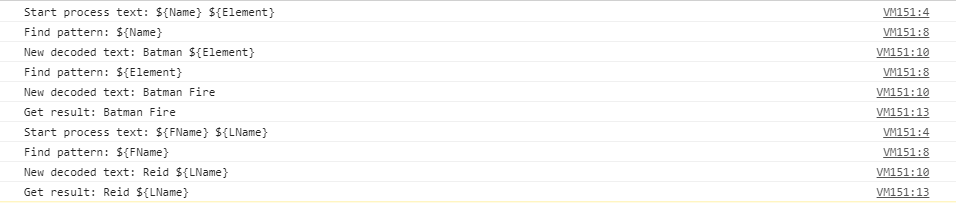
    1663103289761.png

    So can someone explain to me why the first string is decoded completely, while in the second, only the first pattern is decoded? :kaodes:

    Thanks in advance for your help!

    Edit: Additional tests for fun, this time without using the function of my plugin. I don't understand what I'm missing...

    Simply by removing the call to the function.
    Code:
    getText = function(text) {
      let regex = /\${([\w|\.]+)}/gm;
      let regexParts;
      console.log("Start process text:", text);
      do {
        regexParts = regex.exec(text);
        if (regexParts) {
          console.log("Find pattern:", regexParts[0]);
          text = text.replace(regexParts[0], regexParts[1]);
          console.log("New decoded text:", text);
        }
      } while (regexParts);
      console.log("Get result:", text);
      return text;
    };
    
    getText("${Name} ${Element}");
    getText("${FName} ${LName}");

    Result: only the first pattern is detected in both strings.

    1663105185793.png

    By replacing the function call, and concatenating a text to the found pattern.
    Code:
    getText = function(text) {
      let regex = /\${([\w|\.]+)}/gm;
      let regexParts;
      console.log("Start process text:", text);
      do {
        regexParts = regex.exec(text);
        if (regexParts) {
          console.log("Find pattern:", regexParts[0]);
          text = text.replace(regexParts[0], regexParts[1] + "OK");
          console.log("New decoded text:", text);
        }
      } while (regexParts);
      console.log("Get result:", text);
      return text;
    };
    
    getText("${Name} ${Element}");
    getText("${FName} ${LName}");

    Result: the two patterns of each string are decoded.
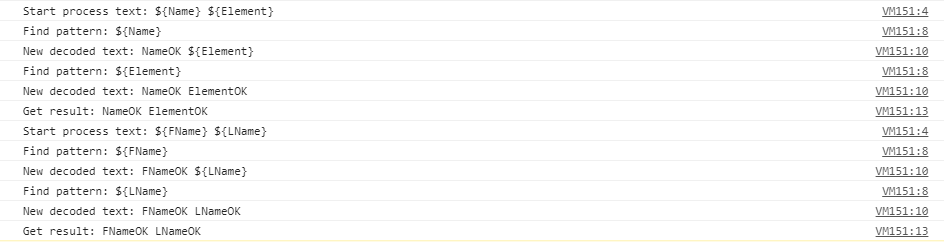
    1663105333234.png
  14. The simple answer is because you're changing the string the regular expression is trying to match against.

    When a regular expression finds a match using the exec method it updates the lastIndex property. The lastIndex property is the point in the string that the regular expression has already looked for matches in, so it won't check anything before this point again.

    By making the part of the string you've matched shorter, you're actually making the exec start searching a few characters after the last match which means it isn't checking the whole remaining part of the string. In the case of "${Name} ${Element}" becoming "Name ${Element}", lastIndex is 7 so when you try to use exec again the string that is being searched is "Element}". There is no match with "Element}" and your regular expression.

    This doesn't happen in the case of "${Name} ${Element}" becoming "Batman ${Element}" as "Batman" is only one character shorter than "${Name}" so only the whitespace character is skipped over.

    You might consider starting with two copies of your input text and using one to check for matches and the other to do the text replacements.
  15. Wow, simple and clear! In the meantime, I had found a plan B by making a recursive call of the function, just before the return... not ideal in terms of processing time, but it worked.

    But I prefer by far your proposal, and will test and optimize my code in this way. When you understand, it's easier to avoid the traps! :ewink:

    Thanks @Silva for your precious help!
  16. Trying to figure out how to check for State 61 OR State 67 this code works for the 1st
    state but not for the second... (And yes I do want it to say false if the states are found, that part is correct and was working with the 1st listed state) Thanks in advance.

    Untitled.png
  17. isStateAffected() only takes one parameter. Your second one just gets discarded. You can use logical operators to chain several statements.
    Code:
    //put this inside your if(...)
    user.isStateAffected(61) || user.isStateAffected(67)
    
    //shorter alternative
    //replaces everything inside your notetag
    value = !user.isStateAffected(61) && !user.isStateAffected(67);
  18. Thank you! I tried something similiar to your first suggestion but I guess I messed it up somehow. Used the second one and works great :)
    eomereolsson said:
    isStateAffected() only takes one parameter. Your second one just gets discarded. You can use logical operators to chain several statements.
    Code:
    //put this inside your if(...)
    user.isStateAffected(61) || user.isStateAffected(67)
    
    //shorter alternative
    //replaces everything inside your notetag
    value = !user.isStateAffected(61) && !user.isStateAffected(67);
  19. In Yanfly's "Enemy Levels" video (linked here) they use a skill they called "Study" which reveals all of the enemy stats as well as their weaknesses, resistances, immunities, etc.

    I have been scouring their YouTube and website, but cannot find information on how they implemented the "Study" skill in MV. (I did find one for VX Ace, but presumably that doesn't transfer.)

    Is someone able to link me to a resource explaining how that is done?
  20. Nate_Tillern said:
    In Yanfly's "Enemy Levels" video (linked here) they use a skill they called "Study" which reveals all of the enemy stats as well as their weaknesses, resistances, immunities, etc.

    I have been scouring their YouTube and website, but cannot find information on how they implemented the "Study" skill in MV. (I did find one for VX Ace, but presumably that doesn't transfer.)

    Is someone able to link me to a resource explaining how that is done?
    Libra (MV Plugin Tips & Tricks) - Yanfly.moe Wiki
    Here you go