JavaScript questions that don't deserve their own thread

● ARCHIVED · READ-ONLY
Started by Shaz 3413 posts Page 101 of 171 View original ↗
  1. Thank you very much for taking the time to help me out! If you someday need help with editing a tile or mapping something, I'm happy to return the favor.

    I'm fine with using the show picture with eventing, but I was wondering if I could adjust the variable for the player Y already while I'm setting the variable.

    Here is what I have:
    Event Page
    showpicture.png


    Right now the variable 0002 is just Screen Y of Player, but surely there is a script call I can do here to adjust Screen Y to have it 48px higher than the player?

    Would this work?

    Code:
    $gamePlayer.y(+48);
  2. I'd say either that, or add 48 to your variable.

    Since you already set the value of that variable beforehand, it will use that value when you add, subtract, anything except "set". Using that will reset the value.
    It'd look something like this, as an example:

    Spoiler
    1642857595150.png

    If this is something you tried already, forgive me in advance. :kaoswt:

    Edit: If by chance this works and it ends up below the player, try subtracting instead.
  3. Candacis said:
    Right now the variable 0002 is just Screen Y of Player, but surely there is a script call I can do here to adjust Screen Y to have it 48px higher than the player?

    Would this work?

    Code:
    $gamePlayer.y(+48);
    If your goal is to save that one line in the event so you're not setting the variable and then subtracting from it, you're close! You can: Control Variable -> Script -> $gamePlayer.screenY()-48 (again, 0, 0 is the upper-left corner, so to make it higher up you'd go more toward zero).
  4. Thanks both of you! Both methods work fine.
    Yeah, it might be unnecessary to save 1 line, but it was bugging me that I half remembered that script call and couldn't figure it out.
    Thanks for the explanations. If I can return the favor with a small edit or mapping problem, message me some time :LZSsmile:
  5. Can anyone tell me how I can make an array of all of an actor's states that are within an array of numbers? So for instance make an array of all states that are affecting an actor between numbers 20 and 50.
  6. Hello!
    I am looking for a script call to place in a conditional branch.
    I want that:
    IF a sprite is facing a direction and the player talks to them, then I can activate a switch to show a different sprite (in this case the sprite the player talks to would "turn their head") - the frame is on the event pages by switch. once they have said their piece the switch turns off... and it goes back to random movement unless the player talks to them again. the original sheet has 4 direction movement, I just need it to give the illusion that the person is going back about their business and only pauses to speak with the player when talked to.
    so I need a script call that will look at the sprite sheet of the event and give the right switch depending on the row "playing"
    Thanks in advance!!
  7. AlphaOmega said:
    I want that:
    IF a sprite is facing a direction and the player talks to them, then I can activate a switch to show a different sprite
    The trick with this is that as soon as you interact with an event it automatically turns to face the player - this means that anything you do to check the event's facing at that point will reflect that turn.

    So your request is more than a simple JavaScript question, you're really looking for a plugin that modifies event behavior upon interaction.

    That being said, to address your question anyway...inside of an event, there's no need for a script call, you can use the event commands Conditional Branch -> Tab 3 -> Character -> This Event -> is facing

    And if you do feel the need for a script, Googling "RPG Maker MV facing script" results in $gameMap.event(this._eventId).direction()
  8. ATT_Turan said:
    That being said, to address your question anyway...inside of an event, there's no need for a script call, you can use the event commands Conditional Branch -> Tab 3 -> Character -> This Event -> is facing
    I did try conditional branching, testing it to be sure it would even work first; and nothing. I put the switches to autorun so that it would force the game to stop too. I don't have else on the event because if it wasn't working for one facing direction it wasn't going to work for the others. That's why I wondered if maybe a script would be better in this case.

    1643980920916.png1643980525925.png1643980559774.png
  9. AlphaOmega said:
    I did try conditional branching, testing it to be sure it would even work first; and nothing.
    I don't understand how your conditions could ever be true.

    In order for the event to be facing left, that means the player is to its left, and facing right to activate the event.

    If the event is facing left, the player must be facing right - how could it be any other direction?
  10. Hi,

    please allow me a newbie question (probably already got asked a dozen times)... In several video-tutorials (especially from Yanfly's plugins), the tutor uses an enlarged version of the "note" field where he inputs the notetags...

    This seems very very helpful for writing long notetags... Unfortunately the size and layout of my "Database" window is fixed, and so is the "note" field.

    Is there some kind of secret key combination or plugin that enlarges the "note" field?
  11. Franz_Pantalon said:
    please allow me a newbie question (probably already got asked a dozen times)... In several video-tutorials (especially from Yanfly's plugins), the tutor uses an enlarged version of the "note" field where he inputs the notetags...
    I don't recall seeing this, but it's probably another editor that has the same color scheme, or it's Photoshopped for legibility.
    Franz_Pantalon said:
    Unfortunately the size and layout of my "Database" window is fixed, and so is the "note" field.
    Yes - however, the width of the notes box will not cut off your text, you can write very long lines in it that scroll off to the side. So if you're having trouble reading and keeping track of things, you can simply type it out in any other text editor, then copy and paste it into the notes box.

    Just to mention it, this question is not actually asking anything about JavaScript, per the title of this thread...it should be a post in MV Support :wink:
  12. @Franz_Pantalon while the YEP video is modified in bigger notefield is for visibility,
    but if you want to control notefield and make a smaller text inside with the exact
    same effect with <attack2> for example, use this plugin [NoteFieldsFromJS].

    it works really nice and you have a full insight without losing what you have typed :)
  13. Wondering how I might be able to easily edit the base plugins or if there's a simple one available that can do what I'm looking for:

    To nudge the overall x,y display of animations that target party members into proper position, as with my custom HUD they display weirdly over the party members' head. Meanwhile, animations display just fine on enemies so I don't want to edit the x,y in general. Only the x,y for animations that target party members.

    If I can't, I do plan on using custom animations separate for each skill / intended use / enemy, so I can just set the position of it to something else like "Feet" and/or using Shift. That seems to work okay.

    Thank you.
  14. Hello !
    I am just looking how to change (or remove) symbol for multiple objects .
    Not finding it in settings, guesisng it's something to change somewhere in scripts.
    (I also use VisuStella Menu and Visual inventory if it changes anything.)

    1645308679923.png
    Thank you!
  15. I have a quick question regarding || (or). How come something like this:
    if (target.battleSkills().contains($dataSkills[19] || target.battleSkills().contains($dataSkills[20])
    ...can't be written as:
    if (target.battleSkills().contains($dataSkills[19] || $dataSkills[20])
    ...or:
    if (target.battleSkills().contains($dataSkills[19 || 20])
    ?

    Edit: Also, I noticed that both user.battleSkills().contains($dataSkills[15]) and user._battleSkills.contains(15) return the same result. So is there a reason I should use the longer version over the shorter one?
  16. I want to display a message window in combat without hiding battle UI. How can I do that?
  17. Frostorm said:
    I have a quick question regarding || (or). How come something like this:
    if (target.battleSkills().contains($dataSkills[19] || target.battleSkills().contains($dataSkills[20])
    That's incorrect syntax, because it's missing a closed parentheses, but that's not the point at the moment :wink:
    Frostorm said:
    ...can't be written as:
    if (target.battleSkills().contains($dataSkills[19] || $dataSkills[20])
    Because || is boolean OR. All it does is return the first side of the operation that has a non-falsy value. It doesn't get passed as an expression into a function to somehow change what that function does, any more than you'd see any difference between $dataSkills[2+2] or $dataSkills[4].

    In this example, you're asking "Which of these database entries exists? Pass that one into contains()" which is pointless. They both exist, because you have skills 19 and 20 in your database, so it will always be skill 19. And if you didn't have both, there's no reason to check for it in your code, you know as the developer that you didn't make skill 19.
    Frostorm said:
    ...or:
    if (target.battleSkills().contains($dataSkills[19 || 20])
    ?
    Again, OR is going to return the first operand that has value. Since both 19 and 20 are non-zero values, it will always return 19, which gets referenced by the array. Then, the element returned by the array gets passed as the argument into the function.

    You're trying to think about it linguistically, like you'd say in a sentence "Do you have this or this?" but it's a mathematical operation.
    Frostorm said:
    Edit: Also, I noticed that both user.battleSkills().contains($dataSkills[15]) and user._battleSkills.contains(15) return the same result. So is there a reason I should use the longer version over the shorter one?
    That can't be correct, unless that result is false. Where is this battleSkills coming from? It must be a plugin, as it doesn't exist in the base code.

    $dataSkills[15] returns an object of type SKILL, with all of the member variables and functions inherent to that. If your battleSkills array is also of type SKILL, it would be impossible for you to get a true result when comparing one of those objects to the integer value 15.

    Similarly, if battleSkills is an array of numbers representing skill IDs, it would be impossible to pass in a SKILL object and get a true comparison to any element. See my example below:
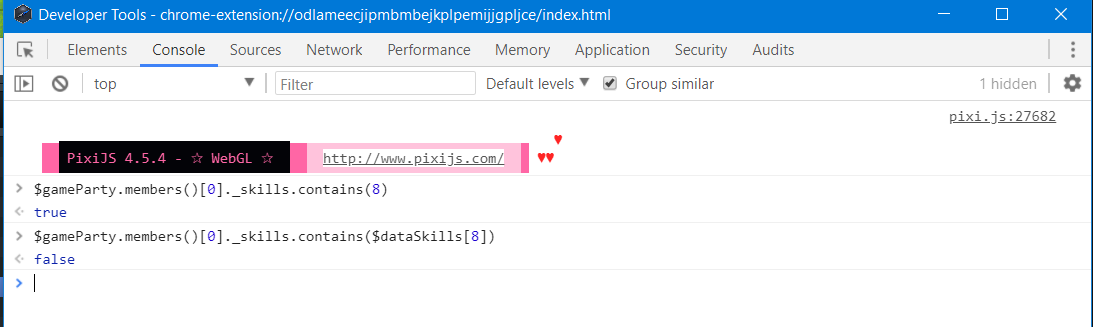
    contains.png


    acumenoftheabacus said:
    I want to display a message window in combat without hiding battle UI. How can I do that?
    Are you in the right forum/thread? You're asking about JavaScript, but your profile says you're using VX Ace, which is based on Ruby.

    If you are in the right place, then it depends whether you're using MV or MZ. For MV, Yanfly has message plugins that control where on the screen the message window is displayed (as does Galv, I believe). You could try one of those - but this is really a question for a plugin thread, not JavaScript as there's not a single JS command that would accomplish this, as far as I know.
  18. ATT_Turan said:
    That can't be correct, unless that result is false. Where is this battleSkills coming from? It must be a plugin, as it doesn't exist in the base code.
    Yea, ._battleSkills comes from Yanfly's YEP_EquipBattleSkills plugin. It simply contains the skill IDs of the unit's equipped skills. I decided to use ._battleSkills since all I needed was to check if certain skills were equipped and cuz it's shorter, lol.

    Also, thanks a bunch for the detailed explanation!

    Edit: Another quick question!
    Could I just put a conditional into this box if I wanted various Counter skills to only sometimes times require the offending attack to be Physical? If so, how would I reference the Counter skill being procced?
    1645871123080.png
  19. Frostorm said:
    Could I just put a conditional into this box if I wanted various Counter skills to only sometimes times require the offending attack to be Physical?
    No - the instructions on that window for the parameter say that it accepts a boolean value. There's nothing there to indicate it would evaluate code that you entered.

    If you read through the rest of the documentation, there are thorough instructions you can give via notetag to customize how each counter skill works, what kind of damage it reacts to, chance of it countering, etc.
  20. (MZ) I'm trying to make my game resolution 544x416, but it doesn't shrink down properly. The actual game still seems to be bigger, and these scroll bars appear, because the whole thing isn't fully visible.

    What am I doing wrong?
    This is without any plugins.