So I looked around the forum for a while and couldn't find what i was looking for so decided to make an account and post this. If this has indeed already been answered somewhere just point me in the right direction.
Also I'm using RPG Maker VX Ace
Basically I'm currently working on a game that changes its point of view between multiple actors.I'm still rather new at this but I've figured out how to change actor to actor without just modifying the original actor as the game progresses, so that classes/appearances/skills change with ease.
But my problem is that I don't know how, if this even can happen, to also change the players items with each actor. For example, if the player is currently playing as Actor A and Actor A has 5 potions, and then the player switches to playing as Actor B, I don't want the player to have those potions anymore. And then whenever the player eventually switches back to Actor A I want the potions to appear in their items list again.
Is there some simple command I am missing? Or is there a script I can use to do this? And if there is a script how would I go about using it in a case like this? Any help & suggestions is greatly appreciated!
Items change with actor change?
● ARCHIVED · READ-ONLY
-
-
This script by Formar0153 did the trick for me when I was in this situation: http://cobbtocs.co.uk/wp/?p=135
Directions in script. If you need more let me know and after I get some sleep I'll try to assist more (way too late and I'm barely awake enough to post this as is). -
Awesome! I'll try it out and report my progress.
Thanks a lot! :D -
The demo game, Crysalis, has character switching the way you're describing, and it's unencrypted specifically so that you can look at how it's all made and do it yourself.
-
Okay so I've looked around and figured out what all goes into using this script. Only problem is I have no idea where to place it in the script editor to begin with xD Beyond that though I think I have it figured out.This script by Formar0153 did the trick for me when I was in this situation: http://cobbtocs.co.uk/wp/?p=135
Directions in script. If you need more let me know and after I get some sleep I'll try to assist more (way too late and I'm barely awake enough to post this as is).
I'll run through it and see how it works this way compared to the script. Thanks!The demo game, Crysalis, has character switching the way you're describing, and it's unencrypted specifically so that you can look at how it's all made and do it yourself. -
I've moved this thread to RGSS3 Script Requests. Please be sure to post your threads in the correct forum next time. Thank you.
-
All regular scripts are added under the materials header, where the script editor tells you "insert here".Only problem is I have no idea where to place it in the script editor to begin with
When adding several scripts, you might have to be careful about the order, but all scripts go into that area -
With more sleep, here's more on how to use it:
First I put it near the bottom of the scripts in my game. The only conflicts I could foresee is if you have a script that also gives you alternate currencies as those two may clash.
Then, to change inventories, call the following via a script call in the event:
$game_actors.change_inventory("Actor2")
or something like that, replacing "Actor2" with whatever you wish to call the next set of inventory.
Just remember the inventory you start the game with is called "Main" (quote marks included), so when/if you want to change back, call that.
Also, you must start a new game once you install this script, and delete all saves in the directory (or at least I had to when I installed it). Otherwise the game will crash when you first go to save as it will look for your gold, and it will be under a different name. -
Thanks again for your help on this! Okay so when I am inputting the script in the event I just used $game_actors.change_inventory("inv1") to keep it simple but I keep getting this error.With more sleep, here's more on how to use it:
First I put it near the bottom of the scripts in my game. The only conflicts I could foresee is if you have a script that also gives you alternate currencies as those two may clash.
Then, to change inventories, call the following via a script call in the event:
$game_actors.change_inventory("Actor2")
or something like that, replacing "Actor2" with whatever you wish to call the next set of inventory.
Just remember the inventory you start the game with is called "Main" (quote marks included), so when/if you want to change back, call that.
Also, you must start a new game once you install this script, and delete all saves in the directory (or at least I had to when I installed it). Otherwise the game will crash when you first go to save as it will look for your gold, and it will be under a different name.
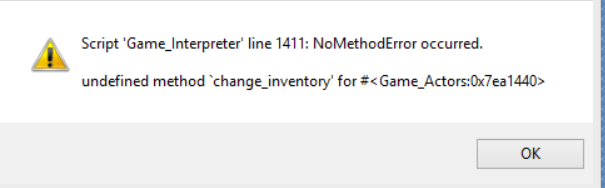
Not being a scriptor myself I have not the faintest clue as to what it means ;D I tried it multiple times, made a whole new project, even tried taking out the parenthesis and quotations to see if there was any change in the error but nothing. -
Did you start a new game after adding the script, or did you load a savegame?but I keep getting this error.
That error is always the result of a missing declaration and in 90% of all cases this is caused because the developer loaded an old save from before the script (and it's setup) was included. A lot of scripts need the "new game" to start themselves properly.
If you did start a new game, then the script or its functions or the script call events need to be checked for typos in the names. -
I erased all the save files in the project and started a new game. Started a whole new project and that didnt work either. This is what I used in the event:Did you start a new game after adding the script, or did you load a savegame?
That error is always the result of a missing declaration and in 90% of all cases this is caused because the developer loaded an old save from before the script (and it's setup) was included. A lot of scripts need the "new game" to start themselves properly.
If you did start a new game, then the script or its functions or the script call events need to be checked for typos in the names.
$game_actors.change_inventory("inv1") -
please read a script's instruction before using it - you made the wrong scriptcall
The following is the part of the script giving your instructions:
Code:ALLWAYS read a script and its instructions when you add it to your project - most of the scripts contain the information of their use in their headers, and a lot of them require configuration and will not work if you do not follow their instructions.----------------------Instructions----------------------The default inventory is called "Main" you can change it belowif you wish.To change inventory call:$game_party.change_inventory(name) -
I had read it over a few times. Reading the original scriptors FAQ he said that replacing party and actor was necessary when there is only one actor in the party at a time. Also parenthesis are required. I'm just going to keep fiddling with it until something new happens.
-
My bad, it is $game_party, not $game_actors. Try $game_party and see what happens, even if you only have one actor.