Or if you want it completely static, just set in the database - system menu to draw the background image, set the image you want as background and just use MOG title particles for your particles and MOGS Picture COM for your commands.(in this case turn off MOG layer plugin)
Either of these things should work for you.
Regarding centralizing your game commands, are you using a plugin for that? Does it come with Hima plugin or are you using MOG Picture COM?
*sorry for off topic post but came to post what others did*
Is that artwork from those old children's horror books, "Scary Stories to Tell in the Dark"?
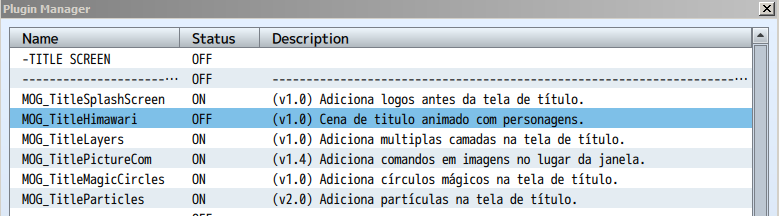
Alright, the background is in place now, but I would like to use the MOG_TitleHimawari plugin to showcase the characters in the game doing cool poses, but if I turn it on or off then I just get a still screen.
So take your characters and put them on to a layer in PSD or similar, the canvas should be the same size as your Background_1 image.
Make sure the background is transparent.
Then set them up, like you did for Background_1 in Mog_titlelayers plugin.
Play with the Z index setting to move the layers forward and back.
I also tried the method you mentioned and it didn't do anything. The MOG_TitleHimawari plugin is still on and it doesn't show the characters at all. It's the same way when that plugin is turned off...
What do you mean it didn’t do anything? If you followed what I said, it would have added multiple layers on to your title screen. Mog titles plugin is for scrolling layers from left to right etc
If you want layers to behave the same way as himawari then you’ll need to use that plugin for that.
I’m not sure if it contains a setting to make the background layer stay static. I would think that it does, but possibly not. You’ll need to look at it and see if there is a setting for your bg layer that says x or y scroll, and then set to zero.
You need to spend some time playing with settings to figure these things out for yourself otherwise almost every plugin is going to have problems..
You can use online translator tools if you need to translate any mog plugin instructions in to English.
Okay...I did some tinkering around and I manage to get the method you mention to work
Though the MOG_TitleHimawari plugin has a way to rotate and fade in/out the pictures and the MOG_TitleLayers plugin just limits me to make the layers move on the x/y axis...
Though what I'm trying to do is replacing files with custom graphics that the plugin requires. Also I've been toggling some parameters on the MOG_TitleLayers plugin, which the MOG_TitleHimawari plugin is affected by what values I put on it. As of now, it's me trying to keep default settings from the plugins, replace files with custom graphics (without changing the names), and toggle parameters in the MOG_TitleLayers plugin without changing any parameter values in the MOG_TitleHimawari plugin
After many attempts and banging my head on the desk multiple times later...I found a way to get the MOG_TitleHimawari plugin to work along with the MOG_TitleLayers plugin
Solution
Originally this line of text on line 369 is this.background [0].origin.x += 1; I just changed the code to background [0].origin.x += 0;
Also I had to edit the background file a bit
Solution
To not have that tiling effect, I put an offset filter on the image using photoshop. The image dimensions are 1280x720 pixels and I took the height and width values and divided in half, leaving an offset of 640x360 pixels. The image will look like a whole static image in game.
I did some more steps to get the plugin functioning the way I need
After I did some more trial and error setting up the values on each parameters in the MOG_TitleLayers plugin I finally got the intro screen looking decent...