I am working with someone that is making these graphics. However, the issue is that characters walk up and down, left and right. Would it be possible to make characters only walk in a way to make this work? And can you point me in the right direction?
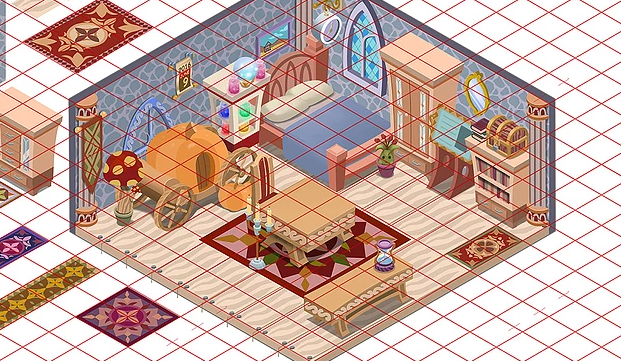
Is this possible? Isometric views?
● ARCHIVED · READ-ONLY
-
-
It is possible to make the character move diagonally(There are many plugins for that). If what you wish is to make it move ONLY that way, it would require just some modifications here and there to make what ever plugin you choose work.
I don't know exactly how to modify that in a plugin, but maybe taking a look inside the code, copying what make it move diagonally and pasting it inside what ever rpg_ main javascript(Inside JS folder, before plugins) controls movement, you can do it. -
Isometric is possible, but it is not easy and has limitations.
As said above you can have the actor move diagonally and use parallax mapping to get isometric maps to show.
What is not possible is to turn the grid diagonally, which means that the events will still be defined on the regular grid and have their triggers on those horizontal/vertical lines.
If you can live with that restriction... -
100% possible. Look up the project Arcadian Atlas. It's an isometric tactics RPG that was being developed with RPGMaker MV on Kickstarter.
However, it is not easy at all. It was so -word for makes you do extra annoying stuff- that it was faster for them to top using what they had in RPGMaker and swap to Unity midway through. -
Thank you three for your advice. I have the graphic designer that you saw above on the phone and we are discussing how to proceed. I will look into everything you said before going any further.
-
I'm actually making an isometric game using the TileD plugin and the Tiled Map Editor. The plugin only supports orthagonal tiles but if you draw your tiles right, you can easily create an iso view.
Example screen from my current project made with 24px tiles (animated so you can see collisions/overlays in action):
Spoiler
It's a little tricky; it takes a while to figure out how elements fit together, and you'll always end up needing 2-3x more tiles than a normal orthagonal map would (or a normal iso grid map). Creating the tiles is the hardest part; using them in a map is MUCH easier... though, you have to accept the fact that you can't use autotiles. You'll also need a plugin to control player movement. In my case, I just let the players walk however they like, rather than restricting them to a grid of any kind. I'm not sure there's a plugin out there right now that will force the player to walk diagonally instead of orthagonally, but I'm sure it's possible.
Case in point (me trying to figure out how to tile grass):
This set of grass tiles ended up being somewhere around 60 tiles - plus color variants - just so I could get it to tile around all edges smoothly.Spoiler
Alternatively you can parallax the maps, but I tried it and hated it; ended up with this. XD -
@ashikai
Your game is looking nice! I was going to make the characters walk freely too, as it seems the best option now.
I see you have a prototype of the isometric tiles uploaded above, but can you upload a finished one? Anything will do, even a really bad looking one (so you don't have to give out your work) - just to understand better. -
@BehemothTheBeast sure~ I'll just post the grass tiles since I was using those as an example.
Here are the ACTUAL SIZED finished grass tiles (with grid lines so you can see how it's split up). This is just one set of grass. Tiles are 24px.
Spoiler(They're off base from the gridlines slightly because of the way I screencapped it)

Below is the full tileset (currently. It's still under construction and I'm still adding/adjusting things as I discover new things while I'm mapping) (not actual size)
Spoiler(They're off base from the gridlines slightly because of the way I screencapped it)

And here's a map utilizing some of these tiles in various ways (map isn't *really* done. Still has errors like the flowers on the school sign and stuff):
Spoiler -
@ashikai
Thank you for posting, that is helpful! You're so nice!
I may be hiring someone to do these graphics, I had them on standby, as I am between this and 3D graphics, going to blow RPG Maker out of the water secret hushhush project. I've uploaded a picture of the new graphics, from a project the graphic designer did recently.
If I do make the executive decision to do isometric I would be willing to work with you and have you talk with my designer at no cost to you for your kindness, as you seem to be learning this. It seems new to do this type of isometric thing, but I do not know. I doubt I will go isometric after finding this new artist but it's slightly possible ... or I may in a future project ( hmmm :D )
Happy Valentines Day!~ -
@BehemothTheBeast Parallax mapping is definitely simplier, and if you've got an artist that's up for doing the maps that way it'll be a less of a headache than Isometric will. I really wanted a game that was kinda MegaMan Battle Network-ish (and that game is isometric) and I wasn't willing to compromise so I'm forcing my way through this muck lol
Hope you land on a style that works well for you! Sounds like your game will be very visually appealing. :) -
Sorry for the Necro100% possible. Look up the project Arcadian Atlas. It's an isometric tactics RPG that was being developed with RPGMaker MV on Kickstarter.
However, it is not easy at all. It was so -word for makes you do extra annoying stuff- that it was faster for them to top using what they had in RPGMaker and swap to Unity midway through.
But I just want to point out that Arcadian Atlas has moved to Unity, and is no longer being developed in RPG Maker
Source
https://steamcommunity.com/games/691790/announcements/detail/1710692554526324802 -
Seth-Rah, please refrain from necro-posting in a thread. Necro-posting is posting in a thread that has not had posting activity in over 30 days. You can review our forum rules here. Thank you.
