Ok so I want to make an event where i click on an event square placed over a door which leads to game over. Then when i pick up a key instead of game over i get the option to use the key or not. Is this possible to do? Thanks.
I NEED HALP!
● ARCHIVED · READ-ONLY
-
-
Totally possible
Easy make a conditional branch that specifies if (Key) is in the inventory
If yes
Options Yes,No
Yes= transfer
No=Gameover or nothing.
Under Else
Gameover -
Ok so I want to make an event where i click on an event square placed over a door which leads to game over. Then when i pick up a key instead of game over i get the option to use the key or not. Is this possible to do? Thanks.Im sorry im completely new to this, could you please go step by step if you dont mind? Thank you :)Totally possible
Easy make a conditional branch that specifies if (Key) is in the inventory
If yes
Options Yes,No
Yes= transfer
No=Gameover or nothing.
Under Else
Gameover -
...if you are new to this I know there are event tutorials.
Look it up on google you can find topics and videos. I suggest you do this will help you further in the future.
-
Dang well I have tried to search this up but i cant seem to find anything. I got the gameover part down and when i pick up key and thats pretty much where im stuck. I dont know how to not get gameover now since I have the key...if you are new to this I know there are event tutorials.
Look it up on google you can find topics and videos. I suggest you do this will help you further in the future. -
You really should spend time familiarizing yourself with all the event command options, and the database first, before asking for help or even looking up tutorials. Knowing all the commands, and stuff, is like 80% of figuring things out in RPG Maker, odds are you wont even need to watch tutorials(just play around with the commands, and stuff see see how they function, and you'll be fine).
-
To do it: Make an event with the door closed (or use your door currently), click on the blank space to make an action, on the bottom of the first page of actions, on flow control, click the first action, conditional branch. After that, click on "4" tab, then click on the circle on the side of "items". Get the key item from the items, then click it. (assuming you created the item) then click ok. Then click on the blank space below "Conditional Branch: (item or key name) in Inventory. After that, click on show text in message tab, if you want to add a text if he want to open the door, and write anything you want. Now, click on blank space below and click on "Show choices" below "Show text", leave it like that, and press ok. Below [yes], click on blank space, then click on control self switch on game progression tab, and then click ok. Go down where you can see "Else", and below that, click on blank space, go to tab "3", then click on Game Over, in Scene Control tab. Now, all the way up in the window, click on "New Event Page", then go down on "Conditions" dialog and click on circle aside of "Self Switch", then leave it like that. Now, if you want to add a opened sprite, go down and click to get a picture. Finally to pass the door, click and enable "Through", just below the event picture. What you make in event page 2 is interaction with door after the door is opened.Dang well I have tried to search this up but i cant seem to find anything. I got the gameover part down and when i pick up key and thats pretty much where im stuck. I dont know how to not get gameover now since I have the key
A simple conditional branch will do :) it's like this:
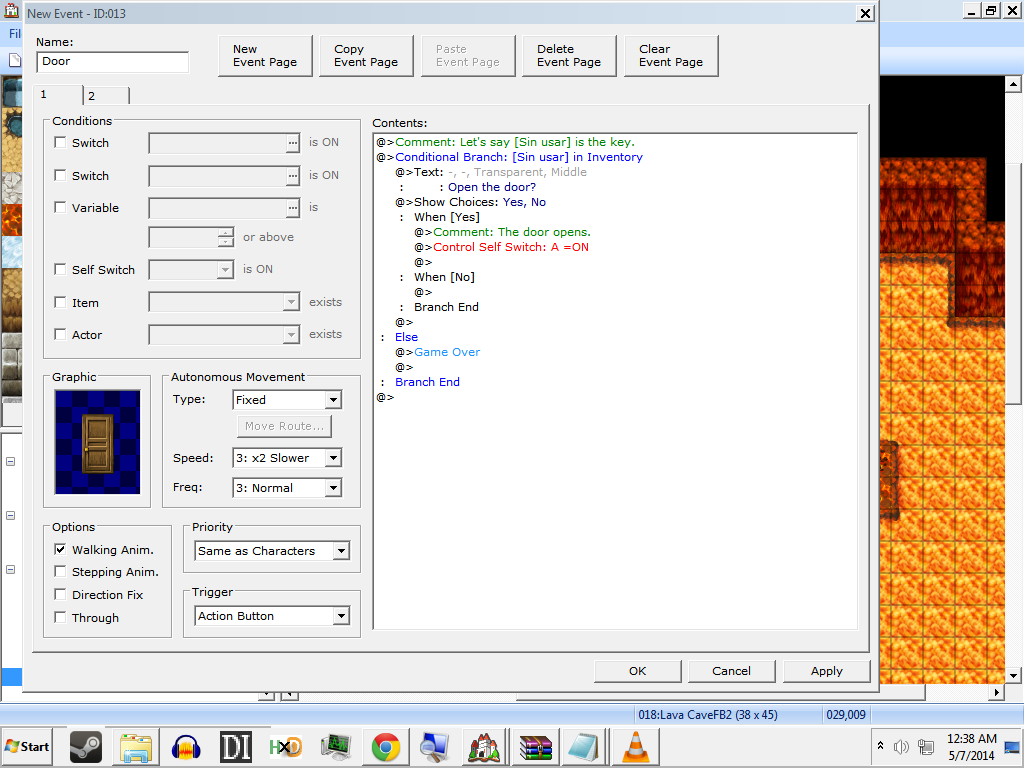
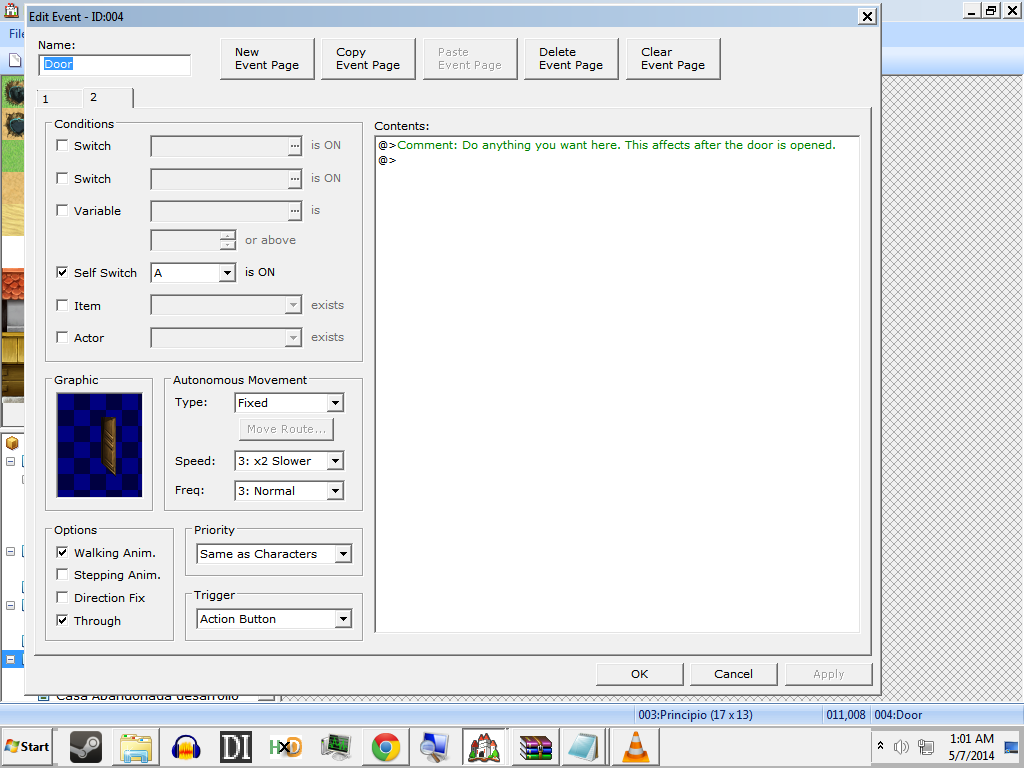
-
-
Thank you for the awesome reply! But I want that event square to be a game over FIRST if I just talk to it. Then when I pick up the key I want to go back to the same door and give me a choice if I want to open it or not, instead of giving me the straight gameover. Is your explanation allowing me to do that if so I will try out your explanation.To do it: Make an event with the door closed (or use your door currently), click on the blank space to make an action, on the bottom of the first page of actions, on flow control, click the first action, conditional branch. After that, click on "4" tab, then click on the circle on the side of "items". Get the key item from the items, then click it. (assuming you created the item) then click ok. Then click on the blank space below "Conditional Branch: (item or key name) in Inventory. After that, click on show text in message tab, if you want to add a text if he want to open the door, and write anything you want. Now, click on blank space below and click on "Show choices" below "Show text", leave it like that, and press ok. Below [yes], click on blank space, then click on control self switch on game progression tab, and then click ok. Go down where you can see "Else", and below that, click on blank space, go to tab "3", then click on Game Over, in Scene Control tab. Now, all the way up in the window, click on "New Event Page", then go down on "Conditions" dialog and click on circle aside of "Self Switch", then leave it like that. Now, if you want to add a opened sprite, go down and click to get a picture. Finally to pass the door, click and enable "Through", just below the event picture. What you make in event page 2 is interaction with door after the door is opened.
A simple conditional branch will do :) it's like this:
-
Yes, the explanation what does is that if you don't have the key, there will be straight game over, if you have the key, what you put happens, like door open which I included, and choice of using key.Thank you for the awesome reply! But I want that event square to be a game over FIRST if I just talk to it. Then when I pick up the key I want to go back to the same door and give me a choice if I want to open it or not, instead of giving me the straight gameover. Is your explanation allowing me to do that if so I will try out your explanation.
-
You should also put Game Over in the "No" section of the choices - so if they HAVE the key and choose NOT to use it, it's also game over (assuming that's what you want to happen).
I will also confirm M_Michael's statement that if they don't have the key and interact with the event, it will be game over.
But yes, find some basic tutorials and go over them (you seem to be ignoring everyone's suggestion in this matter and only interested in getting this particular event up and running - but really, if you learn HOW and WHY by doing tutorials, you'll be able to solve not only this one yourself, but the next dozen you would have asked for help with as well ;) ) -
Ok im having a bit of trouble. I did the exact same thing as you but when I click on the event and i dont have the key it just reads "Open the door?" and no options come up. When I do have the item it says "Open the door?" and when I press yes, it just asks the same question and shows the same options.Yes, the explanation what does is that if you don't have the key, there will be straight game over, if you have the key, what you put happens, like door open which I included.
-
Ok I take back what I said im not "completely" new I just need help on this particular scenario. Tutorials dont seem to be giving me the info i want.You should also put Game Over in the "No" section of the choices - so if they HAVE the key and choose NOT to use it, it's also game over (assuming that's what you want to happen).
I will also confirm M_Michael's statement that if they don't have the key and interact with the event, it will be game over.
But yes, find some basic tutorials and go over them (you seem to be ignoring everyone's suggestion in this matter and only interested in getting this particular event up and running - but really, if you learn HOW and WHY by doing tutorials, you'll be able to solve not only this one yourself, but the next dozen you would have asked for help with as well ;) ) -
Weird, I tested it both without and with key and it worked perfectly, you must have missed something, can you make a screenshot by pressing Prt Scrn (right of F12), going to paint, press paste, save picture, then upload it here or somewhere like photobucket and show it? Can you see the picture of the event I made and see if everything in the picture is as you have in your event?Ok im having a bit of trouble. I did the exact same thing as you but when I click on the event and i dont have the key it just reads "Open the door?" and no options come up. When I do have the item it says "Open the door?" and when I press yes, it just asks the same question and shows the same options.
-
hunk12349, please avoid double posting, as it is against the forum rules. You can review our forum rules here. Thank you.
If you want to reply to several people and quote their posts (though it's REALLY not necessary to quote everyone you reply to - especially when they have large screenshots), use the MultiQuote button on their posts.
You must have done something wrong. The question would only come up if they DID have the key.
Use photobucket to host the image and link to it here. Members don't get a whole lot of space for attachments and it doesn't take long to use it all up. -
http://s1166.photobucket.com/user/coralreef123/media/346586c90d4253a5d978ff45775308bf_zpsa70e1ad4.png.htmlWeird, I tested it both without and with key and it worked perfectly, you must have missed something, can you make a screenshot by pressing Prt Scrn (right of F12), going to paint, press paste, save picture, then upload it here or somewhere like photobucket and show it? Can you see the picture of the event I made and see if everything in the picture is as you have
Will this link work? -
You've put the text before the conditional branch. It should be after. You only want to ask about it if they have it.
And the Game Over should also go after the Else of the conditional branch (so if they don't have the fish, or they do have it but decide not to throw it in, both will result in game over) -
Put game over below "Else", and delete the second "Show Choices" then after the text in "Yes", put the telepoirt. Move the text of "Throw fish in fireplace" to inside the conditional branch, above the "Select Choices" (it should have been done earlier), I've made an example with your texts:

And here is a video of what you must have in my first example: http://s1228.photobucket.com/user/michaelbrutal1/media/Whatyoumusthave_zps1eae1da3.mp4.html?sort=3&o=1 -
I think the second choices is there so that after you throw in the fish, you get the option to go into the fireplace.
In that case, you will want to add the same (second) show choices to the second tab - so if you throw in the fish but don't go into the fireplace, you can come back later and go in. -
ok cool! I figured it out :) Thanks so much for the help!I think the second choices is there so that after you throw in the fish, you get the option to go into the fireplace.
In that case, you will want to add the same (second) show choices to the second tab - so if you throw in the fish but don't go into the fireplace, you can come back later and go in.