How to write an if statement with multiple conditions and variables?

● ARCHIVED · READ-ONLY
Started by Xenphir 14 posts View original ↗
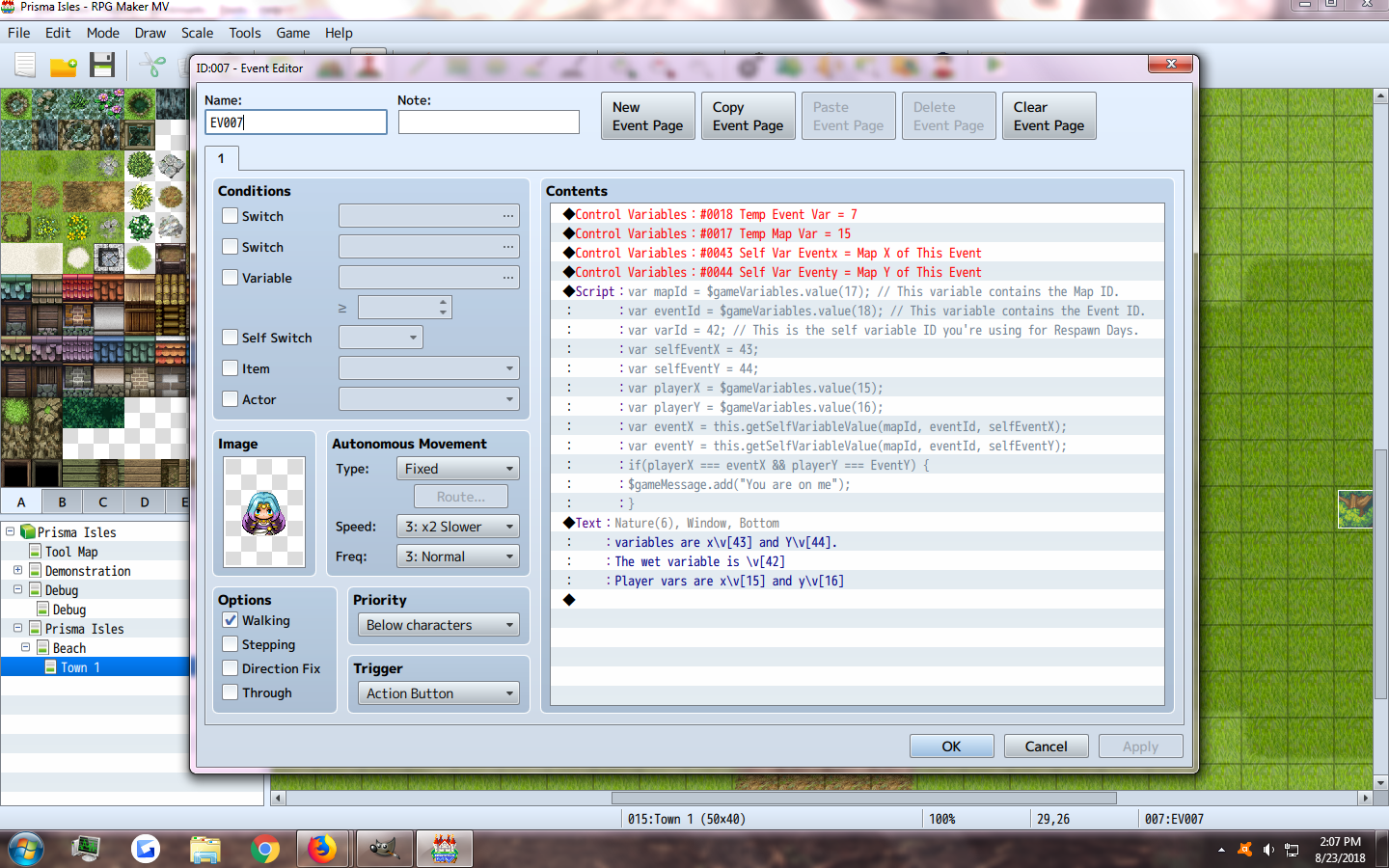
  1. So I am trying to get this event here to call the ID that the player is standing on. I have confirmed that it does collect the correct event ID based on player location, and that the self-variables are being pulled correctly. However I think I wrote my If statement wrong because when player location is equal to event location, it should pop up the message "you are on me" but it doesn't.

    Image
    upload_2018-8-23_14-10-51.png
  2. I'm not sure exactly what is wrong by looking at the screenshot (maybe something with the self var script?) but it seems like you are doing things in a very convoluted way.

    If you're going to be using a script call to show the message anyway, why not just check the event and player positions from javascript directly instead of assigning to rm variables and reading them?
  3. lordosthyvel said:
    I'm not sure exactly what is wrong by looking at the screenshot (maybe something with the self var script?) but it seems like you are doing things in a very convoluted way.

    If you're going to be using a script call to show the message anyway, why not just check the event and player positions from javascript directly instead of assigning to rm variables and reading them?
    The message is a temporary think so that i can test the if and statement. I actually need to get it to change a self variable for an event by getting that specific event's information. My main goal is that when this script is used from a watering can, if the player is on the event, it will make the crops self variable to wet.
  4. Looks fine, except, where are the player x and y coming from?
  5. Xenphir said:
    The message is a temporary think so that i can test the if and statement. I actually need to get it to change a self variable for an event by getting that specific event's information. My main goal is that when this script is used from a watering can, if the player is on the event, it will make the crops self variable to wet.

    What I mean is, shouldn't the javascript be something like this:

    Code:
    for(i=0;i<$gameMap._events.length;i++)
    {
       if ($dataMap.events[i] && $dataMap.events[i].x === $gamePlayer.x && $dataMap.events[i].y === $gamePlayer.y)
       {
          $gameMessage.add("You are standing on event " + $dataMap.events[i].name);
       }
    }
    And then you just set the selfvar on $dataMaps.events?

    Sorry for the horrible javascript code, you can probably get the event through some reduction function but "find" didn't seem to work :)
  6. Aloe Guvner said:
    Looks fine, except, where are the player x and y coming from?
    Like he said, you have to set the variables 15 & 16 if you haven't already.
  7. I re-read your issue, and I believe this is a simpler way. If I'm understanding correctly, you want to modify a "Self Variable" of an event that the player is standing on top of. A "Self Variable" comes from a Yanfly plugin (next time, it would help to link that plugin, even if you think it isn't relevant).

    Code:
    const mapId = $gameMap.mapId();
    const eventId = $gameMap.eventIdXy($gamePlayer.x, $gamePlayer.y);
    const varId = 999;  // Your "Self-Variable" ID here
    const value = 'cowabunga, dude!'
    if (eventId) {this.setSelfVariableValue(mapId, eventId, varId, value);}
  8. Aloe Guvner said:
    I re-read your issue, and I believe this is a simpler way. If I'm understanding correctly, you want to modify a "Self Variable" of an event that the player is standing on top of. A "Self Variable" comes from a Yanfly plugin (next time, it would help to link that plugin, even if you think it isn't relevant).

    Code:
    const mapId = $gameMap.mapId();
    const eventId = $gameMap.eventIdXy($gamePlayer.x, $gamePlayer.y);
    const varId = 999;  // Your "Self-Variable" ID here
    const value = 'cowabunga, dude!'
    if (eventId) {this.setSelfVariableValue(mapId, eventId, varId, value);}
    Im pretty new to scripting so could you explain what this means? Im tryimg to get so when player uses a watering can tool it checks they are on it and waters only that one. Though eventually id like to make it so it does it when player is next to the event and facing it
  9. Sure, here is the same thing with comments. The approach is based on your query:
    I actually need to get it to change a self variable for an event by getting that specific event's information.

    Code with comments
    Code:
    // Get the mapID that the player is currently on
    const mapId = $gameMap.mapId();
    
    // Check the tile the player is standing on for which event Id
    const eventId = $gameMap.eventIdXy($gamePlayer.x, $gamePlayer.y);
    
    // Define which "Self Variable" you will use
    const varId = 999;  // Your "Self-Variable" ID here
    
    // Define what value you will set the "Self Variable" to
    const value = 'cowabunga, dude!'
    
    // If the player is standing on top of an event, then set the "Self Variable" of that event
    // to the value specified earlier
    if (eventId) {this.setSelfVariableValue(mapId, eventId, varId, value);}

    It's up to you where you call this script. The easiest would probably be in a Common Event that you call when the player uses the "Watering Can".

    For watering an event next to the player, you can check the player's direction, and modify which tile that you look for events. If the player is facing right, check the tile of the player x+1 for example. If the player is facing up, check the tile of the player y-1. You can experiment with the direction by pressing F8 to open the console and type $gamePlayer. Look for the property that gives the direction and figure out which value is which direction.
  10. Aloe Guvner said:
    Sure, here is the same thing with comments. The approach is based on your query:


    For watering an event next to the player, you can check the player's direction, and modify which tile that you look for events. If the player is facing right, check the tile of the player x+1 for example. If the player is facing up, check the tile of the player y-1. You can experiment with the direction by pressing F8 to open the console and type $gamePlayer. Look for the property that gives the direction and figure out which value is which direction.

    I am not sure how to write this in script, as pressing f8 does nothing in RMMV or in Test Game.
    Also the script works if its in the event the player is standing on, but does not work as the Watering Can tool so I will have to play with it a little. XD
  11. Having access to the console is an incredible tool, I would advise trying to figure out why it doesn't work for you. In addition to seeing the full text of error messages, you get auto-complete such as this, so you can learn script variables (faster than waiting for forum replies).

    Here is an example:
    Spoiler
    ConsoleExample.png

    So by doing this, you can test $gamePlayer.direction() and learn that it either outputs 2,4,6, or 8, which are the same directions as on a numpad (2 - down, 4 - left, 6 - right, 8 - up). In this way, you can check the players direction and then check the tile next to them by adding/subtracting 1 to x/y as appropriate.

    Xenphir said:
    Also the script works if its in the event the player is standing on, but does not work as the Watering Can tool so I will have to play with it a little. XD
    What do you mean by "does not work as the Watering Can tool" ?

    I suggested in my previous post to use the code in a Common Event, did you try that?
  12. Aloe Guvner said:
    Having access to the console is an incredible tool, I would advise trying to figure out why it doesn't work for you. In addition to seeing the full text of error messages, you get auto-complete such as this, so you can learn script variables (faster than waiting for forum replies).

    Here is an example:
    Spoiler
    View attachment 97032

    So by doing this, you can test $gamePlayer.direction() and learn that it either outputs 2,4,6, or 8, which are the same directions as on a numpad (2 - down, 4 - left, 6 - right, 8 - up). In this way, you can check the players direction and then check the tile next to them by adding/subtracting 1 to x/y as appropriate.


    What do you mean by "does not work as the Watering Can tool" ?

    I suggested in my previous post to use the code in a Common Event, did you try that?

    Firstly, thank you so much for your patience in dealing with a newbie in this matter. It is much appreciated!
    Here are some screenshots.

    Images
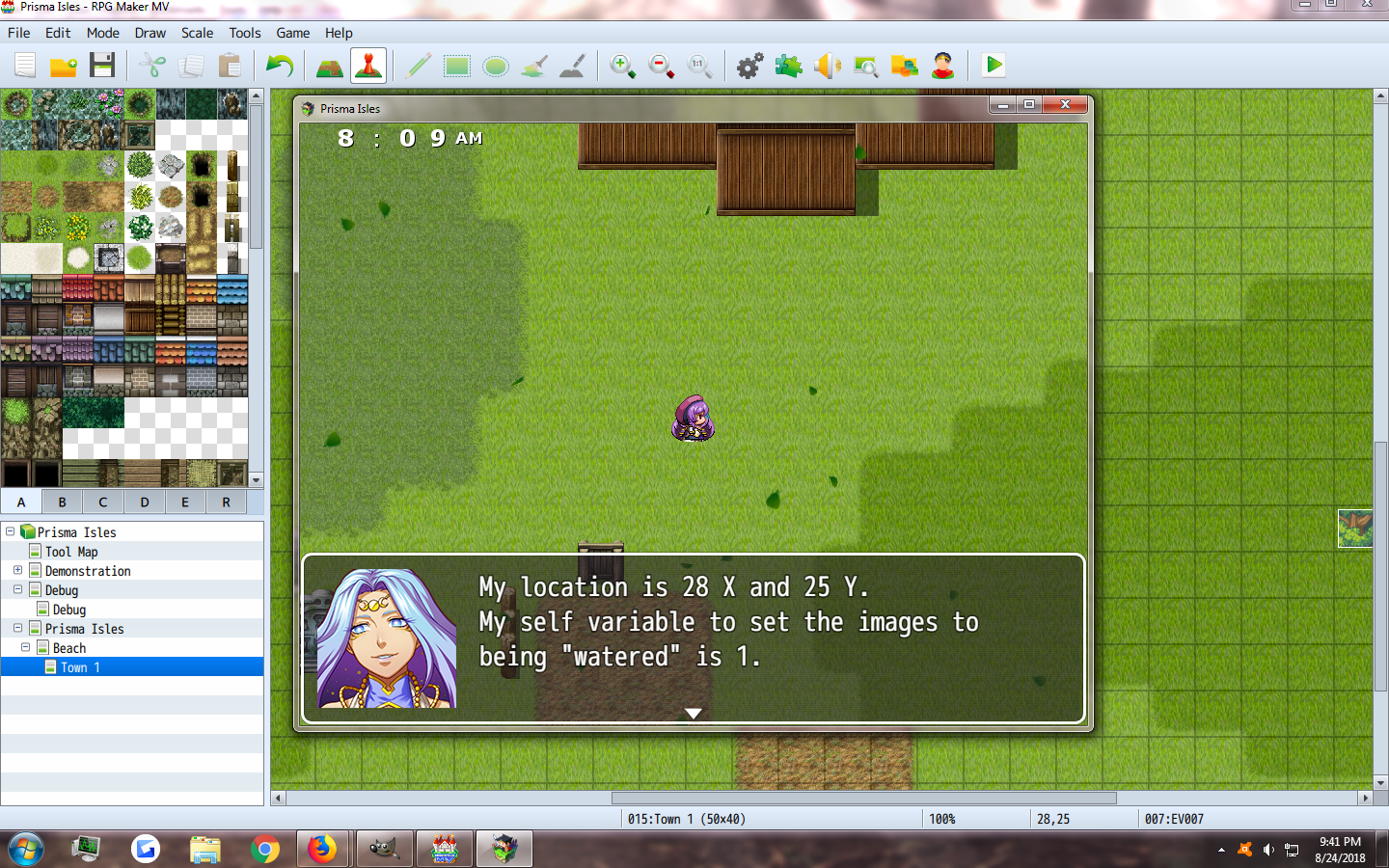
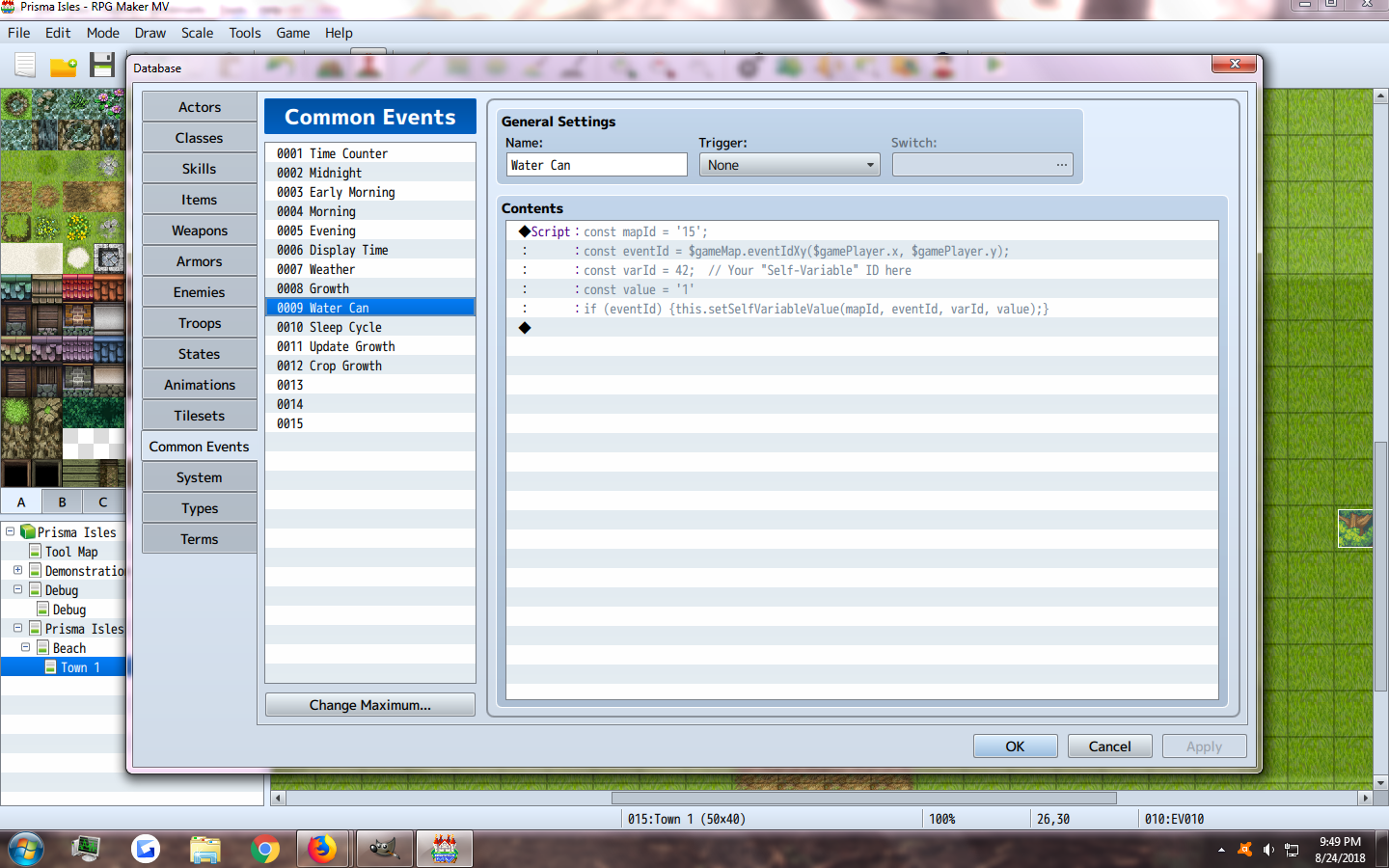
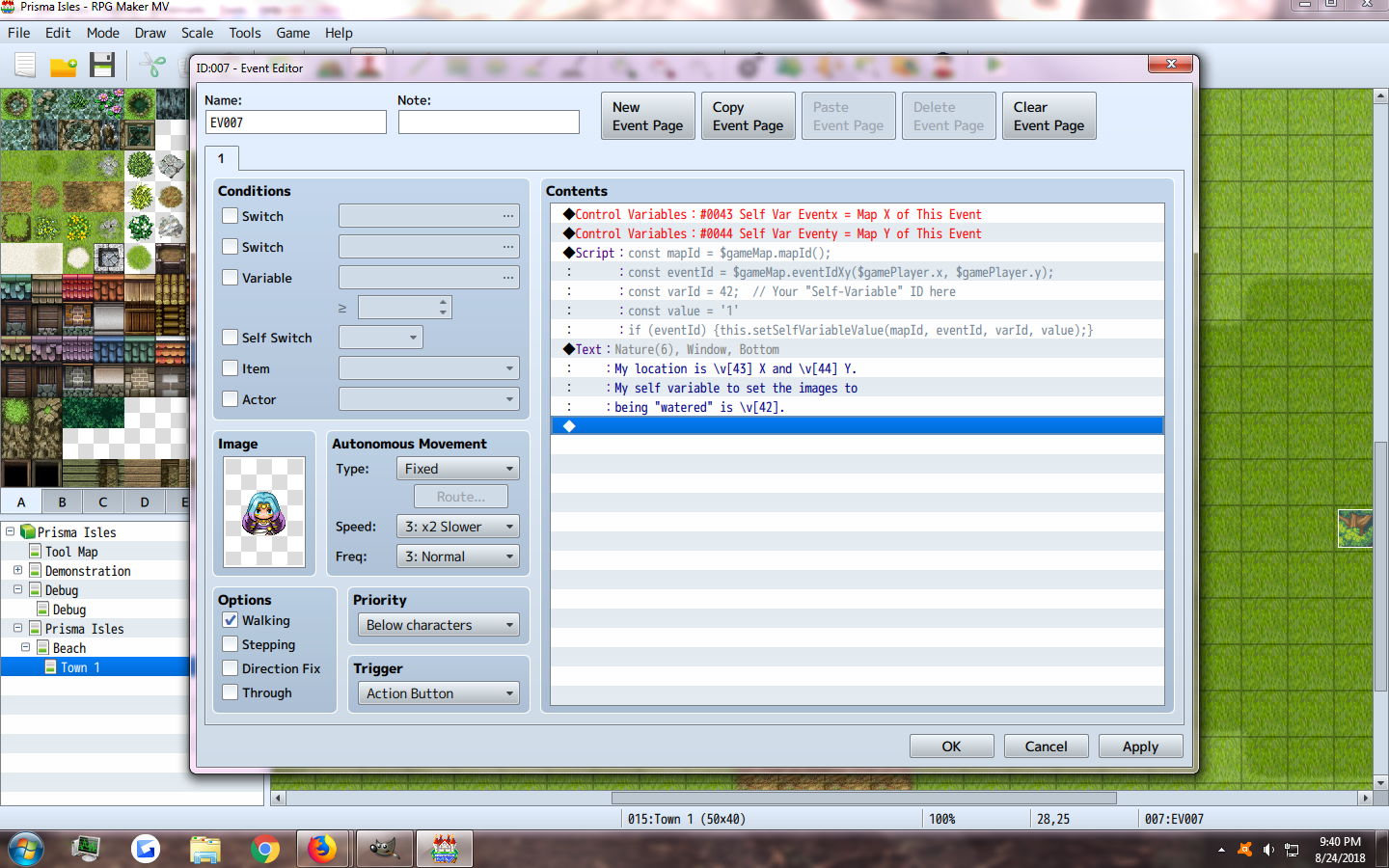
    Firstly, the watering can tool has to be used on Map 1 no matter what to be compatible with Moghunter's Chronoengine. So thinking the mapID was the issue, I changed it to the mapID I need it to be (As only one map will have waterable plants, the rest will regrow on their own in the wild) So the map I have crops on is map 15. When using this script as a direct copy/paste from you on my test event, her self-variable of "wet" turns to 1. Which is what is supposed to happen for the common event displayed earlier, will change the actorsprite to the wet version of the correct growth stage.
    upload_2018-8-24_21-41-22.png
    upload_2018-8-24_21-41-48.png


    So for the actual crops here is my layout, using both Moghunter's collision tools from chronoengine, and yanfly's self-switches and variables.
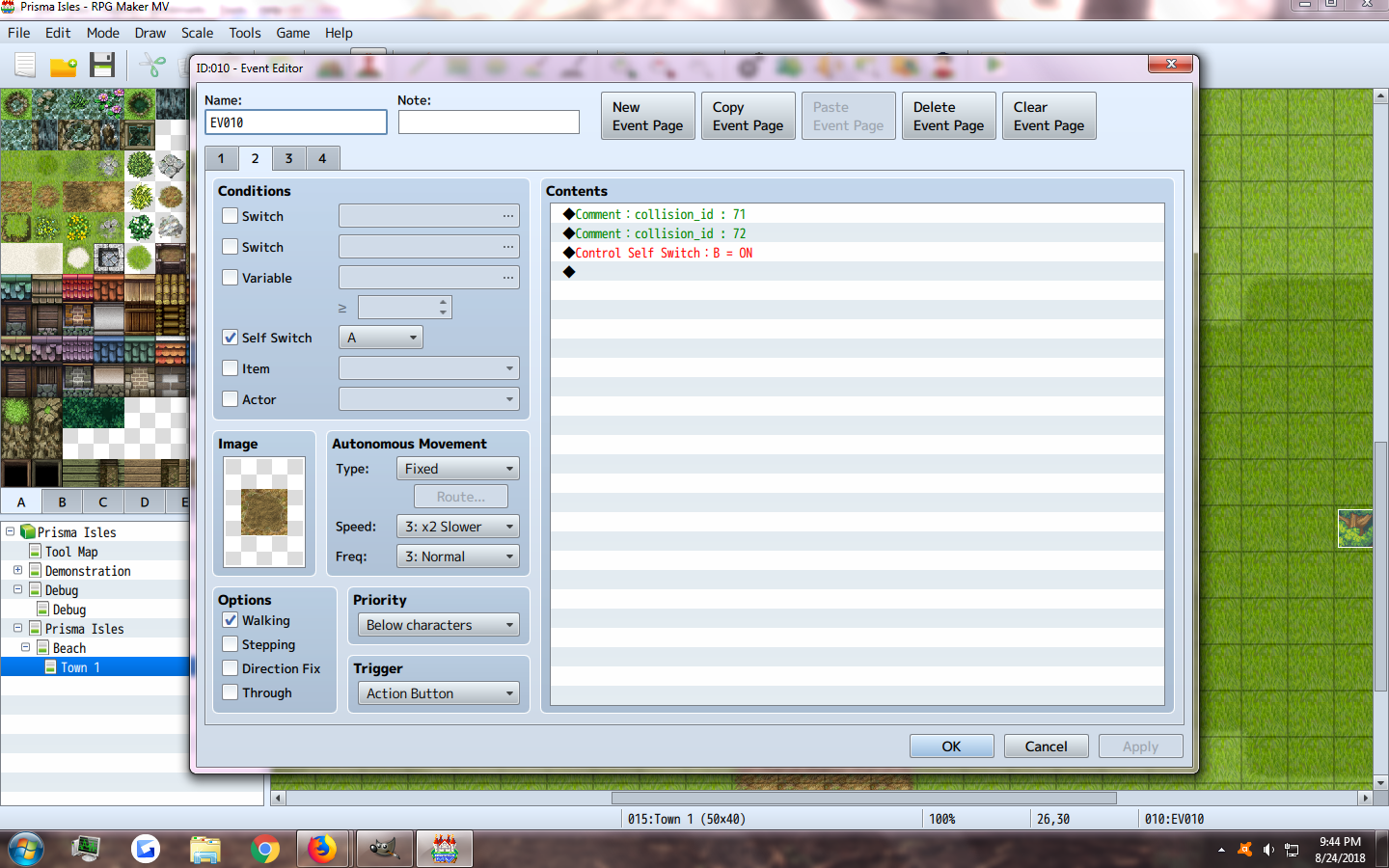
    The first page has collision for a temporary tool "Stone Axe" Which will actually be renamed to a Hoe later on. This sets the ground to be tilled in the next page, and sets the collision IDs from Hoe to the IDs for any/all future seed types.
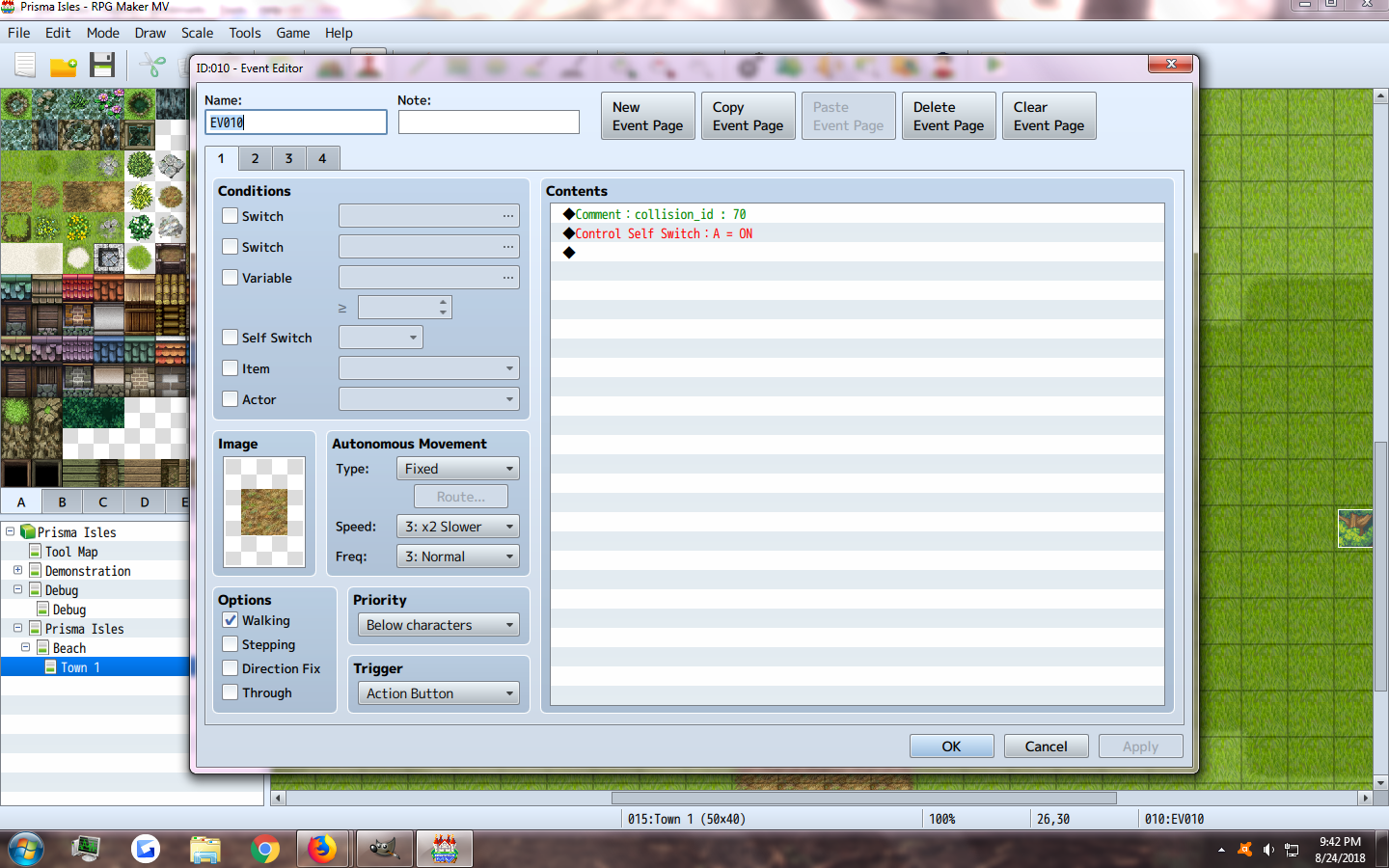
    upload_2018-8-24_21-43-7.png

    This page just lets players toss a seed on the dirt. I was testing with two different kinds at first to see if I can use multiple, Turnips, and grapes. However for this watering bit, I'm only trying to get turnips to work and will add more crops after getting the first one to work.
    upload_2018-8-24_21-45-1.png

    The third page for the seeds sets the variable. Using the tool "seeds", each different seed will set the "seed variable" to its own number. The event at the time of placing the seeds, will read that variable and change it to a self-variable version. This is also where I set the self variable for growth, as shown in Yanfly's re-harvestable plants tutorial.
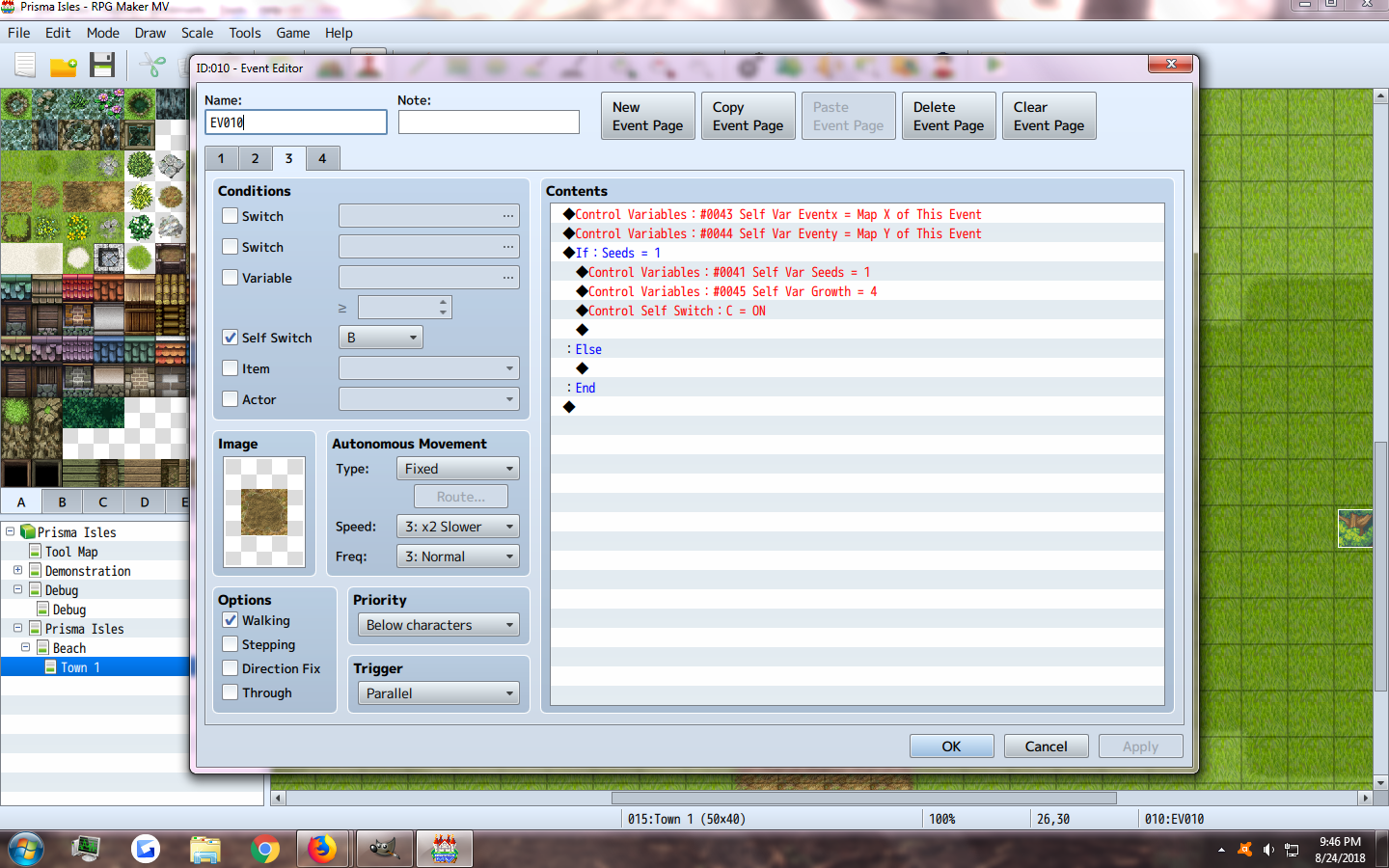
    upload_2018-8-24_21-46-20.png

    Page 4 runs a common event parallel at all times to check the growth stage, and if it has self-variable "wet", and picks the right image. I have not gotten to the harvest part yet.
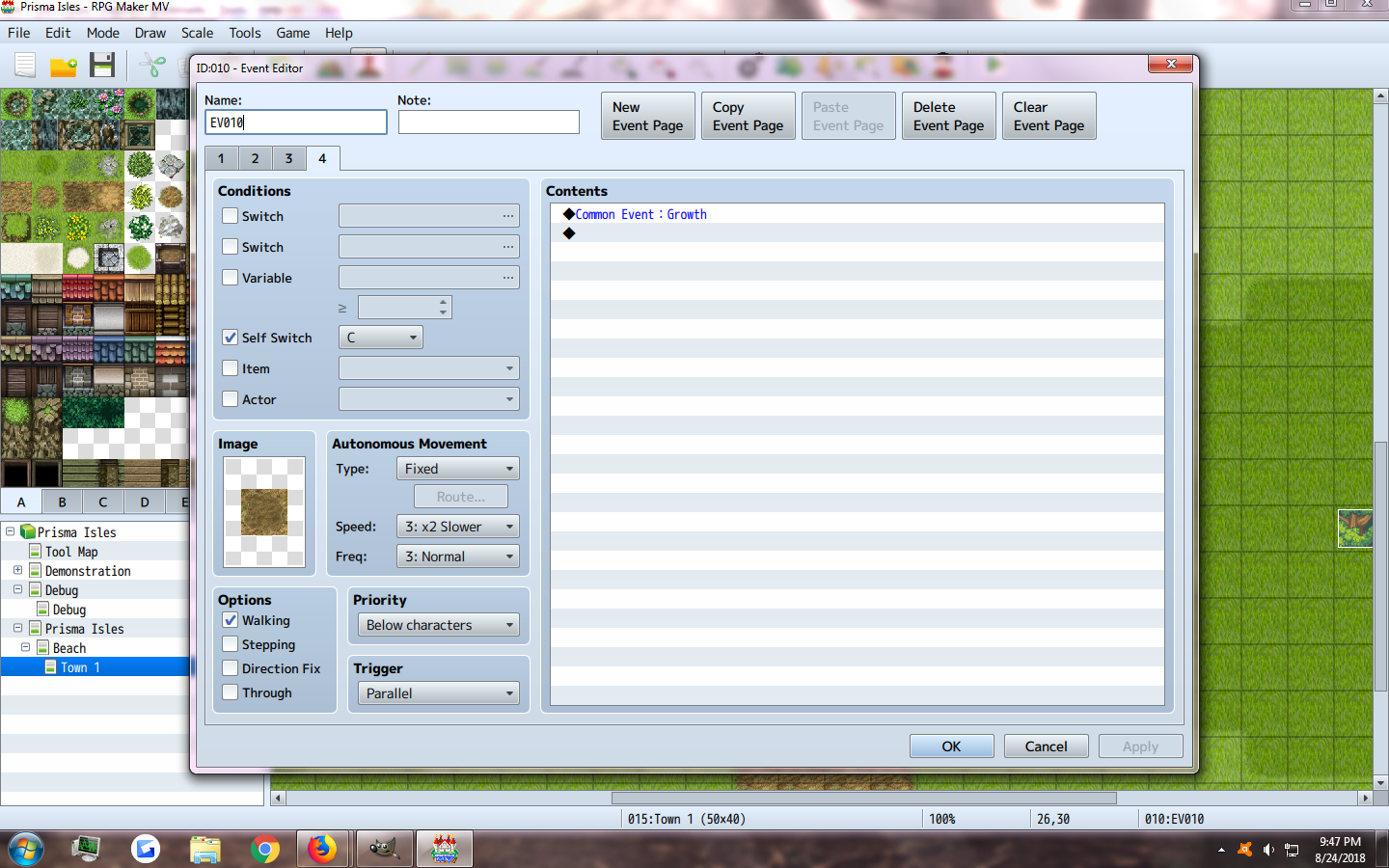
    upload_2018-8-24_21-48-17.png

    upload_2018-8-24_21-48-33.png

    upload_2018-8-24_21-48-45.png

    The water can tool is on Map 1, and uses it via an item's common event. I set the map ID to 15 since I thought it wasn't working because the water can event itself is on Map 1. However, when standing on a tillable-spot, it does not show the wet version of the image.
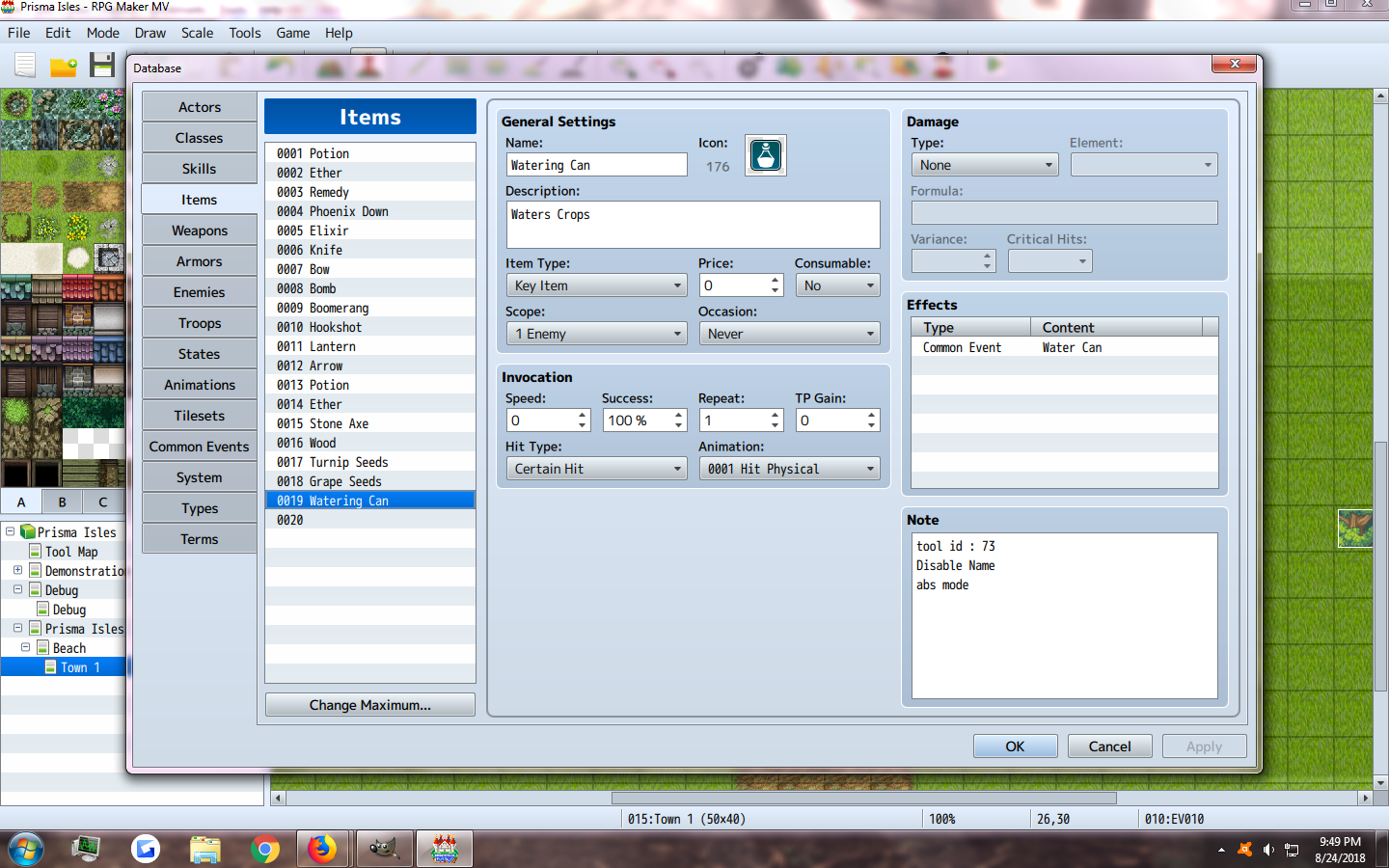
    upload_2018-8-24_21-49-30.png


    upload_2018-8-24_21-50-5.png
  13. One quick thing -
    Note this this:
    Code:
    const value = '1';
    Is different than this:
    Code:
    const value = 1;

    The first one is a string (text), and the second one is a number. For Self Variables, I think you're gonna want the number.
    Also, you should end each line with a semi-colon; sometimes it's OK without the semi-colon but it's better to be safe.

    As for your screenshots, I don't know what "collision_id" and "ActionSprite" is, so I can't help with that, or anything about a Moghunter plugin because I've never used it. But here's a simple example that works using the method that I explained.

    Spoiler
    Here is the first page of the on-map event:
    PlantPage1.png

    Here is the second page. Notice that it's conditioned by the Self Variable.
    PlantPage2.png

    Here is the Common Event that is called by the Watering Can item.

    CommonEvent.png

    Finally, here is the Watering Can item.

    WateringCan.png

    When I use the Watering Can from the Item Menu, the Common Event is called, the Self Variable is updated, and the plant changes graphics.
  14. Aloe Guvner said:
    One quick thing -
    Note this this:
    Code:
    const value = '1';
    Is different than this:
    Code:
    const value = 1;

    The first one is a string (text), and the second one is a number. For Self Variables, I think you're gonna want the number.
    Also, you should end each line with a semi-colon; sometimes it's OK without the semi-colon but it's better to be safe.

    As for your screenshots, I don't know what "collision_id" and "ActionSprite" is, so I can't help with that, or anything about a Moghunter plugin because I've never used it. But here's a simple example that works using the method that I explained.

    Spoiler
    Here is the first page of the on-map event:
    View attachment 97048

    Here is the second page. Notice that it's conditioned by the Self Variable.
    View attachment 97049

    Here is the Common Event that is called by the Watering Can item.

    View attachment 97051

    Finally, here is the Watering Can item.

    View attachment 97052

    When I use the Watering Can from the Item Menu, the Common Event is called, the Self Variable is updated, and the plant changes graphics.

    Omg thank you so much I had no idea what the ' ' did xD I can confirm that using the same page with the parallel common event growth works too, so I don't have to use another page. (Because the graphic blinks/glitches when changing pages so was trying to avoid that as much as posisble) Thank you a ton ^.^ This thread should help lots since the farming genre is more popular now thanks to stardew hehe. ^.^ I had the right idea the first time, but my code was written terribly wrong. Oh and I also figured out for some reason my dev console is f12, but I did get it to pop up so thank you :3