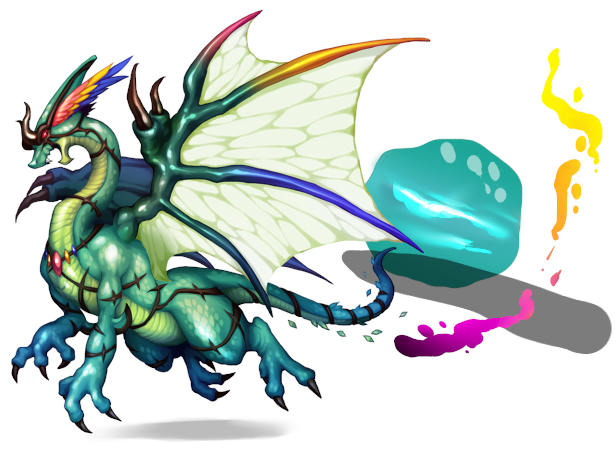
RPG Maker VX, VX ACE and MV have a particular style of pixel art that goes beyond 8 or 16 bit. With older art styles, you're usually dealing with a limited number of pixels and colors. You can zoom in on these sprites and identify the number of colors and pixels used and try to replicate that style by limiting yourself to those constraints. There's also a lot of tutorials out there designed around teaching the base knowledge around how to do this.
But when you move beyond that, the number of pixels and colors seem to expand beyond the point of being able to zoom in and draw pixel by pixel. It would take forever. So I'm assuming that other tools and methods are used that don't require getting all the way down to the pixel level except when putting in extra fine detail.
I was wondering if any artists from the community could point me the right direction on this. Are there techniques out there used to generate different textures and patterns? Are these sprites hand drawn and then digitized? How would someone go about making say, an enemy battler, look like it belongs along side the RTP enemies?
I know that this is not easy. I'd just kind of like to know how they make sprites like that.
Thanks in advance!
How are RTP style sprites created?
● ARCHIVED · READ-ONLY
-
-
Are you talking about tilesets?
-
More the character, enemy, bust and background art. I've managed to fudge some RTP-like tiles before, mostly with Photoshop/GIMP patterns and a lot of Lasso selection. Tiles seem a little more manageable due to the smaller size.
But I'm willing to step up my game in all aspects of game making so any tips on tiles is welcome as well. I'm most interested in enemies as the RTP is missing some creatures that I need. -
I'm kind of confused on your topic to be honest. The character sprites are the only pixel art of the current gen RTP. The rest are drawn digitally with a brush tool that uses antialiasing so putting them pixel by pixel isn't what you want to do.
-
More the character, enemy, bust and background art.
I'm pretty sure the enemy art and busts are just bigger originally and zoomed out. -
Yeah, I guess I can see how the small characters and even the battlers are pixel art as they are separate pieces put together to unique sprites. It's more of larger sprites I'm wondering about. Enemy battlers, background art, title screens and such.
The rest are drawn digitally with a brush tool that uses antialiasing...
I guess this is what I want to know more about.
I'm pretty sure the enemy art and busts are just bigger originally and zoomed out.
Not sure what mean by this. -
The RTP looks to be painted rather than done pixel by pixel. When you use a paintbrush in Gimp or something else it draws many pixels in many different shades of the same color which is a lot different than the typical "choose color and paint x amount of pixels that color" approach. I'm not really that good or an artist or anything but I started with making my own art and was confused at first trying to use the RTP grass as a reference and noticed at least 20+ shades of green.
-
Okay, so it sounds like I'd need to learn a lot more about the brush tool and how to make art with it. I'm sure I can fine some information about this but if anyone has any links that they've found really helpful in this area, I'll be sure to check those out.
Does anyone know if there are any techniques used to produce nice RTP style art that goes beyond painting with a brush tool? Any filtering, gradient, resizing tricks or anything else that may be handy to know? -
I mean that I think they were painted(digitally) bigger originally and resized, leaving them a little bit pixelly.Not sure what mean by this.
I guess I might have miseunderstood your question and you weren't asking about that though... -
Okay, so it sounds like I'd need to learn a lot more about the brush tool and how to make art with it.
Does anyone know if there are any techniques used to produce nice RTP style art that goes beyond painting with a brush tool? Any filtering, gradient, resizing tricks or anything else that may be handy to know?
It's drawing but in the computer. Set canvas triple the size of what you usually have them, usually 3000x3000. You only use a hard round brush tool for drawing if you have a drawing tablet OR draw by hand, scan, trace over on GIMP using vector tools, eyedrop colors or eyeball it, do some hard cell shading, color outlines. Once done, resize to desired dimensions. -
I think the main thing to know is that it's not drawn to scale. The final steps would involve scaling a battler down, and possibly indexing the color to reduce the file size even more. That was the case with XP's battlers.
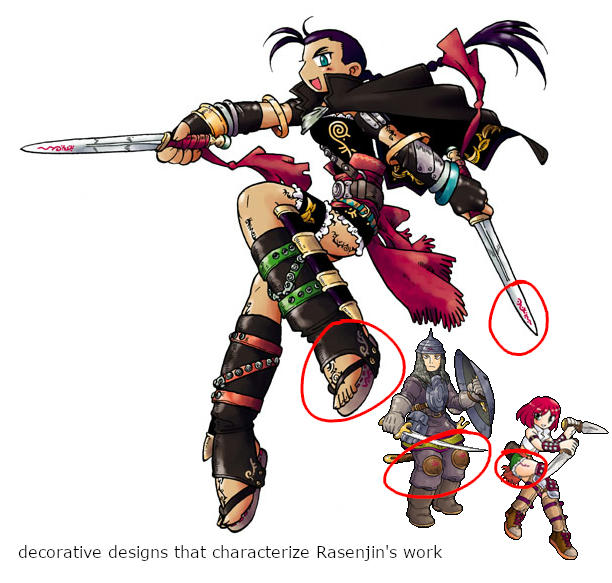
The XP battler artist btw is Rasenjin. His process follows traditional medium, with pen & ink and a build up of color from light to dark using of washes or markers. It's a shame how much detail is lost, when it's down size. Scrawling ornate designs is a signature part of his style as "rasen" in his name translates to "spiral". If you look closely at the RMXP Battlers you can make out blurry artifacts of these decorations on armor, weapons and skin.
Now, MV's Battler is pretty obviously created through digital technique and tools. Primarily the use of blending modes that give them their glossy vivid colors. Layering. Hard and Soft bushes with varying degrees of opacity. And a pressure sensitive stylus.