Thank you very much! The ogre images were just what I needed!!
hiddenone's MV Resource Warehouse
● ARCHIVED · READ-ONLY
-
-
I drag and dropped the files into my generator and they appeared in the "Variation tab but they won't appear on anything else.
-
@Art602 Make sure your MV is updated to at least version 1.3.2. If it's not up-to-date the pieces won't appear on the sprites properly because of the numbering system.
-
@Art602 Make sure your MV is updated to at least version 1.3.2. If it's not up-to-date the pieces won't appear on the sprites properly because of the numbering system.
Hold up.. are you telling me I no longer have to tediously rearrange all the numeric values when adding content to the Generator folder?... -
@M.I.A. That's correct. I have a note about it in my opening post, but since that 1.3.2 update the generator's allowed for non-sequential numbering, which is why my pieces have such high numbers.
-
Hey,
I copied the generator pieces into my MV generator but they don't seem to show up when I open the character generator in the program...
What did I do wrong? -
@Klammsi It's hard to know from just what you said, so I can only recommend making sure to close and reopen MV after putting in the pieces (the generator doesn't update automatically) and to make sure you've got at least version 1.3.2.
-
@hiddenone Thank you I updated MV and it's working perfectly now!
Really gorgeous pieces!! Thank you very much!
One more question if I may. From the Accessory and clothing folder, a couple of the images are not appearing on the face images...
they are displayed perfectly on the SV and walking ones..
Did I miss a file? I dont believe so as I copied and pasted the whole folder.. -
@Klammsi I've done my best to make most of my pieces complete, but some of the face pieces are still uncompleted since I don't have the skill to finish them. You're not missing any files, they just don't exist at the moment.
Since it's Easter, I thought it'd be a good time to add some new beast ears to the generator. So today I've got two new bunny ears for your heroes! They can look a bit odd if you use them with front hair, so just keep that in mind. Happy game making!
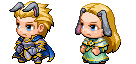
click to download -
Awww :kaojoy: Such a cute update for the holiday! I love it~
-
Okay I'm trying to add the beast assets to my generator. Having a bit of trouble, do I have to change the human body bits out every time I need to make a beast? Or am I doing this completely wrong and there is a way to make it so I just add it in and can change between human, or beast anytime?
-
The only part you will need to manually change out is the neck piece. The beast body is under 'facial mark'.
-
The only part you will need to manually change out is the neck piece. The beast body is under 'facial mark'.
Ok that's not as bad as what I thought it would be! Thanks a whole bunch! :) -
This is epic!
The newest update added support for TV, TVD, & SV ears. I was wondering if you had generator parts for your down-turned orc/goblin ears? -
OMG! I'm so glad that you made the samurai armors! However, I hope you would make the "Modern" clothes because I'm looking for it so long time. =[ I need it so bad.
-
@Mando Jetii I had noticed that the update allows for new ears, and I was pretty excited about it. Keep an eye out for the next restaff release. ;) No clue when it will be coming out though.
@Azymus At some point I'd like to make more modern clothes, but I don't know when I'll be able to get around to working on them. -
Hi. Is there any way to make the character generator work with the tall sprite templates? Like, to put them in instead of the chibi templates?
-
As far as I know, there is no way to make the in-engine generator work with anything but the default-sized character templates, both regular and child. However, there are third-party generators that might work, but I'm not certain about that as I have never tried it.
Take a look at those, or, if absolutely need-be, just put the parts together in Photoshop or whatever your preferred graphic editing software is. -
@hiddenone Yay, Thank you for listened my request but take your time to make those modern clothes! =] I'm look forward to see them one day! =]
-
Those are BEAUTIFUL!
How does one installs them?
I also have this question. I've figured out where my Generator is (i'm on Mac) and I have the files but when I drag them in, they don't load into the generator. I've tried restarting my software (RMMV) but they still don't appear. I've made sure they don't interfere with other customs because I don't have any. Any suggestions on what I should do?