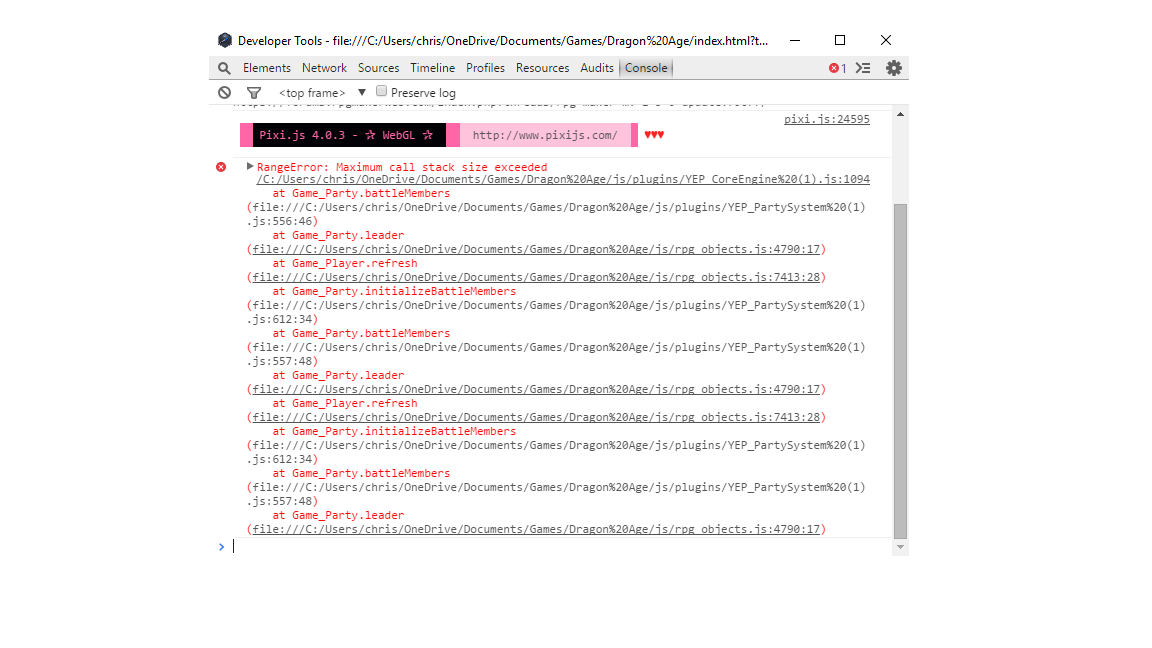
I have the RPG Maker MV Version 1.5.1. I’m trying to use the updated versions of Yanfly Plugins, but I get these errors. Can anyone help? Also at the top it says I can't use the Quest Journal Plugin because "I have project folders lower than 1.5.0"
Help with Yanfly Plugins?
● ARCHIVED · READ-ONLY
-
-
I've moved this thread to Plugin Support. Thank you.
-
That error means what it says. You never updated your core files for your project, so they are still below 1.5.0. You will need to update them. Go to the thread on how to update to 1.6.1 and follow the directions on how to update the core files as those will be the same in all version (basically, make a new project, then copy the relevant .js files to your project. Back up your project first).
-
Also, you named plugins "YEP_CoreEngine%20(1)" and "YEP_PartySystem%20(1)" according to your screenshot, which isn't the correct name of the plugin, you need to ensure that it is named the same as what the plugin author provides it as. If you have a bunch more like that then you need to fix all of them. Additionally, for YEP plugins you have to put them in the correct order (which is the order listed on their website).
-
Additionally, your project folder path also contains spaces. Remove them.
Anything that is replaced with a %-number combination in those error messages is something that breaks the networking rules required for the filenames.
Your wrong plugin filenames for example are the result of the automatic renaming by Windows in case of multiple downloads. -
I will take a look later on when I have free time. Thank you guys for you your input!