I bought rpg maker mv in steam and have some problems with it. During making tutorial it worked ok and I can launch the downloads from tutorial with no problems, but after I started my own project on the new map it occured some problems. I cant launch the projects with my own game in the redactor (there are 3 of them that doesnt work). Its just written "enable to launch the proect game".
Thanks for answers and help/
Help! Enable to launch the project
● ARCHIVED · READ-ONLY
-
-
can you give a screenshot of the error message? because that doesn't sound like a regular message from the program...
Other possible causes: your project might be in a wrong directory, where did you create it?
And it could be that this happens if you deployed the game into itself, does this happen on a new project before you do anything else? -
can you give a screenshot of the error message? because that doesn't sound like a regular message from the program...
Other possible causes: your project might be in a wrong directory, where did you create it?
And it could be that this happens if you deployed the game into itself, does this happen on a new project before you do anything else?
Thank for answering,
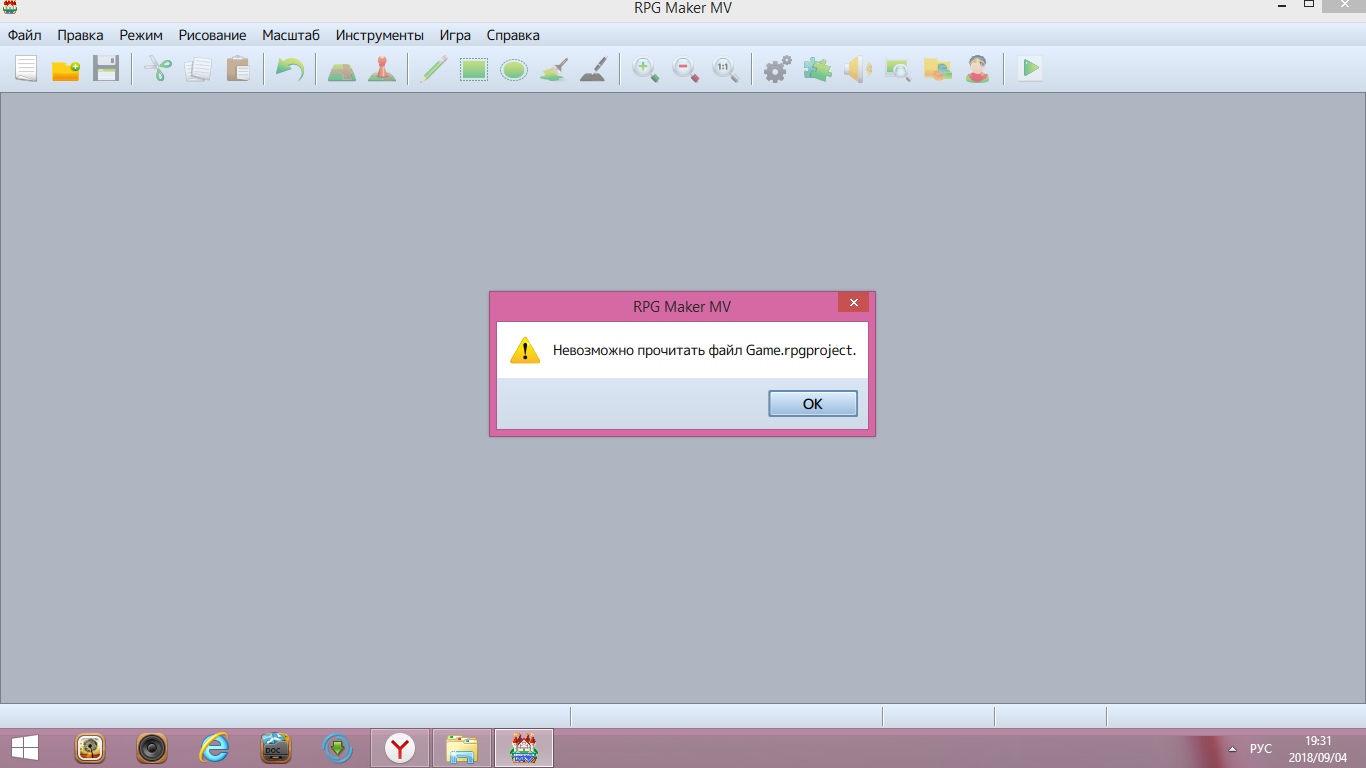
It's in Russian, so maybe I translate it incorrect. It can be also "enable to read the project game "
It is created automatically in the directory of my documents (other projects in this directory work, those with my tutorials).
I read forum and tried to create new project and copy paste files, but then there were such mistakes as" enable to read armors, maps, common events, etc". When I finished pasting it was an empty map with my characters on it and nothing else :(.
Don't understand what do you mean as "deploy the game into itself" -
can you give a screenshot of the error message? because that doesn't sound like a regular message from the program...
Other possible causes: your project might be in a wrong directory, where did you create it?
And it could be that this happens if you deployed the game into itself, does this happen on a new project before you do anything else?
Oh!! Do you mean it's no good to save the project multilple time in the same folder, like for tutorials I always created new project, and for those that don't work I just created one project and saved everything multiple times in it -
1) I asked for a screenshot because the form and colors of the message will tell us where the message comes from even if we can't read it.
2) if your username contains non-latin letters, then you can not use any folder inside the documenta directory.
That is why I specifically asked for the directory path where you create it.
3) one folder for each project. You can copy the folder and keep multiple folders, but only one project is possible in each folder because the filenames need to remain the same.
And "deployment" is a specific function in the menu that needs a different target folder for output. -
2)everything in English no non Latin letters in the folders1) I asked for a screenshot because the form and colors of the message will tell us where the message comes from even if we can't read it.
2) if your username contains non-latin letters, then you can not use any folder inside the documenta directory.
That is why I specifically asked for the directory path where you create it.
3) one folder for each project. You can copy the folder and keep multiple folders, but only one project is possible in each folder because the filenames need to remain the same.
And "deployment" is a specific function in the menu that needs a different target folder for output.
3)I mean that I just created a project, working on it and saved it multiple times in one folder (by Save button) . The others that work were saved only once and then I didn't do anything to them. (open the project,finish tutorial, save and nothing else )
Sorry for stupidness :( -
Do you know all networking rules and have them all checked with the path?
If not, please post the full path from drive letter c:\ to index.html here for us to check.
The "latin letters only" is only one example of several different rules.
And where is the screenshot? -
Will make it as soon as possibleDo you know all networking rules and have them all checked with the path?
If not, please post the full path from drive letter c:\ to index.html here for us to check.
The "latin letters only" is only one example of several different rules.
And where is the screenshot? -
Do you know all networking rules and have them all checked with the path?
If not, please post the full path from drive letter c:\ to index.html here for us to check.
The "latin letters only" is only one example of several different rules.
And where is the screenshot? -
that is an editor error telling you that the file with the name "game.rpgproject" has been damaged or is missing.
That file alone is not a problem because it contains no data - you can simply make a new project and copy an intact version of it into your project directory.
However, there is usually a reason why files are damaged - and this might not be the only one. If you get similiar messages for other files after you replace that one, then you will have lost data and can only try to repair as much as you can.
Much more important however is to find the cause why that file has been damaged.
Possibilities are:
1) a windows crash or power failure while the editor was active
2) project is stored in a cloudsync'ed folder (very bad idea, and if you have cloudsync'ed your documents folder you need to move your projects somewhere else
3) any of the regular reasons why files might be damaged under windows - from virus infection to impending hardware failure of your HDD. -
Thank you so much for the patience! I will try to do something with it.that is an editor error telling you that the file with the name "game.rpgproject" has been damaged or is missing.
That file alone is not a problem because it contains no data - you can simply make a new project and copy an intact version of it into your project directory.
However, there is usually a reason why files are damaged - and this might not be the only one. If you get similiar messages for other files after you replace that one, then you will have lost data and can only try to repair as much as you can.
Much more important however is to find the cause why that file has been damaged.
Possibilities are:
1) a windows crash or power failure while the editor was active
2) project is stored in a cloudsync'ed folder (very bad idea, and if you have cloudsync'ed your documents folder you need to move your projects somewhere else
3) any of the regular reasons why files might be damaged under windows - from virus infection to impending hardware failure of your HDD.