@Tayruu Well, I'm making more of a visual novel fan game, so that is the reason there are no 3 tile wide hallways. The setting is inside of a school, I chose that tile set only because it fit the look I was going for the most. No you can't walk where both tiles collide, so that wouldn't be a problem. Anything I missed?
Game & Map Screenshots 11
● ARCHIVED · READ-ONLY
-
-
@superkoopa That could work as a battleback, with very careful placement of battlers so that no one is shown as halfway up a building, but it would be very restricted - which might be fine if your game is one vs one hand-to-hand combat, but for a team vs a troop, I think you would have problems.
As for it being a town - do you mean as a town map that the player can move in? If so, just a few steps and they would be leaving it, so again, it has a very restricted usage.
The first determinant of any graphic should be "what is its purpose, and how does it function?" It seems to me that the image - nice though it is - fails the test of functionality, so even though it is pleasant eye candy, it is unlikely that it will benefit the game. -
@Kes I totally agree with every point you made. Thank you for your honest critique. Functionality should always be priority, form follows function.
-
This is inside of my tavern for my game I'm working on.
-
@ShadowCrispy Remember to remove the autoshadow for the windows upstairs :)
-
Now that the MV3D plugin has been upgraded to 0.6, i can finish up my forest area!
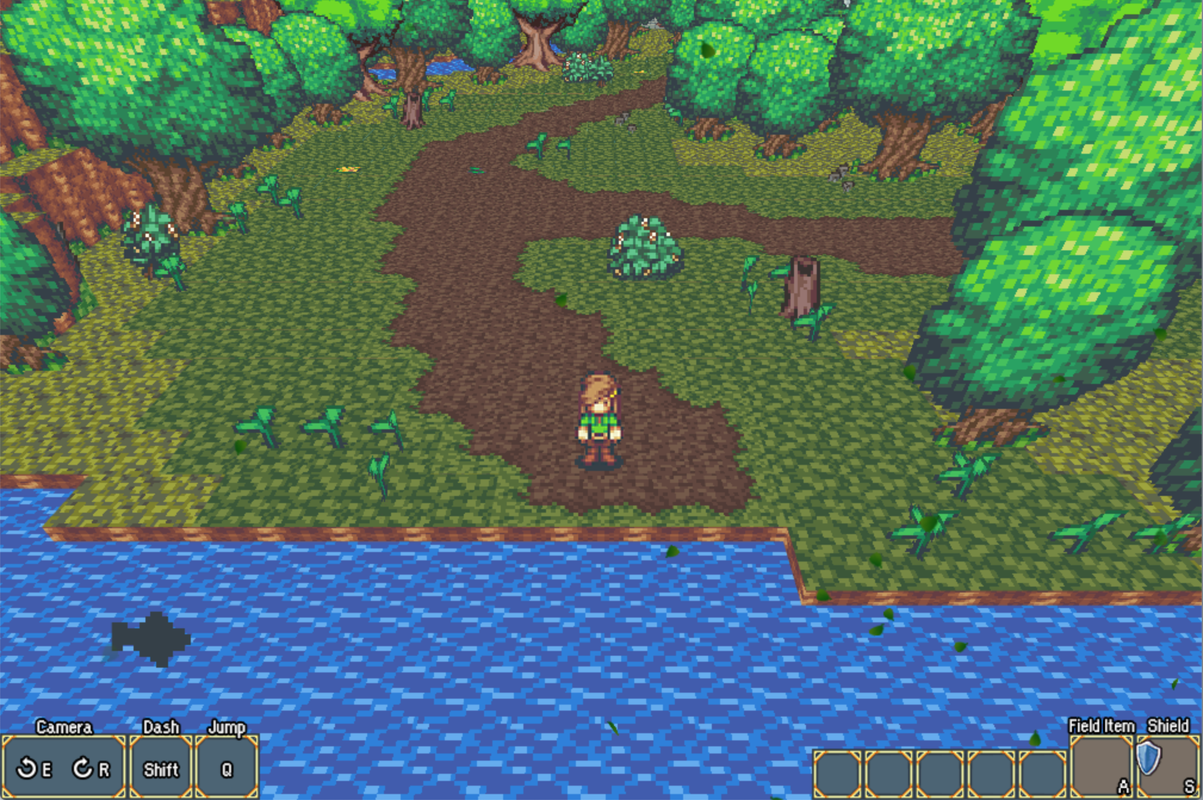
-
So recently made this character to go with my tileset. Does she look awful or out of place? She's in a warehouse.
-
@gRaViJa Such a cool look. I really like how those plants pop up.
@StrawberrySmiles Neither out of place or awful, quite the opposite!
I'm just trying to find a consistent art style at the moment. I created the background but I'm using Suikoden sprites as placeholders.
-
@superkoopa That's really cool. The art style is gorgeous for sure. That's actually something I've been wanting to experiment with too. Making a game with pre-rendered backgrounds (in a way) on RPG Maker. Too bad I got my hands full on my current project to really start messing around with that stuff.
-
@gRaViJa I'm really digging this depth. Looking good!
I've created a commissioned savannah tileset and made a sample map with it:

-
I would but temporarily using some assets i cant post (currently trying to learn pixel art so i can change them)
This is how my battle commands look so far but im unsure about the numbers
on the gauges... I want something elegant and simple that has the feel of a FF game.
(The commands will not appear like that in-game as i have yanfly equip skills) -
I think the numbers look fine. But maybe you could play around with the fonts and stuff to find one that better fits your preference.
I've been experimenting with the art style and view for my current test project - so here I have a front view battle system, where you can see your characters face in the hud, and you get an image (and sound) of your character appearing on screen during your moves.
I tried it out using a lineless style to see how it would look and this is what came out.
Basically I'm trying to get a look of vanilla - rpg maker (so I can keep it simple), but also add a little bit extra to help it stand out a bit.Spoiler
Right now, the animations appear over the players, I'm hoping to find a solution to that eventually. -
@orange~ Thanks buddy! sometimes it's just nice to hear from someone else's perspective. The one thing I've learned about pre rendered backgrounds is that they are not really suited for rpgmaker. In my previous post of the town (which is the same size as a Width 17/Height 13 map), it takes about 5 steps to reach one side to the other. The work around I guess would be scripting a pixel movement system (I'm sure there is one already) and then like resizing the sprites accordingly, Just like the PSone Final Fantasy games. I'm thinking whether to just use pre rendered backgrounds for certain areas (like entrances) and scenes, and then the rest tiles based.
Whilst i'm here I figured I'd post this, it's a haunted swamp temple. In the arch above the door is a gargoyle, I quickly painted it's eyes red before I uploaded the picture., why not! Again I'm using Suikoden sprites as placeholders, I really need to make some of my own, I was thinking in the same sort of style.
-
Working on a little somthing-something lately. Making levels is fun.
Spoiler -
@superkoopa Yeah I'd imagine that you can run through the pre-rendered areas pretty quickly. But then again, if you look at the pre-rendered games on PS1, especially survival horror titles, they'd switch angles pretty regularly. Like just one hallway might use 3 different backgrounds and you could run from one background to another in just those '5 steps.'
I'll experiment with that stuff at some point, but I'd probably have pretty limited area to explore. A smaller game or something. Can't imagine the work a full RPG would require D: Using these backgrounds in specific spots only sounds good imo. Regardless, your work looks very beautiful! Do you paint that stuff or what's your work process? -
@orange~ You're right, they'd use a few angles to convey one scene alone. My work process basically consists of finding a nice reference picture, and then using layers to paint over it, then its just a case of editing around with colour tones, and pixel settings, making sure it all looks right.
-
@Kich You're probably going to hate me saying this, but...
I like those tiles, and think the colour palette is excellent. But there is something weird about the shadows. To get shadows like that, the light source (which we assume is the sun) would have to be absolutely vertically above the objects. Unless it is permanently high noon in your world, that's going to look odd after a while. -
My title screen!
-
id
-
Maybe the back of the castle could be a garden! :kaoluv: