Galv's Move Route Extras

● ARCHIVED · READ-ONLY
Started by Galv 32 posts Page 1 of 2 View original ↗
  1. Move Route Extras - Version 1.1
    RPG Maker MV Plugin
    Galv
    Introduction
    I felt MV could use the same extra move route commands as Ace did. So my first plugin is creating an MV version.


    Screenshot
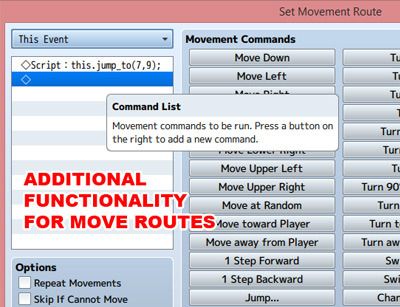
    move-route-extras-mv_zps01vewcdw.jpg


    Features
    This script was written to fill some gaps the move route commands left out.
    Script commands can be used in move routes (for events and player) to:
    – Jump forward x spaces
    – Jump to an event or x,y position
    – step toward/away from event or x,y
    – turn toward/away from event or x,y
    – turn on/off self switches
    – fade opacity in/out
    – move random only on chosen regions
    – wait a random amount of time
    – repeat commands a number of times
    – play ballons/animations
    – change graphic to a chosen charset frame


    How to Use
    - Copy the "GALV_MoveRouteExtras.js" file into your project's /js/plugins/ folder.
    - Activate it using the 'Plugin Manager'
    - Read the 'HELP' documentation (also found in plugin manager) to view available move route 'Script' commands.


    Plugin
    Get it here


    Credit and Thanks
    - Galv


    Terms
    Free to use in any RPG Maker MV project including commercial. Please credit "Galv". :)


    Updates
    2015-11-05 - Version 1.1 - Added ability to set a character's graphic to a certain frame of a characterset
    2015-10-23 - Version 1.0 - Release
  2. Thanks
  3. This is super handy, one little feature I'd really like added, is the ability to jump to variable X and variable Y. so say you had two variable checking player location, you could make an evnent jump to the player. That's only one possibly use for such a method.

    Regardless, this is really cool!
  4. Try using:

    this.jump_to($gameVariables.value(x),$gameVariables.value(y))where x and y are the numbers of the variables you want to use
    But you can already jump to player in the commands available by using:

    Code:
    this.jump_to(0)
    :)
  5. Thanks darl!
  6. Someone mentioned I forgot to add the ability to change an event's graphic to a certain frame (which was in my Ace version).


    I have updated this to version 1.1 and added it now
  7. Hello Galv, Is there any way that this command " this.turn_toward(i); "  can be used toward a currently running "this event" instead of event id number?


    I have been looking for a way to turn towards ranged events for my ABS. I can do it with this already with that script code, but with a lot of events... :)


    Thanks for the great plugin!
  8. I'm not certain exactly what you mean, but you could try something like:


    this.turn_toward($gameMap._interpreter.eventId())


    Not sure if there's a different way to access that variable but - hope that does what you need.
  9. That doesn't seem to be the one. I know i have a hard time explaining what i trying to get across sorry about. Basically just looking for a way to make the player turn and face an event that is not activated by event touch or player touch without having to input Id's for all of them.
  10. Perhaps give an example of what you are trying to achieve as I still don't understand.
  11. I have a lot of ABS events set on player approach that I am trying to make the player turn to target before shooting. With: "this.turn_toward(i); " it simplified things, but still have to input each Id number. As you can see in the screen shot I have to input the Id of that event into the script code:


    Screenshot (100).png


    Lol I tried using " this.turn_toward($gameMap.event(this._eventId)); ", but that didn't work.


    I use " this.turn_toward(0);"  a lot when wanting the event to turn towards the player.


    Just trying to find a way to make that command without setting a bunch of variables for every event.


    I really hope that helps. If not ill try to explain better :)
  12. Could you store the event's ID in a variable then use $gameVariables.value(x)?
  13. I"m not quite sure what you mean. Wouldn't I still have change each event?
  14. I honestly still do not understand what you're doing, sorry haha
  15.  Honestly, it all started with me wanting something like "this.turn_toward($gameMap.event(this._eventId));" and apparently there is not. :) I appreciate your time and efforts today very much and sorry for the miscommunication and thanks again for such great plugins. 
  16. @UnmercyfulI'm a bit late to the conversation but couldn't you just use this._eventId to refer to the current event (ID:038)?
  17. @GalvHow hard would it be to add 4-way passage options to the move route extras? Not sure if there's an easier method but I'm thinking for invisible passageways this could be useful. Line the passage with events, set move route 4-way options and it will force the player to only enter/exit the tile in the directions specified (overriding tileset passage options). Could use a 4 bit flag or something like:

    Spoiler
    URLD
    X 0000 0
    D 0001 1
    L 0010 2
    LD 0011 3
    R 0100 4
    RD 0101 5
    RL 0110 6
    RLD 0111 7
    U 1000 8
    UD 1001 9
    UL 1010 A
    ULD 1011 B
    UR 1100 C
    URD 1101 D
    URL 1110 E
    URLD 1111 F

    I've been trying to find an easy way to do this but have not found any good solutions yet.


    I imagine you would have to extend the Game_Map.checkPassage function to check the event tile's four-way options before callback and if the options were set, return function early. Not sure how you would store the four-way options, probably just read it from the list of set move route commands.
  18. I don't think I am understanding - tilesets have 4 way passage already, couldn't you use tiles for this? To me a passageway is on the map. This plugin is for forced move-route functionality :)
  19. True but what if the passage is on an A tileset, or if the passage options are needing to change (such as a rotating bridge)... This would add dynamic passage capability which is what I can't find a solution for.


    To explain further, maybe I'm going about the rotating bridge the wrong way but I created a 3x3 character to be the bridge, it has 4 directions, left/right, up/down and both diagonal directions. I really only want to pass in the left/right up/down directions but the tiles that it sits on is water and I need the passage options to change based on the direction the bridge is in. I'm probably going about this the wrong way.


    Maybe there is some way to set the passage options in the animation itself but I'm not sure how.
  20. To describe in more detail:


    Bridge initially spans left to right. Player walks onto bridge from the left. When player steps on center tile the bridge rotates to the up/down orientation.


    Initial passage options for 3x3 bridge grid


    XXX


    ------


    XXX


    When bridge rotates, up/down passage


    X | X


    X | X


    X | X


    It needs to change the passage options dynamically. I was thinking move routes might be a good place for this setting since it can be applied ahead of time in custom route and updated in contents.