Galv's Layer Graphics (fogs, parallaxes, mapping)

● ARCHIVED · READ-ONLY
Started by Galv 241 posts Page 1 of 13 View original ↗

  1. Layer Graphics - Version 1.9
    RPG Maker MV Plugin
    Galv


    Introduction
    I couldn't live without graphic layers. Converted this one from my Ace script.
    I have not tested this on slower computers to see what kind of lag large images create, but I would harazard a guess that especially playing on a server, larger files might cause issues when downloading. So make sure to test!


    Screenshot
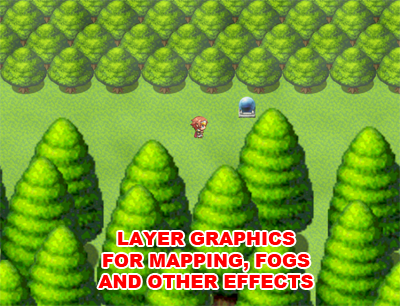
    layer-graphics_zpsslcdxic9.png


    Features
    This plugin allows you to use graphics as layers on the map, designed to be used for layer mapping (parallax mapping), fogs and other effects.
    Layers can move at different speed to player movement (useful for perspective effects), slide like fogs, display at different levels on the map (below map, below characters, above everything, etc.), opacity, blend, etc.
    Uses 'Plugin' command to change layer settings during game.


    Battle layers are now implemented, so you can create fogs and the like for battles.

    How to Use
    - Copy the "GALV_LayerGraphics.js" file into your project's /js/plugins/ folder.
    - Activate plugin using the 'Plugin Manager'
    - Create a new folder in your project: /img/layers/
    - Use Plugin commands to setup layers
    - Read the 'HELP' documentation (also found in plugin manager) for more details and try the demo if you don't understand.


    Plugin
    Get it here


    Credit and Thanks
    - Galv


    Terms
    Free to use in any RPG Maker MV project including commercial. Please credit "Galv". :)


    Updates


    2016-06-15 - Version 1.9 - fixed compatibility issue with Yanfly Battle Core and layer positioning


    2016-05-02 - Version 1.8 - fixed a crash when starting a battle with layers when no map layers were made


    2016-04-16 - Version 1.6 - Added non-repeating layers to map. Added battle layers.


    2016-01-23 - Version 1.5 - Added trial code for potential memory issue


    2015-11-29 - Version 1.4 - Added efficiency code, added setting to specify tile size if you have changed it.
    2015-11-06 - Version 1.1 - Can now add layers via map notes
    2015-10-30 - Version 1.0 - Release
  2. Literally just started looking for this 3 min ago. LMAO
  3. Can't wait to try it out!
  4. I loveeeeeeeeeeeee XSHIFT and YSHIFT :p

    It makes light 3D c:
  5. Thanks a lot Galv. Again a amazing script, I allready loved your work in Vx Ace.

    I checked the comments on your homepage and figured it makes sense to load up all parallax plugins in a kind of loading screen level?

    Refresh it in the loading screen and after that I can just go from map to map without further plugin lines needed? :)

    btw. I would love to see your timed button attacks for rpg maker mv, loved that one ;)
  6. Yeah, I use an initialize map and add the plugin calls to it to set up all maps. No need to refresh if it's in the loading map, though. Layers are created when player goes to a new map and the refresh option only needs to be used if a new layer is setup on the map the player is currently on so it creates the graphic on it, too.


    So basically, once layers are created, their settings are saved. Using the plugin command again for an existing layer will modify it, no need to refresh then either :)
  7. This is great! I was looking for a good alternative to Galenmereth's BindPictureToMap plugin for parallax mapping, and this fits the bill nicely.

    PROTIP for users, though: if using a layer for the ground, make the Z value -1 (rather than 0, according to the help file) or tiles you put on the map that are below star priority won't appear.
  8. Thanks Myshu.


    I'm interested in how slower machines handle lots of layer images.


    I have tested 255 fogs (using one cached graphic) on the same map and my laptop still ran fine. Much more impressive that doing it on Ace for me.
  9. That sounds awesone Galv...was a bit worried. Especially for Android etc.

    Did you do any tests there?
  10. I haven't done any tests on android, only PC. Not sure how this will run on those devices.
  11. Looking forward to testing this out. Downloading now xD
  12. @Galv: I have a few questions

    I want to ask as someone who went inside to do this, do you know if pictures and your bust system's busts are always in front of the layer graphics (despite of their priority setting)?

    Also, how much images are allowed per layer and how many layers can I do with this?

    If I had layer 4 with an Image's Z at 5

    then I had a layer 5 with an Image's Z at 0,

    would layer 4's image cover layer 5?
  13. Well, I want to give my thanks to Galv, this plugin is awesome, really awesome.


    If I had layer 4 with an Image's Z at 5

    then I had a layer 5 with an Image's Z at 0,

    would layer 4's image cover layer 5?
    @MikeMakes when I put this plugin in my project I make a mistake like those, I put a image in layer 3 with z at 5, and other layer 4 with Z at 1, but i forget to put the blend of layer 4 at multipply, the layer 4 cover over the layer 3, i just adjust the blend type online.

    I was playing around the amount of layers that its recognize and is really awesome, because I put shadows in layer 3 with multipply blend, in layer 4 I put lights with add blend, and later I put more shadows over in a 5th layer, and goes everything so cool.
  14. I haven't tested but the busts from my plugin and pictures should always appear in front of the layers, yep.


    Also, you can have as many layers on a map as you like. I wouldn't recommend using lots, though, especially if you plan to export to mobile devices.


    A layer with higher Z value will appear above layers with lower Z value.


    You can have multiple layers on the same z value if you like, the layer order will depend on which one you added first. :)
  15. Thanks drack_669 for the pointer and Galv for clarifying it for me.

     
  16. Would be nice if I could just use mapnotetags or something instead. Now I gotta make a parallel event and erase it on each map with fog just for that. Or am I supposed to make all these plugin calls for all maps in the titlescreen?

    EDIT: Nevermind, it doesn't even work If I call this while I'm already in the map. I gotta call all these in the titlescreen somewhere. Would still prefer mapnotetags.
  17. You have to refresh the Layers if u are allrdy on the map :)
    But you got a point with the map notetags...would be a bit simpler, so I asked myself if thats possible. Is it?
    Doesnt rly matter to much, the one or the other way Galv did us a huuuge favor with this awesome script :)
  18. It would be possible, yes. I will put it on my to-do list to add map notetag feature.


    The reason it was designed this way is due to projects I made, I change layers a lot (daytime, nighttime, changing fogs, storm/lightning effects, etc.) so notetags on a map didn't work for me.


    But I don't see why I can't include both methods :)


    EDIT: I have updated to version 1.1 - can now add layers via map NOTES as well.
  19. Is locking in the layer on the map in the upper left corner supported like how locking parallax with "!"? If so, what are the settings?
  20. The ! functionality doesn't work for layers (I honestly haven't actually tried it to know exactly how it acts).

    How exactly do you want the layer to act? Sticking to the map for "parallax" mapping?