Galv's Character Frames

● ARCHIVED · READ-ONLY
Started by Galv 75 posts Page 1 of 4 View original ↗

  1. Character Frames - Version 1.2
    RPG Maker MV Plugin
    Galv


    Introduction
    It's been done before, but I created this one for compatibility with some of my own plugins.


    Screenshot
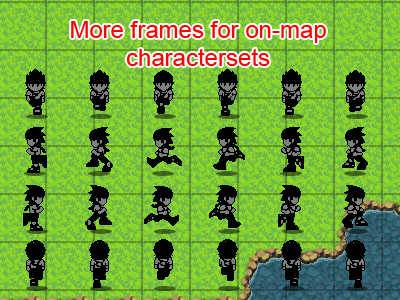
    character-frames_zpsok7gip6p.png


    Features
    Enables you to use charactersets that have more than the default 3 frames per character.
    - Specify frames per sheet by adding %(x) to the filename.
    - Frames play in 1-2-3-4-1-2-3-4 order instead of default 1-2-3-2-1 order.


    How to Use
    - Copy the "GALV_CharacterFrames.js" file into your project's /js/plugins/ folder.
    - Activate plugin using the 'Plugin Manager'
    - Read the help file to see how it works. Examine the demo if you don't understand.


    NOTES


    A normal charactersheet is 4 characters across with 3 frames each: 12 columns.
    A normal charactersheet is 2 characters down with 4 directions each. 8 rows.
     
    If your new sheet uses more frames, for example 5 frames each...
    4 characters across with 5 frames each: 20 columns
    (same amount of rows as this plugin doesn't change that).


    Plugin
    Get it here


    Credit and Thanks
    - Galv


    Terms
    Free to use in any RPG Maker MV project including commercial. Please credit "Galv". :)


    Updates
    2015-01-17 - Version 1.2 - Fixed a bug displaying characters in menus
    2015-12-15 - Version 1.1 - Added a way to modify how fast frames display
    2015-12-12 - Version 1.0 - Release
  2. Will this eventually be compatible with sideview battlers? Would be great to have the animations play that way for battlers. Thanks for doing this by the way. Your map character control plugin is way better then the weird thing I had to come up with the get idle animations to work.
  3. I'll do a different plugin for battler frames, this one will be just for charactersets on the map
  4. I love it!

    Is there any way to alter the animation speed? As things stand now, my 12-frame character looks like he's walking on the moon. 
  5. I updated to version 1.1, adding a setting for you to modify the rate the frames are displayed based on how many frames a sheet has.


    I hope this helps :)
  6. Thank you! This makes it look so much better!
  7. Awesome script, Galv! I just have one question: How do you pick an "idle" frame? Do you use an additional spritesheet for just idling? I'm hoping to use a 6-frame sprite sheet, but none of the 6 frames would work for a standing/idle pose. What are your thoughts?
  8. Ahh! Thank you! I didn't see that in the help file. Awesome plugin! ^_^
  9. Thanks for the great plugin, I believe i have everything right. Is there a way to stop it from showing double sprites in the game menus and on save screens?

    Screenshot.png
  10. Aha, I never thought about that. That's a bug I will fix it is soon as I can :)
  11. Sweet! Thanks for the reply, Have a great day!
  12. I believe I fixed that - updated to v.1.2 - let me know if any issues.
  13. Fixed right up! Thank you kind sir. Screenshot2.png
  14. Fantastic scripts, but I have a doubt: It seems that Character-Frames (walk and run) doesn't work with events, am I right? or is there a command?
    I noticed the Black Arrow in demo, while performs diagonal movement it doesn't change color from black to green/red (walk/run).
  15. That's correct, it only works for the player
  16. I was wondering if it would be possible to get a compatibilty with events in future. Anyway, good work Galv.
  17. I didn't do events as they aren't technically able to run, but I thought about it and I could base it off of the event's speed. I've added to my to-do list. :)
  18. So I think I've found a bug with this script.


    Ok, so I downloaded your demo with Character Frames, Character Animations and Diagonal Movement. The demo as it is plays fine, and I saw no issue until I put in my sprite sheet for a test (attached). Basically, with Character FRAMES on, the animations cycle across a 106x106px area from left to right  with the sprite getting clipped in half twice per cycle (I included a screenshot, but you can't see the movement. I could try for some video later.) Disabling Character FRAMES and leaving the other two scripts on makes my sprite display and move around the screen normally. I tried this with a blank project too, so I'm pretty sure it's an issue with Character Frames.


    (Originally my sprite sheet was composed of rectangular grids (106px high by 72px wide) and I thought that might be the issue so I rejiggered it to be square (106x106) and the problem doesn't disappear.)


    I dunno if this is a bug or if you never built in support for larger sprites and that's the issue.

    Spoiler
    galv-bug.png


    isaac-walk%(4).png
  19. Did you rename the character image filename to include the number of frames in the format written in the plugin help?