Gain access to more control over parameters, action conditions, drop items, drop item conditions, exp, gold, and more!

This script adds levels to your enemies. The level can be a fixed number, or it can be based on a variable or some other game data using a "level formula".
Enemy levels can be increased or decreased during battle, allowing you to change an enemy's stats and skills dynamically during the game.
Enemy level can be based on party levels as well, if you would like to provide party-based scaling.

Like actors, you can assign a class to an enemy. You can then proceed to set up an enemies parameters and skills using its class. Combined with enemy levels, you can set parameters for levels from 1 to 99. Classes come with skill learnings, which you can use to determine whether an enemy is able to use a certain skill or not based on its level.
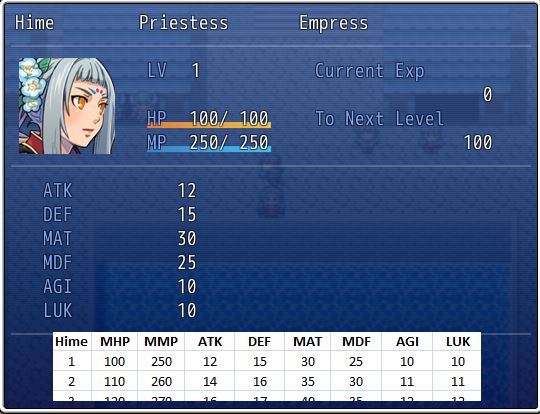
If you don't want to manage an enemy's parameters using a class, you can use parameter tables. This script allows you to manage enemy parameters using spreadsheets, individually setting parameters for each level. Enemy levels will be required to access parameters for different levels.

If you don't want to use enemy levels to scale their parameters, you still have the option of using param formulas.These two scripts allow you to control how much gold and exp you receive from an enemy based on formulas. This allows you to dynamically alter gold or exp obtained from battle based on any arbitrary conditions.This script provides advanced enemy drop management. You create "groups" of drop items and then add conditions to each group to control which ones are available for the party to receive depending on whether the conditions have been met.
You can add arbitrary items to each group of drops, allowing you to overcome the 3-item drop limit that the editor imposes.

This script allows you to link battlers together to enable special "synchronization effects". For example, you can link together several enemies together so that when one enemy dies, all of the others in the link die as well.

This script provides an "exp modifier" that allows you to determine how much exp an actor receives from an enemy based on the difference between their levels. High-level actors defeating low-level enemies may receive no EXP, while low-level actors defeating high-level enemies may receive bonuses for defeating stronger enemies.
Originally posted at Hime Works!