By: Traverse (31/10/15)
Intro:
Spoiler
Spoiler
So I was messing around with the font options in RMMV. Wait, what font options, you say?
Indeed, there are no easily accessible font options. Most of the settings are split between the stuff in the Window_Base object and the Bitmap core object. So I decided to slap together a quick plugin to make changing the default fonts a bit more convenient. And then I started testing it.
And then, to my utter annoyance and near disbelief, I find out that custom fonts aren't recognized immediately when they're put into the fonts folder. You know, like how it WASN'T in Ace. Apparently, the go-to solution is either to install them on your machine (which, depending on what platforms you're going to export to, is not actually an option) or to edit the .css file that comes in the folder and change the default to your custom font there.
Which works until you suddenly want to use more than one custom font in your game. Yeah. So. Most of this plugin is just butt-basic options like changing font size and outline colors, but the important thing is that this plugin contains a custom font loader that allows the game to load, you know, custom fonts. Without installing them. Or changing the .css file. You can then use those loaded fonts in whatever other scripts/modifications/plugins you want.
So I was messing around with the font options in RMMV. Wait, what font options, you say?
Indeed, there are no easily accessible font options. Most of the settings are split between the stuff in the Window_Base object and the Bitmap core object. So I decided to slap together a quick plugin to make changing the default fonts a bit more convenient. And then I started testing it.
And then, to my utter annoyance and near disbelief, I find out that custom fonts aren't recognized immediately when they're put into the fonts folder. You know, like how it WASN'T in Ace. Apparently, the go-to solution is either to install them on your machine (which, depending on what platforms you're going to export to, is not actually an option) or to edit the .css file that comes in the folder and change the default to your custom font there.
Which works until you suddenly want to use more than one custom font in your game. Yeah. So. Most of this plugin is just butt-basic options like changing font size and outline colors, but the important thing is that this plugin contains a custom font loader that allows the game to load, you know, custom fonts. Without installing them. Or changing the .css file. You can then use those loaded fonts in whatever other scripts/modifications/plugins you want.
Features:
- Loads custom fonts placed in the fonts folder.
- Quick access to font outline width/outline color/size/other language font settings used in Window_Base and inheriting windows.
- Pixel offset option for text drawn by Bitmap (meant to be used with custom fonts cut-off when drawn). Negative X/Y values shift the text left/up.
Plugin:
Spoiler
Spoiler
//=============================================================================
// FontEditor.js
//=============================================================================
/*:
* This plugin overwrites the default behaviour of Window_Base.
* Use more than one font name separated by a comma to auto search for the
* next font if preceding cannot be found.
* Window_Base functions overwritten: standardFontFace
* standardFontSize
* resetFontSettings
* Bitmap functions redefined: drawText
*
* @plugindesc Alter the default font settings used by Window_Base and its inheritors... and load custom fonts.
* @author Traverse (31/10/2015)
*
* @param Load Custom Fonts
* @desc Add custom fonts to LOAD (not USE) here. Check Help for instructions.
* @default
*
* @param Font Name (English)
* @desc Change the default English font used by Window_Base.
* @default GameFont
*
* @param Font Size
* @desc Change the default font used by Window_Base. Default = 28.
* @default 28
*
* @param Outline Width
* @desc Change the width of the font outline. Default = 4.
* @default 4
*
* @param Outline Color
* @desc Change the color of the font outline. Default = rgba(0, 0, 0, 0.5).
* @default rgba(0, 0, 0, 0.5)
*
* @param Font Name (Japanese)
* @desc Change the default Japanese font used by Window_Base.
* @default GameFont
*
* @param Font Name (Chinese)
* @desc Change the default Chinese font used by Window_Base.
* @default SimHei, Heiti TC, sans-serif
*
* @param Font Name (Korean)
* @desc Change the default Korean font used by Window_Base.
* @default Dotum, AppleGothic, sans-serif
*
* @param Font Name (Russian)
* @desc Change the default Russian font used by Window_Base.
* @default GameFont
*
* @param Text X-Offset
* @desc Add a custom x-coordinate pixel offset to all drawn text. Use for fonts chopped off from the left. Default = 0.
* @default 0
*
* @param Text Y-Offset
* @desc Add a custom y-coordinate pixel offset to all drawn text. Use for fonts cut off from top or bottom. Default = 0.
* @default 0
*
* @help In order to use a custom font, it must first be placed in the fonts folder.
Then it must be LOADED by the game. After loading, it must be SET to be used,
either with this plugin, or another one, or by modifying the core code directly.
The format for LOADING (not SETTING) custom fonts with this plugin is:
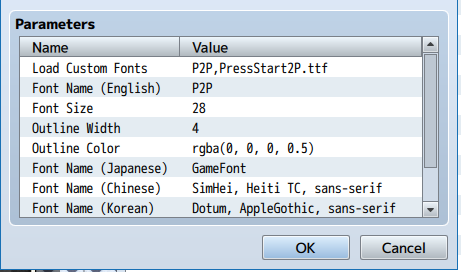
refname,fontname/refname2,fontname2/refname3,fontname3/ect.
Example: Arial,Arial.ttf/Courier New,Courier New.ttf/ComSns,Comic Sans.ttf
Each 'refname' is a unique identifier. This is what you put in when SETTING
the font for use in the Font Name boxes of this plugin and what you will call
(as a string) if you want to set the font in a script/plugin/modification to
the core code.
Each fontname is the filename of the font you are using as it appears in the
fonts folder, and COMPLETE WITH FILE EXTENSION.
Due to how this plugin parses the strings, there must NOT be any spaces between
the commas and slashes that do not exist in the original filename.
E.g. Arial, Arial.ttf/... will NOT be loaded.
*/
(function() {
var substrBegin = document.currentScript.src.lastIndexOf('/');
var substrEnd = document.currentScript.src.indexOf('.js');
var scriptName = document.currentScript.src.substring(substrBegin+1, substrEnd);
var parameters = PluginManager.parameters(scriptName);
var eng_font_name = String(parameters['Font Name (English)'] || 'GameFont');
var jap_font_name = String(parameters['Font Name (Japanese)'] || 'GameFont');
var cn_font_name = String(parameters['Font Name (Chinese)'] || 'SimHei, Heiti TC, sans-serif');
var kr_font_name = String(parameters['Font Name (Korean)'] || 'Dotum, AppleGothic, sans-serif');
var rus_font_name = String(parameters['Font Name (Russian)'] || 'GameFont');
var font_size = Number(parameters['Font Size'] || 28);
var font_outline_width = Number(parameters['Outline Width'] || 4);
var font_outline_color = String(parameters['Outline Color'] || 'rgba(0, 0, 0, 0.5)');
var draw_text_XOffset = Number(parameters['Text X-Offset'] || 0);
var draw_text_YOffset = Number(parameters['Text Y-Offset'] || 0);
var directory = window.location.pathname.substring(0, window.location.pathname.lastIndexOf('/'));
var font_array_string = String(parameters['Load Custom Fonts']);
var split_strings = (font_array_string.split('/'));
var cust_font_hash = {};
split_strings.forEach(function(x) {
Object.defineProperty(cust_font_hash,
x.split(',')[0], {
value : x.split(',')[1],
enumerable : true})
});
Object.keys(cust_font_hash).forEach(function(refname) {
var fontname = cust_font_hash[refname];
var font_dir = directory + '/fonts/' + fontname;
console.log(refname);
console.log(font_dir);
Graphics.loadFont(refname, font_dir);
});
Window_Base.prototype.standardFontFace = function() {
if ($gameSystem.isJapanese()) {
return jap_font_name }
else if ($gameSystem.isChinese()) {
return cn_font_name }
else if ($gameSystem.isKorean()) {
return kr_font_name }
else if ($gameSystem.isRussian()) {
return rus_font_name }
else {
return eng_font_name }
};
Window_Base.prototype.standardFontSize = function() {
return font_size;
};
Window_Base.prototype.resetFontSettings = function() {
this.contents.fontFace = this.standardFontFace();
this.contents.fontSize = this.standardFontSize();
this.resetTextColor();
this.contents.outlineWidth = font_outline_width;
this.contents.outlineColor = font_outline_color;
};
var _bitmap_drawtext_trav_fontedit_271015 = Bitmap.prototype.drawText;
Bitmap.prototype.drawText = function(text, x_base, y_base, maxWidth, lineHeight, align) {
var x = Number(x_base + draw_text_XOffset);
var y = Number(y_base + draw_text_YOffset);
_bitmap_drawtext_trav_fontedit_271015.call(this, text, x, y, maxWidth, lineHeight, align);
};
}) ();
//=============================================================================
// FontEditor.js
//=============================================================================
/*:
* This plugin overwrites the default behaviour of Window_Base.
* Use more than one font name separated by a comma to auto search for the
* next font if preceding cannot be found.
* Window_Base functions overwritten: standardFontFace
* standardFontSize
* resetFontSettings
* Bitmap functions redefined: drawText
*
* @plugindesc Alter the default font settings used by Window_Base and its inheritors... and load custom fonts.
* @author Traverse (31/10/2015)
*
* @param Load Custom Fonts
* @desc Add custom fonts to LOAD (not USE) here. Check Help for instructions.
* @default
*
* @param Font Name (English)
* @desc Change the default English font used by Window_Base.
* @default GameFont
*
* @param Font Size
* @desc Change the default font used by Window_Base. Default = 28.
* @default 28
*
* @param Outline Width
* @desc Change the width of the font outline. Default = 4.
* @default 4
*
* @param Outline Color
* @desc Change the color of the font outline. Default = rgba(0, 0, 0, 0.5).
* @default rgba(0, 0, 0, 0.5)
*
* @param Font Name (Japanese)
* @desc Change the default Japanese font used by Window_Base.
* @default GameFont
*
* @param Font Name (Chinese)
* @desc Change the default Chinese font used by Window_Base.
* @default SimHei, Heiti TC, sans-serif
*
* @param Font Name (Korean)
* @desc Change the default Korean font used by Window_Base.
* @default Dotum, AppleGothic, sans-serif
*
* @param Font Name (Russian)
* @desc Change the default Russian font used by Window_Base.
* @default GameFont
*
* @param Text X-Offset
* @desc Add a custom x-coordinate pixel offset to all drawn text. Use for fonts chopped off from the left. Default = 0.
* @default 0
*
* @param Text Y-Offset
* @desc Add a custom y-coordinate pixel offset to all drawn text. Use for fonts cut off from top or bottom. Default = 0.
* @default 0
*
* @help In order to use a custom font, it must first be placed in the fonts folder.
Then it must be LOADED by the game. After loading, it must be SET to be used,
either with this plugin, or another one, or by modifying the core code directly.
The format for LOADING (not SETTING) custom fonts with this plugin is:
refname,fontname/refname2,fontname2/refname3,fontname3/ect.
Example: Arial,Arial.ttf/Courier New,Courier New.ttf/ComSns,Comic Sans.ttf
Each 'refname' is a unique identifier. This is what you put in when SETTING
the font for use in the Font Name boxes of this plugin and what you will call
(as a string) if you want to set the font in a script/plugin/modification to
the core code.
Each fontname is the filename of the font you are using as it appears in the
fonts folder, and COMPLETE WITH FILE EXTENSION.
Due to how this plugin parses the strings, there must NOT be any spaces between
the commas and slashes that do not exist in the original filename.
E.g. Arial, Arial.ttf/... will NOT be loaded.
*/
(function() {
var substrBegin = document.currentScript.src.lastIndexOf('/');
var substrEnd = document.currentScript.src.indexOf('.js');
var scriptName = document.currentScript.src.substring(substrBegin+1, substrEnd);
var parameters = PluginManager.parameters(scriptName);
var eng_font_name = String(parameters['Font Name (English)'] || 'GameFont');
var jap_font_name = String(parameters['Font Name (Japanese)'] || 'GameFont');
var cn_font_name = String(parameters['Font Name (Chinese)'] || 'SimHei, Heiti TC, sans-serif');
var kr_font_name = String(parameters['Font Name (Korean)'] || 'Dotum, AppleGothic, sans-serif');
var rus_font_name = String(parameters['Font Name (Russian)'] || 'GameFont');
var font_size = Number(parameters['Font Size'] || 28);
var font_outline_width = Number(parameters['Outline Width'] || 4);
var font_outline_color = String(parameters['Outline Color'] || 'rgba(0, 0, 0, 0.5)');
var draw_text_XOffset = Number(parameters['Text X-Offset'] || 0);
var draw_text_YOffset = Number(parameters['Text Y-Offset'] || 0);
var directory = window.location.pathname.substring(0, window.location.pathname.lastIndexOf('/'));
var font_array_string = String(parameters['Load Custom Fonts']);
var split_strings = (font_array_string.split('/'));
var cust_font_hash = {};
split_strings.forEach(function(x) {
Object.defineProperty(cust_font_hash,
x.split(',')[0], {
value : x.split(',')[1],
enumerable : true})
});
Object.keys(cust_font_hash).forEach(function(refname) {
var fontname = cust_font_hash[refname];
var font_dir = directory + '/fonts/' + fontname;
console.log(refname);
console.log(font_dir);
Graphics.loadFont(refname, font_dir);
});
Window_Base.prototype.standardFontFace = function() {
if ($gameSystem.isJapanese()) {
return jap_font_name }
else if ($gameSystem.isChinese()) {
return cn_font_name }
else if ($gameSystem.isKorean()) {
return kr_font_name }
else if ($gameSystem.isRussian()) {
return rus_font_name }
else {
return eng_font_name }
};
Window_Base.prototype.standardFontSize = function() {
return font_size;
};
Window_Base.prototype.resetFontSettings = function() {
this.contents.fontFace = this.standardFontFace();
this.contents.fontSize = this.standardFontSize();
this.resetTextColor();
this.contents.outlineWidth = font_outline_width;
this.contents.outlineColor = font_outline_color;
};
var _bitmap_drawtext_trav_fontedit_271015 = Bitmap.prototype.drawText;
Bitmap.prototype.drawText = function(text, x_base, y_base, maxWidth, lineHeight, align) {
var x = Number(x_base + draw_text_XOffset);
var y = Number(y_base + draw_text_YOffset);
_bitmap_drawtext_trav_fontedit_271015.call(this, text, x, y, maxWidth, lineHeight, align);
};
}) ();
Instructions:
Contained in the plugin.
For anybody using the 27 October version of this plugin, be aware that the .js file needs to be named FontEditor.js (or else you must edit the line of code described in Post #7 of this thread to take a different filename). As of 29 October, this plugin has been updated to automatically detect whatever filename the .js file has been named to, so you can now name it anything you wish.
FAQ
Spoiler
Spoiler
Q. I filled out the Load Custom Fonts field but my font isn't showing up.
A. Properly filling out the field will load the font for potential use. It doesn't automatically make the game use it. That has to be set in the Font Name fields of this plugin or by another plugin or by modifying the default files.
Q. I don't know the format for filling out the Load Custom Fonts field.
A. The correct format and instructions are in the Help section of the plugin (or just read the comments in the plugin above).
Q. Why doesn't the title logo font change?
A. That font is set by Bitmap, not Window_Base. This plugin doesn't directly touch the font used by Bitmap, which remains whatever has been set as GameFont - it affects what is set afterwards by Window_Base, which changes the font initially set by Bitmap depending on language settings.
Window_Base settings affect text drawn by in-game windows, which the title logo is not drawn within; it is drawn separately and uses the font initially set by Bitmap. Which, as mentioned, doesn't differentiate between languages either; you'll notice that no matter what language settings you're using, the title will always be drawn with GameFont by default. You'll either have to change gamefont.css or use another plugin to alter that font.
Q. Do you plan to expand this plugin to allow fonts to be set for individual windows?
A. No. The reason behind this is because there are other, more fully-featured window-customizing plugins like Luna Engine or Yanfly Message that do not load custom fonts and may become incompatible with this plugin if I did this. Inserting a feature to set fonts for individual windows means altering the code for individual windows - the more this is done, the more likely this plugin will become incompatible with other window-changing plugins.
As it is, using other window-altering plugins is already likely to make everything except the fonts loader and pixel-offset options stop working anyway. The reason this shouldn't be much of a problem is that right now, the way things are set up, other plugins are likely to completely overwrite the clashing features in this one if there is a conflict. The more alterations made, the less I can guarantee an effect that clean.
Q. How do I install this plugin?
A. The same way as any other plugin. Save the code in a .js file and place in your game's plugins folder and then select from the Plugin Manager.
Q. I filled out the Load Custom Fonts field but my font isn't showing up.
A. Properly filling out the field will load the font for potential use. It doesn't automatically make the game use it. That has to be set in the Font Name fields of this plugin or by another plugin or by modifying the default files.
Q. I don't know the format for filling out the Load Custom Fonts field.
A. The correct format and instructions are in the Help section of the plugin (or just read the comments in the plugin above).
Q. Why doesn't the title logo font change?
A. That font is set by Bitmap, not Window_Base. This plugin doesn't directly touch the font used by Bitmap, which remains whatever has been set as GameFont - it affects what is set afterwards by Window_Base, which changes the font initially set by Bitmap depending on language settings.
Window_Base settings affect text drawn by in-game windows, which the title logo is not drawn within; it is drawn separately and uses the font initially set by Bitmap. Which, as mentioned, doesn't differentiate between languages either; you'll notice that no matter what language settings you're using, the title will always be drawn with GameFont by default. You'll either have to change gamefont.css or use another plugin to alter that font.
Q. Do you plan to expand this plugin to allow fonts to be set for individual windows?
A. No. The reason behind this is because there are other, more fully-featured window-customizing plugins like Luna Engine or Yanfly Message that do not load custom fonts and may become incompatible with this plugin if I did this. Inserting a feature to set fonts for individual windows means altering the code for individual windows - the more this is done, the more likely this plugin will become incompatible with other window-changing plugins.
As it is, using other window-altering plugins is already likely to make everything except the fonts loader and pixel-offset options stop working anyway. The reason this shouldn't be much of a problem is that right now, the way things are set up, other plugins are likely to completely overwrite the clashing features in this one if there is a conflict. The more alterations made, the less I can guarantee an effect that clean.
Q. How do I install this plugin?
A. The same way as any other plugin. Save the code in a .js file and place in your game's plugins folder and then select from the Plugin Manager.
Credits:
- Traverse
Terms of Use:
Free to use and modify. Give credit if you use the whole thing, I spent time writing up that help segment
 .
.No credit necessary if only part of the plugin is used (i.e. you extract only the code for the font loader). Which means, I suppose, that you could cut out part of the comments or something and call it only using part of the plugin to avoid crediting me and I couldn't complain... although my laughter would suffice as payment in that case.
Extra Notes:
Spoiler
Spoiler
This plugin does overwrite three Window_Base functions, but it shouldn't really matter too much. You can even cut out just the loader too if that's all you need (if that's all you need to take, I'm won't even ask for credit). it probably wasn't the smartest or most efficient way to do it, but I don't think there's anything else that can load multiple custom fonts right now (not even Yanfly's Core, I tried). I haven't tested this on any other platform but Windows, so use at your own caution.
UPDATED 27/10/15: Added a feature to add a horizontal pixel offset for all text drawn. This is meant to be used with custom fonts that get chopped off from the left because of how they're drawn by default. This means a Bitmap function had to be redefined too.
UPDATED 29/10/15: Updated the plugin to automatically detect plugin parameters no matter what the .js file has been named as.
UPDATED 31/10/15: Added a Y-offset option for fonts cut off from the top/bottom.
UPDATED 9/11/16: Updated the formatting of the post, since it seems there were upgrades that broke the formatting.
The bulk of this post came from the topic I put up on rpgmakervxace.net. I was the one who posted that there, no plagiarism involved.
This plugin does overwrite three Window_Base functions, but it shouldn't really matter too much. You can even cut out just the loader too if that's all you need (if that's all you need to take, I'm won't even ask for credit). it probably wasn't the smartest or most efficient way to do it, but I don't think there's anything else that can load multiple custom fonts right now (not even Yanfly's Core, I tried). I haven't tested this on any other platform but Windows, so use at your own caution.
UPDATED 27/10/15: Added a feature to add a horizontal pixel offset for all text drawn. This is meant to be used with custom fonts that get chopped off from the left because of how they're drawn by default. This means a Bitmap function had to be redefined too.
UPDATED 29/10/15: Updated the plugin to automatically detect plugin parameters no matter what the .js file has been named as.
UPDATED 31/10/15: Added a Y-offset option for fonts cut off from the top/bottom.
UPDATED 9/11/16: Updated the formatting of the post, since it seems there were upgrades that broke the formatting.
The bulk of this post came from the topic I put up on rpgmakervxace.net. I was the one who posted that there, no plagiarism involved.