@Fox536
Thank you so much for the fix. Honestly, I never actually thought that far. Looking back, now I feel really sorry for forcing the engine to read the same notetags, over, over, and over again (imagine if there are 50+ plugins installed!). :o
Once again, I truly appreciate the time you took to make the fix for me. :D
Equip Skill System
● ARCHIVED · READ-ONLY
-
-
No problem at all, it's the least I could do for you after you made the script for everyone :D
-
this plugin update was awesome, great job moogle_x!!
-
I just want to say that this is AWESOME and we WILL be using it in our game. Thanks for all of your hard work :)
-
A demo Please?!?
-
Is there a way to NOT show the two little windows in the middle? (the equip limit and the skill pool)
All my skills will cost 1 and I don't want to show those to confuse the player. -
@killerfer
Technically, you can if you edit the script directly with an editor.
If you are comfortable with this approach, let me know and I'll tell you which part you need to change/edit. :) -
@Moogle_X
Well I don't know much about programming but I think I can do that if you show me which lines I must alter/erase. Thank you very much -
@killerfer
Let's begin editing the script, shall we? ;)
It's actually pretty simple. All you need to do is putting comment sign ( // ) on 4 specific places.
I used Atom as the script editor. But, I think you can use Wordpad or Notepad++ as well.
Now, I want you to add comment sign ( // ) on line 1496 just before "+ this._eqsLimitWindow.height"SpoilerTake a look at the picture below. This picture is the script before any editing.

Next, add comment sign ( // ) on line 1510 just before "+ this._eqsCostWindow.height"
This is the result if done correctly.
After that, take a look at the other picture below. This is also the picture before any editing.Spoiler
Add 2 other comment signs ( // ) on line 1622 and 1623 so the end result look like the picture below.Spoiler
After you do all of the above, the window should end up look like this in the game.Spoiler
The last thing that you need to do is making sure all of your skills has 0 equip cost.Spoiler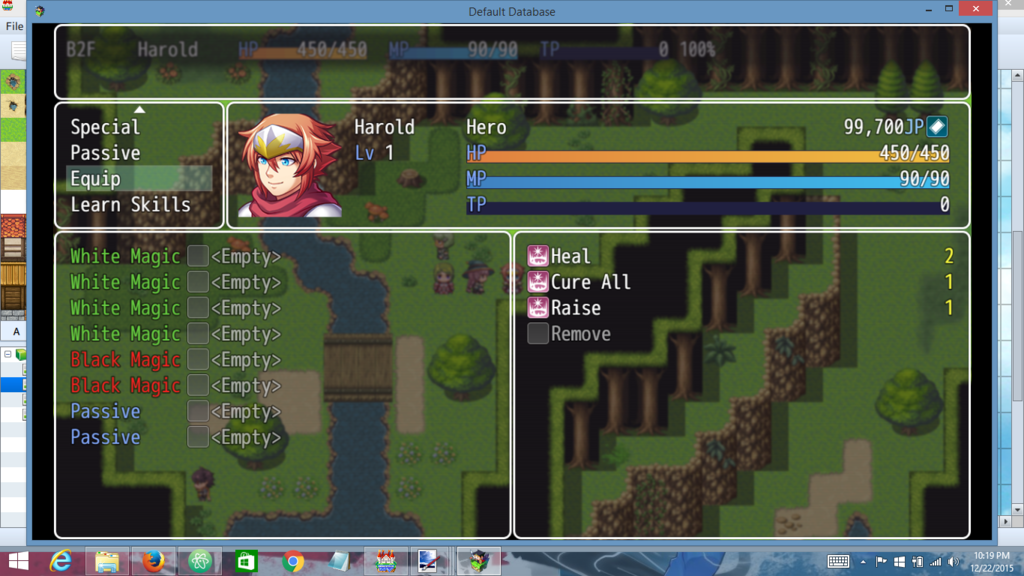
Simply edit the plugin parameter "Default Equip Cost" below, and change the value to 0.
Hope it helps! :DSpoiler
-
@Moogle_X
I can't express my gratitude. It worked just the way I wanted it to. Thank you very much for your time and attention. That tutorial was perfect. I won't forget it ever. ;_; -
Do you plan in add more features? If you do could you add a Tag so 2+ skill cant be chosen.
I'll try to explain:
Fire I
Fire II
Fire III
If the player equip fire I he cant equipe Fire II and Fire III. Also same logic with other 2 Fires skils. That would be awersome for passive stuff that I dont wanna to stack. Like 2 passives: Lord of the Day and Lord of the Night. :D
The tag wold be something like <NoEquip ID, ID, iD...>
tyvm :D -
Hello again. I've been trying to make a Blue Magic user and I've been following the yanfly tutorial to make the skill learnable from a specific class.
if (target.isActor() && target._classId === 15)The thing is: I made a passive skill called "Learn" and I want the skill to be learned not by the user class, but if he has the Learn skill equiped.
Is there a way for me to do this? -
Moogle_X, you're doing a really good job adding the new features that everybody is requesting you! Thank you so much <3
By this way, I'm using a class change plugin, and yanfly learn system, but I would like the skill pool just show the skills that class have learn, and when I change class, all skills are unequipped, could be this possible? -
@killerfer
Yes, it can be done. You just need to change the code to this:
Change "x" to the "Learn" skill id.if (target.isActor() && target.eqsSkillEquipped($dataSkills[x]))
My only concern is whether the code above will produce error (or not) when "applied" to enemy. Let me know if that happen.
@Targaryen
Your request will involve editing Yanfly's script, unfortunately. :(
Maybe, you can request Yanfly to add skill's "auto-forget" option when switching class.
That way when the actor change class, only the current class' skills will be shown in the skill pool. -
@Moogle_X
Thank you very much, it worked just as I wanted. No errors when used against enemies too. -
@Moogle_X
Thank you, I'll try to tell her to do that -
The plugin is updated to v1.41. :)
It simply added compatibility fix with Yanfly's Auto Passive States plugin.
Please make sure to position Passive States plugin above Equip Skill System. -
@Moogle_X
I'm really sorry for giving you so much trouble, but I can't live without this plugin anymore :p
Is there a way for the scene to not be in the skills menu? Like for it to appear only when I call it.
And is there a way for me to put it directly in the main menu with the yanfly main menu manager? -
@killerfer
Technically, I can create a separate scene just for equipping skills.
My only concern is how the scene will look.
What do you want to do with the "skill type window"? (The one that contains "magic", "special", etc)
Get rid of it completely? If so, what going to happen with the actor status window at the right? Move it to the left? It may look very weird.
If "skill type window" still exist, what's going to be inside it? Only equip command? Again, it may look weird too.
Maybe, you have a better idea? I'll write a separate script for your request, so tell me your opinion. BD -
@Moogle_X
I'm really flattered. :blush:
I hadn't thought about the skill type window, but since you mentioned it, I had an idea. Been trying to do it in paint all day because may skills in image editor are close to none haha.
How about something like this?
That way, if you have a skill like a "MAT +10%" passive, the player can see the changes directly in the screen.Spoiler
On top of that I thought it would be prettier (although it must be too much trouble to ask) to use the bars drawn from the status menu core plugin from yanfly. It could be something like this.
I couldn't put the numbers on the image without screwing with the bars sorry :(Spoiler
If those are too difficult to pull don't really need to bother with it, you already did too much for me. Thank you very much.
PS: sorry about the awful paint skills :p
By the way, I think I found a little bug. I made a passive skill that let the actor use another skill type. When he equips it, the new type of skill only shows when I close the skill scene and open it again. The same happens for when I unequip it. Ex: I have "White Magic" passive equipped and can use the white magics. When I unequip it if I press cancel to go to the "skill type window", I can still choose the white magic and use, for example, a healing spell. The command only disappears when I return to the main menu screen and open the skills screen again.