Encounter Control (MV/MZ)

● ARCHIVED · READ-ONLY
Started by ATT_Turan 26 posts Page 1 of 2 View original ↗
  1. Encounter Control 1.5
    ATT_Turan

    Introduction
    This plugin was inspired by a comment from @RCXGaming that I thought led into a nice little set of features. The overall purpose is to give the developer more control over encounters while still allowing them to be randomized, and without having to get into eventing them all.

    I have tested the basic functionality, please let me know if you encounter any errors. I will consider making compatibility patches if the other plugin is free to use (or one I own, such as a Yanfly product) and unobfuscated. Otherwise, other authors are free to modify this code to make it compatible with theirs so long as I am still credited.

    Features
    This plugin is designed to give more control over how random encounters are treated. One half is giving a minimum number of steps between encounters, to prevent the frustration of finishing a battle and getting into another almost immediately.

    The other is tracking which troop was just fought, so as to prevent a repeat of the same exact battle. If you have many troops listed in a map, you can remember more than one, to force even more variety before the player sees a repeat.

    Additionally, a notetag is provided to force the player to encounter specific troops in a specific order, as well as one that disables encounters at a given party level.

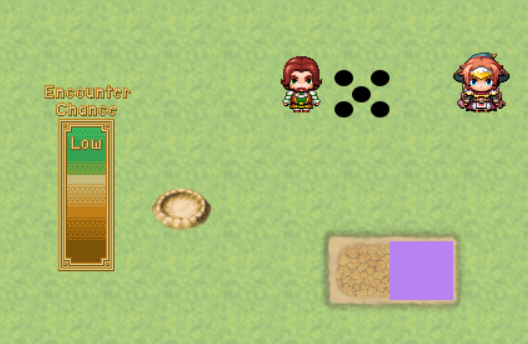
    As a non-control feature, an encounter gauge can be added to the map screen. This uses images provided by the user which move as the player takes steps and approaches their next encounter - this can make a gauge drain or fill, amongst other things. Sample images are provided and may be freely used so long as credit is given to hiddenone.
    1720799290845.png

    Notetags
    Map Notetags

    Code:
    <encountersteps: x>

    Where x is the decimal percent of Enc. Steps the player must have before an encounter is possible. This overrides the Minimum Steps plugin parameter for this specific map.

    Example: <encountersteps: .6>

    Code:
    <encounterorder: x y z>

    List the troop IDs (no leading zeros) you wish the player to encounter, in the order you wish them to be encountered. Once all troops have been encountered, the list will start again from the beginning.

    This disregards any settings in the Encounters section of the map properties, as well as the Remembered Troops plugin parameter or notetag.

    Example: <encounterorder: 12 8 15 22 49 6>


    Code:
    <rememberedtroops: x>

    Where x is the number of troops the game will track before allowing any repeat encounters. Supplying a number larger than the number of troops you have listed in the map properties will have no effect.

    Example: <rememberedtroops: 2> - will make the last 2 troops the player fought be ignored as candidates when determining which troop they are about to encounter.

    Code:
    <encounterlevel: x>

    Where x is the level at which the player will no longer get any random encounters on this map. It is compared to the average level of all battle party members.

    Code:
    <encounterregions: x:y a:b>

    Where each pair is a region ID followed by its modifier for steps toward an encounter. Positive values will make steps in that region count more toward an encounter, whereas negative values will make them count more slowly.

    Note that any negative values must be a decimal value greater than -1 or it will completely negate the step and encounters will never happen, aside from with bush modifiers.

    Example: <encounterregions: 2:2 3:-.5 4:3>

    Terms and Credits
    Free for non-commercial and commercial use. Credit ATT_Turan.
  2. Ooh I really like that remember troops function!
  3. ATT_Turan said:
    Example: <encounterorder: 12 8 15 22 49 6>
    while the troop id is removed from this list, is it also just possible it take
    1 random from this list without removing to be able to gain a battle again?

    or some like:
    <encounter>
    troop 12: .4
    troop 1: .05 (if rare enemy)
    ....
    ....
    </encounter>

    or similair?
  4. ShadowDragon said:
    while the troop id is removed from this list, is it also just possible it take
    1 random from this list without removing to be able to gain a battle again?
    Can you try to explain your question in a different way?

    I don't see how your example is different from the regular system of listing encounters in the Map Properties with a weight to make some rare.
  5. ATT_Turan said:
    in the order you wish them to be encountered. Once all troops have been encountered, the list will start again from the beginning.
    for the order, so the list will be empty before it refilled and probably in the same order,
    why not just pick 1 at random so you can also encounter the same twice.

    the reason of the other tag mention is that each encounter can different.
    while encounter steps = 30 on note tag, I don't know if this means minimal 30 steps.

    or steps taken is minimal 30 to max for its encounter so there is a bit more range
    as I don't know exactly how the default one works.
  6. I'm still having a hard time - it would help if you gave an actual example of what you would like to happen in the game to the player.

    ShadowDragon said:
    for the order, so the list will be empty before it refilled and probably in the same order,
    why not just pick 1 at random so you can also encounter the same twice.
    As I said above - I don't understand how that's different from the default system. You go to Map Properties, make a list, and every encounter chooses from it randomly. How is what you're asking for different?

    ShadowDragon said:
    the reason of the other tag mention is that each encounter can different.
    while encounter steps = 30 on note tag, I don't know if this means minimal 30 steps.
    There's no such thing as encounter steps = 30 in a notetag.

    The instructions say:
    ATT_Turan said:
    Where x is the decimal percent of Enc. Steps the player must have before an encounter is possible.

    So if you entered in the Map Properties:
    1720464375386.png

    And put - either in the Minimum Steps plugin parameter or the <encountersteps> notetag - the value .5, then .5 * 30 = the player can't possibly get into an encounter unless they've made at least 15 steps.

    ShadowDragon said:
    as I don't know exactly how the default one works.
    1720464473274.png
  7. now I get the encounter steps between them, so the map encounter list
    of troops are still added towards the notetag, but than its done in order
    if added, if not added, than the troop list idea is still randomized that way.

    if so, than it is clear what it does :)
  8. ShadowDragon said:
    now I get the encounter steps between them, so the map encounter list
    of troops are still added towards the notetag, but than its done in order
    if added, if not added, than the troop list idea is still randomized that way.
    No.

    The entire point of the <encounterorder> notetag is to replace the troops you list in Map Encounters. In fact, if you have the notetag, the Map Encounters section should just be empty.

    You do not have to use this notetag for anything else in the plugin to work. In fact, if you have this notetag, the Remembered Troops plugin parameter and notetag do not function on that map. I will update my instructions to be more explicit in that fact.

    It is designed to do the opposite of how the engine normally works - instead of randomly determining a troop, you specify "the players will always fight these troops in this order."
  9. Major update!

    A new feature has been added - you're now able to display an encounter gauge that shows the player how long they have until their next encounter.

    It's referred to as a gauge in the plugin description and parameters, but I've designed it flexibly so that any two images can be used. There's no warping or stretching, so you can use images that are curved or a specific shape, not just a straight bar.

    And if that's not cool enough, a beautiful sample gauge has been provided, courtesy of @hiddenone - you're free to use it in your projects with this plugin, just add her to your credits.

    1720799446754.png
  10. This is pretty cool. I looked at it because it sounded like I could just replace what I was already using to control this effect. Alas, not quite there.

    But, with that in mind:

    Do you have any plans to add an "encounter ceiling" to this plugin? A feature that would dictate "guaranteed encounter at X amount of steps"? Or does the plugin simply use the "average steps per encounter" as the maximum?
  11. Tai_MT said:
    Do you have any plans to add an "encounter ceiling" to this plugin? A feature that would dictate "guaranteed encounter at X amount of steps"? Or does the plugin simply use the "average steps per encounter" as the maximum?
    It would be simple to add that, but it's already sort of there.

    By default, the map calculates how many steps it takes you to have an encounter by doing
    (random number from 0 to your Enc. Steps) + (random number from 0 to your Enc. Steps) + 1

    So the number you type into Enc. Steps already determines a guaranteed value, it's 2x - 1.

    RPG Maker doesn't do what some other JRPGs do, where they make a random check every step.

    So, in summary - I could add it as a plugin parameter, but it's already determined by what you enter in the map properties so I don't know what it would accomplish.
  12. That's pretty interesting information to know. I only asked because I was hoping that it were possible to have a "range" for the encounters. Like say I wanted the player to be able to take 11 steps before they could get an encounter, but could take no more than 40 before an encounter was forced on them.

    But, it sounds like if I were to put 20 in the Encounter Steps field then .9 for the minimum, I could have an encounter anywhere from 18 to 39 steps. If that's the case, then it could be tricky to personally fine-tune those numbers to get the ranges I would potentially want. Still, that's a "me" problem, and what I was hoping for is probably pretty niche if we're honest.

    Anyway, thanks for the info. Plugin sounds great. Keep up the good work!
  13. Tai_MT said:
    But, it sounds like if I were to put 20 in the Encounter Steps field then .9 for the minimum, I could have an encounter anywhere from 18 to 39 steps.
    You could put .55 in the minimum steps to get 11 from 20. But you're correct, you can't naturally have an even value as the maximum.

    If you go to line 239, you can pretty easily change the equation - either deleting the + 1 at the end or changing it to a 2. Either way would produce an even value on the maximum random rolls.
  14. Updated to version 1.3 to add a request by @Pikuseruatisuto - you can now use map notetags to make specific region IDs contribute more or less toward your encounter steps.
  15. It looks as if it has some really nice features. I will try it out.

    The only feature that the plugin that I currently use for random encounters has that this doesn't is letting you use variables for encounter rates. In my current (MZ) project the town gets a little bit more dangerous at night. In previous (MV) projects I have done the old "kill the gang leader and the encounter rate for town goes very high to give less encounters" trick more than once.

    Edit: I seem to be having a little trouble (maybe I don't understand the parameters). To enable random encounters at all, I seem to need a <encounterorder: > notetag for the map. Here are some screenshots:

    Screenshot 2025-10-05 132022.png

    Screenshot 2025-10-05 132044.png
    and the map with the random encounters:
    Screenshot 2025-10-05 132108.png
    I have tried it without the other plugin (which shrinks the party on the overworld map), and it doesn't make any difference.
  16. Piyan Glupak said:
    Edit: I seem to be having a little trouble (maybe I don't understand the parameters). To enable random encounters at all, I seem to need a <encounterorder: > notetag for the map.
    My quick feature addition last night also added a bug. I've corrected it in 1.4, download from the first post.


    Piyan Glupak said:
    The only feature that the plugin that I currently use for random encounters has that this doesn't is letting you use variables for encounter rates.
    That's a decent idea, I can add that in later.
  17. Thank you for the update. :)

    Err... You aren't going to like this, but the "Remembered Troops" feature doesn't seem to be working. I think that this may have been masked by the previous need for an <encounterorder: > notetag.

    I deleted the <encounterorder: > notetag from the map with the enemies, and got random encounters okay. Unfortunately, I noticed that the troop would sometimes be the same as in the previous encounter, so I tried changing the "Remembered Troops" parameter to 2, but to no avail.

    The only other thing that I did to the test project was to make a new map with the default inn event, so that I can play-test for lots of random encounters without starting a new game.
    ATT_Turan said:
    That's a decent idea, I can add that in later.
    Thank you in advance. Allowing variables to be used for encounter rates would would give this plugin a lot of flexibility.
  18. Piyan Glupak said:
    Err... You aren't going to like this, but the "Remembered Troops" feature doesn't seem to be working.
    No problem - it was just a little typo. I corrected that and added the plugin parameter for using a variable per your request.
  19. Thank you for the update. The "Remembered Troops" works fine now. I also put enemies on the overworld map, with two regions, and the "Encounter Regions" note-tag works well.

    The "Encounter Variable" parameter affects the encounter frequency of the maps when a variable is assigned. When the variable is set to a high number (such as 100), you get a random encounter every 2 steps. Setting the variable to 2 makes things more normal, but still a little more lively. From what you wrote in the help section, I assume that setting the variable a value of 1 means that the map encounter rates and any "Encounter Region" note-tags are not adjusted.

    Setting the variable chosen for the Encounter Variable parameter to 0 really reduces the number of encounters. If you set it to -1, you only seem to get encounters where an "Encounter Regions" note-tag was positive (such as 2).

    Thanks again.
  20. Piyan Glupak said:
    The "Encounter Variable" parameter...
    I'm not sure what you're trying to report/give as feedback here, but then perhaps I wasn't sure how you expected it to work in the first place.

    I think the description in the documentation is clear - if you use the encounter variable, the value of the variable replaces the normal step counter.

    By default, in the engine, moving 1 tile will subtract 1 from your remaining steps until an encounter. If you have the encounter variable defined, it will subtract whatever the value of the variable is instead. So a variable with a value of 2 will subtract 2 steps every tile.

    Then all other modifiers for encounter regions and bushes are applied as they always are.