Am I doing something wrong?
Eli Button Common Events - Assign/bind common events to your keyboard keys!
● ARCHIVED · READ-ONLY
-
-
Hi there!Am I doing something wrong?
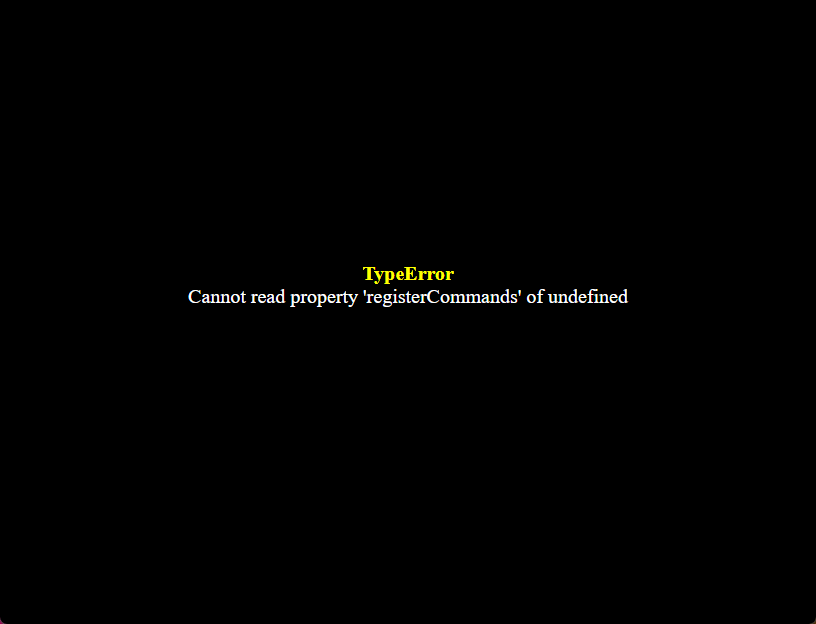
View attachment 350732
Yes, you need my core plugin "Eli Book". Download it and put somewhere above all other Eli Plugins.
Hakuen Studio Eli Book RPG Maker MZ by Hakuen Studio -
oh, im sorry. thank you !Hi there!
Yes, you need my core plugin "Eli Book". Download it and put somewhere above all other Eli Plugins.
Hakuen Studio Eli Book RPG Maker MZ by Hakuen Studio -
Hi, is this plugin works on joiplay by any chance? Or my code editing just bad, because i can't call the common event after i press the button.
-
I have no idea. I didn't even know joiplay exists until now. Best you can do to try to debug this is first make sure you manage to make the plugin work on a playtest on your computer first. After you manage to make it work, then you move on to joiplay for testing.Hi, is this plugin works on joiplay by any chance? Or my code editing just bad, because i can't call the common event after i press the button.
Also, you give me too little information for me to help you.
- What happens? An error appear? Or nothing happen?
- Are you using MV or MZ?
- Are you suing the core plugin Eli Book somewhere above all other Eli plugins on your plugin manager? How did you setup your button common events, can you show it to me?
-
Hi, thanks for replying my post. But sorry, i already fix the bug, i think i setup the wrong common event and i use a save that doesn't include the plugin.I have no idea. I didn't even know joiplay exists until now. Best you can do to try to debug this is first make sure you manage to make the plugin work on a playtest on your computer first. After you manage to make it work, then you move on to joiplay for testing.
Also, you give me too little information for me to help you.
- What happens? An error appear? Or nothing happen?
- Are you using MV or MZ?
- Are you suing the core plugin Eli Book somewhere above all other Eli plugins on your plugin manager? How did you setup your button common events, can you show it to me?
im trying to delete the post because i already fix it but i can't find the delete button, sorry and thank you for the reply. -
Hi, Im trying to setup a button Common Event that calls the save menu. But after I save it, reopen the game, and load my save. The save menu was looping, I mean after I press x/escape it's still reopening.
How can I fix this?
(This is the common event I use)
{"id":56,"list":[{"code":355,"indent":0,"parameters":["SceneManager.push(Scene_Save);"]},{"code":0,"indent":0,"parameters":[]}],"name":"Save Hotkey","switchId":1,"trigger":0} -
Hi there!Hi, Im trying to setup a button Common Event that calls the save menu. But after I save it, reopen the game, and load my save. The save menu was looping, I mean after I press x/escape it's still reopening.
How can I fix this?
(This is the common event I use)
{"id":56,"list":[{"code":355,"indent":0,"parameters":["SceneManager.push(Scene_Save);"]},{"code":0,"indent":0,"parameters":[]}],"name":"Save Hotkey","switchId":1,"trigger":0}
- I need to see a screenshot of your common event and from the plugin parameter of the button you assigned it.
- Are you using MV or MZ?
- Also, you don't need a script call to call the save menu. The default event commands already have a Open Save command.
-
Hi, Thank you for the reply:rhappy:Hi there!
- I need to see a screenshot of your common event and from the plugin parameter of the button you assigned it.
- Are you using MV or MZ?
- Also, you don't need a script call to call the save menu. The default event commands already have a Open Save command.
1. The plugin parameter
The common event
2. The game i played is in RPG MZ.
3. Fyi, I only have a phone. So I don't know a thing about the default event commands :rswt
That script originally was for a RPG MV game, for a game that doesn't let you save in a specific map. -
- You are showing to me screenshot of the JSON files. I need the screnshot from the actual RPG Maker editor. Not this.Hi, Thank you for the reply:rhappy:
1. The plugin parameterView attachment 361681
The common event
View attachment 361682
2. The game i played is in RPG MZ.
3. Fyi, I only have a phone. So I don't know a thing about the default event commands :rswt
That script originally was for a RPG MV game, for a game that doesn't let you save in a specific map.
- Are you saying that you are trying to change the behavior of a game you are playing? Or are you making a game with the RPG Maker Editor?2. The game i played is in RPG MZ.
- How are you developing the game with a phone?3. Fyi, I only have a phone. So I don't know a thing about the default event commands
I think you are not understand properly some things. Here is a thread to help developers that are using my plugin. Not someone that is playing a game and want to change/mod that game. You need to use RPG Maker Editor.
Otherwise, you need to contact the developer that created the game and tell him the problem so he can fix it. -
Thank you for the reply and sorry for the trouble I made, I was trying to use your plugin to made the game much easier by adding a save menu button because I can't save at a certain map. I'm really sorry for the trouble;_;- You are showing to me screenshot of the JSON files. I need the screnshot from the actual RPG Maker editor. Not this.
- Are you saying that you are trying to change the behavior of a game you are playing? Or are you making a game with the RPG Maker Editor?
- How are you developing the game with a phone?
I think you are not understand properly some things. Here is a thread to help developers that are using my plugin. Not someone that is playing a game and want to change/mod that game. You need to use RPG Maker Editor.
Otherwise, you need to contact the developer that created the game and tell him the problem so he can fix it.
Maybe I'll use the RPG Maker Editor after I bought a laptop and for the last time, I'm really sorry for the trouble I made. -
Anyone have any idea why, when using this (the MV version), it would be able to run the Common Event in question precisely once and then never again?
At the moment, I'm disabling Dash in my game and then was trying to use this to replace X to execute an event which in turn allows the player to select a skill from a category of Map Specific effect skills using YEP_MapSelectSkill, and then I use that variable to force a cooldown on a skill and run it's common event (since Common Event can't actually just use a Skill for whatever reason, even when it has menu only scope).
The common event is still fine, and exists, and can be triggered fine by talking to a test NPC that invokes it. But no longer can the button be used.
I can't replicate this weird bug by modifying Hakuen Studio with my X button changes (seems to work fine there), so I can only assume it's fighting another plugin.
I do use various other common event triggering plugins (i.e. start of game, end of combat, whenever a random encounter happens). But I've tried turning them OFF too and the usual debugging and this still is a problem (same with load order changes, even if this is last, past all those other plugins).
Kind of annoying as this is the last link in the chain to allow the player to use commonly wanted map skills (and quickly heal etc. too) without needing to go menu diving. -
Hi!Anyone have any idea why, when using this (the MV version), it would be able to run the Common Event in question precisely once and then never again?
At the moment, I'm disabling Dash in my game and then was trying to use this to replace X to execute an event which in turn allows the player to select a skill from a category of Map Specific effect skills using YEP_MapSelectSkill, and then I use that variable to force a cooldown on a skill and run it's common event (since Common Event can't actually just use a Skill for whatever reason, even when it has menu only scope).
The common event is still fine, and exists, and can be triggered fine by talking to a test NPC that invokes it. But no longer can the button be used.
I can't replicate this weird bug by modifying Hakuen Studio with my X button changes (seems to work fine there), so I can only assume it's fighting another plugin.
I do use various other common event triggering plugins (i.e. start of game, end of combat, whenever a random encounter happens). But I've tried turning them OFF too and the usual debugging and this still is a problem (same with load order changes, even if this is last, past all those other plugins).
Kind of annoying as this is the last link in the chain to allow the player to use commonly wanted map skills (and quickly heal etc. too) without needing to go menu diving.
Seems to me that you are using some plugins, and maybe there is a compatibility issue.
I would suggest that you try my sample project, map the X button to a common event, and see if you manage to call that common event more than one time.
This test will let you know if the problem is a plugin compatibility or not.
It will also be nice if you can send a screenshot of the X button common event. Both the common event page than the plugin parameters you used to setup it -
Yep its almost certainly that, as I mention, I already did that as part of the usual debug process: added a quick 'trigger on X' event to your Studio and there is no problem there. Either that, or this does not appreciate long common event chains with many conditions?Hi!
Seems to me that you are using some plugins, and maybe there is a compatibility issue.
I would suggest that you try my sample project, map the X button to a common event, and see if you manage to call that common event more than one time.
This test will let you know if the problem is a plugin compatibility or not.
It will also be nice if you can send a screenshot of the X button common event. Both the common event page than the plugin parameters you used to setup it
I have since setup an alternative using a Paralel Process monitoring the Controller button with WolfPad which does work as a bandaid, though I'd rather not be using a constant extra paralel process if needed.
The common event is lengthy, so I'm paraphrasing it here:
Obviously, each character in turn links another Common Event that runs a specific skill based on what the player has chosen.
For example, if Skill 108's event is called, that puts Double-Time on Cooldown, and then does what it does (using a modified Yanfly smart jump to dash the player forwards 2 spaces whilst honoring the players Z axis and halting if there is a drop or wall (as I'm in 3D with MV3D). Example of subsequent event:
Naturally, the point of this is that the player doesn't have to go into the menu to use their Map-related skills, they can just pop Y on Gamepad or G on Keyboard to get a curated selection of skills and execute them.
There are no problems if I run the Common Event Independently of the button, such as by using the action button on a map event calls the common event.
Part of me wonders if this is stumbling on the same thing FaceWindow did before (that did not like Conditional Branches at all, always hid the face afterwards no matter what unless you changed to a different character, and RPGLord69 gave me a workaround for it).
In any case, what I'm looking for is what could cause it to stop running. I have no idea at the moment so can't diagnose it any further (there are no error logs, it just refuses to execute again via button). I have tried with both overwrite and not set on, no difference. -
I don't think long common events are a problem... maybe there is a compatibility issue somewhere. I think a good workaround for you to test is, on the X common event, you just activate a switch, and that switch can execute the real common event that you want.Yep its almost certainly that, as I mention, I already did that as part of the usual debug process: added a quick 'trigger on X' event to your Studio and there is no problem there. Either that, or this does not appreciate long common event chains with many conditions?
I have since setup an alternative using a Paralel Process monitoring the Controller button with WolfPad which does work as a bandaid, though I'd rather not be using a constant extra paralel process if needed.
The common event is lengthy, so I'm paraphrasing it here:
View attachment 364350
View attachment 364352
View attachment 364353
Obviously, each character in turn links another Common Event that runs a specific skill based on what the player has chosen.
For example, if Skill 108's event is called, that puts Double-Time on Cooldown, and then does what it does (using a modified Yanfly smart jump to dash the player forwards 2 spaces whilst honoring the players Z axis and halting if there is a drop or wall (as I'm in 3D with MV3D). Example of subsequent event:
View attachment 364354
Naturally, the point of this is that the player doesn't have to go into the menu to use their Map-related skills, they can just pop Y on Gamepad or G on Keyboard to get a curated selection of skills and execute them.
There are no problems if I run the Common Event Independently of the button, such as by using the action button on a map event calls the common event.
Part of me wonders if this is stumbling on the same thing FaceWindow did before (that did not like Conditional Branches at all, always hid the face afterwards no matter what unless you changed to a different character, and RPGLord69 gave me a workaround for it).
In any case, what I'm looking for is what could cause it to stop running. I have no idea at the moment so can't diagnose it any further (there are no error logs, it just refuses to execute again via button). I have tried with both overwrite and not set on, no difference.
So, on the button common event:
if switchId is ON
// DO NOTHING
else
// activate switch ID
Then on the other common event, you make sure to set the switch to off at the end.
I don't think there is a problem with configurations, but, just to make sure, you could send a screenshot of your button x common event plugin parameter. -
Nope, no effect with that, again it runs the event one time fine, and then can never be run again via the button (even changing maps and resetting all variables).I don't think long common events are a problem... maybe there is a compatibility issue somewhere. I think a good workaround for you to test is, on the X common event, you just activate a switch, and that switch can execute the real common event that you want.
So, on the button common event:
if switchId is ON
// DO NOTHING
else
// activate switch ID
Then on the other common event, you make sure to set the switch to off at the end.
I don't think there is a problem with configurations, but, just to make sure, you could send a screenshot of your button x common event plugin parameter.
The event is still there, and indeed can still be run elsewhere, like by talking to my Dev-Cat in the test rooms.
As mentioned I've also tried disabling all potential other event and controller plugins (YEP_CommonEvents and UtilityCommonEvents, and their controller config, and CG-Tepsy's Random Encounter Common Event) but none have any effects. The plugin setup is only for X, but here you go anyways:
-
It is probably a compatibility issue. I don't know what else can be. I opened MV here and tested it on my project, with a gamepap common event for the X key, the same way your screenshot. The common event runs fine more than once.Nope, no effect with that, again it runs the event one time fine, and then can never be run again via the button (even changing maps and resetting all variables).
The event is still there, and indeed can still be run elsewhere, like by talking to my Dev-Cat in the test rooms.
View attachment 364370
As mentioned I've also tried disabling all potential other event and controller plugins (YEP_CommonEvents and UtilityCommonEvents, and their controller config, and CG-Tepsy's Random Encounter Common Event) but none have any effects. The plugin setup is only for X, but here you go anyways:
View attachment 364371
When you test again, after you run the common event for the first time, open the console(F12 or F8), go to the console tab, and write down these ones to see the result:
Eli.ButtonCommonEvents.regularCommonEvents[15] → Must return false (not true or undefined)
Input.gamepadMapper[2] → Must return "x"
let me know the results so we can track it down -
It is probably a compatibility issue. I don't know what else can be. I opened MV here and tested it on my project, with a gamepap common event for the X key, the same way your screenshot. The common event runs fine more than once.
When you test again, after you run the common event for the first time, open the console(F12 or F8), go to the console tab, and write down these ones to see the result:
View attachment 364389
Eli.ButtonCommonEvents.regularCommonEvents[15] → Must return false (not true or undefined)
Input.gamepadMapper[2] → Must return "x"
let me know the results so we can track it down
Yep, it's returning True after running the event. -
Hmm!! So that is why it is only being able to call once. After the common event ends, it should be set to false, so the plugin knows the common event has ended and it can play it again in case the user presses the button again.
On my Eli Book there is a hook on the Game Interpreter that setups a common event Id when the eventId is 0 or undefined. The common event id is set by comparing the list passed to the setup method with the ones from $dataCommonEvents
Then at the end of the interpreter, on the terminate method, there is a new method to be executed on every end of every common event. This is for other plugins do what they need/want to do.
Then, on the Button Common Event plugin, we use the method onCommonEventEnd:
On the `endRegularButtonCommonEvent` it gets the id of the common event, and set it to false.
So now, two things can be happening:
1) Somehow that method is not being called. Maybe some other plugin, that is below my button common event and eli book, is messing with the Game_Interpreter.prototype.terminate
So! Open my plugin code with any text editor, find the "endRegularButtonCommonEvent as it is on the screenshot. Somewhere inside the function, put: console.log("OK").
Run the game and test it again. Open the console log and see if "OK" will be displayed there. If it is, then the function is being executed, and we get to the second thing.
2) The method is being executed, but somehow the `Eli.ButtonCommonEvents.regularCommonEvents[15]` is being set to true again. That one can be trick to know...
Type on the console the following:
Input.gamepadMapper
And send me a screenshot of what it returns to you. -
Excuse the delay, at work.
Added here and saved:
No result in the console after using the button:
Which made check Eli.ButtonCommonEvents.regularCommonEvents[15] BEFORE running it, and it is indeed undefined there. So it starts undefined, becomes true, and stays true.
I did a full Notepad ++ file-search for endRegularButtonCommonEvent just in case, but that doesn't exist anywhere except your own plugin so not a direct replacement occuring.
I did Input.Gamepadmapper anyways:
That looks a bit odd, but I guess X is overidden, removing shift.