Destination Sprite
By Krimer
Introduction
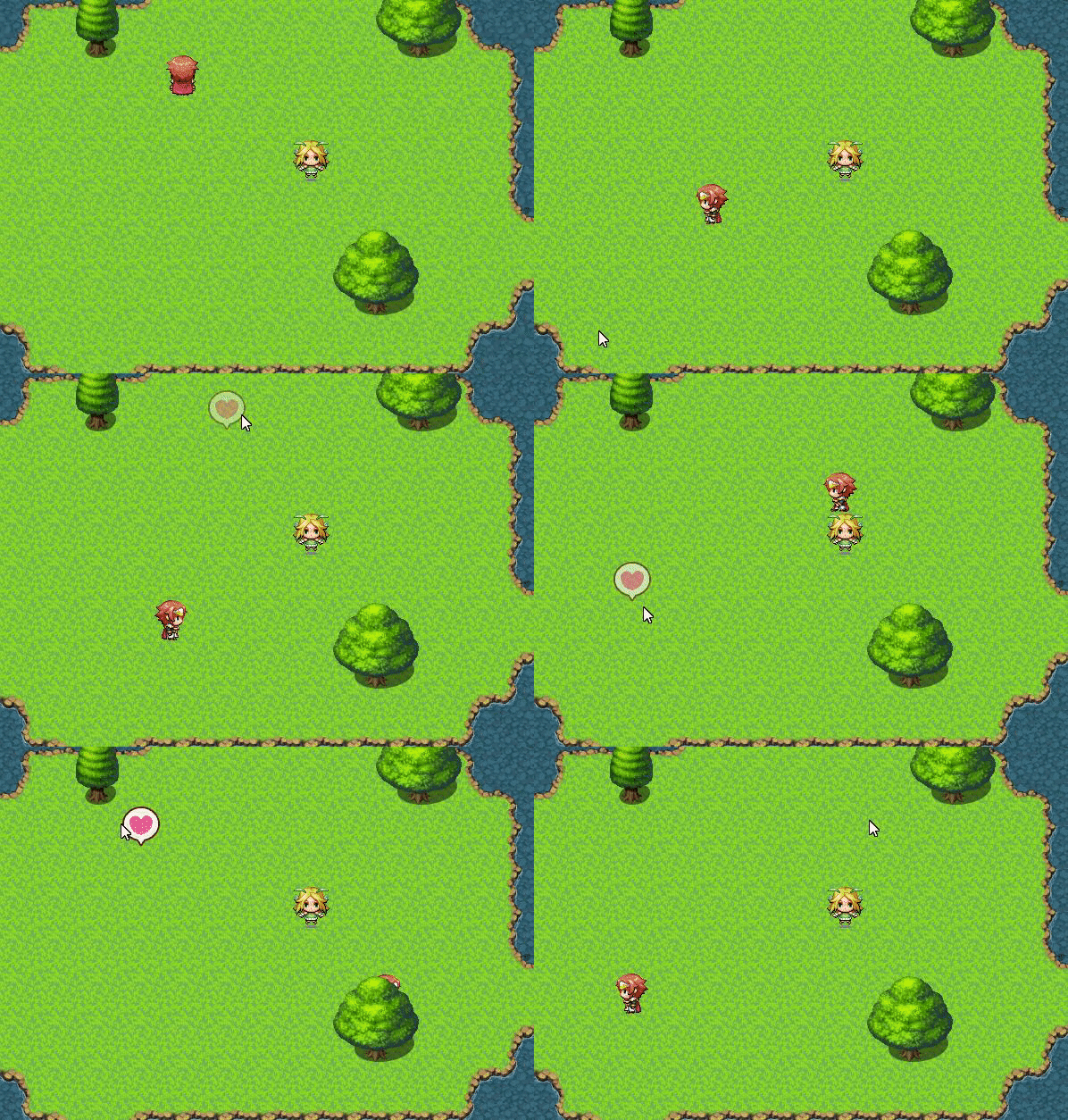
Customizable destination sprite for mouse/touch input
Features
- Easy to use.
- Resize and recolor the destination sprite
- Use a custom image or spritesheet as the destination sprite
- Multiple animation modes
Screenshots

How to Use
- Create file with name DestinationSprite.js
- add file to /plugin folder of your project
- Activate DestinationSprite in plugin manager
Plugin MV-MZ
Spoiler
JavaScript:
//=============================================================================
// DestinationSprite.js
// Version: v2.0.5
//=============================================================================
/*:
 * @target MZ
 * @plugindesc <DestinationSprite> v2.0.5 - Customizable destination sprite for mouse/touch input with spritesheet animation support
 *
 * @author Krimer
 *
 * @param spriteType
 * @text Sprite type
 * @type select
 * @option Square
 * @option Circle
 * @option Custom
 * @option Spritesheet
 * @option Off
 * @default Square
 * @desc Type of destination sprite to display
 *
 * @param imageName
 * @text Image name
 * @type file
 * @dir img/system
 * @default
 * @desc Image file for Custom or Spritesheet types (from img/system/)
 *
 * @param Sprite Settings
 * @default
 *
 * @param spriteSize
 * @text Sprite size
 * @parent Sprite Settings
 * @type number
 * @min 1
 * @default 48
 * @desc Size in pixels for Square/Circle types. Default: 48
 *
 * @param spriteColor
 * @text Sprite color
 * @parent Sprite Settings
 * @type text
 * @default #ffffff
 * @desc Color for Square/Circle types (hex format). Default: #ffffff
 *
 * @param spriteOpacity
 * @text Sprite opacity
 * @parent Sprite Settings
 * @type number
 * @min 0
 * @max 255
 * @default 120
 * @desc Maximum opacity (0-255). Default: 120
 *
 * @param blendMode
 * @text Blend mode
 * @parent Sprite Settings
 * @type select
 * @option Normal
 * @option Additive
 * @default Additive
 * @desc Blend mode for the sprite. Default: Additive
 *
 * @param Animation Settings
 * @default
 *
 * @param animationMode
 * @text Animation mode
 * @parent Animation Settings
 * @type select
 * @option Loop
 * @option Once
 * @default Loop
 * @desc Loop = continuous animation, Once = play once then fade out
 *
 * @param fadeSpeed
 * @text Fade speed
 * @parent Animation Settings
 * @type number
 * @min 1
 * @max 50
 * @default 12
 * @desc Opacity decrease per frame for "Once" mode. Default: 12
 *
 * @param scaleAnimation
 * @text Scale animation
 * @parent Animation Settings
 * @type boolean
 * @default true
 * @desc Enable pulsing scale effect for Loop mode (Square/Circle/Custom only)
 *
 * @param Spritesheet Settings
 * @default
 *
 * @param frameWidth
 * @text Frame width
 * @parent Spritesheet Settings
 * @type number
 * @min 1
 * @default 48
 * @desc Width of each frame for Spritesheet type. Default: 48
 *
 * @param frameHeight
 * @text Frame height
 * @parent Spritesheet Settings
 * @type number
 * @min 1
 * @default 48
 * @desc Height of each frame for Spritesheet type. Default: 48
 *
 * @param frameNumber
 * @text Number of frames
 * @parent Spritesheet Settings
 * @type number
 * @min 1
 * @default 8
 * @desc Number of frames in the spritesheet. Default: 8
 *
 * @param animationSpeed
 * @text Animation speed
 * @parent Spritesheet Settings
 * @type number
 * @min 1
 * @max 60
 * @default 6
 * @desc Frames to wait between animation updates. Lower = faster. Default: 6
 *
 * @param loopType
 * @text Loop type
 * @parent Spritesheet Settings
 * @type select
 * @option Forward
 * @option Ping-Pong
 * @default Forward
 * @desc Forward = 1,2,3,1,2,3... Ping-Pong = 1,2,3,2,1,2,3...
 *
 * @help
 * Compatible with both RPG Maker MV and MZ
 *
 * SPRITE TYPES
 * -Square: Simple filled square
 * -Circle: Simple filled circle
 * -Custom: Single custom image from img/system/
 * -Spritesheet: Animated spritesheet (horizontal strip) from img/system/
 * -Off: Hide the destination sprite completely
 *
 * ANIMATION MODES
 * -Loop: Continuous animation (spritesheet loops, shapes pulse)
 * -Once: Play animation once then fade out
 * For Spritesheet type:
 * -Loop mode: Frames play continuously (Forward or Ping-Pong)
 * -Once mode: Frames play once then sprite fades out
 *
 * SPRITESHEET FORMAT
 * Spritesheets should be horizontal strips with all frames in a single row
 * Example: 8 frames at 48x48 = 384x48 pixel image
 *
 * Enable/Disable sprite script call:
 *   $gameTemp.setDestinationSpriteEnabled(true);
 *   $gameTemp.setDestinationSpriteEnabled(false);
 *
 * You can find the color picker here, or use any graphic editor that works with hex color codes
 * https://www.w3schools.com/colors/colors_picker.asp
 */
//=============================================================================

var Imported = Imported || {};
Imported.Krimer_DestinationSprite = true;

(function() {

    const parameters = $plugins.filter(function(p) { return p.description.contains('<DestinationSprite>'); })[0].parameters;

    const dSpriteType = String(parameters['spriteType'] || 'Square');
    const dImageName = String(parameters['imageName'] || '');
    const dSpriteSize = Number(parameters['spriteSize'] || 48);
    const dSpriteColor = String(parameters['spriteColor'] || '#ffffff');
    const dSpriteOpacity = Number(parameters['spriteOpacity'] || 120);
    const dBlendMode = parameters['blendMode'] == 'Additive' ? 1 : 0;
    const dAnimationMode = String(parameters['animationMode'] || 'Loop');
    const dFadeSpeed = Number(parameters['fadeSpeed'] || 12);
    const dScaleAnimation = parameters['scaleAnimation'] != 'false';
    const dFrameWidth = Number(parameters['frameWidth'] || 48);
    const dFrameHeight = Number(parameters['frameHeight'] || 48);
    const dFrameNumber = Number(parameters['frameNumber'] || 8);
    const dAnimSpeed = Number(parameters['animationSpeed'] || 6);
    const dLoopType = String(parameters['loopType'] || 'Forward');


    const Game_Temp_initialize_dAlias = Game_Temp.prototype.initialize;
    Game_Temp.prototype.initialize = function() {
        Game_Temp_initialize_dAlias.call(this);
        this._destinationOpacity = 0;
        this._destinationSpriteEnabled = true;
    };

    Game_Temp.prototype.setDestinationOpacity = function(value) {
        this._destinationOpacity = value;
    };

    Game_Temp.prototype.getDestinationOpacity = function() {
        return this._destinationOpacity;
    };

    Game_Temp.prototype.setDestinationSpriteEnabled = function(value) {
        this._destinationSpriteEnabled = value;
    };

    Game_Temp.prototype.isDestinationSpriteEnabled = function() {
        return this._destinationSpriteEnabled;
    };

    const Game_Temp_setDestination_dAlias = Game_Temp.prototype.setDestination;
    Game_Temp.prototype.setDestination = function(x, y) {
        if (dAnimationMode == "Once" && (this._destinationX !== x || this._destinationY != y)) {
            this._destinationOpacity = dSpriteOpacity;
        }
        Game_Temp_setDestination_dAlias.call(this, x, y);
    };


    const Sprite_Destination_initialize_dAlias = Sprite_Destination.prototype.initialize;
    Sprite_Destination.prototype.initialize = function() {
        this._currentType = null;
        this._bitmapReady = false;
        this._animFrame = 0;
        this._animDir = 1;
        this._animTimer = 0;
        Sprite_Destination_initialize_dAlias.call(this);
        this.opacity = 0;
    };

    Sprite_Destination.prototype.destroy = function(options) {
        if (this._currentType == 'Custom' || this._currentType == 'Spritesheet') {
            options = { children: false, texture: false, baseTexture: false };
        }
        Sprite.prototype.destroy.call(this, options);
    };

    Sprite_Destination.prototype.createBitmap = function() {
        var tileWidth = dSpriteSize || $gameMap.tileWidth();
        var tileHeight = dSpriteSize || $gameMap.tileHeight();
        this._currentType = dSpriteType;
        this._bitmapReady = false;
        this._animFrame = 0;
        this._animDir = 1;
        this._animTimer = 0;
        this.bitmap = new Bitmap(tileWidth, tileHeight);
        if (dSpriteType == 'Square') {
            this.bitmap.fillAll(dSpriteColor);
            this._bitmapReady = true;
        } else if (dSpriteType == 'Circle') {
            this.bitmap.drawCircle(this.bitmap.width / 2, this.bitmap.height / 2, dSpriteSize / 2, dSpriteColor);
            this._bitmapReady = true;
        } else if (dSpriteType == 'Off') {
            this._bitmapReady = true;
        } else if (dSpriteType == 'Custom') {
            if (dImageName) {
                var self = this;
                var bmp = ImageManager.loadSystem(dImageName);
                if (bmp.isReady()) {
                    this.bitmap = bmp;
                    this._bitmapReady = true;
                } else {
                    bmp.addLoadListener(function() {
                        self.bitmap = bmp;
                        self._bitmapReady = true;
                    });
                }
            } else { this._bitmapReady = true; }
        } else if (dSpriteType == 'Spritesheet') {
            if (dImageName) {
                var self = this;
                var bmp = ImageManager.loadSystem(dImageName);
                if (bmp.isReady()) {
                    this.bitmap = bmp;
                    this._bitmapReady = true;
                    this.setFrame(0, 0, dFrameWidth, dFrameHeight);
                } else {
                    bmp.addLoadListener(function() {
                        self.bitmap = bmp;
                        self._bitmapReady = true;
                        self.setFrame(0, 0, dFrameWidth, dFrameHeight);
                    });
                }
            } else { this._bitmapReady = true; }
        }
        this.anchor.x = 0.5;
        this.anchor.y = 0.5;
        this.blendMode = dBlendMode;
    };

    Sprite_Destination.prototype.updateSpriteFrame = function() {
        if (!this.bitmap) return;
        this.setFrame(this._animFrame * dFrameWidth, 0, dFrameWidth, dFrameHeight);
    };

    const Sprite_Destination_update_dAlias = Sprite_Destination.prototype.update;
    Sprite_Destination.prototype.update = function() {
        if (this._currentType !== dSpriteType) {
            this.createBitmap();
        }
        Sprite_Destination_update_dAlias.call(this);
    };

    Sprite_Destination.prototype.updateAnimation = function() {
        if (!$gameTemp.isDestinationSpriteEnabled()) {
            this.opacity = 0;
            return;
        }
        if (dSpriteType == 'Off' || !this._bitmapReady) {
            this.opacity = 0;
            return;
        }
        this._frameCount++;
        this._frameCount %= 20;
        if (dSpriteType == 'Spritesheet') {
            this.updateSpritesheetAnim();
        } else {
            this.updateBasicAnim();
        }
    };

    Sprite_Destination.prototype.updateBasicAnim = function() {
        if (dAnimationMode == "Loop") {
            this.opacity = dSpriteOpacity === 255 ? 255 : dSpriteOpacity - Math.abs(10 - this._frameCount) * 6;
            if (dScaleAnimation) {
                this.scale.x = 1 + this._frameCount / 20;
                this.scale.y = this.scale.x;
            } else {
                this.scale.x = this.scale.y = 1;
            }
        } else if (dAnimationMode == "Once" && $gameTemp.getDestinationOpacity() > 0) {
            this.scale.x = this.scale.y = 1;
            this.opacity = $gameTemp.getDestinationOpacity() - dFadeSpeed;
            $gameTemp.setDestinationOpacity(this.opacity);
        } else { this.opacity = 0; }
    };

    Sprite_Destination.prototype.updateSpritesheetAnim = function() {
        this.scale.x = this.scale.y = 1;
        this._animTimer++;
        if (this._animTimer < dAnimSpeed) {
            if (dAnimationMode == "Once" && this._animFrame >= dFrameNumber - 1) {
                if ($gameTemp.getDestinationOpacity() > 0) {
                    this.opacity = $gameTemp.getDestinationOpacity() - dFadeSpeed;
                    $gameTemp.setDestinationOpacity(this.opacity);
                } else { this.opacity = 0; }
            }
            return;
        }
        this._animTimer = 0;
        if (dAnimationMode == "Loop") {
            if (dLoopType == 'Ping-Pong') {
                if (this._animFrame >= dFrameNumber - 1) { this._animDir = -1; }
                if (this._animFrame <= 0) { this._animDir = 1; }
                this._animFrame += this._animDir;
            } else {
                this._animFrame++;
                if (this._animFrame >= dFrameNumber) this._animFrame = 0;
            }
            this.opacity = dSpriteOpacity;
        } else {
            if (this._animFrame < dFrameNumber - 1) {
                this._animFrame++;
                this.opacity = dSpriteOpacity;
            } else if ($gameTemp.getDestinationOpacity() > 0) {
                this.opacity = $gameTemp.getDestinationOpacity() - dFadeSpeed;
                $gameTemp.setDestinationOpacity(this.opacity);
            } else { this.opacity = 0; }
        }
        this.updateSpriteFrame();
    };


    const Scene_Map_onMapLoaded_dAlias = Scene_Map.prototype.onMapLoaded;
    Scene_Map.prototype.onMapLoaded = function() {
        Scene_Map_onMapLoaded_dAlias.call(this);
        if (dImageName && (dSpriteType == 'Custom' || dSpriteType == 'Spritesheet')) {
            ImageManager.loadSystem(dImageName);
        }
    };

})();
Author's Notes
Free to use. Feel free to use it however you like. If you'd like, you can credit me, but it's not required. :)