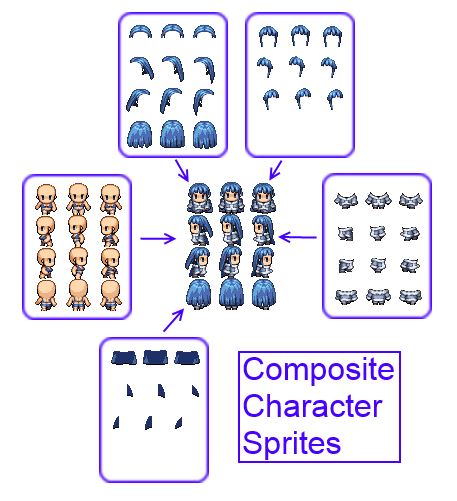
In this article we will be looking at a concept called "Composite Sprites", and how it can be used to implement composite characters in RPG Maker. This article is solely focused on coming up with the specifications and design that the script will be built on.
It goes through an overview of what we want to accomplish, and the steps involved to arrive at a solution that seems feasible to implement.
Background
Composite Sprites is an established concept. For example, if we look at the Torque2D wiki, they define a composite sprite as
a sprite by name that is a composite of multiple other sprites "inside" it. These sprites can be placed in any location and can be of any size, orientation, blending, sort-point, scene-depth, etc.You're basically grouping multiple sprites together so that you can control all of the sprites together rather than having to figure out how to synchronize each separate sprite. For example, suppose you have a circle and a square beside each other. If we group them together, we can then move both sprites together, allowing us to preserve their relative positions without having to worry about moving each sprite individually. Moving the whole group 5 units to the left would move each sprite 5 units to the left.The idea of grouping objects together is not unique to game development or graphics. Many applications allow you to take multiple, separate objects and group them together.
Composite Character Sprites
Suppose you had two equip slots: one for a weapon, and one for your armor. If you had 10 weapons and 30 pieces of armor, and you wanted your character's appearance to reflect what they are currently using or wearing, you have 341 possible combinations to choose from, including no weapon or no armor, or both). If you needed to draw 341 different sprites for one character, you will probably scrap the idea. And this is a very simple case where you have two equip slots. Add another slot, and you have even more possibilities to consider. Drawing each complete sprite is not a scalable solution at all, both in time and in file size.
The fundamental idea behind composite characters is to have the game engine generate these sprites for you by composing different sprites together to form your character sprite. All you have to do is provide the pieces and tell the engine when to use which piece, and everything should work out.
Now, instead of drawing thousands of sprites, all you need is to draw each piece of equip separately.
Composite sprites come in handy here because your character is composed of multiple sprites, and when the character moves, all sprites need to move in-sync as well.
Creating the Requirements
Since we're making something ourselves, we have control over everything, including what we want the script to do. Let's start by considering only armors.
User Input
- Allow users to choose which image to use for each armor.
- Build a sprite based on all of the armors that the character is wearing
- Cache the sprite somewhere to avoid having to rebuild the sprite everytime we need to use it
- Rebuild the sprite whenever an armor is changed
Any problem-solving begins by looking at what we're working with. This largely dictates what direction our solution will go.
Constraints
- Character sprites must conform to a particular specification (3 rows, 4 columns)
- You can use one spritesheet per image (VX standard) or hold 8 sheets per image (Ace standard)
Designing a Solution
Read the rest at HimeWorks!