Common Events

● ARCHIVED · READ-ONLY
Started by jcoultas 10 posts View original ↗
  1. Hello, I just acquired VX Ace, and have spent the past two days working on a game I started with MV. Regretably, it was a RWBY fangame and I have no artistic talent with spriting, so I wasn't able to get the battler sprites for MV, so when I saw the current humble bundle deal, I jumped on it.

    Anyway, I have spent a couple months away from MV while waitring around for a guy that offered to help me by making the sprites and he showed no sign of even starting and kept 'forgetting.

    Anyway, that aside, I copied over a common event from MV, VX Ace had all the commands so it was easy enough to copy, it just didn't work.

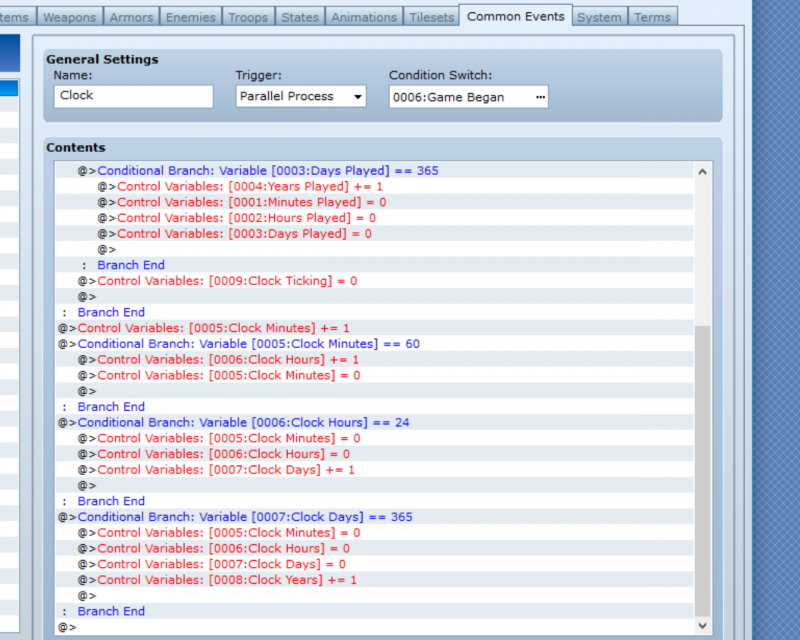
    The common event :

    ce1.png
    ce2.png


    The intent of this common event is to track the date in the game itself, with time in game passing at 4 times the speed in real life. Also, to track the total amount of time played in the game.

    I may be forgetting something, but when I call the common event to start and set it to parallel, the game freezes and I can't move my character. Hopefully it's easy to fix and I just forgot something because I was stalled in my game developement prior to getting VX Ace over missing battlers.
  2. A screenshot would be far easier to understand, and more accurate - you have typos on just about every line there. There is no way you could be using variable 9 for all of those things. It's also very difficult to follow your nesting because you've typed it all out - hard to tell if some of those things would be executed under the right situations or not.

    Please provide screenshots, then we can try and help you.
  3. jcoultas said:
    I call the common event to start and set it to parallel, the game freezes
    *because*, it is set to parallel, and it's always processing.

    try adding an "exit event" at the end of the process.
  4. No, that's not it.

    Parallel events don't cause your game to freeze, but a badly written one will cause it to lag. The player will still be able to do stuff. THIS parallel event has the required Wait right at the start, so it's not the reason.

    Also, Exit Event does nothing for parallel events. They loop, so when the pointer hits the end of the commands, it just goes back to the top again and starts over. Exit Event simply moves the pointer past the last command.

    I bet you've also got an autorun event somewhere, that's either being turned on by the same switch, or by something else. Could be a common event, could be a map event (and in that case it doesn't even need a switch). Even look at events that don't have any commands but are set to autorun. Including common events.
  5. I'll go back and edit my introduction post, but some clarification.

    Common Event 001: Clock is set to trigger as a parallel process. The condition switch being switch 0006: Game began

    And as for my variables:
    0001: Minutes Played
    0002: Hours Played
    0003: Days Played
    0004: Years Played
    0005: Clock Minutes
    0006: Clock Hours
    0007: Clock Days
    0008:: Clock Years
    0009: Clock Ticking
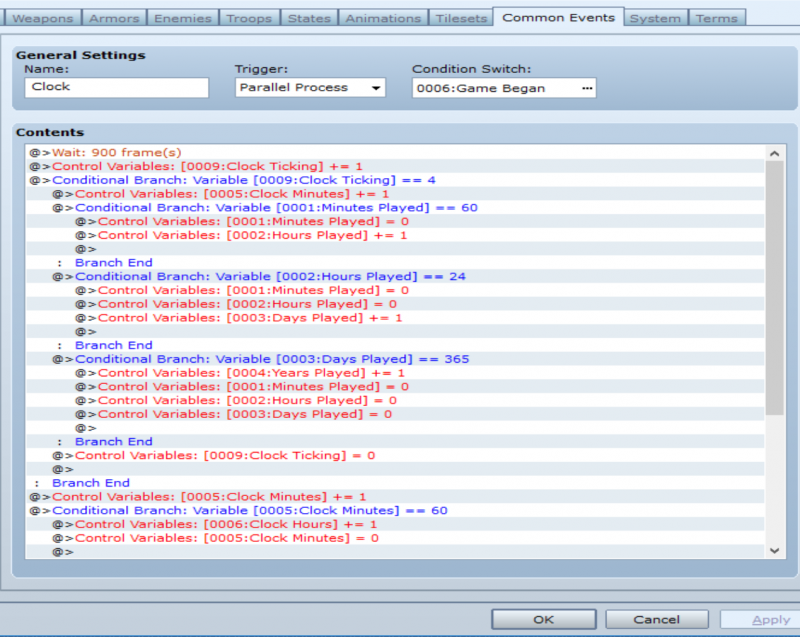
    ce1.png
    ce2.png

    Variable 0009 ticks every in real life 15 seconds and is arguably the key to the whole clock working. When it ticks, 1 minute passes in game, but only on the fourth tick does a minute of gameplay time pass, so three fourths of the time it'll just bypass the first conditional branch completely and it will just resolve variables 0006-0009, the in game clock.

    I created a second common event for interacting with the clock and calling the current in-game date and time, and that seems to be working flawlessly if I could just get time flowing using the parallel common event.


    As for how i start the clock:

    I have an autorun event:

    Control Variables [0007: Clack Days] +=1
    Control Variables [0006: Clack Hours] +=7

    (Insert intro cutscene that plays fine)

    Control switches [0006: Game Began] = On
    Control self Switch: A = On

    Second event page is blank and triggers if self switch A is on so it should break the loop, and indeed the intro cutscene has not looped, I just can't move at all.


    @Shaz I literally only have two common events and the second is not parallel. As for local events, during trobleshooting I tried moving the autorun event/intro to a separate map with my character, and it froze there too, The only think using that switch is the autorun event, though I did have to use an event to flip the switch on.

    @gstv87 I don't recall havng to start the common event, just whatever I was doing did not seem to be starting it, I thought once I flipped the required switch the clock would start moving, but in my toubleshooting last night I resorted to trying to call the common event, and that was freezing me up without fail, I guess because they never end. So hopefully I've shared enough to find out why time was not passing


    edit Well, I'm not sure why it's suddenly working but I just tried the game an it actually seems the clock is running. not sure why it wasn't working yesterday, I did not change anything this morning, apart from changing the wait time from 900 to 9, so the clock was flowing super fast, but even so, wait 900 should be 15 seconds and last night I was waiting around for minutes and the time was not moving. I don't get it at all.

    60 frames = 1 second
    900 frames = 15 seconds

    ??

    I suppose I should be grateful it's working now. I switched it back to 900 and time appears to be flowing properly, but I'm positively baffled as to why it is working now when it wasn't last night. I may have spotted a flaw in my second common event for calling the date and time, but it seems easily fixed with a conditional branch.

    suddenly my game is taking quite a while to load though, and I haven't created much, basically just four maps, and only two (the interior of a home) are completed and have all their events.

    I started on the overworld map, though just barely, and also the forest map surrounding the cottage you start in, but there's only 6 events there and I haven't gotten into the serious eventing yet. Namely I've gotten to the point where I want to start working on a minigame but I did not want to jump ahead to another common event until I had the clock one working.
  6. How do you end your autorun event that turns the clock on?
  7. Shaz said:
    How do you end your autorun event that turns the clock on?

    Turn on self-switch A
    Then possess a later blank page that activated if selfswitch A is activated

    The freezing occurred when I tried to call the common event because for some bizarre reason, the common event was not starting last night even though I triggered the switch and whenever I interacted with the clock, even after waiting several minutes, it kept saying September 1st, 7:0 am, year 0.

    It seems to work now, after I changed the wait time to 9 instead of 900, and then tested it, and then turned it back to 900. I have no idea why changing the number and then changing it back worked.
  8. jcoultas said:
    I have no idea why changing the number and then changing it back worked.
    That isn't the cause why it works now.
    It looks as if you have a timing problem due to conflicting autoruns and parallel processes. The editing of the common event might have changed the timing order slightly and that might be why it currently works - but the big problem with timing inconsistencies is that they will pop up again and again until they're really solved and removed.
    So if you change any of the events involved in the timing bug again, the bug (or a different one) will appear again.

    Please follow the link "bughunting" in my signature for more information, you'll need that to find the cause of your bug.
    Additionally:
    1) Only call common events that are set to trigger = none. NEVER call a common event that is set to parallel process or autorun, those need to be controlled by their switches only.
    Some part of your description reads as if you've been calling your parallel process by an event command "call". If that is correct, rewrite your event to remove the call command for the parallel process
    2) NEVER just describe an event if we ask about - always give the screenshot.
    There are a lot of reasons for this, mainly that no description contains all the data of the event we need - Shaz asked you for details of your autorun event for a reason, and we still don't have all the required details because you just gave an incomplete description of the event.
  9. just consider one thing: if you play 2 hours, that's effectively 120 minutes played as well, or 0.083 days.
    you might want to simply tally up the lot of *seconds* played, and extrapolate minutes, hours and days from there.
  10. Andar said:
    That isn't the cause why it works now.
    It looks as if you have a timing problem due to conflicting autoruns and parallel processes. The editing of the common event might have changed the timing order slightly and that might be why it currently works - but the big problem with timing inconsistencies is that they will pop up again and again until they're really solved and removed.
    So if you change any of the events involved in the timing bug again, the bug (or a different one) will appear again.

    Please follow the link "bughunting" in my signature for more information, you'll need that to find the cause of your bug.
    Additionally:
    1) Only call common events that are set to trigger = none. NEVER call a common event that is set to parallel process or autorun, those need to be controlled by their switches only.
    Some part of your description reads as if you've been calling your parallel process by an event command "call". If that is correct, rewrite your event to remove the call command for the parallel process
    2) NEVER just describe an event if we ask about - always give the screenshot.
    There are a lot of reasons for this, mainly that no description contains all the data of the event we need - Shaz asked you for details of your autorun event for a reason, and we still don't have all the required details because you just gave an incomplete description of the event.


    The event is simply just text so I literally gave everything except for the text portion of the introduction, it's too early to give spoilers, lol, but I just deleted the text to take a screenshot.

    Page 2 is blank and conditioned upon self switch A being on. I intend to make a better introduction like the one I made with MV, but I only got ace the night before last, so haven't gotten that far. Likely I'll start on a different map for the cutscene and then cut to the opening here.

    intro event.png