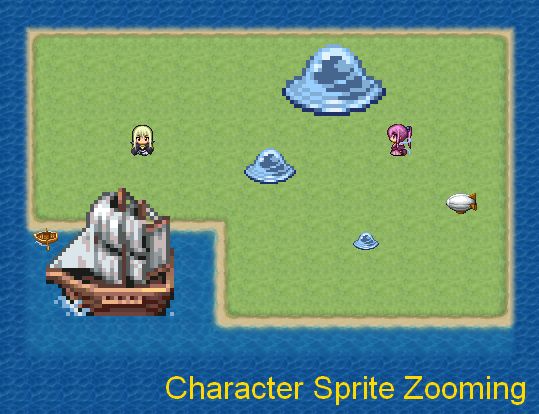
Character Sprite Zooming

● ARCHIVED · READ-ONLY
Started by Tsukihime 3 posts View original ↗


  1. This script allows you to control the zoom-level for character sprites, which includes the player, followers, events, and the default vehicles.


    All it does is change the look of the sprite.


    Note that the engine supports many different ways of drawing character sprites. This script only supports character *sprites*, rather than character images.


    Get it at HimeWorks!
  2. Can i Ask what is Script call?what do you mean by that? I just copy the script an put it in above main and below materials I dont know next I dont know what to do? where i Just put that "To change player sprite zooming, use one of the script calls" Script?
  3. Loloa.Stealt said:
    Can i Ask what is Script call?what do you mean by that? I just copy the script an put it in above main and below materials I dont know next I dont know what to do? where i Just put that "To change player sprite zooming, use one of the script calls" Script?

    Have you already figured it out? Basically to do a script call, when eventing, go to the last tab labeled '3' and look at the very last option: script. Once you've filled out the script call form thingy (which is (zoom_event_sprite(ID, zoom) or whatever it is you're doing. Imagine that the ID of the event is 4 and you wanted it at 0.5 or half the size of normal, you'd put zoom_event_sprite(4, 0.5). That's what I mean by 'filled out'), you paste it right into the space it gives you for the script and that should be a completed script call. Sorry if I explained it badly.