here they are
MZ - [CGMZ] Menu Command Window
● ARCHIVED · READ-ONLY
-
-
@alltheyuriz I can't reproduce the error with the settings you've shown, have you done anything else? Maybe try it in a blank project with just my core and menu command window plugins, it could be a conflict with another plugin if you haven't changed anything else.
-
@casper667 Edit: I forgot I have your MV core still enabled, do you have an MZ message plugin like you had for MV?
Edit: so I disabled all my plugins and left yours on and I got this
new error message -
@alltheyuriz Just making sure, but you have also disabled my MV plugins as well? They won't work in MZ and could cause errors.
Have you modified or replaced any of the javascript files that come with MZ such as rmmz_managers? -
I am trying to set up "Achievement" into the menu. I'm noob. What should I enter into JS Command? I can't find documentation of this plugin. Please help.
I am trying to set up "Achievement" into the menu. I'm noob. What should I enter into JS Command? I can't find documentation of this plugin. Please help.
SceneManager.push(CGMZ_Scene_Achievements)
I discover the answer in document of 'achievement plugin' myself. -
I don't think I have and I have disabled all the plugins also I'll check that I have the mz java script files@alltheyuriz Just making sure, but you have also disabled my MV plugins as well? They won't work in MZ and could cause errors.
Have you modified or replaced any of the javascript files that come with MZ such as rmmz_managers?
Edit: I have the plugins replaced the rmmz_managers with a fresh one and all the mv plugins are disabled. and I'm still getting the error @casper667
Edit: I also need to replace the MV with MZ scripts do you have one for disabling the skipping of the map movement, Message Alignment, Message editing and one that changes the entire game font even the menu and system? -
Hi all, small update for this plugin today to add the ability to enable/disable commands by the party having an item in their inventory:
Version 1.2.0
- Added option to disable commands if party doesn't have item -
Hi all, this plugin received a minor update today :kaohi:
This update will make it so setting up a JSON parameter improperly will no longer crash the game. It will warn in the dev tool console instead. These warnings are still important to fix, as your custom commands will not work properly until they are set up properly.
This update also added Spanish language help documentation.
Version 1.2.1
- Added Spanish language help documentation
- This plugin now warns instead of crashes when detecting invalid JSON
-
Hi all, this plugin has been updated to version 1.3.0 today! :kaohi:
This update adds subcategories! Subcategories are commands that do not immediately display, but instead require the player to select another command which will then replace the shown commands with another list of commands. For example, you might have a Collections subcategory that the player first needs to select the Collections command before they see Picture Gallery, Encyclopedia, and Achievements options. See below for a gif of how this works:

This update also added many visual changes, as can be seen from the gif above. Your commands can now have a background image instead of the standard slightly transparent grey rectangle. Your commands can also have an icon aligned right or left, independent of the command text's alignment.
This update allows you to require certain commands to have the player select an actor first, before the command JavaScript will run. The actor selected can then be used by the scene the command calls, similar to how the status command requires an actor to be selected and will then display the status of that actor.
This update removed the Enable Text Codes option because it was no longer needed, as text codes are supported by default. Initially, this was meant to allow you to disable text codes in case they caused any bugs in your menu, but they have become quite stable with improvements to [CGMZ] Core and this option was no longer needed. This update will also cause the plugin to attempt to create a command symbol for you in the event you leave your command symbol blank.
Version 1.3.0
- Added option to have subcategories with their own list of commands
- Added commands that can require actor selection first
- Added separate Icon property to commands which can be aligned separately
- Added background image option to commands
- Removed option to disable text codes
- This plugin will now attempt to make a command symbol for you if blank
-
It might be a dumb question, but anyway...This update allows you to require certain commands to have the player select an actor first, before the command JavaScript will run. The actor selected can then be used by the scene the command calls, similar to how the status command requires an actor to be selected and will then display the status of that actor.
I'm adding "Talk (to x party member)" into the menu. Already figured that I need to set 'Actor Select' to true. Up to that point it is exactly what I want to do, however, what should I enter into the JS Command?
I want to make it so each party member I select has a different dialogue.
Basically the exact same system with the 'Status' menu (which instead of showing the status, each member shows a different dialogue).
Is this possible to set up?
Thanks in advance! :kaoswt: -
@senzhm Hi, this plugin is only focused on providing the ability to make your own commands and link them to scenes or functionality added via other plugins, not creating those additional scenes or functionality. The message window by default is not part of the menu scene so you would need some other plugin to add that and to say dialogue when an actor was selected via this plugin.
If you are ok with going back to the map scene every time this option is selected, you could do something like
Code:const variable = 1; const commonEvent = 1; $gameVariables.setValue(variable, this._statusWindow.actor(this._statusWindow.index()).actorId()); $gameTemp.reserveCommonEvent(commonEvent); this.popScene();
And then in your common event you would check which actor id was selected via the variable, and say the dialogue that way. -
my game freezes when I add a second option
-
@ghfjbgtjtb Hi, can you show the plugin parameter for the option that is freezing the game?
-
Hi all, today this plugin received an update to version 1.4.0! :kaohi:
This update adds JavaScript show and enable conditions for your menu commands, so you can now use custom JS code to determine if the command displays (show) and is selectable (enabled).
This update also changed how the original js command parameter works internally in the code. As a result, you will need to go in and edit your js command parameter to ensure it keeps working. It will most likely show as a json encoded string, so it will start and end with quotation marks which should not be there, and new lines may have been converted into the \n symbol among other things. Before updating, you should back up your existing JS commands so you do not lose anything and can paste them into the new parameter type.
Important: When updating, you will need to let these new parameters initialize to their defaults. You should also back up your existing commands js so you can easily copy and paste it back into the new parameter type.
Version 1.4.0
- Added JS Show option for javascript show conditions
- Added JS Enable option for javascript enable conditions
- JS Command type change
-
Hi all, today this plugin was updated to version 1.4.1! :kaohi:
This latest version adds an easier way to make a common event command. By default, common events do not run in the menu so you need to pop the scene, and also when selecting something in the window the default behavior is to deactivate the window which leaves the game looking like it froze.
To address this common issue, I have made it so you can directly select a common event when setting up your command, and the plugin will handle the rest for you.
Version 1.4.1
- Added easy way to make a command run a common event
- Removed deprecated [CGMZ] Core function calls
-
Hi all, today this plugin was updated to version 1.5.0! :kaohi:
This version adds on select parameters so you can have your commands show different text, icon, and background image when the player selects them vs when they are not actively selected. This can help bring attention to the currently selected command.
These parameters are optional, if not set they will default to the normal command name, icon, and background image no matter the command's selection status.
Version 1.5.0
- Added on select parameter options for command name, icon, image
-
Hi all, today this plugin was updated to version 1.5.1! :kaohi:
This version adds the option to stay in the menu for a common event menu command. Usually, common events only run on the map. However, in some cases they can run in the menu such as when using a plugin like [CGMZ] Common Events Everywhere. This allows you to make an option that runs a common event entirely in the menu, if your game allows for it.
Version 1.5.1
- Added option to not exit the menu automatically for common event
-
Hi all, today this plugin was updated to version 1.5.2! :kaohi:
This version fixes a bug that could cause the menu subcategory to not properly reset. It will now always reset if the map is loaded, which should cover any case that was not already handled such as other plugin scenes leading directly back to the map, to title commands, etc.
Version 1.5.2
- Fix bug with menu subcategory not always properly resetting
-
Hi all, today this plugin was updated to version 1.6.0! :kaohi:
This version adds a confirmation window option, which you can enable on a per-command basis. This means you can have certain commands such as Exit Game show a confirmation window first, while other commands such as the encyclopedia command does not. Note that this does not work for personal commands (if the player first needs to select an actor).
See below gif for how it can look:
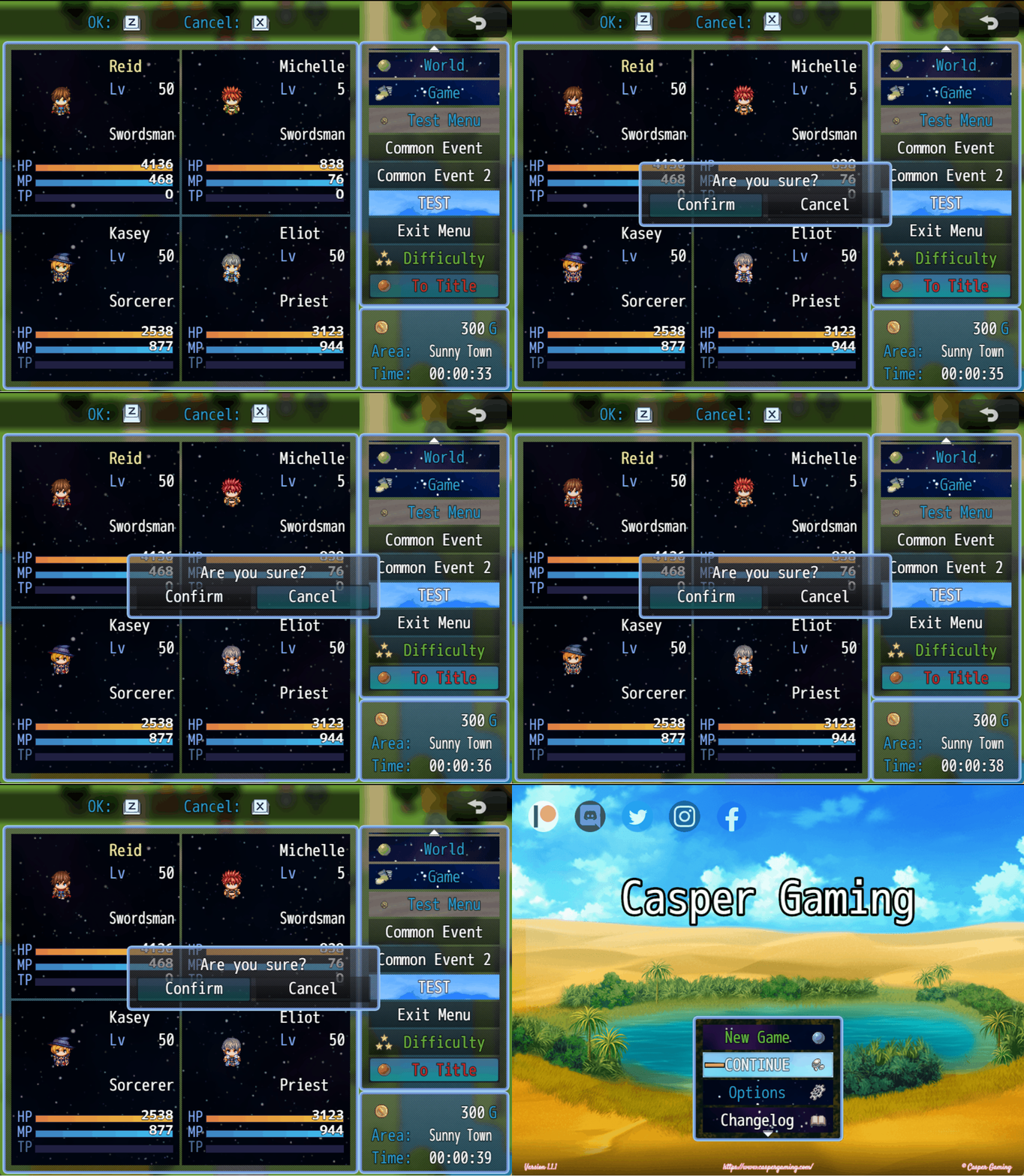
Numerous supporting options have been added for this new window, including an x and y offset and a width parameter. The other parameters have been organized, so the plugin should hopefully make more sense where to find things for new users.
Version 1.6.0
- Add option to show a confirm window for certain commands
- Organized parameters