[CGMZ] Global Data

● ARCHIVED · READ-ONLY
Started by CasperGaming 12 posts View original ↗
  1. [CGMZ] Global Data
    By: Casper Gaming
    Last Update: May 31, 2026
    Latest Version: 1.1.0
    Forum-Header-Introduction.png
    Ever wanted to save things in one game, and have them available to all other saved games? Now you can. It supports saving a string of text, a number, a switch, or a variable. You can load the data in another saved game, or clear the data if you don't want other saves to have access to it any more.
    Forum-Header-Features.png
    • Share switches and variables between all save files
    • Pass text, decimal, and other data between save files with a key/identifier
    Forum-Header-Screenshots.png
    Screenshots
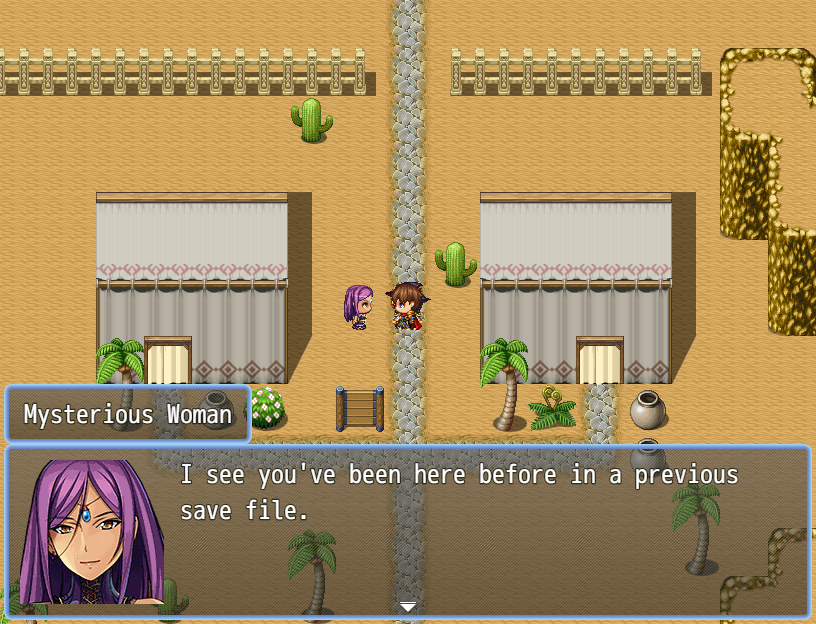
    This NPC knows if the player has been there already, even if the player has only been there in a separate save file.
    gdata1.png
    Forum-Header-Video.png
    [embedded media]
    Forum-Header-HowTo.png
    Import into plugin manager and enable the plugin. Some customization options available. Further instructions in plugin.

    Online documentation can be found on my website.
    User documentation can be found on the Casper Gaming Wiki.
    Forum-Header-Download.png
    Plugin (along with all my other plugins) can be found here: https://www.caspergaming.com/plugins/cgmz/globaldata/
    Requires CGMZ Core plugin: https://www.caspergaming.com/plugins/cgmz/core/

    Also available on Itch.io:
    [CGMZ] Global Data for RPG Maker MZ by Casper Gaming Forum-Header-CreditAndTerms.png
    https://www.caspergaming.com/terms-of-use/
    Forum-Header-VersionHistory.png
    Version History
    Version 1.0.1
    • Added Spanish language help documentation
    • This plugin now warns instead of crashes when a parameter is invalid
    Version 1.0.2
    • Fix bug with saved games and new switch or variable parameters
    Version 1.1.0
    • Added global items
  2. This is perfect for special quests or to keep permanent data to combine with other plugins like albhed dictionaries, sidequests, etc.
  3. Would be interesting to make a Way of the Samurai type of game with this :p
  4. This screams Undertale shenanigans to me and I love it.
  5. Great plugin as always.

    Is there a way to reset a global variable?
  6. @Viranda Yes, use the Clear Data plugin command to remove a piece of global data
  7. casper667 said:
    @Viranda Yes, use the Clear Data plugin command to remove a piece of global data
    Thank you. That works.
  8. version-101.png
    Hi all, this plugin received a minor update today. :kaohi:

    This update will cause the plugin to print warnings in the dev tools console instead of crash when invalid JSON is detected in a plugin parameter. Invalid JSON is caused by setting up a parameter incorrectly. These warnings are still important to fix, as the plugin will not be able to read your parameters until the errors are fixed.

    This update also added Spanish language help documentation.

    Version 1.0.1
    • Added Spanish language help documentation
    • This plugin now warns instead of crashes when a parameter is invalid
  9. I'm having trouble getting this to work because I think another series of plugins I'm using is clearing all the data in between game loads. It's RyanBram/Ohisama's SRPG battle system. I'm not exactly sure where to start looking to fix the problem, but any help would be appreciated!
  10. @IPTdragon Have you tried turning the suspected conflicting plugin off to confirm that it is that one causing the issue?
  11. version-102.png
    Hi all, today this plugin was updated to version 1.0.2! :kaohi:

    This version fixes a bug that could cause global switches or variables added later in development to not properly be reflected in a saved game until the game was manually saved.

    Version 1.0.2
    • Fix bug with saved games and new switch or variable parameters
  12. version-110.png
    Hi all, today this plugin was updated to version 1.1.0! :kaohi:

    This version adds global items. These are items you set as global in the plugin parameters, and then if any save file gains (or uses) that item, all other save files will also have the new item amount when they are loaded or when a new game is started.

    Version 1.1.0
    • Added global items