Caethyril's MZ Plugins

● ARCHIVED · READ-ONLY
Started by caethyril 209 posts Page 5 of 11 View original ↗
  1. :kaoswt: Whoops, there was a mistake in my example. I used => but that includes a >, causing the tag to terminate early. (This is why better plugin-writers than I close their code tags with /> instead. :kaoslp:)

    Try this instead, it seems to work for me:

    <subskills: const s = subject.skills(); const r = [362]; for (const subskillId of [363, 364]) for (const o of s) if (o.id === subskillId) { r.push(subskillId); break; } if (r.length === 1) return []; // empty return r; >
    Like in your screenshot, this tag goes in the Note box of the parent skill, i.e. Fire. You don't need any related tags on the subskills. I changed the numbers to match your screenshot, so you should just be able to copy+paste it this time. :kaohi:
  2. caethyril said:
    :kaoswt: Whoops, there was a mistake in my example. I used => but that includes a >, causing the tag to terminate early. (This is why better plugin-writers than I close their code tags with /> instead. :kaoslp:)

    Try this instead, it seems to work for me:

    <subskills: const s = subject.skills(); const r = [362]; for (const subskillId of [363, 364]) for (const o of s) if (o.id === subskillId) { r.push(subskillId); break; } if (r.length === 1) return []; // empty return r; >

    Like in your screenshot, this tag goes in the Note box of the parent skill, i.e. Fire. You don't need any related tags on the subskills. I changed the numbers to match your screenshot, so you should just be able to copy+paste it this time. :kaohi:

    First of all, thanks for bothering to help :p I don't know much about plugin-writing but yours are very good when it comes to being compatible. VE has some really cool plugins but I have struggled to find plugins that work with them tbh :p

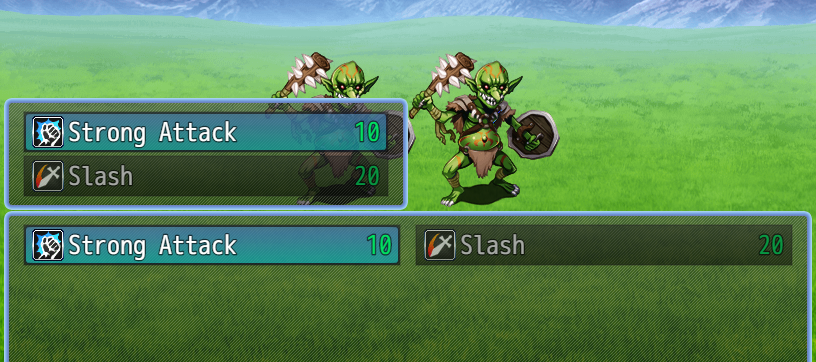
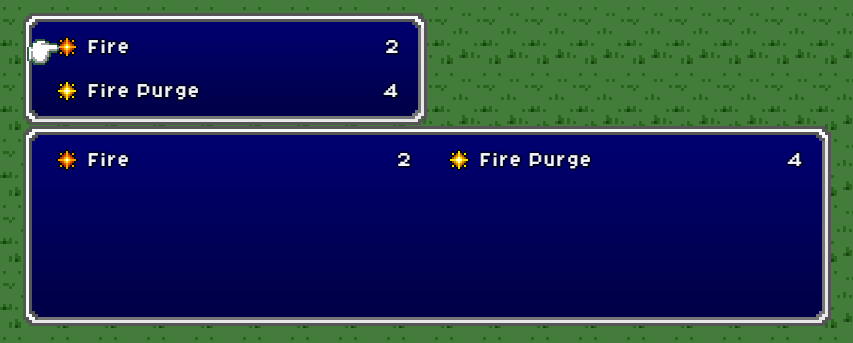
    The results becomes like this for me, both in a new test game and my own. Inserted the code in the notebox of Fire (362) and Strong Attack (Changed the numbers ofc)
    new.png123.png

    I seem too get both the subskill menu and the additional skill at the same time o_O

    ----------------------------------------------------------

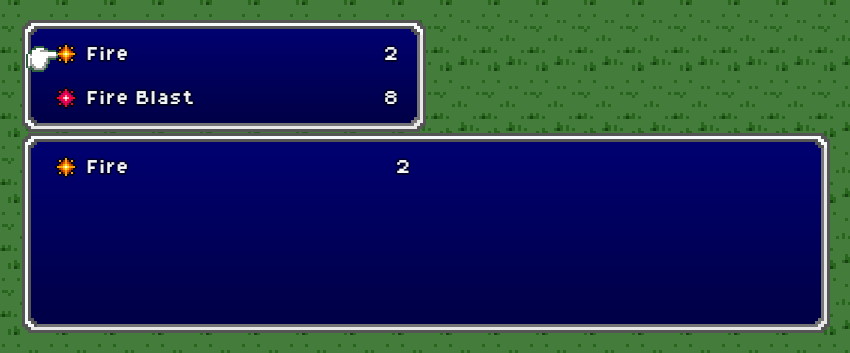
    I was just about to post this as I tried a last idea. I made the subskills have no skill type, this actually worked as a work around :p
    af.png

    I think this will work, I don't think those skills will need a skill type for anything. I also tested this without your new code and that didn't work (I would have felt like an idiot if it was that simple all along xD)

    Thank you for the help! :p
  3. Willibab said:
    I don't know much about plugin-writing but yours are very good when it comes to being compatible.
    Yep! After basic functionality, my main goal when writing plugins is compatibility with others...partly because specific compatibility patches are usually a pain to figure out. :kaoblush:

    Willibab said:
    I seem too get both the subskill menu and the additional skill at the same time o_O
    ...
    I made the subskills have no skill type, this actually worked as a work around :p
    Yes, assigning skills as subskills doesn't affect whether they show up in their usual place. Your solution is what I would have suggested here. :kaohi:

    Willibab said:
    Thank you for the help! :p
    You're welcome, happy RPG Making!
  4. Hey, me again :p

    I have a script from you called Cae_BigCrits. I seem to recall having asked for it at some point but I can't find where. Just had it in every project by default for awhile :p


    Cae_BigCrits Plugin
    (() => {
    'use strict';
    let crit = false; // internal flag, passes status between independent methods
    (alias => {
    Sprite_Damage.prototype.setup = function(target) {
    crit = target.result().critical; // update crit flag
    alias.apply(this, arguments); // default setup
    };
    })(Sprite_Damage.prototype.setup);
    (alias => {
    Sprite_Damage.prototype.fontSize = function() {
    if (crit) return 28; // font size 26 if crit
    return alias.apply(this, arguments); // otherwise default size
    };
    })(Sprite_Damage.prototype.fontSize);
    })();

    I was wondering if you could add the abiliy to change the color of the text to one on the options in the Window.png (Or hex code or something, whatever is simplest I suppose) so I can change the color to fit my color palette.

    Or alternatively explain where the color comes from? Its bright yellow, not a color I have on my Window.png


    Nevermind, it was another plugin. one I had checked like 3 times but found it immedatley after posting this, because ofc i did xD
  5. custom.png

    In Cae_OnUseEffects, is it possible to use the custom formulae to implement the changes below?

    1 a.mat = 1% Evasion
    1 a.mdf = 1% Hit
    1 a.luk = 1% Critical

    Im using very simplistic stats in a side game xD Also trying to use as few plugins as possible.

    ewf.png
  6. @Willibab - the OnUseEffects formulae are for deciding action results. E.g. the Evasion formula returns the chance (from 0~1) that the action hits its target.

    Instead, you'd want a plugin that lets you change how battler params are calculated. I don't think any of mine offer that, so I spent like 5 minutes to write this (untested):
    plugin code
    JavaScript:
    /*:
     * @target MZ
     * @plugindesc Change the EVA, HIT, and CRI formulae.
     * @author Caethyril
     * @url https://forums.rpgmakerweb.com/posts/1337081
     * @help Free to use and/or modify for any project, no credit required.
     */
    ;void (alias => {
      Game_BattlerBase.prototype.xparam = function(xparamId) {
        // Get original value
        const res = alias.apply(this, arguments);
        // Add extra based on param ID
        switch (xparamId) {
          case 0:   // HIT
            return res + this.mat / 100;
          case 1:   // EVA
            return res + this.mdf / 100;
          case 2:   // CRI
            return res + this.luk / 100;
          default:
            return res;
        }
      };
    })(Game_BattlerBase.prototype.xparam);
    Note that the formulae here are all like "X / 100", because 1% = 1/100. Also, this adds the basic param bonus to the original value, just in case you want to still use HIT/EVA/CRI traits as well. :kaohi:
  7. @caethyril It seems to be working great, thanks! :p
  8. caethyril said:
    v1.0 Cae_MapEvents 2020-09-20
    Regarding MapEvent, when I used the Freeze Event, it worked, but when I transferred to other maps, all of the events' images disappeared. Does anyone have any ideas on how to fix this?

  9. @Gum - oh, I forgot I put the freeze stuff in Cae_MapEvents. :kaoswt:

    I just tested with the latest core script version (1.6.0) and only Cae_MapEvents active, but I couldn't reproduce the issue.

    However, in your video I notice you're using other plugins. Have you tried loading my plugin after VisuStella's? As a general rule, load bigger plugins first! :kaohi:

    If that doesn't work then unfortunately I can't offer much help, because of the way VisuStella write their plugins.
  10. Ah, yeah, i found the problem. This is kind of sad. Your MapEvent not compatible with Visu EventMoveCore :rswt
  11. Ah. It might be possible to do what you want with only VisuStella, but I'm not very familiar with their plugins. You could try asking in Plugin Support?
  12. I hope this isn't a stupid thing to ask, but on Cae_PictureTouch.js, is there anyway for it to save the PictureID of the image that was clicked on as a variable?
    As far as I see in the Bind Event Plugin Command, there's only the option to call a particular common event when clicked, which is awesome, but
    instead of 20 clickable pictures going to 20 common events,
    I'd like to have all my picture interaction events going to the same common event, with a conditional for each that only allows the correct sub-event to run based on which Variable PicId# was clicked on...
    (the reason I'd like this is I'm working on a point and click game, and I'd like each map have it's own common event where all the picture click events of that map go to.)
  13. @Ghoost - nice idea! I was going to suggest using the pictureId argument of a Script Bind, e.g.
    JavaScript:
    $gameVariables.setValue(123, pictureId);
    $gameTemp.reserveCommonEvent(4);
    I.e. "set the value of variable 123 equal to this picture's ID, then reserve common event 4". However, reserving a common event just queues it up to run at the next opportunity, so this approach wouldn't guarantee that the variable value matches the corresponding picture.

    I've updated Cae_PictureTouch to v1.6. It now has a "Picture ID Variable" parameter: when a picture's bound event starts, this variable will be set equal to that picture's ID. I did a little testing and it seemed OK, but let me know if you have problems with it! :kaohi:

    Also, in case it helps: you can use the script call version to Enable/Disable based on a variable picture ID. E.g. "re-enable all binds for the picture whose ID is stored in variable 123":
    JavaScript:
    const picId = $gameVariables.value(123);
    const trigger = "all";
    CAE.PictureTouch.enableBind(picId, trigger);
  14. Oh wow!
    It works perfectly!! Now I don't need to make a bunch of common events! T-T
    Thank you so much Caethyril, you're really fantastic!!

    I did have one more question though, o_o if it's at all possible to do...
    Would it be possible to also save that picture's filename(without the extension) as a variable too?
    I'm trying to recreate the old-school flash games where on hovering it shows the name of the thing you're hovering over.

    The way I'm going at this is with a 'text to picture' that will display variable 11 in the top right corner.
    So if I can somehow have the plugin save the picture filename to a variable the same way it does the ID, then I can just have the name of the image 'Key' for example automatically show with minimal set up...
  15. Ghoost said:
    It works perfectly!!
    Great! :kaojoy:
    Ghoost said:
    Would it be possible to also save that picture's filename(without the extension) as a variable too?
    I think that's unnecessary, because you can get a picture's name from its ID? E.g. if the picture ID is stored in variable 1, then you can get the name of that picture like this:
    JavaScript:
    $gameScreen.picture($gameVariables.value(1)).name()
    That could be used with Control Variables -> Script in an Event Bind, or as a Script Bind.
  16. caethyril said:
    Great! :kaojoy:

    I think that's unnecessary, because you can get a picture's name from its ID? E.g. if the picture ID is stored in variable 1, then you can get the name of that picture like this:
    JavaScript:
    $gameScreen.picture($gameVariables.value(1)).name()
    That could be used with Control Variables -> Script in an Event Bind, or as a Script Bind.
    Wooooaaah, I never new that!!!
    I knew you could get item names from the item id, but not pictures!!!
    Thank you!

    ***Update:
    welp, it turns out it gives me
    "Maps/Room1/Key"
    as the name, which in hindsight I should've seen coming since I use folders to organize each room's clickable pictures xD

    I guess the best solution is to have a parallel common event that just has conditionals like:
    "If Map ID = 1 AND PictureIDvar = 1, then set PictureNameVariable = Key
    "If Map ID = 1 AND PictureIDvar = 2, then set PictureNameVariable = Poster
    etc
    and just do that for every picture on every map. T-T Tedious, but definitely possible!
  17. It should also be possible to work around it with a little extra scripting, e.g.
    JavaScript:
    const s = $gameScreen.picture($gameVariables.value(1)).name(); s.slice(s.lastIndexOf("/") + 1)
    That may not work in some cases, e.g. `${template literals}`. In that case you could try this instead:
    single expression
    JavaScript:
    $gameScreen.picture($gameVariables.value(1)).name().slice($gameScreen.picture($gameVariables.value(1)).name().lastIndexOf("/") + 1)
    Technical details:
  18. caethyril said:
    @Tea++ - in case it helps, I just finished up that little demo. I didn't run across any problems with the plugin...there were a couple of issues with my event logic, but I think those are fixed now. :kaoswt:
    demo info
    It's a little menu of 3 commands that supports button & touch input. It's mostly the same as a typical button-only picture menu: a loop of checking button states every frame. The touch binds interface with that by setting the selected menu index (a variable) and turning on an "OK" switch. The usual "is OK triggered" check just turns on that switch rather than processing immediately. The switch is checked near the end of the loop: if it's on, the "OK" action gets processed for the selected index.

    I also bound some console message scripts to the Leave and Press triggers as an example for debugging. It's a good way to check when the binds are actually activating, since script binds process immediately: they don't have to wait for the main interpreter or the Show Text window to be free.

    The spinning green triangle that appears is clickable (if you can catch it) and goes blue when you hover it. I was going to add some actual examples behind the "Example" commands, but then I realised they were pretty much just different layouts/appearances of the 1-column menu.
    Here's the demo link for anyone interested~
    Hopefully you get it working! :kaohi:

    Wow! Time flies, I can't believe it took me this long to revisit this issue. Sorry for the long delay.

    Thank you so much for the demo project, it's really cool what you did with that, I love the triangle mini game!

    I finally figured out what the issue was, your plugin is doing exactly what it should. But I have another event that listens to keyboard input, and unfortunately, it highjacks the hover effect after it runs through the first time, which explains why it would work at first, then locks up on the "New Game" option.

    Again thank you so much for all your help! I'm not sure if mouse and keyboard input will play nice, I may have to choose one or the other.

    Edit: Actually I figured it out! ^^
  19. @caethyril Perhaps I am misunderstanding the instructions. For the ItemSelector, do I need to assign the store saved property name to a variable?

    I added the filter code to all items then used the command to set to the one filter code. However, nothing showed up.