BM VK Equip

● ARCHIVED · READ-ONLY
Started by blackmorning84 34 posts Page 1 of 2 View original ↗
  1. BM MV VK Equip


    Author: Blackmorning


    Changelog
    Code:
    * Version 1.20: 2018-Mar-16
     * - updated for RPG Maker MV version 1.5.0
     * Version 1.19: 2017-Aug-12
     - adjusted icon placement to better work with changed equipment slots (ie. from yanfly)
     * Version 1.18: 2017-July-07
     * fixed adding actor/character errror
     * Version 1.17: 2017-June-28
     * - can remove body window and just show status compare window
     * Version 1.16: 2016-June-03
     * - adjusted visual options
     * - changed coding
     * Version 1.15: 2016-May-13
     * - fixed font size error
     * Version 1.14: 2016-May-12
     * - adjusted equip status window to include the difference
     * Version 1.13: 2016-May-11
     * - added paper doll mode, can now choose to dress the body image.
     * Version 1.12: 2016-May-11
     * - compatible with QuasiParamPlus
     * Version 1.11: 2016-May-10
     * - compatible with YEP equipment requirements
     * Version 1.10: 2016-Apr-11
     * - compatible with yanfly equip core
     * - put below Yanfly Equip
     * Version 1.01: 2016-Mar-14
     * - fixed images when changing classes
     * Version 1.00: 2015-Nov-24
     * - Finished plugin!


    Download


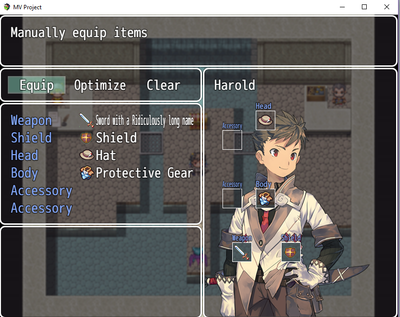
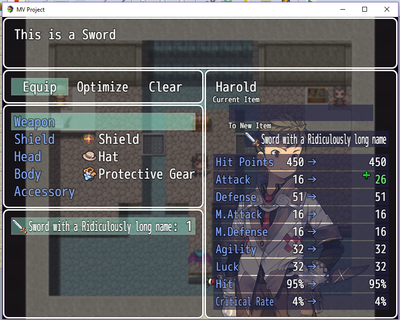
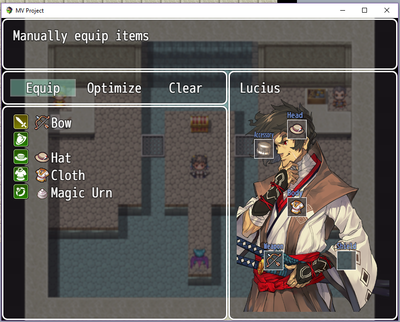
    Features


    -Icons for equipment types (based on types assigned in Database or custom numbers


    -Visual placement of equipment onto a body image (based on actor's equipment slot numbers)


    -Equipment icon positions can be assigned to match your own images.


    -Adjust size of equipment icons on body image or use larger individual images assigned in the item' notebox


    -Customize different locations for equip slots for everyone of your actors or classes. Actors with unique equipment slot setups will take priority over classes with unique equipment slot setups which will take priority over the default equipment slot setup. This is for each individual slot number.


    -Body image can be assigned to actors or to classes in the Database Notebox (actors take priority)


    -Show/reorder all parameters in Equip Status. (can rename/name any parameter)


    Screenshots

    Spoiler
    5437447.png1758985.png


    8770023.png

    Actor/Class Notetags


    <ebodyimage: name>The name is the filename of the image in Img\Pictures<eicon-id: x,y> with id as the equipment slot, x, y is the new co-ordinates.


    Weapon/Armor Notetags


    <eiconimage: string>Uses a picture from Img\Pictures\ of your RPG Maker MV Project's directory with the filename of "string" (without the extension) as the imagepicture. Will adjust to size of box.


    Terms of Use


    Any scripts made by Blackmorning is free for use with both free and commercial RPG Maker games. Donations are welcome if using for commercial games, but I will not ask for royalties and such if you choose to use my scripts in your commercial games


    (NOTE: I would love to be able to get a free copy of your game:).


    Credit with Blackmorning84 and a link to http://bmscripts.weebly.com/.


    Editing these scripts is perfectly okay as long as you still provide proper credit. (good luck with that, maybe throw me a line to let me know what you changed, it might be beneficial for others)
  2. Nice to see you on the MV side Blackmorning! Always liked this script for VXA. 
  3. i can't use 


    <ebodyimage: name>


    in the class notetag so i can change ebodyimage when i change a character's class.
  4. Do you have an image on the actor?

    -Body image can be assigned to actors or to classes in the Database Notebox (actors take priority)


    If you do, the actors image will take priority over class image. Not sure if that's what's going on, but it'd be my guess.
  5. i do not use actor's note box. i only use the class note box. maybe because i downloaded version 1.00. i think he updated and fixed some problems. but i don't know where to download the updated script. 


    i used his vx ace visual equipment script for the vx ace games and it worked though. i am sure he doesn't have a chance to upload the updated version of the script yet.


    anyway, nice script.
    • Previous Page
    • Thanks to wrathunleashed
      Thanks for noticing that the images were messed up when changing classes.

      UPDATES
      MV MK Equip
  6. Thanks to wrathunleashed
    Thanks for noticing that the images were messed up when changing classes.

    UPDATES
    MV MK Equip
  7. Update to my MV Equip so that it now works with Yanfly's Equip Core.CheersUpdateMV Equip
  8. This was a great script! I would like to know whether it is possible to implement a feature to update the picture used for the body image that gets updated real-time based on the current body/armor equipped / or other condtions instead of just using a static body image for one particular actor. That would make this plugin much more appealing than it is now. :D  
  9. A big update to MV Equip.  There is now a paper doll mode (can dress up the body image with the equipment),  it is now compatible with QuasiParamsPlus and YEP equipment requirements.


    UPDATE
    MV Equip
  10. CraneSoft said:
    This was a great script! I would like to know whether it is possible to implement a feature to update the picture used for the body image that gets updated real-time based on the current body/armor equipped / or other condtions instead of just using a static body image for one particular actor. That would make this plugin much more appealing than it is now. :D  

    See new update  MV Equip.  It can create a paper doll like picture.
  11. Little update, visual mostly to MV Equip so that the difference in parameter value is shown.


    UPDATE
    MV Equip
  12. There was a little error in the font size of MV equip that has been fixed.


    UPDATES
    MV equip
  13. New Script, that's right.  Check out MV Shop.  It changes up the shop scene to give you more control.  Customization includes window layout, item info and actor display.  Also MV Equip has been updated, so coding matches and some additional features.  Cheers!


    UPDATES
    * new*  MV Shop  * new*
    MV Equip
  14. Thank you for sharing,This is very easy to use
  15. Hi


    Thank you for your great great plug-in !!


    I have a probrem...


    I want to use actor's one. But I can not use.


    Actor note tag is bellow


    <ebodyimage:test>


    and put it "/img/picture" "test.png"
  16. Thanks to KanonElSebas for noticing that there was an issue with MV Equip. I think the error is fixed now, but if anyone else notices anything, please let me know. Thanks

    UPDATES
    MV Equip
  17. Hello, when i try to use this script together with the yanfly equip script, I can't figure out how to setup the custom <eicon-1: 60, 330> locations. Since you can add multiple of the same equipment slots to the same actor. Every time i try to use <eicon-1: 60, 330> it still defaults to the plugin manager settings and doesn't change the location of the icons.

    Any help is appreciated.
  18. digger6 said:
    Hello, when i try to use this script together with the yanfly equip script, I can't figure out how to setup the custom <eicon-1: 60, 330> locations. Since you can add multiple of the same equipment slots to the same actor. Every time i try to use <eicon-1: 60, 330> it still defaults to the plugin manager settings and doesn't change the location of the icons.

    Any help is appreciated.
    Some issues noticed with using custom equipment slots from yanfly in BM MV Equip. Thx digger6. These have been fixed.

    As a refresher, to change the icon positions, you need the actor/class notebox and this line
    <eicon-id: x, y>

    the id refers to the equipment slot, starting from 0. If using a custom set, refer to the order that you put them in.

    for example:
    <Equip Slot: 1, 3, 4, 5, 5, 5, 5>

    remember the numbers themselves refer to the equipment type, not the slot.
    so to change the weapon to the top left
    <eicon-0: 10, 10>
    to change that last accessory
    <eicon-6: 50, 50>

    UPDATES
    BM MV Equip