BM MV Shop

● ARCHIVED · READ-ONLY
Started by blackmorning84 22 posts Page 1 of 2 View original ↗
  1. BM MV Shop


    Author: Blackmorning


    Changelog
    * Version 1.21: 2018-Apr-01
    * - fixed error with parameters
    * Version 1.20: 2018-Mar-16
    * - compatibility with EIS Shop System
    * - updated for RPG Maker MV version 1.5.0
    * Version 1.10: 2017-Feb-23
    *- added info from YEP-ShopCore
    * Version 1.00: 2016-Jun-03
    * - Finished plugin!


    Download


    * - Decide what parameters to show/compare (using symbols in table below)
    * - parameter percentage added directly to comparison
    * - Customize layout of shop
    * - added information on items, equipment
    * - choose between special single actor or group comparison


    Screenshots

    Spoiler
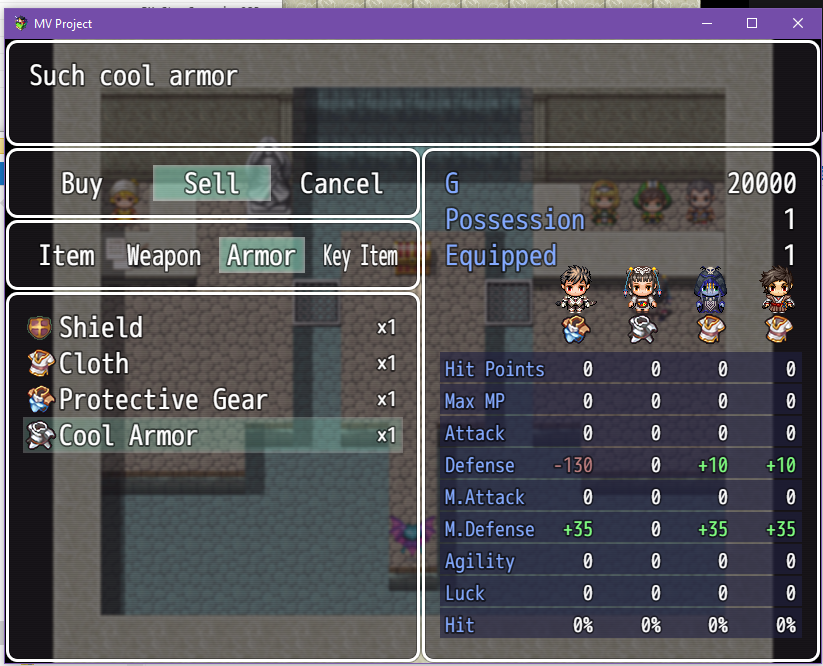
    2271966_orig.png1029769_orig.png

    Terms of Use


    Any scripts made by Blackmorning is free for use with both free and commercial RPG Maker games. Donations are welcome if using for commercial games, but I will not ask for royalties and such if you choose to use my scripts in your commercial games


    (NOTE: I would love to be able to get a free copy of your game:).


    Credit with Blackmorning84 and a link to http://bmscripts.weebly.com/.


    Editing these scripts is perfectly okay as long as you still provide proper credit. (good luck with that, maybe throw me a line to let me know what you changed, it might be beneficial for others)
  2. Is this compatible with Yanfly's PLugins?
  3. that I've tested so far, yes.  If something doesn't work, let me know.
  4. Very nice! This is definitely a great way for players to access more detailed and easy to understand information about the parties equipment.
    I think scripts like this deserve a lot of praise :)
  5. MV shop update to include information from YEP-ShopCore.
    Sorry for the long absence, but I'm gonna try and get back in on this.
    UPDATES
    MV shop
  6. Sorry to dig that out. But it's totally not working. When I try to buy something it says: "undefinied is not a function" Is this a common issue?
  7. Klunky2 said:
    Sorry to dig that out. But it's totally not working. When I try to buy something it says: "undefinied is not a function" Is this a common issue?
    yes and no - it is a common error usually caused by the user doing something wrong, but not specific enough to tell us where you made your mistake.

    There are three possible causes of this class of errors:

    1) you installed the plugin but forgot to start a new game after that.
    90% of all plugins invalidate older savefiles, and if you try to continue an older game after adding a new plugin, such errors become common.
    Solution: delete your old savefiles and click on "new game" in your next playtest

    2) one of your plugins is not correctly configured and missing data - not neccessarily the one you think however.
    You'll need to press F8 at the error message to get the full error sequence listing all plugins involved

    3) two of your plugins are incompatible to each other or in the wrong order
    again F8 will tell you which plugins are involved and you can try to look for a solution (which may or may not exist, some plugins simply can't be used together)
  8. aceviper64 said:
    I saw you made this plugin compatible with yep-shopcore.
    I'm using eis shop system
    https://forums.rpgmakerweb.com/index.php?threads/eis-shop-system.63514/
    for the shop stocking control.

    anyway I was wondering if you could make this one compatible too?
    It's been a while, but I'm back. I got an update done for MV shop and MV Equip to go with the 1.5.0 MV Maker update. MV shop is now also compatible with EIS Shop System. I'm currently working on MV Status to see if I can make the hexagrams like I did for Ace.

    UPDATES
    MV shop
    MV Equip
  9. It says Quasi Params is not defined when I try it but there's nothing about that being a requirement?
  10. Tuomo L said:
    It says Quasi Params is not defined when I try it but there's nothing about that being a requirement?
    Minor update to MV shop so that it works with the parameters better

    UPDATE
    MV shop
  11. This makes the item shop menu look all weird.
  12. Roninator2 said:
    Works fine for me.
    Can you help me? Can you post this plugin on MediaFire or google drive or smth else, so I can download it.
  13. NeoShima said:
    Can you post this plugin on MediaFire or google drive or smth else
    No. the website works fine. It's your restriction that is blocking you. Are you able to do something to unblock the site? I don't see anything wrong with it.
  14. Roninator2 said:
    No. the website works fine. It's your restriction that is blocking you. Are you able to do something to unblock the site? I don't see anything wrong with it.
    I guess it's because of Im from Russia. Idk why VPN doesn't help1590440674665.png
  15. NeoShima said:
    I guess it's because of Im from Russia.
    exactly, but not in the way you might think

    406 means that your computer requested an answer from that website in a language and font that is not available on its server.
    somehow your browser tried to force that server to answer in your language, and that server refused - which indicates that it has multiple language responses but not the one for your language (if it had only one language it would not have reacted to that)
  16. A bit of a necropost, but I'm having a heck of a time trying to adjust the parameter line height in the shop status window. I'd like to get the text a bit more compact vertically. Anyone have an idea?
  17. Is there a way to replace the icon for gold, so it's consistent with the one I use in the Yanfly Core plugin?