Blackmorning Scripts

● ARCHIVED · READ-ONLY
Started by blackmorning84 20 posts View original ↗
  1. Blackmorning Scripts


    Here are the scripts I made for RPG Maker VX Ace. They can all be found with full descriptions on my site.


    bmscripts.weebly.com


    Core Scripts (2)


    These are scripts that majorly impact the game and should to be placed towards the top regardless of where they are categorized.


    Base - needed for all other BM scripts

    Spoiler
    • [li]allow the actor to change directions instead of moving by pressing a button[/li]
      [li]allow re-sizing of the game window[/li]


      [li]allow mouse cursor to be hidden in Gaming Window[/li]


      [li]show transparent faces for non-battle members in all menus (as of version 1.02, this can be turned off)[/li]


      [li]show and customize gauges for exp and parameters (as of version 1.02, this can be turned off)[/li]


      [li]add or change vocab for parameters[/li]


      [li]allows more information to be shown in the help window[/li]
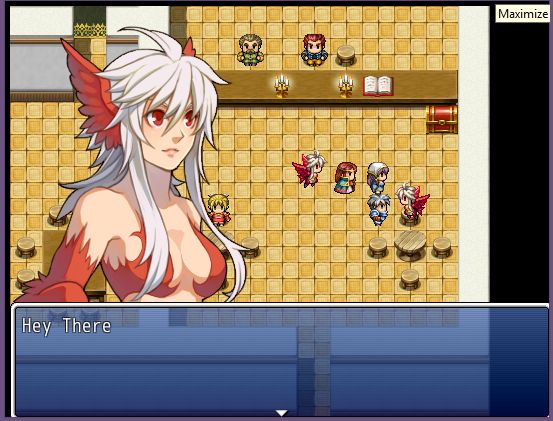
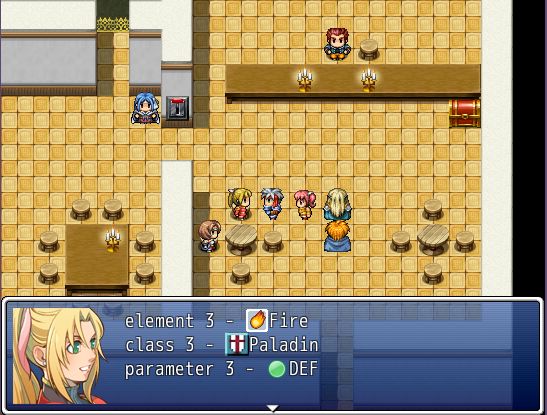
    Messages

    Spoiler
    • [li]writes out different terms using codes in messages[/li]
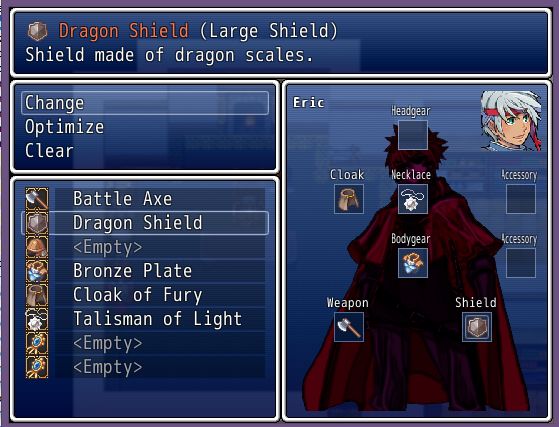
      [li]write out values of actor's parameters, classes, ex parameters, etc[/li]


      [li]write text based on switches being true/false[/li]


      [li]add text sounds and animations during messages[/li]


      [li]add animations over characters during messages[/li]


      [li]add balloons over characters during messages[/li]
    7712913_orig.jpg
    5393398_orig.jpg
    Gameplay Scripts (2)


    Scripts here affect how gameplay works.


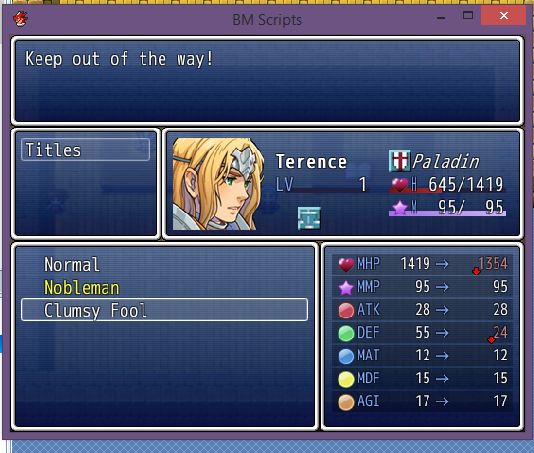
    Actor Titles

    Spoiler
    • [li]adds titles to actor's customization (similar to classes, but independent)[/li]
      [li]titles can be added/removed through events[/li]


      [li]titles can affect base stats and level up bonuses[/li]


      [li]changing titles can be changed through the main menu or status menu (for status menu, you need YEA status)[/li]


      [li]message coding for actor titles[/li]


      [li]can assign titles to variables for events[/li]
    9696299_orig.jpg
    Actor Alignments

    Spoiler
    • [li]adds alignment to actor's customization (the good, the bad, the demonic)[/li]
      [li]alignment points can be added/removed through events[/li]


      [li]gauge to show alignment can be placed on actor's face[/li]


      [li]alignment can be shown in BM YEA Status Addon[/li]


      [li]message coding for actor alignment and party alignment[/li]


      [li]can assign alignment to variables for events[/li]
    Menu Scripts (7)


    These scripts provide various menu changes or involve changes regarding menus.


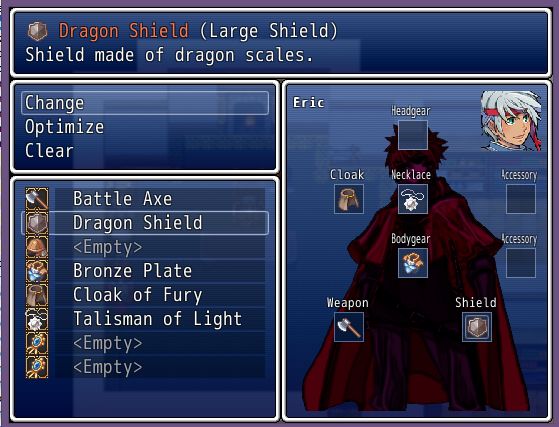
    Advanced Valkyrie Stories Equip

    Spoiler
    • [li]Similar to the Equip Scene in "Valkyrie Stories" made for RPG Maker VX by Hanzo Kimura[/li]
      [li]Icons for equipment types[/li]


      [li]Visual placement of equipment onto an image[/li]


      [li]Image can be assigned to actors or to classes in the Database Notebox (actors take priority)[/li]


      [li]Equipment icon positions can be assigned and changed to match new images[/li]


      [li]Optimize equipment when you press CTRL[/li]


      [li]Remove all equipment when you press ALT[/li]
    650054_orig.jpg
    562108_orig.jpg
    Advanced YEA Status

    Spoiler
    • [li]needs YEA Status Menu[/li]
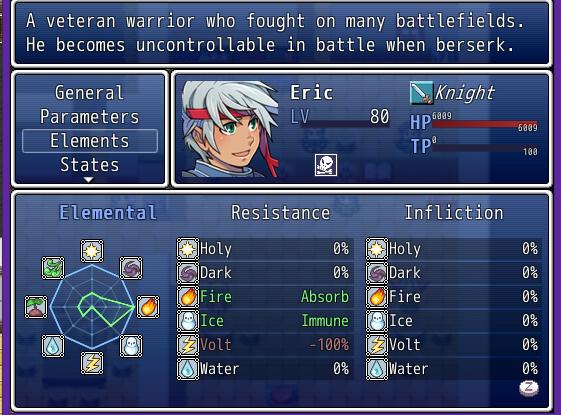
      [li]gives a graphical representation of the values for parameters, elemental & state resistances[/li]


      [li]changes format in biography window (actor's age, height, birthplace, gender, alignment)[/li]


      [li]age is a property of the actor and can be changed with Selchar's Variable based Calender script[/li]


      [li]can assign icons for parameters, elements, states independent of BM-Icons[/li]


      [li]message coding for actor's age, height, birthplace & gender[/li]
    5721891_orig.jpg
    Advanced Shop

    Spoiler
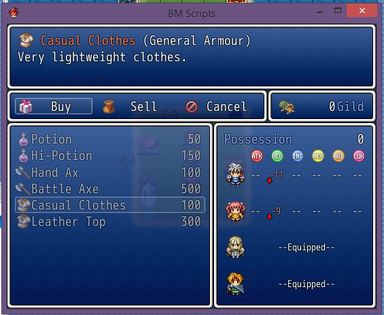
    • [li]shows animated/walking actor graphic in status window for equitable items[/li]
      [li]shows atk, def, mat, mdf, agi and luk changes for all equipment in columns[/li]
    9179652.jpg
    Basic Equip

    Spoiler
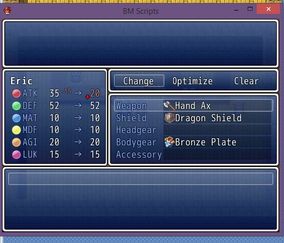
    • [li]shows some added information for parameter changes[/li]
      [li]icons added for visual comparison of increases/decreases[/li]
    2239671.jpg
    Basic Status

    Spoiler
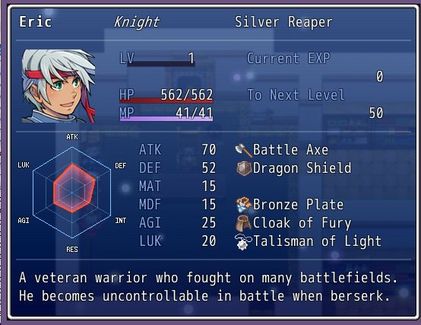
    • [li]Gives a graphical representation of the values for parameter rates.[/li]
      [li]can assign icons for parameters independent of BM-Icons (can still use BM-Icons instead)


      adds portrait to background (if available)[/li]
    9697966.jpg
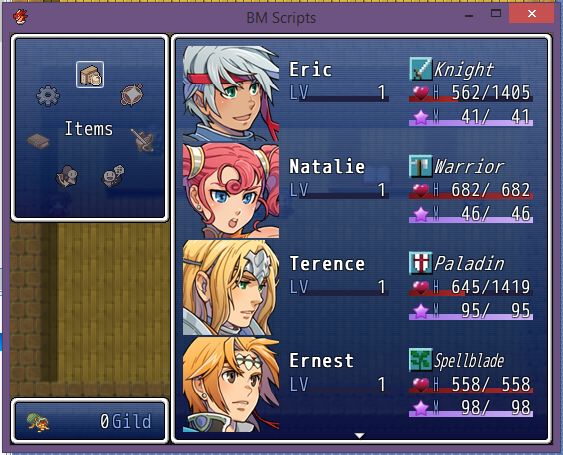
    Ring Command

    Spoiler
    • [li]also requires BM-Icons, ring commands use Icons for iconset can turn the standard menu into a ring menu (on/off)can turn the title commands into a ring (on/off)can turn the battle menus into rings (on/off)[/li]
      [li]movement based on XRXS, Dubealex & Hypershadow180's original XP Ring Menu, as well as Syvkal's ring menu[/li]
    6665774_orig.jpg
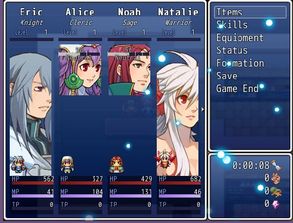
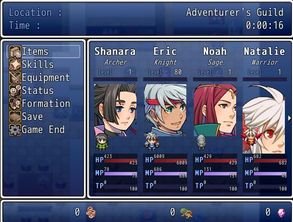
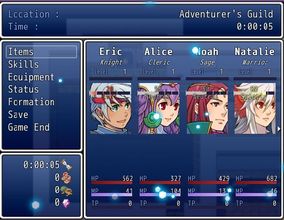
    Advanced Menu

    Spoiler
    • [li]adds music to menu screens[/li]
      [li]adds floating particles to menu screens[/li]


      [li]column-based information for menu status (modded from Galv's)[/li]


      [li]location window in menu screen[/li]


      [li]animated/walking actor graphics in menu screen[/li]


      [li]can change input button for calling menu[/li]


      [li]large actor portraits for menu columns[/li]
    5747415.jpg
    6897006.jpg


    3533035.jpg
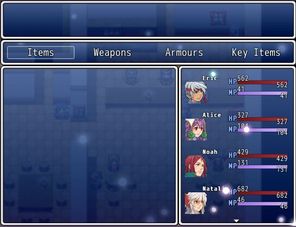
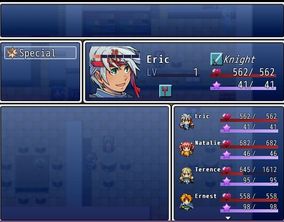
    Advacned Item/Skill

    Spoiler
    • [li]can change background image[/li]
      [li]can change opacity of item/skill scene[/li]


      [li]always shows select member window in skills/item scenes[/li]


      [li]changes style of actor window[/li]


      [li]animated/walking actor graphics[/li]
    __4241893.jpg
    __4947462.jpg
    Utility Scripts (1)


    These scripts do not have player-impact, but are primarily used for developers.


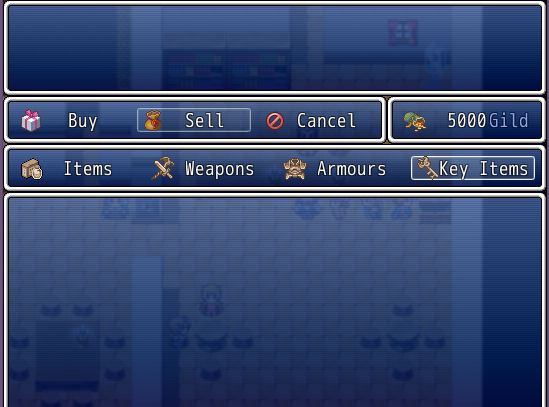
    Icon System

    Spoiler
    • [li]can add icons automatically before specific words in windows (stats, elements, commands, classes, states, etc)[/li]
      [li]assigning 0 to an icon treats the word as a non-icon word and is written normally [/li]


      [li]needed for BM-ring menu[/li]
    796255_orig.jpg
  2. Don't know why nobody posted here yet.

    Nice work there :)
  3. These look extremely useful for my next project.  I think from what I have read that they should be compatible with Yanfly's various menu scripts.  Is that the case, or will it be a question of suck it and see?

    Thanks for releasing these.
  4. ksjp17 said:
    These look extremely useful for my next project.  I think from what I have read that they should be compatible with Yanfly's various menu scripts.  Is that the case, or will it be a question of suck it and see?

    Thanks for releasing these.
    I haven't tested all of YEA's scripts, but I have tested some of the main ones and they seem to work.  Probably best to put my core script near but below YEA's core script (near the top of customized scripts) and put any of my other scripts below YEA's scripts.
  5. Thanks for the info.
  6. Good work! Thanks for sharing :D

    Do not be afraid to use more lines, nor create new local variables for intermediate results.

    Consider reducing the impact of your structural comments. Focus more on the why and the why-not.

    *hugs*

     - Zeriab
  7. All scripts look awesome. I'll give some a try later. :)
  8. Anyway some new updates to the Columns menu, I've added some new options for the location window, so you can now decide what's in it, where it goes or if it shows up at all.  Also given more options for what appears for the actors (character graphics, busts, TP gauge, etc).

    Not an update, but I've explained a feature that I forgot to in BM-messages.  With a switch, you can show a bust image based on the face assigned.

    UPDATES
    BM-Columns Menu
  9. just saw this been at work an outrageous amount this week. Dying to try them out asap.

    edit

    Doing something wrong here

    Need helps

    Left it for other ppl who have same prob 


    Spoiler
    wrong_10.png

    here is the way i got the scripts

    wrong10.png


    edit2

    DUH!

    Move BM-Status Menu to bottom under all the add ons.

    btw Thank you so epic freaking much!
  10. Hey all,  I've been working with ShinGamix recently, finding and fixing issues.  BM-Base and BM-Icons have both been updated to deal with some issues with Yami's Guardian script.  I've also fixed an issue with the drawing of the currency icon and have added actor icons which can be assigned in the Actor's Notebox in the Database.  The actor icons aren't being used for anything but the scripting is there for future usage as well as a shrunken faces (size of icons) that can be used like an icon.

    UPDATES
    BM-Base
    BM-Icons
  11. Going by the date and time showing the last edit in your opening post, it looks as if those updates have not been included.  Could I suggest that you put them there as well, because people will automatically assume that that is where the latest version is and won't necessarily scroll down and see them. 
  12. ksjp17 said:
    Going by the date and time showing the last edit in your opening post, it looks as if those updates have not been included.  Could I suggest that you put them there as well, because people will automatically assume that that is where the latest version is and won't necessarily scroll down and see them. 
    the links in the main post are the same because they link offsite to my own website.  The scripts are not hosted on this forum, but my own site where there are also added instructions/help.  I'm on multiple forums, so this was a more efficient way of handling my updates and keeping everything accurately linked.
  13. Ah, that makes a lot of sense.  Thanks.
  14. New updates to to give some new options for BM-Columns Menu and BM-Shop scripts.  For these, you need the updated BM-Base.   It's now up to the user whether they want to use character graphics or scaled down face graphics for the shop status and the item/skill selection windows.


    Screenshots


    8219805.jpg 

    7161555.jpg

    UPDATES
    BM-Base
    BM-Columns Menu
    BM-Shop
  15. Very interested in using your "YEA Status Screen Add-on" script, however I have a question.

    Is there a limit on the number of states and elements that can be displayed, or can it be changed?
  16. Amazing script on the status add on. Is there a way to emulate that to a custom window (just showing that web thing). If so, how?
  17. HeartFire said:
    Amazing script on the status add on. Is there a way to emulate that to a custom window (just showing that web thing). If so, how?
    Do mean to use use this in the default status screen or to use different information to fill the graph?
    SpaceManFive said:
    Very interested in using your "YEA Status Screen Add-on" script, however I have a question.

    Is there a limit on the number of states and elements that can be displayed, or can it be changed?
    It is only limited to the size of the window.  Using a higher resolution that you can find in YEA-core, you can therefore fit more elements/states. You can define what elements or states are shown (not likely a reason to show buffs for example).  Just look in BM-YEA Status for: 
    Code:
    ITEMS_SHOWN={      :element => [9,10,3,4,5,6,7,8], # elements you want shown      :state   => 2..8,  # states you want shown      :param   => 2..7,  # parameters you want shown    } # DO NOT REMOVE 
    You can also put this little coding below my script.  It makes the line_height based on the font size that you define, but then it can look squished, so you have adjust to where it's still visually appealing.  

    Code:
    class Window_StatusItem < Window_Base  def line_height    contents.font.size + 2  endend
  18. Yes, BM. For example, I want to add that web in the default status screen...
  19. blackmorning84 said:
    Do mean to use use this in the default status screen or to use different information to fill the graph?

    It is only limited to the size of the window.  Using a higher resolution that you can find in YEA-core, you can therefore fit more elements/states. You can define what elements or states are shown (not likely a reason to show buffs for example).  Just look in BM-YEA Status for: 

    ITEMS_SHOWN={      :element => [9,10,3,4,5,6,7,8], # elements you want shown      :state   => 2..8,  # states you want shown      :param   => 2..7,  # parameters you want shown    } # DO NOT REMOVE You can also put this little coding below my script.  It makes the line_height based on the font size that you define, but then it can look squished, so you have adjust to where it's still visually appealing.  

    Code:
    class Window_StatusItem < Window_Base  def line_height    contents.font.size + 2  endend
    Great! That's what I was hoping for.

    The games I'm making use a higher number of elements and states, meaning that there's more to be displayed if something like this were used. Glad to know that it can be configured to display more, so long as you have room to display them.
  20. I've finished the VK Equip.  Right now, this needs YEA ace equip engine.  Newer updates may change that.  I tried to be true to the appearance of Valkyrie Stories' equip screen while still being compatible with the default menu.  

    UPDATE
    VK Equip


    Screenshot


    8534195_orig.jpg