Basic Game Time + Night/Day

● ARCHIVED · READ-ONLY
Started by Vlue 20 posts View original ↗
  1. Basic Game Time + Night/Day v1.6

    by V.M.


    Introduction

    Provides a series of functions to set and recall a new variable known as game time, as well custom tints based on current game time to give the appearance of night and day.

    Features

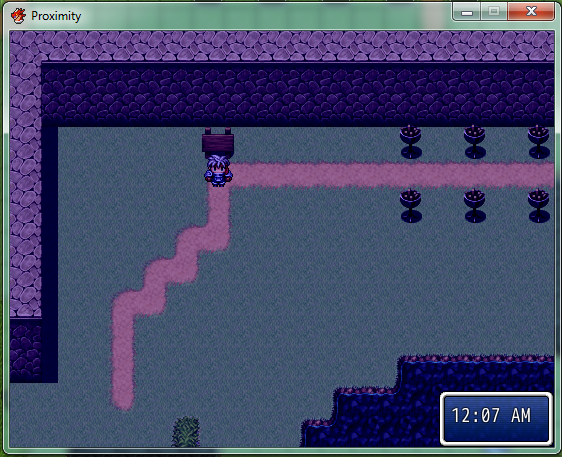
    - Game Time, complete with unfancy little clock

    - Night and Day cycle with custom tints and timing

    Screenshots

    Spoiler
    GameTime.png
    How to Use

    Plug and play and customize if needed

    Script

    Convenient Pastebin: Here

    FAQ

    None at the moment

    Credit and Thanks

    - By V.M.

    - Free to use in any project with credit given

    Author's Notes

    Hopefully nothing explodes

    V1.6: Added function to hide and show clock with script call

    V1.5: Added functions to stop time or tinting

    V1.4: Fixed bug where toggling game clock with it unused would crash game
  2. Awesome. I wanted something just like this for my game.
  3. I spent the last 48 hours look for something like this.

    Its pretty much perfect but is there a way to have the clock pause when you are talking to people, or more importantly when you open the menu.
  4. Icenick said:
    I spent the last 48 hours look for something like this.

    Its pretty much perfect but is there a way to have the clock pause when you are talking to people, or more importantly when you open the menu.
    Why yes! There is now! New version is up which features two new options.

    PAUSE_NOT_IN_MAP will stop time while not in a map scene

    PAUSE_IN_MESSAGE will stop time while the message window is visible
  5. Vlue said:
    Why yes! There is now! New version is up which features two new options.

    PAUSE_NOT_IN_MAP will stop time while not in a map scene

    PAUSE_IN_MESSAGE will stop time while the message window is visible
    Wow fast respond time! I noticed however my favorite feature about your system no longer works. Time would continue to flow in combat. I been struggling to add this to my other time system but failed. Is there anyway to have time pause when on the menu or in message windows, but have it pass normally in combat?

    Also I tried adding something to your script that when you press "L" or default Q, it would hide the clock, it acts like a toggle so you can toggle on the clock and hide it when you feel. Is that something you could add next update?
  6. Icenick said:
    Wow fast respond time! I noticed however my favorite feature about your system no longer works. Time would continue to flow in combat. I been struggling to add this to my other time system but failed. Is there anyway to have time pause when on the menu or in message windows, but have it pass normally in combat?

    Also I tried adding something to your script that when you press "L" or default Q, it would hide the clock, it acts like a toggle so you can toggle on the clock and hide it when you feel. Is that something you could add next update?
    Ah, it happened again, those were added too! Though it fought me the whole time :D

    PAUSE_IN_COMBAT variable added, defaulted to false. Self-explanatory.

    CLOCK_TOGGLE variable added, set to any input number (available choices can be found in the INPUT help file) to use that to toggle le clock.
  7. <3 I think this is the perfect Time system.

    My hands off (I dont wear hats) to you, your quite the quick and skilled programmer.

    EDIT: Actually I have a question, Im tired but I dont see any switches or variables, how can I make say a shop that is only open from 9am-5pm? Or a rare monster that spawns only from midnight to 3pm.

    EDIT2: In addition, can you advance the clock by a specific amount? Say sleeping in a bed will automatically add 8 hours? Is this possible or you can only set it as sleeping in a bed will set it to 8am regardless of time.
  8. Cool script, but yeah, variables will be useful. And in both - time changes variable, and variable changes time.

    Also it's incompatible with Khas Awesome Light Effects. I mean - there's no lights.
  9. Icenick said:
    <3 I think this is the perfect Time system.

    My hands off (I dont wear hats) to you, your quite the quick and skilled programmer.

    EDIT: Actually I have a question, Im tired but I dont see any switches or variables, how can I make say a shop that is only open from 9am-5pm? Or a rare monster that spawns only from midnight to 3pm.

    EDIT2: In addition, can you advance the clock by a specific amount? Say sleeping in a bed will automatically add 8 hours? Is this possible or you can only set it as sleeping in a bed will set it to 8am regardless of time.
    Oh quite simple, they are there! When making a conditional branch go to the script option and you would use some functions there.

    Examples! Yes! Say you want something to only occur at 4am, then in the script option you'd put: GameTime::hour? == 4

    However if you want a range like that shop, little more complicated but still doable! You'd put: GameTime::hour? >= 9 and GameTime::hour? < 17

    That puts it at only doing what's within the conditional branch if the time is between 9am and 5pm! (It uses a 24 hour clock, gotta remember)

    Second Edit: Yes there was a way to change the clock time by a specified amount! But a bit of a runaround and complicated so instead I just

    added a function for that, grab the new version. The function is GameTime::change(time)
  10. Angius said:
    Cool script, but yeah, variables will be useful. And in both - time changes variable, and variable changes time.

    Also it's incompatible with Khas Awesome Light Effects. I mean - there's no lights.
    Variables!? You can do that! If you wanted to set a variable to the current time you can use the script call:

    $game_variables[]=(variable id, GameTime::hour?) to set variable id to the hour

    $game_variables[]=(variable id, GameTime::minute?) to set variable id to the minute

    $game_variables[]=(variable id, $game_time) to set variable id to the minute of the day (range of 0-1440)

    To change time with a variable? Just as complimicated! Script calls:

    GameTime::set($game_variables[](variable id)) to set time to the number of the variable, in minutes

    GameTime::change($game_variables[](variable id)) to increment time in minutes by the variable (available in the most recent version only)

    As for the Khas Awesome Lighting Effects business, that's a pretty fancy script! And no not compatible straight off the bat.

    But here, if you put this at the end of my script, or in a new block anywhere below it, you can achieve that... to some degree.

    Might have to edit tones a bit... I suggest more blue. Everyone likes blue.

    Spoiler
    Code:
    module GameTime
      def self.init
    	$game_time = 0
    	$game_time_surface = $game_map.effect_surface
      end
    	def self.tint(tint = 60)
    	if USE_TINT != true then return end
    	for i in NOTINTMAPS
    	  if $game_map.map_id == i
    		$game_map.effect_surface.change_color(0,10,10,10,25)
    		return
    	  end
    	end
    	if SceneManager::scene_is?(Scene_Map) then else return end
    	case $game_time
    	when PRESUNRISE_TIME .. SUNRISE_TIME
    	  $game_map.effect_surface.change_color(tint,PRESUNRISE_TONE.red,PRESUNRISE_TONE.green,PRESUNRISE_TONE.blue,PRESUNRISE_TONE.gray)
    	when SUNRISE_TIME .. NOONSTART_TIME
    	  $game_map.effect_surface.change_color(tint,SUNRISE_TONE.red,SUNRISE_TONE.green,SUNRISE_TONE.blue,SUNRISE_TONE.gray)
    	when NOONSTART_TIME .. NOONEND_TIME
    	  $game_map.effect_surface.change_color(tint,NOONSTART_TONE.red,NOONSTART_TONE.green,NOONSTART_TONE.blue,NOONSTART_TONE.gray)
    	when NOONEND_TIME .. PRESUNSET_TIME
    	  $game_map.effect_surface.change_color(tint,NOONEND_TONE.red,NOONEND_TONE.green,NOONEND_TONE.blue,NOONEND_TONE.gray)
    	when PRESUNSET_TIME .. SUNSET_TIME
    	  $game_map.effect_surface.change_color(tint,PRESUNSET_TONE.red,PRESUNSET_TONE.green,PRESUNSET_TONE.blue,PRESUNSET_TONE.gray)
    	when SUNSET_TIME .. 1440
    	  $game_map.effect_surface.change_color(tint,SUNSET_TONE.red,SUNSET_TONE.green,SUNSET_TONE.blue,SUNSET_TONE.gray)
    	when 0 .. MIDNIGHT_TIME
    	  $game_map.effect_surface.change_color(tint,SUNSET_TONE.red,SUNSET_TONE.green,SUNSET_TONE.blue,SUNSET_TONE.gray)
    	when MIDNIGHT_TIME .. PRESUNRISE_TIME
    	  $game_map.effect_surface.change_color(tint,MIDNIGHT_TONE.red,MIDNIGHT_TONE.green,MIDNIGHT_TONE.blue,MIDNIGHT_TONE.gray)
    	end
      end
    end
  11. Vlue said:
    Oh quite simple, they are there! When making a conditional branch go to the script option and you would use some functions there.

    Examples! Yes! Say you want something to only occur at 4am, then in the script option you'd put: GameTime::hour? == 4

    However if you want a range like that shop, little more complicated but still doable! You'd put: GameTime::hour? >= 9 and GameTime::hour? < 17

    That puts it at only doing what's within the conditional branch if the time is between 9am and 5pm! (It uses a 24 hour clock, gotta remember)

    Second Edit: Yes there was a way to change the clock time by a specified amount! But a bit of a runaround and complicated so instead I just

    added a function for that, grab the new version. The function is GameTime::change(time)
    Thanks again, every is working perfectly :) .

    FYI I dont know if theres a better way but what I did was.

    Event1- Page1 Condition branch time =24 then switch 1 on. (parallel process)

    Page2 Display text "Im a shady character" (with graphic and all)

    Event2 - Parallel Process, (somewhere in the corner) Condition GameTime::hour? >= 24 and GameTime::hour? < 4 . ELSE Turn switch 1 off.

    Hope that makes sense, it does for me and it works.
  12. Sweet... Now I wonder, can that clock conform to "real world" time, as well? I mean, there's a diabolical little imp in the back of my head suggesting to arrange matters so that when you play at night, the game is enjoying the dark of night, and all sorts of unsavory people and creatures stalk the streets and forests, while if you play during the daytime, shops are open and so forth and so on... which would mean potentially higher replay value to catch those hours you missed on the first playthrough...

    Also, a realtime battle system with the clock ticking could lead to some VERY interesting fights... "Keep the vampire lord busy a little longer - sunrise is in a mere three minutes!" :D
  13. Warpmind said:
    Sweet... Now I wonder, can that clock conform to "real world" time, as well? I mean, there's a diabolical little imp in the back of my head suggesting to arrange matters so that when you play at night, the game is enjoying the dark of night, and all sorts of unsavory people and creatures stalk the streets and forests, while if you play during the daytime, shops are open and so forth and so on... which would mean potentially higher replay value to catch those hours you missed on the first playthrough...

    Also, a realtime battle system with the clock ticking could lead to some VERY interesting fights... "Keep the vampire lord busy a little longer - sunrise is in a mere three minutes!" :D
    I've already made a real time uh.. thingy! Basic Real Time (System Time)

    It doesn't have the tints or the clock though :(
  14. Vlue said:
    As for the Khas Awesome Lighting Effects business, that's a pretty fancy script! And no not compatible.

    But here, if you put this at the end of my script, or in a new block anywhere below it, you can achieve that... to some degree.

    Might have to edit tones a bit... I suggest more blue. Everyone likes blue.

    Spoiler
    Code:
    module GameTime
      def self.init
    	$game_time = 0
    	$game_time_surface = $game_map.effect_surface
      end
    	def self.tint(tint = 60)
    	if USE_TINT != true then return end
    	for i in NOTINTMAPS
    	  if $game_map.map_id == i
    		$game_map.effect_surface.change_color(0,10,10,10,25)
    		return
    	  end
    	end
    	if SceneManager::scene_is?(Scene_Map) then else return end
    	case $game_time
    	when PRESUNRISE_TIME .. SUNRISE_TIME
    	  $game_map.effect_surface.change_color(tint,PRESUNRISE_TONE.red,PRESUNRISE_TONE.green,PRESUNRISE_TONE.blue,PRESUNRISE_TONE.gray)
    	when SUNRISE_TIME .. NOONSTART_TIME
    	  $game_map.effect_surface.change_color(tint,SUNRISE_TONE.red,SUNRISE_TONE.green,SUNRISE_TONE.blue,SUNRISE_TONE.gray)
    	when NOONSTART_TIME .. NOONEND_TIME
    	  $game_map.effect_surface.change_color(tint,NOONSTART_TONE.red,NOONSTART_TONE.green,NOONSTART_TONE.blue,NOONSTART_TONE.gray)
    	when NOONEND_TIME .. PRESUNSET_TIME
    	  $game_map.effect_surface.change_color(tint,NOONEND_TONE.red,NOONEND_TONE.green,NOONEND_TONE.blue,NOONEND_TONE.gray)
    	when PRESUNSET_TIME .. SUNSET_TIME
    	  $game_map.effect_surface.change_color(tint,PRESUNSET_TONE.red,PRESUNSET_TONE.green,PRESUNSET_TONE.blue,PRESUNSET_TONE.gray)
    	when SUNSET_TIME .. 1440
    	  $game_map.effect_surface.change_color(tint,SUNSET_TONE.red,SUNSET_TONE.green,SUNSET_TONE.blue,SUNSET_TONE.gray)
    	when 0 .. MIDNIGHT_TIME
    	  $game_map.effect_surface.change_color(tint,SUNSET_TONE.red,SUNSET_TONE.green,SUNSET_TONE.blue,SUNSET_TONE.gray)
    	when MIDNIGHT_TIME .. PRESUNRISE_TIME
    	  $game_map.effect_surface.change_color(tint,MIDNIGHT_TONE.red,MIDNIGHT_TONE.green,MIDNIGHT_TONE.blue,MIDNIGHT_TONE.gray)
    	end
      end
    end
    I too am looking for lighting effects, I tried using KHAS but it requires the screen to be too dark and lags the game. Kylock Autolight would be perfect if it was for ACE.

    Anyways I don't understand I added your "spoiler" new script at the end of you day and night one, it gave me an error, I added it in a new script block and it still gave me an error! I want to see how this looks :(
  15. Icenick said:
    I too am looking for lighting effects, I tried using KHAS but it requires the screen to be too dark and lags the game. Kylock Autolight would be perfect if it was for ACE.

    Anyways I don't understand I added your "spoiler" new script at the end of you day and night one, it gave me an error, I added it in a new script block and it still gave me an error! I want to see how this looks :(
    Well, that's not right! Let's figure this out.

    What's the error?
  16. Script .. Line 29:NoMethodError occurred.

    undefined method 'effect_surface' for # <Game_Map:0x85b6064>

    What does that script even do? It looks like it would darken the screen?
  17. Oh, hehehe. That blurb is to make my script work 'with' Khas Awesome Lighting Effects.

    I suppose I could've been more clear in that. It'll error without it installed.
  18. Vlue said:
    Oh, hehehe. That blurb is to make my script work 'with' Khas Awesome Lighting Effects.

    I suppose I could've been more clear in that. It'll error without it installed.
    Oh lol! I had KHAS, it worked fine before with your script for me, I just didn't like it because it made your night so much darker and it lagged.
  19. Icenick said:
    Oh lol! I had KHAS, it worked fine before with your script for me, I just didn't like it because it made your night so much darker and it lagged.
    Yah, it would conflict with extra tones and darker blippity blahs. I think that's what the extra script was about... with a recommendation with lighter tones.

    The lag however I don't know about!
  20. Im working with someone right now to fix Kylock's Autolight on Ace, because in my opinion this is the best looking and easiest script. If you want if he gets it working 100% (currently have 1 area, the lighting wont show when the clock hits 6pm and your hero is on another map then zone into the map with lighting) I could send you the script if you wanted an addon? Assuming he gives permission, since he did all the work im just finding the errors lol.