Avy's MV Stuff

● ARCHIVED · READ-ONLY
Started by Avery 1966 posts Page 76 of 99 View original ↗
  1. Seriel said:
    Ooooohhhh I like those <3

    These will come in handy! :D
    Im sure I am dumb, but how do I download these?
  2. @Bakaboiii Hover your mouse over the relevant image.
    Right click. This gives you a drop down menu
    Select 'Save image as'. This opens up the save window.
    Navigate to the folder where you want to store the image.
    Click Save
    Done
  3. @Avery I am wondering if there was any way to add to the dancer face set you have posted. Im looking for emotions like Angry and Worried. I appreciate all your work and you are an inspiration!
  4. Avery you are a miracle worker! You just saved me so much time with that extending drawbridge! I don't think I could gift you enough hearts in all the internet for all your amazing work!
  5. Kes said:
    @Bakaboiii Hover your mouse over the relevant image.
    Right click. This gives you a drop down menu
    Select 'Save image as'. This opens up the save window.
    Navigate to the folder where you want to store the image.
    Click Save
    Done
    Oh, so I just save the image? How do I install them? Thank you for replying and not calling me dumb hahaha, I am super new to this.
  6. @Bakaboiii Answering your new question would derail this thread. A quick search in the MV Support forum (make sure to select 'This Forum' and not the default 'Everywhere') should find what you need. If not, post a thread there.
  7. Sorry if this has been asked before, but how in the world was the event set up for that Mimic sprite behavior cycle?
  8. @Guardinthena
    Thank you! <3
    Honestly, I had set up that sheet forgetting that how sprites can be animated changed since good old XP days.... it is possible that you have a better time setting it up if you recut it into giving every frame (blarg, to difficult to explain, just recut it myself)
    mimicfix.png
    And then it's a "simple" turn movement with some "change characterset" inbetween (at least I hope so... it should be).

    @gothicvoid Thank you! I am sorry, I am right now extremly busy (i know, I say this a lot) and I don't know if/when I can help you as the things I do inbetween are extremly random.
    There is a handy (but German) tutorial by PandaMaru here, that explains some neat basic on emosets:
    https://rpgmaker-mv.de/forum/thread/77-vx-ace-emotion-facesets-edits/ (you might try using google translate), given by the level of your edits that should be doable for you ;3
  9. The animated stairs are fantastic. I love 'em!
  10. Once again, @Avery, You--Are--Wonderful. I have spent the whole day plugging away trying to get the Mimic to work. I hacked up the original into a half-a**ed sprite sheet once I realized it needed to be, but you went and did it properly. Thank you! With a lot of tinkering and messing with the wait time limits and eye-balling your beautiful GIF, I have a very close replica. My only problem is the images flash between switching graphics, or jump because it's not in the right frame beforehand. That's more technical issues, nothing to do with your beautiful work.

    On a side note, scrolling through your creatures I think I've found a minor set up issue-- you have the label for 'Monsters' and subtabs beneath that for Fairy's, Winged Beasts and such. I realized that you have quite a few monster graphics-such as the Mimic-under the Winged Beasts tab when clearly Mimics, mimic trees, mushrooms and such do not fly--thank goodness! Last thing any adventuring party needs is a flying mimic dropping on their heads!

    Jesting aside, was the 'Monsters' tab suppose to be where those were at or is there a missing tab? I thought I should bring it up. It was confusing when I tried to double back the other day and find the mimic.
  11. Avery said:
    @gothicvoid Thank you! I am sorry, I am right now extremly busy (i know, I say this a lot) and I don't know if/when I can help you as the things I do inbetween are extremly random.
    There is a handy (but German) tutorial by PandaMaru here, that explains some neat basic on emosets:
    https://rpgmaker-mv.de/forum/thread/77-vx-ace-emotion-facesets-edits/ (you might try using google translate), given by the level of your edits that should be doable for you ;3
    AWESOMENESS! thank you! this is what i needed!
  12. YOUR HEREOS WERE SWALLOWED BY A HUGE WHALE! What do you do now?!?!

    Some round walls for a flesh cave, also a bunch of handy matching autotiles and some decoration with a few recolors, I know, there is space for more but I guess there's always space for more I guess.
    Though... I might consider expanding it, if there are enough planning on using it ;3 Maybe you have some suggestions?
    FleshCaveA5.png
    FleshCaveA1.png
    FleshCaveA2.png
    FleshCaveB.png
  13. @Avery Once more you are the awesomest!
  14. Oh, that's great.
    Avery said:
    Though... I might consider expanding it, if there are enough planning on using it ;3 Maybe you have some suggestions?
    Can you remake some tiles from XP inner body tileset please? I think MV's still lack of these.
    InnerBody.png
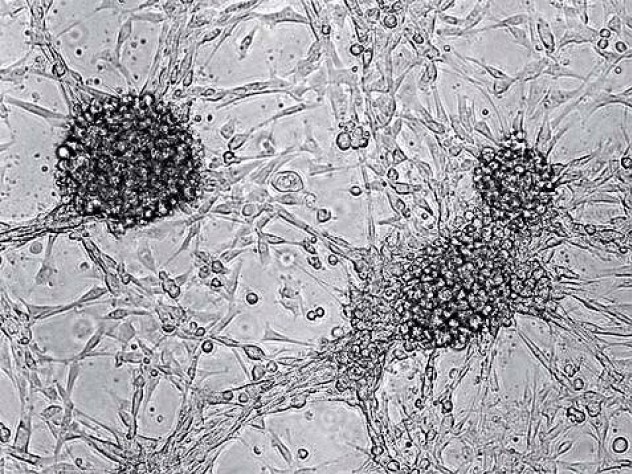
  15. I always look forward to seeing your work, It looks amazing as usual. I would suggest possibly cancer cells... like Darkened areas effected by the disease.

    0709_12_001_.jpg

    I think it would add an edge of difference, and realism as it's a real threat to virtually anything that lives.
    I'm very interested to see how this project will turn out if you decide to build onto it more. ^_^
  16. Well, things I have a hard time finding are teeth, bones, and pieces of furniture that blend into the whole fleshy horror atmosphere
  17. I'm not sure you could hear my squeal of delight so let me post it here: EEEIIIIEEEEE!

    I don't have plans for a flesh level in my current project but I love seeing new asset material to expand the RTP. As always, yours is beautiful, even when it's a grotesque fleshy environment. Also love all the ideas being kicked around here. It's given me inspiration, so I might make some materials when I get the time.

    Also, wanted to comment about the Mimic character sheet from before, I got it working but I had to rearrange the sprites around. I am posting it here in case anyone would like to use your Mimic to mimic the animation you have for it (I'll see myself out in a moment), this is the character behavior sheet to use to do it.

    Mimic Behavior Character Sheet

    Spoiler
    Mimic_Behaviour.png
  18. Any chance of prison MV resources being made? It's hard to find a lot of good inner materials relating to a modern prison.
  19. I am so sorry, please put me in the right spot (or just tell me where to go) but I can't figure out how to download the tilesets. I feel like an idiot but I am searching and searching and it's not getting me anywhere. I know this is not the place to ask but I would love to post in the right place or even see a tutorial on how to do it. I have "hovered" over the name but no link comes up to download. I'm just confused hahaha please forgive me for posting on the wrong spot. I just want to make games that look good and unique. Thank you and again, sorry.
  20. If I got a cent for everyone asking that question I would not have to work to make it until my degree.
    The answer is literally on nearly every page of this thread.