@MrDestroyer Avery don't take requests. You need to search internet.
Avy's MV Stuff
● ARCHIVED · READ-ONLY
-
-
@Krystek_My I already researched on internet, but I didn't find anything
-
Do you need one for a side view actor? If so, check this link. https://tm.lucky-duet.com/viewtopic.php?f=12&t=3635 Otherwise, there's a search feature where you can search for posts with the word "Slime" in it to more quickly find images of slimes for side view enemies.[/QUOTE]only thing i could think i need at the moment is a better Slime side view image lol.
-
yeah i did both search here and google and nothing is like what im looking for... same with goblins. im working on drawing one but.... im not that good. lol. and yes side view.Do you need one for a side view actor? If so, check this link. https://tm.lucky-duet.com/viewtopic.php?f=12&t=3635 Otherwise, there's a search feature where you can search for posts with the word "Slime" in it to more quickly find images of slimes for side view enemies.
-
Are you making a Slime character actor?yeah i did both search here and google and nothing is like what im looking for... same with goblins. im working on drawing one but.... im not that good. lol. and yes side view.
-
@Tag365 @gothicvoid Please don't discuss finding other resources in Avery's thread. If you need help finding something, make a thread in Resource Requests instead.
-
sorry. was just answering his question@Tag365 @gothicvoid Please don't discuss finding other resources in Avery's thread. If you need help finding something, make a thread in Resource Requests instead.
-
I am trying to find a battler sheet for the dragon that you made Avey. My game has half / full dragons and I want to be able to make main characters that can batte.
-
@CalebW I suggest you start a thread in Resource Requests to ask for this. As Avery does not allow reposting of her resources, you will need to provide a link back to the post containing the dragon so that people know which one you are referring to.
-
@Kes Thank you
-
Can you do a skunk animal one next?
-
@Tag365 As has been noted many, many times in this thread (twice on this page alone), Avery doesn't take requests. As been suggested, please create a thread in the Resource Requests area instead.
-
It's been a while, but to the courtensy of Pyrathas I am allowed to share something he commissioned from me originally designed for his Necroficer game.
A light and heavy celtic inspired armor, both male and female!
I added a characterless version as well which should make it easier to adjust it if someone needs that.
Have fun with them!
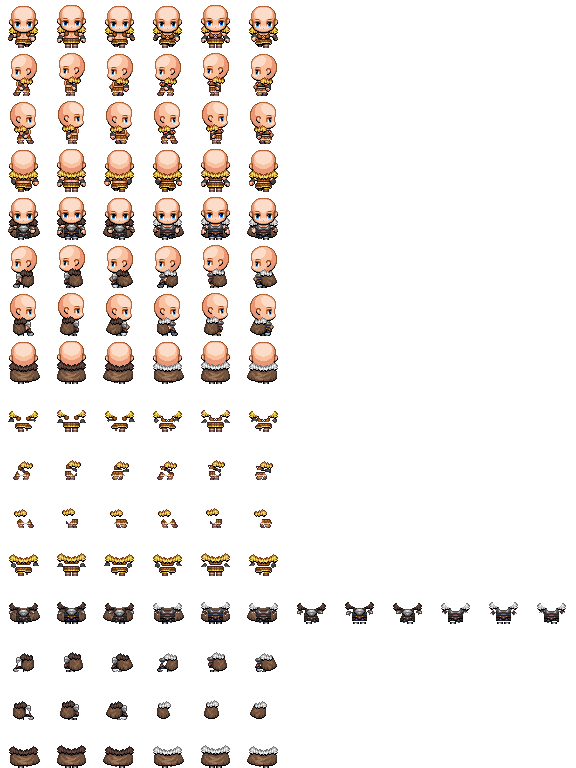
-
How generous. Thanks Avery and Pyrathas.
-
Amazing and thank you
-
Hi there guys!
First, thanks for the amazing tiles!
I only started using RPG maker a couple of days ago and I have a question on how to actually use them in my games. While trying to use the jungle cave tiles I got this:
How do you make so the water connects as on the example on the first page? I'm sure it's just me being a noob and I will be extremely thankful for any help in getting on the right path -
I guess you have to use a tile filled with water onlyHi there guys!
First, thanks for the amazing tiles!
I only started using RPG maker a couple of days ago and I have a question on how to actually use them in my games. While trying to use the jungle cave tiles I got this:
View attachment 110433
How do you make so the water connects as on the example on the first page? I'm sure it's just me being a noob and I will be extremely thankful for any help in getting on the right path -
Hi there guys!
First, thanks for the amazing tiles!
I only started using RPG maker a couple of days ago and I have a question on how to actually use them in my games. While trying to use the jungle cave tiles I got this:
View attachment 110433
How do you make so the water connects as on the example on the first page? I'm sure it's just me being a noob and I will be extremely thankful for any help in getting on the right path
For things like this you probably need to open your own thread.
Anyway those water tiles are auto-tiles. To paste them the same way as you've copied them you need to hold shift+right click.
If you have any questions feel free to message me :)
Alse you're using wrong cliff tiles on the left part of the upper lake,they clash with water tiles ;) -
Hello Avery!
Big fan of your work and thanks for all you do. Would it be possible to get the crowns reuploaded? I think their upload links are dead. :( -
I have no idea how Avery did it, but I found a way to do it.How do you make so the water connects as on the example on the first page
Using a photo editor take the waterfall images and copy them to the space to the right.
Then you need to edit two lines of code in the rpg_core.js file
Line 4541 var waterSurfaceIndex = /*[0, 1, 2]*/[this.animationFrame % 3];
I used the /* */ to comment out that part. The animationframe is change from 4 to 3.
line 4996 var af = this.animationFrame % 3;
Again changing 4 to a 3.
Finally putting it all together. I used Avery's waterfall tile to build the waterfall, then I used the top waterfall tile we just made for the top of the waterfall, go figure; and the bottom waterfall tile on the bottom.
the results