Automatic Revive Skill won't work

● ARCHIVED · READ-ONLY
Started by Princess Bananabelle 5 posts View original ↗
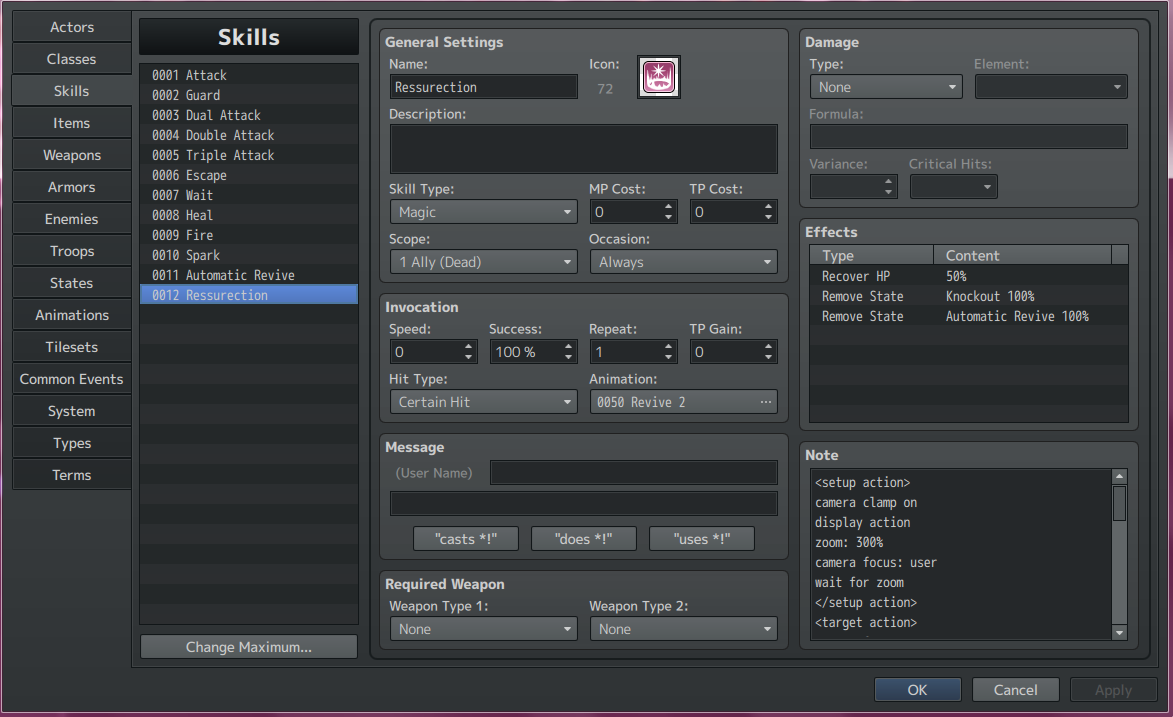
  1. What I'm trying to achieve is an actor cast a skill on an ally that applies the "Automatic Revive" state. When the actor with that state then dies, they will instantly revive. I did what I could with the help of this thread. So far I've managed to apply the state and prevent it from being removed by death, but I can't seem to get the character to revive. I've even tried it in a new project with minimal plugins with no luck. I'm not sure where I went wrong.

    I use MV version 1.5.2 and you can see the versions of the plugins I'm using. When I chose to not update MV any further I updating all of yanfly's plugins and haven't updated since. However, I have the latest versions of State Core and State Category because I didn't get those plugins until just recently when I decided I wanted to create this auto revive skill.

    Knockout State
    Spoiler
    Notetag contents
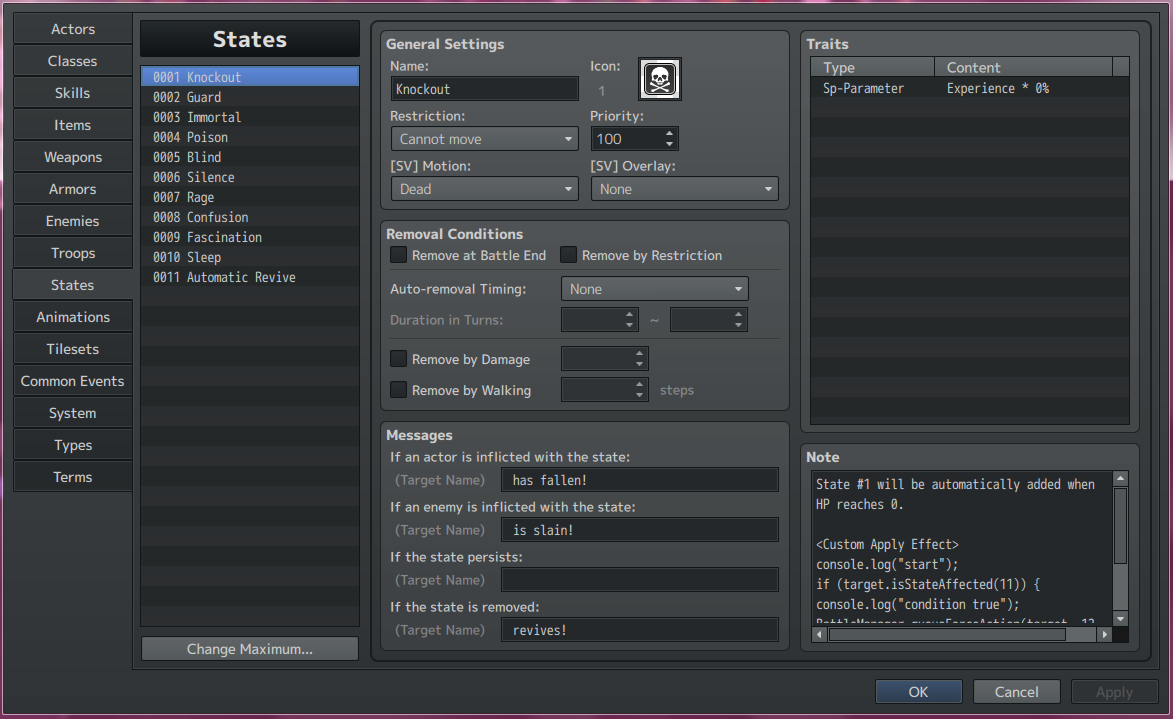
    Code:
    State #1 will be automatically added when
    HP reaches 0.
    
    <Custom Apply Effect>
    console.log("start");
    if (target.isStateAffected(11)) {
    console.log("condition true");
    BattleManager.queueForceAction(target, 12, 0);
    }
    console.log("end");
    </Custom Apply Effect>
    dead state.png

    Automatic Revive State
    Spoiler
    auto state.png

    Automatic Revive Skill
    Spoiler
    auto skill.png

    Revive Skill
    Spoiler
    notetag contents
    Code:
    <setup action>
    camera clamp on
    display action
    zoom: 300%
    camera focus: user
    wait for zoom
    </setup action>
    <target action>
    camera focus: user
    zoom: 250%
    wait for camera
    action animation: user
    animation wait: 20
    motion dying: user
    wait for animation
    action effect: target
    motion standby: user
    wait: 20
    motion spell: user
    wait: 25
    </target action>
    <finish action>
    perform finish
    clear battle log
    reset camera
    reset zoom
    wait for camera
    camera clamp on
    </finish action>
    revive skill.png

    Dead character with state
    Spoiler
    battle fail.png

    Console
    Spoiler
    console.png

    Plugin List
    Spoiler
    plugin.png
  2. Princess Bananabelle said:
    What I'm trying to achieve is an actor cast a skill on an ally that applies the "Automatic Revive" state. When the actor with that state then dies, they will instantly revive. I did what I could with the help of this thread. So far I've managed to apply the state and prevent it from being removed by death, but I can't seem to get the character to revive. I've even tried it in a new project with minimal plugins with no luck. I'm not sure where I went wrong.

    I use MV version 1.5.2 and you can see the versions of the plugins I'm using. When I chose to not update MV any further I updating all of yanfly's plugins and haven't updated since. However, I have the latest versions of State Core and State Category because I didn't get those plugins until just recently when I decided I wanted to create this auto revive skill.

    Knockout State
    Spoiler
    Notetag contents
    Code:
    State #1 will be automatically added when
    HP reaches 0.
    
    <Custom Apply Effect>
    console.log("start");
    if (target.isStateAffected(11)) {
    console.log("condition true");
    BattleManager.queueForceAction(target, 12, 0);
    }
    console.log("end");
    </Custom Apply Effect>
    View attachment 100955

    Automatic Revive State
    Spoiler
    View attachment 100954

    Automatic Revive Skill
    Spoiler
    View attachment 100953

    Revive Skill
    Spoiler
    notetag contents
    Code:
    <setup action>
    camera clamp on
    display action
    zoom: 300%
    camera focus: user
    wait for zoom
    </setup action>
    <target action>
    camera focus: user
    zoom: 250%
    wait for camera
    action animation: user
    animation wait: 20
    motion dying: user
    wait for animation
    action effect: target
    motion standby: user
    wait: 20
    motion spell: user
    wait: 25
    </target action>
    <finish action>
    perform finish
    clear battle log
    reset camera
    reset zoom
    wait for camera
    camera clamp on
    </finish action>
    View attachment 100957

    Dead character with state
    Spoiler
    View attachment 100958

    Console
    Spoiler
    View attachment 100959

    Plugin List
    Spoiler
    View attachment 100956

    Add this into Automatic Revive State's notebox
    Code:
    <Custom Turn Start Effect>
    if (user.isStateAffected(1)) {
     user.removeState(1);
     user.removeState(11);
     user.gainHp(a.hp*0.2);
    }
    </Custom Turn Start Effect>
  3. For the most part this worked, but the hp given to the characters can be a decimal, how is that fixed? Thank you so much for your help.
  4. change to
    user.gainHp(Math.floor(a.hp*0.2));
  5. Works perfectly now, thank you both very much!